
TIPP10
TIPP10 is a ten-finger touch-typing tutor with browser and desktop use, and its listed plan costs nothing.
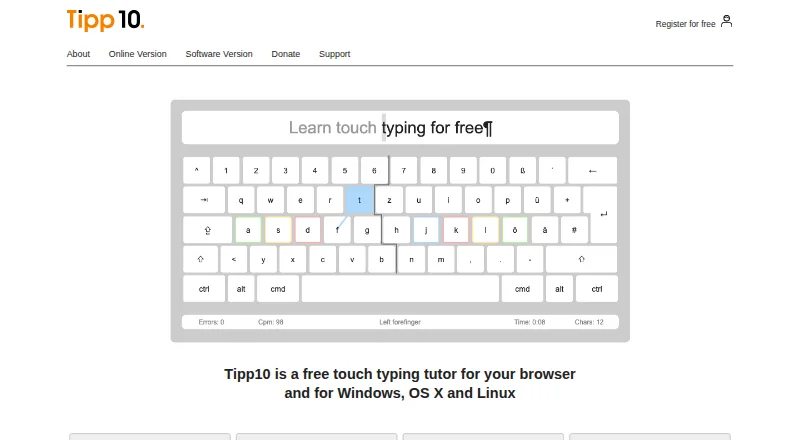
What TIPP10 is
TIPP10 is a ten-finger touch-typing tutor with browser and desktop use, and its listed plan costs nothing. Its lessons introduce keyboard characters across 20 sequential exercises, giving extra practice to letters the learner mistypes. Progress tools include printable lesson reports, speed and error statistics, lesson history, and a trend diagram. Learners can create lessons, choose open material on topics such as programming or legal texts, or use their own text for dictation. English and German interfaces and lessons are listed, along with QWERTY, German, Swiss, Neo, Dvorak, and RISTOME layouts. The maker describes the tutor as suitable for beginners and children. The downloadable desktop version is no longer maintained; the maker recommends the online version. Its listed macOS download supports versions 10.3 through 10.14 and does not work on macOS 10.15 Catalina onward. The downloadable software is offered under the GNU General Public License. The maker says it has no advertising or tracking, while the online privacy policy describes cookies and anonymized usage data.
Good
- Lessons give extra practice to mistyped letters.
- Includes printable reports and speed statistics.
- Learners can create lessons or load their own texts.
- Offers English and German interfaces and lessons.
Watch out
- The downloadable desktop version is no longer maintained.
- The macOS download does not support Catalina or later.
- The maker does not offer phone or email assistance for the free software.
Who it suits
TIPP10 suits beginners and children learning touch typing, as well as learners who want to practice with their own texts. Its online version is the option the maker recommends over the unmaintained desktop download.
Verdict
TIPP10 offers structured typing lessons, progress tracking, and custom practice at no listed charge. The online version is the current recommendation; desktop users should note that the download is unmaintained and has an old macOS compatibility range.
Plans and prices
From TIPP10's own pricing page, checked 29 Sep 2026.
| Plan | Price | What it gives you |
|---|---|---|
| Tipp10 | Free | Free typing tutor; donations accepted |
The facts
Each one read from TIPP10's own pages, with the date it was checked.
What it does
- Adaptive lessons
- Lessons repeat mistyped letters more often and introduce keyboard characters across 20 sequential practice lessons.checked 29 Sep 2026
- Compatibility limits
- The listed macOS download supports versions 10.3 through 10.14 and the page says it does not work from macOS 10.15 Catalina onward.checked 29 Sep 2026
- Custom practice
- Users can make lessons, use open lessons on topics such as programming or legal texts, and load their own texts for dictation.checked 29 Sep 2026
- Desktop status
- The downloadable software version is no longer maintained; the maker recommends the more up-to-date online version.checked 29 Sep 2026
- Intended users
- The maker describes the tutor as suitable for beginners and children and says it has been used by schools and universities.checked 29 Sep 2026
- Layouts and languages
- The interface and lessons are available in English and German, with QWERTY, German, Swiss, Neo, Dvorak, and RISTOME keyboard layouts listed.checked 29 Sep 2026
- License
- The downloadable software version is offered under the GNU General Public License.checked 29 Sep 2026
- Online sign-in
- The online sign-in page offers Google, Apple, and Microsoft sign-in options and a free account registration form.checked 29 Sep 2026
- Privacy
- The maker says Tipp10 is free of advertising and tracking; its online privacy policy describes session and persistent cookies and anonymized usage data.checked 29 Sep 2026
- Progress tracking
- It provides printable lesson reports, error and speed statistics, lesson history, and a trend diagram.checked 29 Sep 2026
- Purpose
- Tipp10 is a free ten-finger touch-typing tutor for browser and desktop use.checked 29 Sep 2026
- School version
- The homepage describes a school or company platform as available soon.checked 29 Sep 2026
- Support
- Support is provided through documentation, FAQs, bug reports, suggestions, and a contact form; the maker says it cannot provide telephone or email assistance for the free software.checked 29 Sep 2026
The company
- Headquarters
- Berlin, Germanychecked 23 Sep 2026
The full review of TIPP10
Overview
TIPP10 is a ten-finger typing tutor for browser and desktop use, best suited to beginners who want a guided route into touch typing. Its adaptive lessons and progress records make practice more purposeful than free-form drills, though the online version is the stronger choice because the desktop download is no longer maintained.
Key features
Lessons that respond to mistakes
TIPP10 moves through 20 lessons that introduce keyboard characters in sequence and give mistyped letters extra practice. Guided lessons, skill diagnostics, and personalized drills support learners who benefit from structure, while the sequence may be less appealing to experienced typists seeking only targeted practice.
Progress and custom practice
Speed and error statistics, lesson history, a trend diagram, and printable reports give learners a concrete way to follow their progress. Users can also create lessons, choose open material on subjects such as programming and legal texts, or load their own text for dictation. That flexibility is useful when general lessons do not match a learner's goals.
Layouts, languages, and privacy
The interface and lessons are available in English and German, with layouts including QWERTY, German, Swiss, Neo, Dvorak, and RISTOME. The maker says TIPP10 has no advertising or tracking; its online privacy policy describes session and persistent cookies and anonymized usage data. Online users can sign in with Google, Apple, or Microsoft, or register for a free account.
Pricing
The Tipp10 plan costs nothing and includes the free typing tutor; donations are accepted. There is no paid plan to compare for the tutor itself, and no free trial is offered. The pricing note also says paid options start at €15/yr with a 30-day trial, but does not identify what that paid offering includes, so readers should not assume it adds specific tutor features.
Platforms
TIPP10 is available on the web and as downloads for Linux, macOS, and Windows. The maker recommends the online version because the downloadable software is no longer maintained. The listed Mac download supports macOS 10.3 through 10.14 and does not work from macOS 10.15 Catalina onward. The desktop software is offered under the GNU General Public License.
Who it's for
TIPP10 suits beginners and children who want a structured way to learn touch typing, as well as learners who value custom dictation text and detailed progress records. The maker says schools and universities have used it, but describes a school or company platform as coming soon. Support consists of documentation, FAQs, bug reports, suggestions, and a contact form; the maker says it cannot provide telephone or email assistance for the free software.
Pros and cons
- Pros: Adaptive lessons revisit mistakes, and progress statistics and printable reports make improvement easier to follow.
- Pros: Custom lessons, topical material, and user-supplied dictation texts accommodate practice beyond the built-in sequence.
- Cons: The unmaintained desktop download is a poor fit for users who need current software, particularly Mac users on Catalina or later.
- Cons: Free-software users cannot rely on telephone or email assistance.
Alternatives
Consider Touch Typer if you want a freemium tutor with a free trial on Linux, macOS, or Windows. Choose TypingClub if you want a web or iOS option with a free individual edition, or a school edition priced at $120 a year with a 20-seat minimum. TypeLift is a web-based alternative with a free plan and a Pro subscription shown at $1.99 a month; the page says prices are for annual payment, excluding VAT. Typing.com may suit readers who want a web-based free edition with grade-based lessons, tests, and games, though it includes ads and retains data for 70 days. Typesy is a paid alternative with a free trial and apps for Android, iOS, macOS, web, and Windows; its Homeschool Family yearly plan is $6 a year, billed as $72 paid yearly, and includes one parent-teacher admin account and two student accounts. Typing Agent may be worth considering for school or district licensing; it is paid, offers a free trial, and bills by student license with volume tiers. TypeTastic is another freemium option for web, iOS, and Android. KeyBlaze is a freemium choice for Windows and macOS.
Verdict
TIPP10 is a sound choice for beginners who want free, structured touch-typing practice with useful progress records and room to create their own exercises. Choose its online version for the current experience; look elsewhere if you need a maintained desktop app, current Mac compatibility, or direct telephone and email support.
Getting started
- Open the TIPP10 website and choose the online version.
- Register for a free account or use Google, Apple, or Microsoft sign-in.
- Choose English or German and a listed keyboard layout.
- Start with the sequential practice lessons or create a custom lesson.
- Load a text for dictation or select open practice material.
Limits worth knowing
The free plan is available at no cost, with donations accepted. The pricing note also gives a paid option from €15/yr and mentions a 30-day trial, although the listed free-trial field says no.
Questions
Is TIPP10 free?
Yes. Its free plan is listed as free, and donations are accepted.
What does the pricing note say?
It says paid from €15/yr and mentions a 30-day trial. The free-trial field separately says no.
Which platforms does it support?
The listed platforms are Linux, macOS, web, and Windows. The downloadable software is no longer maintained, and the listed macOS download does not work from macOS 10.15 Catalina onward.
Is TIPP10 open source?
The downloadable software version is offered under the GNU General Public License.
Who makes TIPP10?
Its headquarters are listed in Berlin, Germany.
What support is available?
Support options include documentation, FAQs, bug reports, suggestions, and a contact form. The maker says it cannot provide telephone or email assistance for the free software.
Alternatives to TIPP10
- 1
Touch Typer
Free planOpen sourceLinuxmacOSSelf-hostedWindows7.7From $2.39 a month - 2
TypeTastic
Free planAndroidiOSWeb7.4From $680 a year - 3
Avidemux
Free planOpen sourceWebLinuxmacOSWindows7.3Free plan - 4
Typing Instructor
WebmacOSWindows7.3From $29.95 a year - 5
Typesy
AndroidiOSWebmacOS6.9From $72 a year - 6
TypingClub
Free planiOSWeb6.9From $120 a year