Klavaro
Klavaro is a free touch typing tutor designed to work across different keyboards and languages.
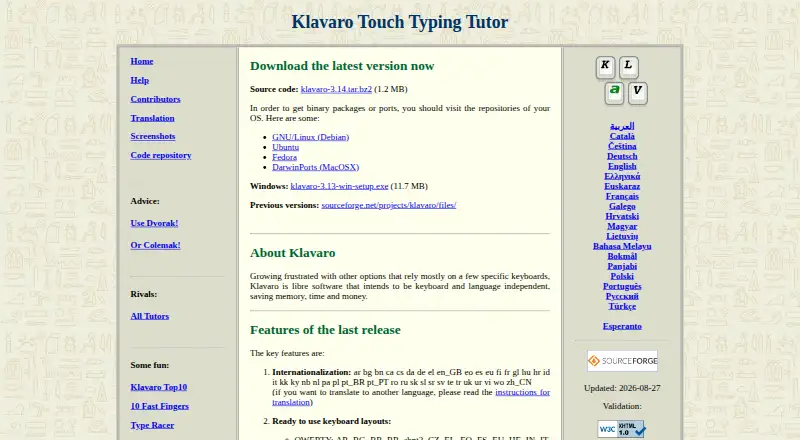
What Klavaro is
Klavaro is a free touch typing tutor designed to work across different keyboards and languages. It includes ready-made keyboard layouts and an editor for configuring and saving custom layouts. Lessons address basic key positions, adaptability, typing speed, and typing fluidness. The program records exercise performance and can display progress charts. For advanced practice, users can import text from local files, paste it from the clipboard, or drag it into the tutor. Its contest module can rank users locally on a shared machine or send scores to a web server for a public global ranking. The site lists translations in dozens of languages, including English, French, Spanish, Arabic, and Chinese. Klavaro is available for Linux, macOS, and Windows, with source code, a Windows installer, and packages listed for several operating-system repositories and MacPorts. It is licensed under GNU GPL version 3.0. The latest manual is available in Portuguese and Esperanto, not English; support is directed through SourceForge forums, where posting requires an account.
Good
- Free to use.
- Includes a layout editor for custom keyboards.
- Progress charts show exercise performance.
- Users can practice with their own text.
- Available for Linux, macOS, and Windows.
Watch out
- The latest manual is not available in English.
- Forum posting requires a SourceForge account.
Who it suits
Klavaro suits learners who want free typing practice across configurable layouts and languages. Its local contest option may also suit people sharing a computer.
Verdict
Klavaro offers structured typing exercises, custom layouts, and progress tracking without a listed price. Consider the language of its latest manual and the forum account requirement if you expect to need guidance.
Plans and prices
From Klavaro's own pricing page, checked 4 Oct 2026.
| Plan | Price | What it gives you |
|---|---|---|
| Klavaro | Free | Libre software · Downloadable source code and Windows installer · Linux and MacPorts packages listed |
The facts
Each one read from Klavaro's own pages, with the date it was checked.
What it does
- Contest
- The contest module can rank users locally on a shared machine or send scores to a web server for a public global ranking.checked 4 Oct 2026
- Custom text
- Users can import text from local files, paste from the clipboard, or drag text into the tutor for advanced exercises.checked 4 Oct 2026
- Documentation
- The site says the latest manual is not translated into English and is available in Portuguese and Esperanto.checked 4 Oct 2026
- Downloads
- The official site links to source code, a Windows installer, and operating system repositories including Debian, Ubuntu, Fedora, and MacPorts.checked 4 Oct 2026
- Intended audience
- SourceForge lists education, desktop end users, and the healthcare industry as intended audiences.checked 4 Oct 2026
- Keyboard layouts
- It includes ready to use layouts and a layout editor for configuring and saving custom layouts.checked 4 Oct 2026
- Languages
- The site lists translations for dozens of languages, including English, French, Spanish, Arabic, and Chinese.checked 4 Oct 2026
- License
- SourceForge lists the project license as GNU General Public License version 3.0 (GPLv3).checked 4 Oct 2026
- Practice
- Its exercises cover basic key positions, adaptability, typing speed, and typing fluidness.checked 4 Oct 2026
- Product
- Klavaro is a touch typing tutor designed to be independent of specific keyboards and languages.checked 4 Oct 2026
- Progress tracking
- Klavaro saves exercise performance characteristics and can display them as progress charts.checked 4 Oct 2026
- Support
- The help page directs users to SourceForge forums for feedback, suggestions, help, and support; posting requires a SourceForge account.checked 4 Oct 2026
The full review of Klavaro
Klavaro is a free touch-typing tutor for learners who want practice across different keyboard layouts and languages. It is best suited to desktop users who value adaptable exercises and the ability to track progress. Its range of practice is a strength; learners who rely on English documentation may find guidance less accessible.
Overview
Klavaro’s defining advantage is that it is not tied to one keyboard or language. It offers ready-made layouts as well as an editor for configuring and saving custom ones, so it can accommodate keyboards that do not match a standard lesson setup. That flexibility is less important if you use one familiar layout and want only straightforward drills.
Practice covers basic key positions, adaptability, typing speed, and fluidness, with guided lessons supported. Klavaro saves exercise performance characteristics and can display progress charts, giving learners a way to follow their practice over time. For advanced exercises, you can use text from a local file, paste it from the clipboard, or drag it into the tutor.
Key features
- Layout editor: Select a ready-made keyboard layout or configure and save a custom one. This is useful for people whose keyboard differs from common layouts or who practise across layouts.
- Varied exercises: Work on key positions, adaptability, speed, and fluidness. This goes beyond speed practice, although the range alone does not establish a particular lesson sequence.
- Progress charts: Klavaro saves performance characteristics from exercises and can present them in charts. That helps learners see how their practice is going, without requiring them to track results separately.
- Bring your own text: Import a local file, paste text, or drag it into the tutor for advanced practice. This gives experienced typists a way to work with chosen material rather than relying only on built-in exercises.
- Contest rankings: Rank users locally on a shared machine or send scores to a web server for a public global ranking. The local option fits shared-device competition; the global option extends it beyond one machine.
- Language and license: The site lists translations in dozens of languages, including English, French, Spanish, Arabic, and Chinese. SourceForge identifies the project as GPLv3 software, appropriate for readers who value libre software.
Pricing
Klavaro is free: the Klavaro plan costs nothing and includes downloadable source code, a Windows installer, and Linux and MacPorts packages. There is no paid tier or free trial to weigh; it is a direct choice for learners who want a no-cost tutor rather than a subscription service.
Platforms
Klavaro supports Linux, macOS, and Windows. The official site links to source code, a Windows installer, and operating-system repositories including Debian, Ubuntu, Fedora, and MacPorts. That makes it a desktop option across the three systems, rather than a web-based tutor for browser practice.
Who it's for
Klavaro suits desktop learners who want structured typing exercises, custom keyboard layouts, and progress tracking without paying. Its intended audiences include education, desktop end users, and the healthcare industry. People using unusual or multiple layouts have a particular reason to consider it; those who need documentation in English should factor in that the latest manual is available in Portuguese and Esperanto, not English.
For help, the project directs users to SourceForge forums for feedback, suggestions, and support, and posting requires a SourceForge account. That extra step may be unwelcome if you expect to need guidance, especially alongside the language limitation in the latest manual.
Pros and cons
- Pro: Custom layouts and support for multiple languages make it adaptable to keyboards beyond a single standard setup.
- Pro: Exercises span key positions, adaptability, speed, and fluidness, with saved performance and charts to follow practice.
- Pro: Free software is offered for Linux, macOS, and Windows, with source code and a Windows installer linked from the official site.
- Con: The latest manual is in Portuguese and Esperanto rather than English, which can make written guidance harder for English-speaking learners to use.
- Con: Posting for support requires a SourceForge account, adding a sign-up step for forum help.
Alternatives
Typing Tutor Software is the category directory for comparing other typing tutors.
- TIPP10 is another free typing tutor, with a free plan on Linux, macOS, web, and Windows. Choose it if browser access matters alongside desktop support.
- TypeTastic offers a free K–12 keyboarding curriculum, three K-5 Digital Citizenship lessons, no advertisements, and no login or reporting, with Android, iOS, and web support. Choose it when a school-age learner needs a curriculum that includes those digital citizenship lessons.
- Touch Typer is another free-plan option for Linux, macOS, and Windows, built by individual developer Robert Koch. Consider it if you prefer a tutor from an individual developer.
- KeyBlaze has a free version for macOS and Windows, while additional lessons, professional exercises, and custom features require an upgrade. Choose it if those upgrade options are relevant to you.
- Tux Typing is free software for Linux, macOS, and Windows from Tux4Kids, an international volunteer group developing software for children. It is an alternative to consider for a child-focused option.
- TypingClub offers free individual use on iOS and the web, as well as a school edition at $120 a year with a 20-seat minimum. Choose it if you want individual browser practice or a school plan.
- Ratatype has a web-based free plan with unlimited speed tests, up to 10 typing exercises per day, and ads. Its monthly Plus plan costs $9.99 a month. Choose it if browser access and a daily exercise cap suit your needs.
- Typing.com offers a web-based free edition with ads, 70-day data retention, email-only support, grade-based lessons, tests, and games, limited to classroom-level settings. Consider it if those school-oriented browser tools fit better.
Verdict
Choose Klavaro if you want a free desktop typing tutor that can adapt to your keyboard layout and lets you track practice across varied exercises. Its custom-layout support is the clearest reason to pick it. Look elsewhere if you need an English manual or want support without creating a SourceForge account.
Alternatives to Klavaro
- 1
TypeTastic
Free planAndroidiOSWeb7.4From $680 a year - 2
Typing Instructor
WebmacOSWindows7.3From $29.95 a year - 3
KAZ Type
WebmacOSWindows6.7From £29.95 a year - 4
KeyBlaze
Free planmacOSWindows6.7From $498 a month - 5
Ratatype
Free planWeb6.7From $49.99 a year - 66.4