KISSlicer
KISSlicer turns STL models into printer-ready G-code for 3D printing.
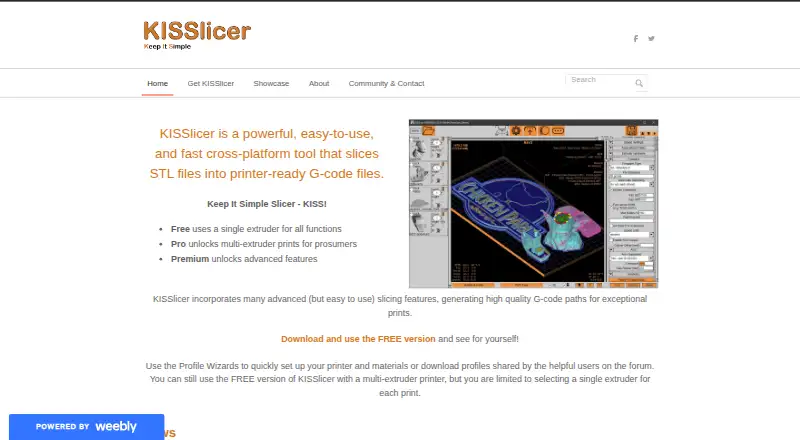
What KISSlicer is
KISSlicer turns STL models into printer-ready G-code for 3D printing. Four Profile Wizards help configure printer, material, style, and support settings. The free plan lets multi-extruder printers be used, but only one extruder can be selected per print; Pro unlocks multi-material printing, with extruders assignable to the raft, support, model, and sub-meshes. KISSlicer also supports automatic support generation, resin slicing, and variable layer height. Premium features include colorized meshes, texturing, dynamic density and gyroid infill, warp compensation, and curved surfaces. Profiles can be shared, while Project Files archive print settings; users can also manage settings with a version control system of their choice. Contributed printer profiles and community discussion are available through the KISSlicer Talk forum. The software runs on Windows, macOS, and Linux, with additional downloads listed for FreeBSD and Raspberry Pi. It is a slicer, not a printer controller. The free plan costs nothing; Pro costs $42 once, and Premium costs $82 once.
Good
- Profile Wizards guide four setup areas.
- Supports STL input and G-code output.
- Automatic support generation is available.
- Pro supports multi-material printing.
- Commercial use is permitted under the license.
Watch out
- Free plan selects only one extruder per print.
- Pro costs $42 once.
- Premium costs $82 once.
- It is not a printer control app.
Who it suits
KISSlicer suits people preparing STL models for 3D printing who want guided setup and control over print settings. Pro and Premium are relevant to users who need multi-material prints or listed premium features.
Verdict
KISSlicer provides guided configuration and a range of slicing controls across major desktop platforms. The free plan is limited to one selected extruder per print, while multi-material printing requires Pro.
Plans and prices
From KISSlicer's own pricing page, checked 30 Sep 2026.
| Plan | Price | What it gives you |
|---|---|---|
| Free | Free | Single extruder for all functions · Multi-extruder printers can be used, but only one extruder can be selected per print |
| Premium Upgrade | $40, paid once | Requires a current KISSlicer PRO Key · Upgrades to Premium · $40 (USD) |
| Pro | $42, paid once | Unlocks multi-material prints · No time limit · No model size limit · May be used commercially · Install on multiple personal computers · $42 (USD) |
| Premium | $82, paid once | Includes all Pro functionality · Early adopter price · No time limit · No model size limit · May be used commercially · Install on multiple personal computers · $82 (USD) |
The facts
Each one read from KISSlicer's own pages, with the date it was checked.
What it does
- Downloads
- The download page lists Windows, Mac OSX, Linux, FreeBSD, and Raspberry Pi versions.checked 30 Sep 2026
- Integrations
- The site offers contributed printer profiles and says profile files can be shared through its community forum.checked 30 Sep 2026
- License terms
- The license permits commercial use and installation on multiple personal computers, has no time limit or model size limit, and prohibits reverse engineering.checked 30 Sep 2026
- Multi-material
- Pro supports multi-extruder printing, with separate extruders assignable to raft, support, model, and sub-meshes.checked 30 Sep 2026
- Not a printer controller
- KISSlicer describes itself as a slicer and says it is not a printer control app.checked 30 Sep 2026
- Premium features
- Listed Premium features include colorized meshes, texturing, dynamic density and gyroid infill, warp compensation, and curved surfaces; the page gives progress estimates for these features.checked 30 Sep 2026
- Profile handling
- Users can share profiles, archive print settings in a Project File, and manage settings with a version control system of their choice.checked 30 Sep 2026
- Purchase delivery
- The maker says purchased keys are emailed to the PayPal account email within 48 hours.checked 30 Sep 2026
- Purpose
- KISSlicer slices STL files into printer-ready G-code files.checked 30 Sep 2026
- Security and licensing
- The maker says KISSlicer has no phone-home licensing and that Pro or Premium keys must not be shared.checked 30 Sep 2026
- Setup
- Four Profile Wizards guide new users through printer, material, style, and support settings.checked 30 Sep 2026
- Support
- Users can seek help from other users or the author on the community-run KISSlicer Talk forum, or contact the maker by form or email.checked 30 Sep 2026
The full review of KISSlicer
KISSlicer is a desktop tool that turns STL models into printer-ready G-code, with guided setup and controls for preparing prints. It suits users who want to manage slicing profiles and, with Pro, assign work across multiple extruders; it is not a printer controller.
Overview
Four Profile Wizards guide setup for the printer, material, print style and supports, giving new users a structured route into the settings. Automatic support generation, variable layer height and resin slicing broaden its use beyond basic FDM preparation, while STL input and G-code or SVG output define its file workflow.
KISSlicer’s strength is the control it offers over profiles and multi-material assignments. Its main trade-off is that the free plan allows only one selected extruder per print, even on a multi-extruder printer. Those who need multi-material work must pay for Pro.
Key features
- Guided setup: Four Profile Wizards cover printer, material, style and support settings. This gives newcomers a clear starting structure without removing the need to make choices about a print.
- Multi-material assignments: Pro supports multiple extruders and lets users assign them separately to the raft, supports, model and sub-meshes. That makes it the relevant upgrade for prints requiring different extruders to serve different parts of a job.
- Premium tools: Premium features include colorized meshes, texturing, dynamic density and gyroid infill, warp compensation and curved surfaces. These are a reason to consider Premium for more involved model preparation; they are not part of the free tier.
- Profile and project handling: Users can share profiles, archive print settings in a Project File and manage settings with a version-control system of their choice. Contributed printer profiles are available through the site, and profile files can be shared in the community forum.
- License and support: The maker says licensing does not phone home. The license permits commercial use and installation on multiple personal computers, with no time limit or model-size limit, and prohibits reverse engineering. Users can seek help on the community-run KISSlicer Talk forum or contact the maker by form or email.
Pricing
KISSlicer is freemium, with one-time paid licenses rather than recurring subscriptions. The free plan costs free and supports a single selected extruder for all functions. Multi-extruder printers can still be used, but only one extruder can be selected per print, so it is best for single-extruder jobs or for evaluating the workflow before upgrading.
- Pro — $42, paid once: Unlocks multi-material prints, has no time or model-size limit, allows commercial use and can be installed on multiple personal computers. It is the direct fit for users who need multi-extruder printing.
- Premium — $82, paid once: Includes all Pro functionality plus Premium features, with the same no-time-limit, no-model-size-limit, commercial-use and multi-computer terms. The maker calls this an early adopter price.
- Premium Upgrade — $40, paid once: Upgrades to Premium but requires a current KISSlicer Pro Key. It is for existing Pro users, not a cheaper standalone route to Premium.
Purchased keys are emailed to the PayPal account email within 48 hours. Pro and Premium keys must not be shared.
Platforms
KISSlicer supports Windows, macOS and Linux. The download page also lists FreeBSD and Raspberry Pi versions. Its job ends at slicing: it is not a printer control app, so users who need to control a printer should choose a separate tool for that role.
Who it's for
KISSlicer is a good match for desktop 3D-printing users who want guided profile setup, automatic supports and the option to keep print settings organized and shareable. Pro is the practical choice for multi-extruder users, while Premium is aimed at those who also want its additional mesh, infill and compensation tools. It is a weaker fit for anyone looking for an all-in-one slicer and printer controller or unwilling to pay to select multiple extruders in a print.
Pros and cons
- Pro: Four Profile Wizards organize setup across printer, material, style and supports, a useful scaffold for new users.
- Pro: Pro permits separate extruder assignments for raft, support, model and sub-meshes, offering meaningful control for multi-material jobs.
- Pro: Commercial use, multiple personal-computer installations and no time or model-size limit make the paid license flexible for ongoing work.
- Con: Free users are limited to one selected extruder per print, including when using a multi-extruder printer.
- Con: KISSlicer does not control the printer, so it cannot replace a printer-control app.
- Con: Premium Upgrade is only available to users with a current Pro Key, making it an add-on rather than an entry-level Premium purchase.
Alternatives
For other options, browse 3D Slicer Software and 3D Printing Software. Among individual apps, PrusaSlicer is a free, open-source option based on the Slic3r project; choose it if an open-source slicer is the priority. ideaMaker is free on Linux, macOS and Windows, with no paid pricing tiers or usage limits stated on its plan. OrcaSlicer is another free, open-source FDM slicer for those platforms. SuperSlicer generates G-code for FFF printers and PNG layers for mSLA printers, making it worth considering if that output mix fits your workflow.
Bambu Studio is free slicing software for Linux, macOS and Windows; it supports SD card printing without its optional networking plugin. Creality Print is a free option described by its repository as an open-source slicer for FDM printers. Lychee Slicer has a free Lite plan with limited multi-plate use and ads on export, plus a free trial; choose it if those terms suit your needs. VoxelDance Tango is a paid alternative with monthly Personal and Personal+ plans capped at 60 and 150 outputs per month respectively.
Verdict
Choose KISSlicer if you want guided desktop slicing with organized profiles and may need detailed extruder assignments for multi-material prints. Its one-time Pro license removes time and model-size limits while adding that capability. Look elsewhere if you need printer control in the same app, or if a free plan must allow multiple selected extruders per print.
Alternatives to KISSlicer
- 1
GrabCAD Print
Free planAndroidiOSWebWindows7.3From $5,000 a year - 2

CHITUBOX
Free planLinuxmacOSWindows6.9$499 one-time - 3

PrusaSlicer
Free planAndroidiOSWebLinux6.9Free plan - 4

Kiri:Moto
Free planWebAPIExtensionLinux6.6Free plan - 5
Orca-Flashforge
Free planLinuxmacOSWindows6.6Free plan - 6
QIDI Slicer
Free planLinuxmacOSWindows6.5Free plan