Orca-Flashforge
Flash Studio Desktop, previously called Orca-Flashforge, is Flashforge’s slicer for preparing 3D prints.
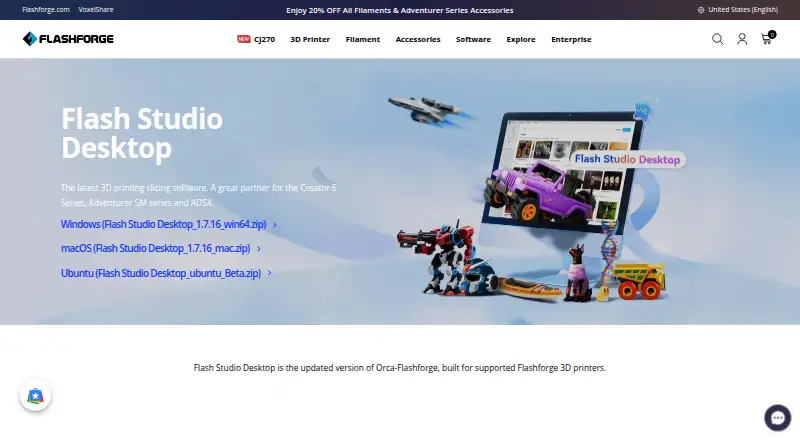
What Orca-Flashforge is
Flash Studio Desktop, previously called Orca-Flashforge, is Flashforge’s slicer for preparing 3D prints. Based on Orca Slicer, it offers basic and advanced modes with settings for layer height, print speed and infill density. It is optimized for supported Flashforge printers, including the Adventurer 5M series, AD5X and Guider 3 Ultra, and supports multi-material printing. Users can transfer files wirelessly, monitor printers remotely, and start, stop and track jobs. WAN Mode sends files through a cloud server, while LAN Only Mode uses the local network and requires the printer and computer to share a network. Controls include extruder and bed temperatures; the Adventurer 5M Pro also supports chamber light and air-filtration fan control. Live video requires a camera-equipped printer, and the Adventurer 5M can use an optional camera. Flash Studio Mobile adds printer monitoring, multi-printer and location-based group control, and remote one-click reprinting. Desktop downloads are available for Windows, macOS and Ubuntu. The software is free and built on an open-source foundation under the GNU Affero General Public License, version 3.
Good
- Free desktop software for Windows, macOS and Ubuntu.
- Offers basic and advanced slicing settings.
- Supports wireless printing and remote job controls.
- LAN Only Mode transfers files over the local network.
Watch out
- Intended for supported Flashforge printers.
- Live video requires a camera-equipped printer.
- Supports only some filament brands.
Who it suits
It suits Flashforge printer owners who want desktop slicing, print controls and remote job monitoring. Users of other printers should note that the software is intended for supported Flashforge models.
Verdict
Flash Studio Desktop combines slicing controls with wireless printing and printer monitoring for supported Flashforge devices. Camera-dependent video and limited filament-brand support are worth checking first.
Plans and prices
From Orca-Flashforge's own pricing page, checked 8 Oct 2026.
| Plan | Price | What it gives you |
|---|---|---|
| Flash Studio Desktop | Free | Supported Flashforge printers · Windows, macOS, Ubuntu |
The facts
Each one read from Orca-Flashforge's own pages, with the date it was checked.
The company
- Company
- Flashforge says Zhejiang Flashforge 3D Technology Co., Ltd. was founded in 2011 and supplies 3D printing solutions.checked 8 Oct 2026
- Company certification
- Flashforge says the company has ISO 9001 certification.checked 8 Oct 2026
- Maker
- The maker identifies itself as Zhejiang Flashforge 3D Technology Co., Ltd., founded in 2011.checked 7 Oct 2026
What it does
- Compatibility limit
- The software is intended for supported Flashforge printers, including the Creator 5 Series, Adventurer 5M series, and AD5X.checked 8 Oct 2026
- Connection modes
- WAN Mode transfers files through a cloud server, while LAN Only Mode transfers files over the local network without the cloud server.checked 7 Oct 2026
- Connectivity
- It supports wireless printing and file transfer through WAN Mode via a cloud server or LAN Only Mode on a local network.checked 8 Oct 2026
- Customization
- Basic and advanced modes expose settings such as layer height, print speed, and infill density.checked 8 Oct 2026
- Downloads
- The download page offers desktop packages for Windows, macOS, and Ubuntu.checked 7 Oct 2026
- Intended users
- Flashforge describes the desktop slicer as suitable for users at different experience levels, with a simplified interface and advanced controls.checked 8 Oct 2026
- License
- The software is built on an open-source foundation under the GNU Affero General Public License, version 3 (AGPLv3).checked 8 Oct 2026
- Live video
- Users can view live print video when the printer has a camera; the page notes that the Adventurer 5M supports optional camera installation.checked 8 Oct 2026
- Local-network setup
- The quick start guide says LAN Only Mode requires the printer and computer to be on the same network and uses the printer ID to connect.checked 7 Oct 2026
- Mobile integration
- Flash Studio Desktop works with Flash Studio Mobile for print monitoring, multi-printer management, location-based group control, and remote one-click reprinting.checked 8 Oct 2026
- Notable limit
- The maker’s comparison says Orca-Flashforge supports only some filament brands.checked 7 Oct 2026
- Printer controls
- The software can control extruder and bed temperatures, and on the Adventurer 5M Pro it can control the chamber light and air filtration fan.checked 7 Oct 2026
- Printer profiles
- It includes preconfigured profiles optimized for Adventurer 5M, Adventurer 5M Pro, AD5X, and Guider 3 Ultra.checked 8 Oct 2026
- Product
- Flash Studio Desktop is the current name for Flashforge’s desktop slicer, formerly Orca-Flashforge.checked 8 Oct 2026
- Purpose
- The software slices 3D models for printing and is built for supported Flashforge 3D printers.checked 8 Oct 2026
- Remote control
- Users can start, stop, and track print jobs remotely and control extruder and bed temperatures in real time.checked 8 Oct 2026
- Slicing controls
- It offers basic and advanced modes and settings for layer height, print speed, and infill density.checked 7 Oct 2026
- Wireless printing
- It supports wireless printing, remote monitoring, and print job start, stop, and tracking.checked 7 Oct 2026
The full review of Orca-Flashforge
Orca-Flashforge, now called Flash Studio Desktop, is Flashforge’s desktop slicer for preparing prints on supported machines. It is best for Flashforge owners who want slicing and printer controls together; users with other brands or resin printers should look elsewhere.
Overview
The free software combines print preparation with wireless job management, which makes it a practical fit for owners of supported Flashforge models such as the Adventurer 5M series, AD5X, Creator 5 Series, and Guider 3 Ultra. Its focus is also its main constraint: printer support is centered on Flashforge, and only some filament brands are supported.
Key features
Basic and advanced modes offer settings for layer height, speed, and infill density. Beginners can start with a simpler set of controls, while users who want to tune those variables can use the advanced mode. Multi-material printing is supported, but resin slicing is not. The software exports .3mf and .gcode files.
Wireless printing supports file transfer, remote job start and stop, and progress tracking. WAN Mode sends files through a cloud server; LAN Only Mode transfers them over the local network, requiring the printer and computer to share a network and the user to connect with the printer ID. The local mode is a useful option for users who prefer local transfers, though setup depends on that shared-network connection.
Users can monitor prints and adjust extruder and bed temperatures remotely. On the Adventurer 5M Pro, controls also cover the chamber light and air filtration fan. Live video requires a camera-equipped printer; the Adventurer 5M needs an optional camera installation for video monitoring.
Flash Studio Mobile extends printer monitoring and control to multiple printers, including location-based groups and remote one-click reprinting. The desktop software is built on an open-source foundation under the GNU Affero General Public License, version 3.
Pricing
Flash Studio Desktop: free. The free plan supports Flashforge printers and runs on Windows, macOS, and Ubuntu. There are no paid tiers or usage caps given, so it is the straightforward choice for supported Flashforge owners who want the desktop slicer without a subscription cost.
Platforms
Desktop packages are available for Windows, macOS, and Ubuntu. The software’s printer controls and wireless workflow make it most relevant to people using supported Flashforge hardware, rather than anyone seeking a slicer for a mixed fleet.
Who it's for
Choose Flash Studio Desktop if you own a supported Flashforge printer and value remote job management alongside adjustable slicing controls. It can also suit users managing several Flashforge machines through the mobile companion. It is a poor fit for resin workflows, owners of unsupported brands, or users whose filament choices fall outside the supported brands.
Pros and cons
- Pros: Free desktop software across Windows, macOS, and Ubuntu, with no paid tier required for its supported-printer workflow.
- Pros: Wireless job controls, monitoring, and temperature adjustment reduce the need to manage every print at the printer.
- Pros: LAN Only Mode offers local file transfer, while WAN Mode provides a cloud-routed option.
- Cons: Printer compatibility is focused on supported Flashforge devices, limiting its usefulness for mixed-brand setups.
- Cons: Filament-brand support is limited to some brands, and resin slicing is absent.
- Cons: Live video requires a camera-equipped printer; Adventurer 5M owners must install its optional camera.
Alternatives
Browse 3D Slicer Software for more category options. PrusaSlicer is a free, open-source alternative for readers seeking a slicer based on the Slic3r project. GrabCAD Print is worth considering for its free Standard plan with core print preparation features and Stratasys printer support; its Pro plan costs 5000.00 USD per.
QIDI Slicer is another free option for owners of the Q1 Pro, X-Max3, X-Plus3, or X-Smart3, with firmware V4.0.0 or above required. Eiger suits Markforged users looking for a free cloud-based platform; its Offline Eiger plan is a paid standalone subscription with quarterly updates and LAN connectivity.
KISSlicer may fit users who want a free slicer for single-extruder printing, though its free plan permits only one selected extruder per print on multi-extruder printers. UltiMaker Cura is a free, open-source desktop slicer. BCN3D Stratos is a free choice for BCN3D Omega, Sigma, and Epsilon owners. CHITUBOX offers a free basic slicer and may be a fit for readers comparing 3D printing slicers.
Verdict
Flash Studio Desktop is the right choice for supported Flashforge owners who want free slicing plus wireless printing and remote controls in one desktop tool. Its clearest reason to choose it is that integrated Flashforge workflow; look elsewhere if you need resin slicing, broader printer compatibility, or more extensive filament-brand support.
Getting started
- Download the Windows, macOS, or Ubuntu package from Flashforge
- Install Flash Studio Desktop, formerly Orca-Flashforge
- Select basic or advanced slicing controls
- Choose WAN Mode for cloud transfer or LAN Only Mode for local transfer
- For LAN Only Mode, place the printer and computer on the same network and connect with the printer ID
- Select a supported Flashforge printer profile and export .3mf or .gcode files
- Use Flash Studio Mobile for monitoring, group control, or remote reprinting
Limits worth knowing
The software is intended for supported Flashforge printers and supports only some filament brands. Resin slicing is unavailable, and live video depends on a camera-equipped printer.
Questions
How much does Flash Studio Desktop cost?
It is free, with a listed plan price of no cost.
Which operating systems are supported?
Downloads are available for Windows, macOS, and Ubuntu.
Is it open source?
It is built on an open-source foundation under the GNU Affero General Public License, version 3.
Can it print over a local network?
Yes. LAN Only Mode transfers files locally when the printer and computer share a network and connect using the printer ID.
Which printers is it optimized for?
Flashforge lists the Adventurer 5M, Adventurer 5M Pro, AD5X, Guider 3 Ultra, and other supported Flashforge printers.
Does it support resin slicing?
No. Resin slicing is not supported.
Alternatives to Orca-Flashforge
- 1
GrabCAD Print
Free planAndroidiOSWebWindows7.3From $5,000 a year - 2

CHITUBOX
Free planLinuxmacOSWindows6.9$499 one-time - 3

PrusaSlicer
Free planAndroidiOSWebLinux6.9Free plan - 4
KISSlicer
Free planLinuxmacOSWindows6.8$42 one-time - 5

Kiri:Moto
Free planWebAPIExtensionLinux6.6Free plan - 6
QIDI Slicer
Free planLinuxmacOSWindows6.5Free plan