Kimi Deep Research
Kimi Deep Research is a research feature that defines a topic’s scope, prepares a plan, searches sources and produces a cited report.
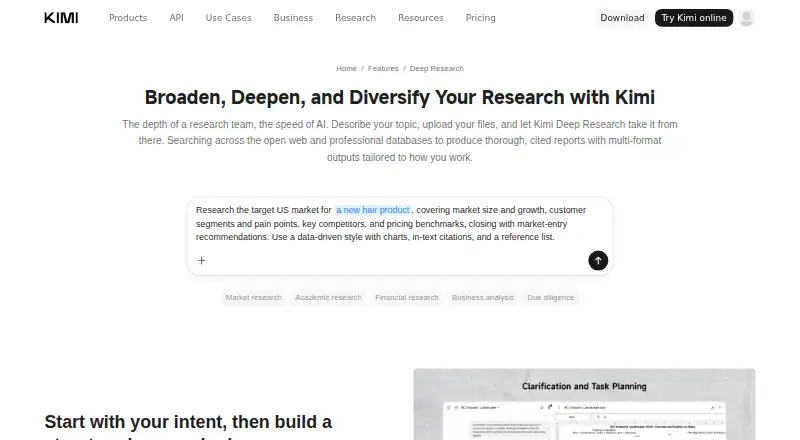
What Kimi Deep Research is
Kimi Deep Research is a research feature that defines a topic’s scope, prepares a plan, searches sources and produces a cited report. It searches the open web and professional databases covering areas such as news, government, academic, corporate, financial and economic information. Reports can include charts and traceable citations drawn from web research and uploaded materials. Users can ask follow-up questions in the same session, with additional sources added in the context of earlier findings. Output formats include Markdown, PDF, PowerPoint, Word, Excel and interactive HTML. Users may upload background files and review the agent’s queries and fetched URLs while it works. Listed use cases include academic and market research, finance and investment, consulting, business analysis and due diligence. It is available on Android, iOS, macOS, Windows, web and as an extension. The free plan has a limited monthly allowance, with usage measured by token consumption rather than a set number of queries. The privacy policy says prompts and uploaded files may be processed to provide and improve services, including AI model training and optimization.
Good
- Searches the open web and professional databases.
- Reports can include citations and charts.
- Supports six listed output formats.
- Users can ask follow-up questions in the same session.
- Available across mobile, desktop, web and extension platforms.
Watch out
- The free plan has a limited monthly allowance.
- Usage is measured by token consumption.
- Prompts and uploaded files may be used to improve services.
Who it suits
It suits people preparing cited reports for academic or market research, investment, consulting, business analysis or due diligence. Its file-upload and follow-up options may help users who want to build on prior research within a session.
Verdict
Kimi Deep Research combines source searches, report generation and follow-up research, with several export formats. Review the limited free allowance and the stated handling of prompts and uploaded files before using it.
Plans and prices
From Kimi Deep Research's own pricing page, checked 2 Oct 2026.
| Plan | Price | What it gives you |
|---|---|---|
| Free | Free | limited monthly allowance; usage measured by token consumption, not query count |
The facts
Each one read from Kimi Deep Research's own pages, with the date it was checked.
The company
- Company
- The company site identifies Moonshot AI and links to Kimi Deep Research, but the opened pages did not state a headquarters or founding date.checked 2 Oct 2026
What it does
- Follow-up research
- Users can ask follow-up questions in the same session, and Kimi retrieves additional sources while building on earlier context and findings.checked 2 Oct 2026
- Output formats
- Supported deliverables include Markdown, PDF, PowerPoint, Word, Excel, and interactive HTML reports.checked 2 Oct 2026
- Privacy and model improvement
- The privacy policy says user content, including prompts and uploaded files, may be processed to provide and improve services, including training and optimizing AI models.checked 2 Oct 2026
- Report contents
- Reports can include relevant charts and cited, traceable sources from web research and uploaded materials.checked 2 Oct 2026
- Research controls
- Users can optionally upload background files and review the research agent’s queries and fetched URLs while it works.checked 2 Oct 2026
- Research use cases
- The feature page highlights finance and investment, academic research, market research, consulting, business analysis, and due diligence.checked 2 Oct 2026
- Research workflow
- Kimi Deep Research clarifies the research scope, creates a plan, searches, and synthesizes findings into a cited report.checked 2 Oct 2026
- Search sources
- It searches the open web and professional databases, including news, government, academic, corporate, financial, and economic sources.checked 2 Oct 2026
- Security
- The privacy policy says Moonshot AI uses reasonable technical and organizational measures to protect personal information, while stating it cannot guarantee security completely.checked 2 Oct 2026
- Support
- The Kimi Help Center has a Deep Research section covering research, search tips, report generation, downloads, and saving.checked 2 Oct 2026
- Usage limit
- Deep Research is limited by token consumption rather than a fixed monthly query count, and the free plan has a limited monthly allowance.checked 2 Oct 2026
Where it runs
- Platforms
- Kimi is available on the web, Windows, macOS, iOS, and Android, and Kimi Browser Extension is offered as a browser extension.checked 2 Oct 2026
The full review of Kimi Deep Research
Kimi Deep Research turns a scoped question into a cited report, with follow-up research in the same session. It suits people working through academic, financial, market or business questions who need findings in formats they can reuse. Its range of sources and exports is a strength; the limited free allowance and privacy policy’s model-improvement use of content are important trade-offs.
Overview
Kimi clarifies the research scope, makes a plan, searches and synthesizes findings. Its search covers the open web and professional databases across news, government, academia, corporate information, finance and economics. That breadth is useful for layered questions, but the output still needs review: citations make sources traceable, not conclusions automatically sound.
Users can optionally add background files and watch the agent’s queries and fetched URLs as it works. This gives researchers a way to follow the process and supply context, though it does not replace checking the report against its cited material.
Key features
Research that can continue
Follow-up questions stay in the same session. Kimi can fetch more sources while carrying forward earlier context and findings, making it a better fit for work that develops as new questions emerge than for a one-off lookup.
Reports and exports
Reports can include charts and cited, traceable sources from web research and uploaded materials. Deliverables can be exported as Markdown, PDF, PowerPoint, Word, Excel or interactive HTML. That range helps move findings into different kinds of documents, though the usefulness of any export depends on how well the report itself answers the question.
Privacy and security
Kimi’s privacy policy says prompts and uploaded files may be processed to provide and improve services, including training and optimizing AI models. Moonshot AI says it uses reasonable technical and organizational safeguards to protect personal information, while acknowledging that security cannot be guaranteed completely. People handling sensitive material should weigh those terms before uploading it.
Pricing
Kimi uses a freemium model, with paid plans from $19/mo. The Free plan costs nothing and includes a limited monthly allowance; Deep Research use is measured by token consumption, not a fixed number of monthly queries. That makes the free tier useful for trying the workflow, but the work’s size can affect how far the allowance goes. Readers with recurring or larger research needs may need a paid plan; the entry price is $19/mo.
There is no fixed monthly query count to plan around, so token consumption is the relevant constraint. Consider that alongside the work you expect to do before choosing the free tier for ongoing use.
Platforms
Kimi is available on Android, iOS, macOS, Windows and the web, as well as through an extension. That spread accommodates desktop and mobile use, with the extension as another access point.
Who it's for
The feature is aimed at finance and investment, academic research, market research, consulting, business analysis and due diligence. It is strongest for readers who need to develop a question into a sourced report, revisit it with follow-ups and export the result. For quick answers, or for work involving sensitive files that should not be processed for service improvement, another approach may suit better.
Pros and cons
- Pro: Search spans open-web and professional sources in multiple fields, useful for questions that need more than a narrow set of results.
- Pro: Follow-up research keeps earlier context, and reports can be exported in six formats.
- Pro: Users can supply background files and inspect queries and fetched URLs during research.
- Con: The free monthly allowance is limited and measured by token consumption, so it does not promise a predictable number of research sessions.
- Con: Prompts and uploaded files may be used to improve services, including model training and optimization; that can rule it out for some sensitive work.
Alternatives
For a different research assistant, browse AI Research Assistants.
- Perplexity is worth considering if its $20 a month Pro plan and expanded use for serious work suit better; its free plan has limited daily use for individuals.
- Genspark Design may fit readers who value a daily free credit allowance or the Plus plan’s 10,000 monthly credits and 50 GB AI Drive storage; those paid plans have no stated price.
- Liner is an option for readers who want unlimited Advanced Search and Deep Research access on its free plan, alongside one file upload per day up to 25MB; that plan has 0 agent credits/month.
- Gab AI Research Assistant offers 250 starting credits, access to every AI model using credits, web search and file analysis on its free plan.
- Consensus may suit paper-focused work: its free tier includes unlimited Papers searches and 3 Deep reviews/month, alongside limited Pro messages.
- Felo AI Research gives free users 200 bonus credits/day, unlimited high-speed search, 5 professional searches/day and 3 file analyses/day, but no API access.
- Innogath provides 500 credits/month, basic-depth Deep Research and Markdown export on its free plan, with one concurrent research; its Ultra plan is $32.00.
- You.com may be a better fit for readers prioritizing a free daily query allotment: its free plan includes 100 queries/day and web and news results.
Verdict
Choose Kimi Deep Research if you need a sourced report that can grow through follow-up research and move into several document formats. Its broad search and continuing session are the main reasons to pick it; the token-limited free allowance and policy allowing prompts and files to help improve models are reasons to look elsewhere, especially for sensitive work.
Getting started
- Open https://www.kimi.ai/features/deep-research
- Use Kimi on Android, iOS, macOS, Windows, web, or the extension
- Choose Deep Research mode
- Describe the research scope and goal
- Upload background files if needed
- Review queries and fetched URLs while the report is built
- Export the result in a supported format
Limits worth knowing
The Free plan costs nothing and has a limited monthly allowance. Deep Research consumption is measured by tokens rather than a fixed monthly query count; paid plans start at $19/mo.
Questions
Is Kimi Deep Research free?
Yes. The Free plan costs nothing and includes a limited monthly allowance. Paid plans start at $19/mo.
Which platforms support Kimi Deep Research?
It is available on Android, iOS, macOS, Windows, the web, and as an extension.
Can I upload files and receive citations?
Yes. You can upload background files, and reports can cite and trace sources from web research and uploaded material.
What formats can reports use?
Supported deliverables include Markdown, PDF, PowerPoint, Word, Excel, and interactive HTML reports.
How is Deep Research usage measured?
Usage is limited by token consumption rather than a fixed monthly number of queries.
What does the privacy policy say about my content?
It says prompts and uploaded files may be processed to provide and improve services, including training and optimizing AI models.
Alternatives to Kimi Deep Research
- 1

Perplexity
Free planAndroidiOSWebAPI8.2From $20 a month - 2

Consensus
Free planAndroidiOSWebAPI8.1From $20 a month - 3
Liner
Free planAndroidiOSWebAPI8.1From $14.99 a month - 4

SciSpace
Free planAndroidiOSWebAPI8.1From $96 a year - 5
Gab AI Research Assistant
Free planAndroidiOSWebAPI8.0From $16.67 a month - 6

Fabric
AndroidiOSWebAPI7.9From $8 a month