Kaspersky Plus Internet Security
Kaspersky Plus Internet Security is a paid security package for Windows, macOS, Linux, Android and iOS.
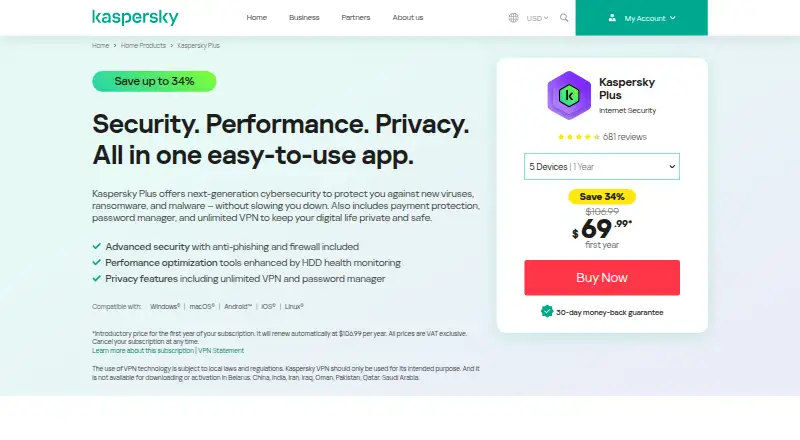
What Kaspersky Plus Internet Security is
Kaspersky Plus Internet Security is a paid security package for Windows, macOS, Linux, Android and iOS. It protects up to 10 devices with antivirus, anti-phishing, firewall, anti-ransomware, cryptojacking protection and network security controls. Payment protection opens banking activity in an encrypted browser, while password storage and autofill handle addresses and card details. An unlimited VPN encrypts data on public Wi‑Fi and hides the user’s IP address. Privacy tools check for data and password leaks. Performance features include storage cleanup, hard-drive health monitoring, app management, optimization, controls for startup and data-hungry apps, and an uninterrupted entertainment mode. Users can manage settings, renew licenses and share protection with family members through a My Kaspersky account. Installation requires that account and an internet connection; VPN use requires WireGuard support. The listed Kaspersky Plus 30-day free trial costs 0.00 USD for 30 days, then a paid yearly subscription begins unless canceled during the trial. Subscriptions renew automatically until canceled, and the renewal price may differ from the introductory price. A 30-day money-back guarantee is advertised.
Good
- Protection for up to 10 devices
- Supports Windows, macOS, Linux, Android and iOS
- Unlimited VPN with public Wi‑Fi encryption
- Encrypted browser for payment activity
- Password storage and autofill
- Performance cleanup and optimization tools
Watch out
- No free plan
- Paid yearly subscription follows the trial
- VPN use requires WireGuard support
- Unavailable on the United States product page
Who it suits
It suits households needing broad security, privacy, payment protection and performance tools across mixed device platforms. It is also suitable for users who want family sharing, an unlimited VPN and management through one My Kaspersky account.
Verdict
Pick Kaspersky Plus Internet Security if you want complete security, payment safeguards, an unlimited VPN and device-performance controls across five operating systems. Look elsewhere if you need a permanently free plan or cannot use the listed account, internet and WireGuard requirements.
Plans and prices
From Kaspersky Plus Internet Security's own pricing page, checked 11 Oct 2026.
| Plan | Price | What it gives you |
|---|---|---|
| Kaspersky Plus 30-day free trial | Free | Trial lasts 30 days · yearly subscription begins unless canceled during trial · Free for 30 days; then a paid yearly subscription starts unless canceled. The page does not state the post-trial price. |
The facts
Each one read from Kaspersky Plus Internet Security's own pages, with the date it was checked.
What it does
- Account management
- Users can install by signing in to their account, manage settings and renew licenses online, and share security with family members.checked 10 Oct 2026
- Anti-hacking
- The product includes anti-ransomware, a firewall, cryptojacking protection, and network security controls.checked 11 Oct 2026
- Customer support
- Kaspersky directs home users to its Home Support channel for technical help with products that protect home and family.checked 10 Oct 2026
- Money-back guarantee
- The product page advertises a 30-day money-back guarantee.checked 10 Oct 2026
- Parental controls
- Yeschecked 24 Sep 2026
- Password manager
- Yeschecked 24 Sep 2026
- Payment protection
- Kaspersky Plus can open payments in an encrypted browser and offers password storage and autofill for address and card details.checked 11 Oct 2026
- Performance tools
- Performance features include storage cleanup, hard-drive health monitoring, performance optimization and uninterrupted entertainment mode.checked 10 Oct 2026
- Privacy features
- Its privacy tools are described as preventing online tracking, unwanted ads, and unauthorized use of device peripherals.checked 11 Oct 2026
- Product purpose
- Kaspersky Plus combines protection against viruses, ransomware and malware with payment protection, a password manager and unlimited VPN.checked 10 Oct 2026
- Protection scope
- complete securitychecked 24 Sep 2026
- Ransomware protection
- Yeschecked 24 Sep 2026
- Regional availability
- The United States Kaspersky Plus page states that the product is not available in that region.checked 10 Oct 2026
- Requirements
- The listed technical requirements include an internet connection, a My Kaspersky account, and WireGuard support.checked 11 Oct 2026
- Security assessments
- Kaspersky lists independent SOC 2 audits and ISO 27001 certification among its third-party assessments.checked 11 Oct 2026
- Security transparency
- Kaspersky says its Transparency Centers let visitors review source code and compare compiled software with publicly available versions.checked 11 Oct 2026
- Subscription terms
- The product page says subscriptions automatically renew each term until canceled, and renewal price may differ from the introductory price.checked 10 Oct 2026
The company
- Company history
- Kaspersky says the company was established on June 26, 1997.checked 11 Oct 2026
- Company security transparency
- Kaspersky says its data privacy and safety are confirmed by multiple audits.checked 10 Oct 2026
- Founded
- 1997checked 28 Sep 2026
- Headquarters
- Kaspersky's contact page lists its Europe address as Rieterstrasse 6, 8002, Zurich, Switzerland.checked 10 Oct 2026
Where it runs
- Device limit
- 10checked 24 Sep 2026
- Device performance
- Performance tools include disk cleanup and health monitoring, app management, and controls for startup and data-hungry apps.checked 11 Oct 2026
Money
- Free plan
- Nochecked 24 Sep 2026
The full review of Kaspersky Plus Internet Security
Kaspersky Plus Internet Security is a paid security suite that combines malware defense with payment safeguards, password management, privacy tools and device-maintenance controls. It suits households managing several devices and wanting one broad package rather than a standalone antivirus. Its range is compelling, but automatic renewal, account requirements and regional restrictions matter before subscribing.
Overview
Plus covers everyday security and several jobs that usually require separate utilities. Its protection scope includes viruses, phishing, ransomware, cryptojacking and network threats, while parental controls make it relevant to family devices. Support for up to 10 devices is useful for a household with mixed computers and phones, although the subscription is paid and there is no permanent free tier.
Kaspersky was established in 1997. The company says its privacy and safety practices undergo multiple audits, including independent SOC 2 audits and ISO 27001 certification. Its Transparency Centers allow visitors to review source code and compare compiled software with publicly available versions. Those measures provide useful visibility for buyers who place weight on security governance.
Key features
The core security layer combines antivirus, anti-phishing, a firewall, anti-ransomware and cryptojacking protection with network security controls. That is a stronger fit than basic malware scanning for people worried about hostile websites, extortionware or suspicious network activity. Parental controls broaden the package for families, though the value depends on whether every household device falls within the 10-device allowance.
Payment protection is unusually substantial for a security suite. Kaspersky can open payments in an encrypted browser and protect banking apps. Its password manager stores credentials and autofills address and card details, while checks for data and password leaks help identify compromised accounts. These features suit users who want payment and account safeguards in the same subscription instead of assembling separate services.
The unlimited VPN encrypts traffic on public Wi-Fi and hides the user’s IP address, removing the data quota found in many free security bundles. WireGuard support is required for the VPN, however, so devices or networks that cannot provide it will not get the full privacy benefit. An internet connection and My Kaspersky account are also required for the product.
Performance tools include storage cleanup, hard-drive health monitoring, performance optimization, app management, and controls for startup and data-hungry apps. An uninterrupted entertainment mode rounds out the maintenance features. They make Plus more suitable for people who want routine device upkeep alongside security, rather than buyers seeking only threat blocking.
Pricing
The Kaspersky Plus 30-day free trial costs 0.00 USD for 30 days. It then starts a paid yearly subscription unless canceled during the trial; the post-trial price is not published. This is a genuine evaluation window, but it is not a free plan, and the transition to billing needs attention.
Subscriptions renew automatically each term until canceled, and the renewal price may differ from the introductory price. Cancellation is available through My Kaspersky or customer support. Kaspersky also advertises a 30-day money-back guarantee, and customers can request a refund within 30 days after a renewal charge. The plan supports up to 10 devices, making it the logical choice for larger households; anyone with fewer devices should weigh whether the bundled VPN, password and performance tools justify a paid suite.
Platforms
Kaspersky Plus supports Windows, macOS, Linux, Android and iOS. Installation, settings and license renewal are managed through a My Kaspersky account, and the subscription can be shared with family members. Because an internet connection and account are mandatory, it is not suited to permanently offline setups. The VPN additionally requires WireGuard support. The United States Kaspersky Plus page says the product is unavailable in that region, so US readers need another choice.
Who it's for
Choose Plus if you want complete security, an unlimited VPN, protected payments, password storage and performance controls across a household’s Windows, macOS, Linux, Android and iOS devices. It is especially well matched to families that need parental controls and up to 10 seats, or to users who prefer one subscription over several narrowly focused tools.
Look elsewhere if you require a permanently free plan, cannot use a My Kaspersky account or WireGuard, live in a region where the product is unavailable, or want a clearly stated long-term price before starting a trial.
Pros and cons
Pros
- Broad protection: Antivirus, anti-phishing, firewall, anti-ransomware, cryptojacking and network controls address more than basic malware.
- Privacy and payment bundle: An unlimited VPN, protected banking apps, encrypted payment browser and password manager reduce the need for separate tools.
- Useful household allowance: One subscription covers up to 10 devices across five operating systems and can be shared with family members.
- Maintenance controls: Cleanup, health monitoring, optimization, app, startup and data-use controls add practical device upkeep.
- Refund window: A 30-day money-back guarantee and renewal-refund requests within 30 days provide an exit after an unwanted charge.
Cons
- No free plan: The offer is a 30-day trial followed by paid annual billing, not ongoing free protection.
- Renewal uncertainty: Subscriptions renew automatically and the renewal price can differ from the introductory price.
- Technical dependencies: Internet access, a My Kaspersky account and WireGuard support are required.
- Regional restriction: The US product page says Kaspersky Plus is unavailable in the United States.
- Unpublished post-trial price: Buyers cannot see the yearly charge for the trial plan before committing.
Alternatives
Pick Bitdefender Total Security if you want a free plan and a stated first-year price of $59.99 a year for five devices and one account.
Choose Avast Free Antivirus when ongoing free antivirus for one device matters more than Plus’s bundled VPN, payment and performance features.
Avira Free Security is a fit for readers seeking free real-time protection, privacy tools and performance optimization.
Consider Avira Free Antivirus if a free plan with 500 MB of VPN data per month meets your needs.
Select ESET HOME Security for paid protection with Essential plans covering one to five devices, a 15-device family option, and Premium plans offering up to three VPN devices for qualifying purchases.
Trend Micro Worry-Free Services suits buyers seeking cloud-based endpoint and mobile protection with custom pricing.
Choose Kaspersky Antivirus if you want a Kaspersky product with a listed 54.99 USD-per-year subsequent renewal price for three devices in its Middle East license.
Norton 360 is an alternative paid suite with a listed 94.99 USD annual subscription for three devices and 2 GB of cloud storage.
Browse Antivirus software for a wider category comparison.
Verdict
Kaspersky Plus Internet Security is a strong choice for households wanting extensive threat protection, payment security, an unlimited VPN, password tools and device-performance controls under one 10-device subscription. Its main reasons to look elsewhere are the missing permanent free plan, automatic renewal with potentially different pricing, technical requirements and US unavailability.
Getting started
- Open the Kaspersky Plus website
- Create or sign in to a My Kaspersky account
- Install on Windows, macOS, Linux, Android or iOS
- Start the 30-day free trial
- Keep the trial or cancel before the paid yearly subscription begins
Limits worth knowing
The free trial lasts 30 days and then starts a paid yearly subscription unless canceled. The package covers up to 10 devices, and VPN use requires WireGuard support.
Questions
Is there a free plan?
No. The listed offer is a 30-day free trial costing 0.00 USD, followed by a paid yearly subscription unless canceled.
Which platforms are supported?
Kaspersky Plus supports Windows, macOS, Linux, Android and iOS.
How many devices are covered?
The package supports up to 10 devices.
Does the subscription renew automatically?
Yes. Subscriptions automatically renew each term until canceled, and the renewal price may differ from the introductory price.
Is there a refund policy?
The product page advertises a 30-day money-back guarantee and allows refund requests within 30 days after a renewal charge.
Alternatives to Kaspersky Plus Internet Security
- 1

Avast One
Free planAndroidiOSExtensionmacOS8.9Free plan - 2

FortiClient
Free planAndroidiOSLinuxmacOS8.6Free plan - 3

Comodo Internet Security
AndroidiOSExtensionWindows8.6 - 4
Kaspersky Antivirus
AndroidiOSWebAPI8.4From $38.99 a year - 5

F-Secure Internet Security
AndroidiOSWebAPI8.4 - 6

PC Matic
AndroidiOSWebAPI8.4From $30 a year