
Avira Free Security
Avira Free Security is an internet security suite for Windows, macOS, Android, and iOS, with a free plan listed as free.
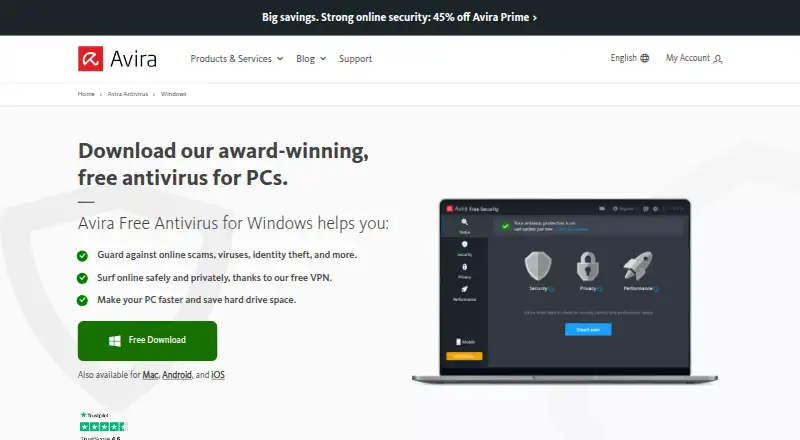
What Avira Free Security is
Avira Free Security is an internet security suite for Windows, macOS, Android, and iOS, with a free plan listed as free. Its cloud-based real-time protection monitors a device and checks suspicious files in Avira’s Protection Cloud. Smart Scan looks for malware, network threats, outdated software, tracking cookies, and unnecessary files, bringing security, privacy, and performance checks together. The included browser extension blocks unsafe and phishing sites and malicious downloads, and provides ad blocking and anti-tracking. The free VPN includes 500 MB of data per month; the Android app includes a VPN with 100 MB of data per day. Windows also gets a software updater for programs and drivers, privacy settings, and tune-up tools, while the Mac version includes a Junk Cleaner for cache, log, and temporary files. Mobile apps add antivirus or protection features and performance or storage tools. The product includes ransomware protection and a password manager, but not parental controls. Avira says it does not sell users’ data or share it with third parties such as governments, technology companies, or advertising networks. Free users can seek help from the community; making a support request to Avira requires an Avira license.
Good
- Cloud-based real-time protection checks suspicious files.
- Smart Scan checks security, privacy, and performance issues.
- Browser extension blocks phishing sites and malicious downloads.
- Includes ransomware protection and a password manager.
- Windows and Mac versions include device maintenance tools.
Watch out
- Free VPN is limited to 500 MB per month.
- Android VPN is limited to 100 MB per day.
- Parental controls are not included.
- Avira support requests require an Avira license.
Who it suits
It suits people looking for free security, privacy, and device maintenance tools across desktop and mobile platforms. The browser protection and VPN may also appeal to people who want web safety and privacy features alongside antivirus protection.
Verdict
Choose Avira Free Security if you want a free suite with antivirus, browser protection, privacy tools, and device maintenance across supported platforms. Look elsewhere if you need parental controls, more VPN data than the free allowances, or direct Avira support without a license.
Plans and prices
From Avira Free Security's own pricing page, checked 15 Oct 2026.
| Plan | Price | What it gives you |
|---|---|---|
| Avira Free Security | Free | free antivirus · VPN with 500 MB monthly data on desktop · Android VPN 100 MB daily · Windows, macOS, Android and iOS apps |
The facts
Each one read from Avira Free Security's own pages, with the date it was checked.
Where it runs
- Android SDK
- The MAVAPI Android SDK scans internal or external storage and exposes Kotlin/Native and Java JNI interfaces.checked 15 Oct 2026
- Apple app integrations
- The iOS app offers VPN, web protection, identity-breach monitoring, call blocking, contacts backup to Dropbox or Google Drive and device analysis.checked 15 Oct 2026
- Browser extension
- Avira Browser Safety blocks malicious sites, phishing and unwanted downloads and reduces ad-network tracking.checked 15 Oct 2026
- Mac tools
- The Mac version includes a Junk Cleaner for removing cache, log, and temporary files.checked 9 Oct 2026
What it does
- Antivirus
- Its cloud-based real-time protection monitors the system and analyzes suspicious files in Avira’s Protection Cloud.checked 9 Oct 2026
- API availability
- Crunchbase states that Avira features are available as licensed SDKs and APIs; these are commercial integrations rather than public open-source interfaces.checked 15 Oct 2026
- Developer SDK
- Avira offers the proprietary SAVAPI cross-platform anti-malware SDK for Windows, macOS and Linux on Intel and ARM processors.checked 15 Oct 2026
- Google Play features
- The Android app lists virus scanning, a 100 MB daily VPN, identity-leak checks, privacy advice, app locking and device cleanup.checked 15 Oct 2026
- Independent limitation
- TechRadar said Smart Scan surfaced many issues that were minor or could not be fixed in the free edition and that upgrade prompts appeared regularly.checked 15 Oct 2026
- Independent praise
- TechRadar praised installation, quick Smart Scan results and the ability to use the product without creating an account.checked 15 Oct 2026
- License
- Avira software is proprietary, licensed rather than sold, and its agreement prohibits copying, modification, redistribution and reverse engineering.checked 15 Oct 2026
- Limit: G2 complexity
- A G2 reviewer complained that the product had become more complicated and installed unwanted extra applications.checked 15 Oct 2026
- Limit: G2 performance
- Some G2 reviewers reported slowdowns during scans and occasional false positives.checked 15 Oct 2026
- Limit: Google Play reviews
- Google Play reviewers complain about intrusive advertising, repeated optimization prompts and inability to scan a chosen folder.checked 15 Oct 2026
- Limit: Software Advice file selection
- Software Advice reports complaints that users cannot select individual files for protection scans.checked 15 Oct 2026
- Limit: Software Advice resource use
- Software Advice says the most repeated complaint is that Avira can consume substantial system resources.checked 15 Oct 2026
- Malware test
- TechRadar’s test blocked 90% of its malware samples, while noting competitors scored higher.checked 15 Oct 2026
- Mobile requirements
- The official requirements list Android 9 or later with 50 MB free space and iOS 13 or later.checked 15 Oct 2026
- Mobile versions
- Avira’s Android app includes antivirus protection, a VPN with 100 MB of data per day, and storage and performance tools; its iOS app includes a VPN and protection features.checked 9 Oct 2026
The company
- Company headquarters
- Avira is headquartered in Tettnang, Baden-Württemberg, Germany.checked 15 Oct 2026
- Company legal name
- Crunchbase lists the legal entity as Avira Operations GmbH & Co. KG.checked 15 Oct 2026
- Company relationship
- Avira’s License and Services Agreement says its products and services are part of Gen Digital Inc.checked 9 Oct 2026
Money
- Free plan
- Yeschecked 20 Sep 2026
- Limit: Trustpilot support and billing
- Trustpilot complaints include license activation problems, difficulty contacting support, uninstall failures and charges continuing after cancellation.checked 15 Oct 2026
The full review of Avira Free Security
Avira Free Security combines antivirus protection with privacy and device maintenance tools across desktop and mobile platforms. It is best suited to people who want those functions at no cost and can work within a limited VPN allowance. Its breadth is useful, though support from Avira itself requires a license.
Overview
The free suite brings cloud-based real-time protection, browser safeguards, a password manager, and device cleanup into one package. Smart Scan also checks for privacy and performance issues, including tracking cookies, outdated software, and unnecessary files. That makes Avira more useful than a malware scanner alone, especially for people who want a single tool for routine security and maintenance.
The trade-offs are clear: there are no parental controls, the VPN allowance is small, and free users must turn to Avira’s community rather than request help directly from the company. Avira says it does not sell user data or share it with third parties such as governments, technology companies, or advertising networks.
Key features
- Cloud-based antivirus: Real-time protection monitors the system and analyzes suspicious files in Avira’s Protection Cloud. Ransomware protection is included, making this a stronger free starting point than a tool limited to on-demand scans.
- Smart Scan: Checks for malware and network threats alongside outdated software, tracking cookies, and unnecessary files. It is useful for a broad maintenance check, though its findings cover several different kinds of issue rather than malware alone.
- Browser safety extension: Blocks unsafe and phishing websites and malicious downloads, with ad-blocking and anti-tracking features. This adds protection while browsing, particularly for people who want fewer tracking and advertising interruptions.
- Password manager: Included in the suite, so users can keep password management among their security tools.
- VPN: The desktop free VPN is capped at 500 MB per month, a quota suited to occasional use rather than regular streaming or browsing over a VPN. Android provides 100 MB per day, a separate allowance for mobile use.
- Device maintenance: Windows users get a software and driver updater, privacy settings customization, and tune-up tools. On Mac, Junk Cleaner removes cache, log, and temporary files. These tools make the package more useful for upkeep, with different features on each desktop platform.
- Mobile protection: Android includes antivirus, the daily VPN allowance, and storage and performance tools. The iOS app includes VPN and protection features.
Pricing
Avira Free Security costs nothing. The plan includes real-time threat protection, privacy tools, and performance optimization, with no free trial because the product itself is free. The VPN caps matter more than the price: desktop users get 500 MB per month, while Android users get 100 MB per day.
There is no paid plan price to compare here. Free users can seek help from experienced community members, but an Avira license is required to submit a support request to Avira. That limitation may matter to users who want direct vendor assistance when something goes wrong.
Platforms
Avira Free Security supports Windows, macOS, Android, and iOS, with a browser extension also included. The supported computer versions are Windows 7 SP1, 8, 10, and 11, and macOS 10.15 through 14. The feature mix varies: Windows has the updater and tune-up tools, Mac has Junk Cleaner, and Android has storage and performance tools alongside antivirus protection.
Who it's for
Avira suits individuals who want antivirus, browser protection, a password manager, and basic device maintenance without paying. It is a practical fit for people using a mix of supported desktop and mobile devices who value a bundle of privacy and upkeep tools as well as threat protection.
It is a weaker fit for households that need parental controls, anyone who relies on a VPN for more than limited monthly desktop use, or users who expect to contact Avira directly for support without holding a license. The platform-specific maintenance tools also mean users should check that their device gets the features they care about.
Pros and cons
- Pros: Free real-time and ransomware protection. Core protection is included at no cost, rather than being limited to scan results.
- Pros: Useful privacy and maintenance bundle. Smart Scan, browser safeguards, and platform-specific cleanup or tune-up tools extend the suite beyond antivirus.
- Pros: Covers desktop and mobile. Windows, macOS, Android, and iOS versions make it relevant to people with more than one type of device.
- Cons: Tight VPN allowances. The 500 MB monthly desktop cap is too small for sustained use; Android’s 100 MB daily limit is also finite.
- Cons: No parental controls. Families looking for supervision tools will need another product or a separate solution.
- Cons: Direct Avira support requires a license. Free users can ask the community, but cannot submit a support request to Avira itself.
Alternatives
For a broader comparison of options, browse Antivirus software or, for Mac-focused choices, Antivirus for Mac.
- Combo Cleaner is worth considering if a scan-only free version is enough: it can find malicious items and show results, but removing them requires moving beyond that free version. It also offers a seven-day free trial.
- ClamAV is an alternative for users seeking a free, open-source antivirus engine with Linux, macOS, Windows, API, and self-hosted platform support.
- Bitdefender Total Security fits readers willing to pay for a five-device plan: Total Security Individual costs $59.99 a year for the first year, plus applicable sales tax, for five devices and one account.
- ESET Mobile Security for Android is the focused option for Android users who want basic features on a lifetime free subscription, with a separate Premium plan for additional features.
- Avira Phantom VPN Free is a Windows-only option for readers who want Avira’s free 500 MB monthly VPN as a standalone product; its Pro plan offers unlimited data, a Windows kill switch, and customer support at custom pricing.
- PC Matic is another freemium security option.
- TotalAV Antivirus is another freemium option across desktop, mobile, and browser extension platforms.
- CrowdStrike Falcon Pro is a paid alternative with Windows and macOS firewall policies and detection details for up to 90 days; its plan costs $14.99 a month per device, billed monthly.
Verdict
Choose Avira Free Security if you want a no-cost suite that joins real-time antivirus, ransomware protection, browser safeguards, privacy tools, and platform-specific maintenance across supported devices. Its main advantage is that breadth at zero cost; look elsewhere if you need parental controls, a VPN for regular use, or direct support from Avira without a license.
Getting started
- Visit Avira’s website.
- Choose the download for Windows, macOS, Android, or iOS.
- Install the app for your device.
- Use Smart Scan to check for security, privacy, and performance issues.
- Add the browser safety extension for website and download protection.
Limits worth knowing
The free VPN provides 500 MB of data per month, while the Android app’s VPN provides 100 MB per day. Parental controls are not included, and direct support requests to Avira require an Avira license.
Questions
How much does Avira Free Security cost?
The Avira Free Security plan is free.
Is there a free plan or trial?
A free plan is available. There is no free trial.
Which platforms does it support?
It supports Windows, macOS, Android, and iOS, and includes a browser extension. Listed computer versions are Windows 7 SP1, 8, 10, and 11, and macOS 10.15 through 14.
Does it include a VPN?
Yes. The free VPN includes 500 MB per month. The Android app’s VPN includes 100 MB per day.
Does Avira Free Security include parental controls?
No. Parental controls are not included.
Who makes Avira Free Security?
Avira’s License and Services Agreement says its products and services are part of Gen Digital Inc.
Alternatives to Avira Free Security
- 1

Avast One
Free planAndroidiOSExtensionmacOS8.9Free plan - 2

FortiClient
Free planAndroidiOSLinuxmacOS8.6Free plan - 3

Comodo Internet Security
AndroidiOSExtensionWindows8.6 - 4
Kaspersky Antivirus
AndroidiOSWebAPI8.4From $38.99 a year - 5

F-Secure Internet Security
AndroidiOSWebAPI8.4 - 6

PC Matic
AndroidiOSWebAPI8.4From $30 a year