Iriun Webcam
Iriun Webcam turns an Android or iOS phone camera into a wireless webcam for a PC or Mac.
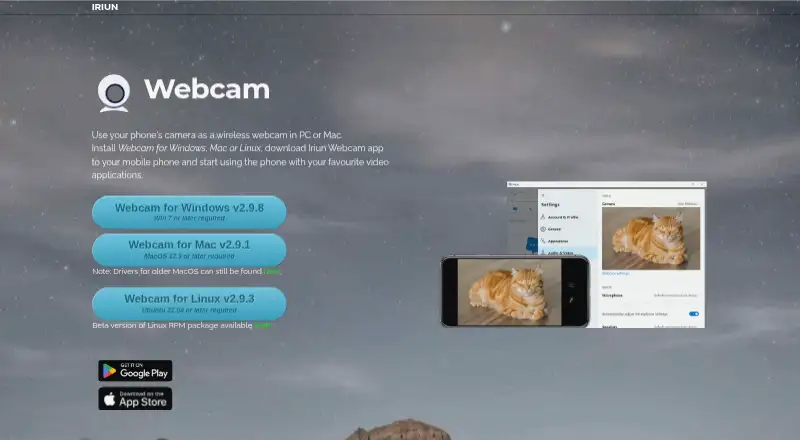
What Iriun Webcam is
Iriun Webcam turns an Android or iOS phone camera into a wireless webcam for a PC or Mac. To set it up, install the computer software and phone app, then use the phone with a video application. On Android, it can connect over Wi-Fi or USB and supports resolutions up to 4K, depending on the phone model. Camera options include pinch zoom and mirroring, and the app can work while the phone screen is off. The Android app lists Teams, Zoom, and OBS among compatible video applications. Desktop downloads are listed for Windows 7 or later, macOS 12.3 or later, and Ubuntu 22.04 or later; the iOS app requires iOS 13.0 or later and iPadOS 13.0 or later. The Android app is free with ads and in-app purchases. Its Pro version removes ads and the watermark, adds manual ISO, exposure, and white balance controls, and allows remote camera control from the desktop. The German App Store listing shows Pro for 7,99 €.
Good
- Connects over Wi-Fi or USB on Android.
- Android resolutions reach up to 4K, phone-dependent.
- Works with Teams, Zoom, and OBS.
- Free plan is available.
- Supports Windows, macOS, Linux, iOS, and Android.
Watch out
- Android app contains ads and in-app purchases.
- Maximum resolution depends on the phone model.
- Pro version is listed at 7,99 € in the German App Store.
Who it suits
Iriun Webcam suits people who want to use a phone camera with computer video apps. It may also fit users who want options such as USB connection, manual camera controls, or desktop remote control.
Verdict
Iriun Webcam offers a free way to use a phone camera with a PC or Mac, with multiple connection and camera options. Check the listed desktop and mobile requirements, and note that removing ads and the watermark requires Pro.
Plans and prices
From Iriun Webcam's own pricing page, checked 30 Sep 2026.
| Plan | Price | What it gives you |
|---|---|---|
| Free | Free | Android app contains ads and in-app purchases |
| Pro version | — | No watermark · no ads · manual ISO, exposure and white balance adjustment · remote camera control from desktop |
The facts
Each one read from Iriun Webcam's own pages, with the date it was checked.
What it does
- Camera features
- The Android app listing names pinch zoom and mirroring, and says the app works with the phone screen off.checked 30 Sep 2026
- Connection options
- The Android app listing says it connects over Wi-Fi or USB.checked 30 Sep 2026
- Data safety
- Google Play displays the developer-provided declarations that no data is shared with third parties and no data is collected.checked 30 Sep 2026
- Desktop versions
- The official site lists Windows 7 or later, macOS 12.3 or later, and Ubuntu 22.04 or later downloads.checked 30 Sep 2026
- Integrations
- The Android app listing names Teams, Zoom and OBS as video applications it can work with.checked 30 Sep 2026
- Pro features
- The Android app listing says Pro removes ads and the watermark, enables manual ISO, exposure and white balance adjustments, and adds desktop remote camera control.checked 30 Sep 2026
- Pro pricing display
- The German App Store listing shows an in-app purchase named “Pro version” for 7,99 €.checked 30 Sep 2026
- Purpose
- Iriun Webcam lets you use a phone camera as a wireless webcam on a PC or Mac.checked 30 Sep 2026
- Setup
- The maker says to install the computer software and phone app, then use the phone with video applications.checked 30 Sep 2026
- Support
- The Google Play listing provides [email protected] as the support email.checked 30 Sep 2026
- Video resolution
- The Android app listing says it supports resolutions up to 4K, with maximum resolution depending on the phone model.checked 30 Sep 2026
The company
- Headquarters
- Oulu, Finlandchecked 28 Sep 2026
Where it runs
- iOS compatibility
- The App Store listing says the app requires iOS 13.0 or later and iPadOS 13.0 or later.checked 30 Sep 2026
The full review of Iriun Webcam
Overview
Iriun Webcam turns a phone into a webcam for a PC or Mac, making it a fit for people who want to use a mobile camera in desktop video apps. Its appeal is the choice of Wi-Fi or USB connection and support for high-resolution video on compatible Android phones. The trade-off is that ads and the watermark remain in the free Android app unless you move to Pro.
Key features
Setup means installing the computer software and phone app, then using the phone camera with a video application. On Android, Wi-Fi offers a cable-free connection and USB gives users a wired option. The app names Teams, Zoom and OBS as compatible applications, which makes Iriun relevant to both video calls and streaming workflows.
The Android app supports resolutions up to 4K, with the phone model determining the maximum. Pinch zoom and mirroring provide basic framing controls, and the app can work with the phone screen off. These are useful conveniences for a phone serving as a camera, though the resolution ceiling is not a guarantee that every handset will deliver 4K.
Pro adds manual ISO, exposure and white balance adjustments, desktop remote camera control, and removes ads and the watermark. That package is aimed at users who want to tune the image or need a clean feed; casual callers can start with Free, accepting its ads and watermark. Iriun is a virtual camera, but it has no background tools, so it is not the right pick for users who want built-in background treatments.
Pricing
Iriun is freemium. The Free plan costs nothing; the Android app contains ads and in-app purchases. Pro removes the watermark and ads, adds manual image adjustments and desktop remote camera control.
Free is the sensible starting point for users willing to tolerate ads and a watermark. Pro is the relevant upgrade for image control or a watermark-free feed, but the displayed App Store price is specific to the German storefront; no subscription term or renewal detail is given for it.
Platforms
Iriun supports Android, iOS, Linux, macOS and Windows. Desktop downloads cover Windows 7 or later, macOS 12.3 or later, and Ubuntu 22.04 or later. The iOS app requires iOS 13.0 or later, and the iPad app requires iPadOS 13.0 or later. Check these requirements against both the computer and mobile device before choosing Iriun.
Who it's for
Iriun suits people who already have a phone they want to use as a PC or Mac webcam, especially Android users who value connection flexibility, pinch zoom or manual controls. It can serve calls and streaming through named applications such as Teams, Zoom and OBS. It is less suitable for anyone who needs background effects or wants a free feed without a watermark.
Pros and cons
- Pros: Wi-Fi and USB connection options on Android give users a choice between wireless and wired setups.
- Pros: Android support up to 4K, pinch zoom and mirroring provide resolution and framing options, subject to the phone's capabilities.
- Pros: Pro adds manual ISO, exposure and white balance controls and desktop remote camera control for users who want to adjust the image.
- Cons: The free Android app includes ads and a watermark, so a clean feed requires Pro.
- Cons: There are no background tools, limiting its appeal to users seeking effects or scene treatments.
Alternatives
Webcam Software is a useful place to compare more options. Choose DroidCam if its free 480p SD video without a watermark is a better fit; HD and other Pro features require an upgrade. xpression camera is another freemium option with a free trial, for readers considering a different app with a trial-based route.
Camo Studio may suit users who want a free 720p-and-below plan without a watermark or ads. Animaze is an alternative with a free Basic plan and a Plus plan at $3.99 a month. FineCam offers a free plan with all features and a watermark, while its 1 Month Plan is $9.95 a month.
PhotoDirector is another freemium option, with a limited-feature free plan and a macOS and Windows platform focus. VCam may fit users looking for a workspace-based option with a free Starter plan capped at three members and 500MB of storage. Webcam Effects is a free alternative for users who specifically want live effects, photos and short video clips.
Verdict
Choose Iriun Webcam if you want to turn a phone into a computer webcam and value Wi-Fi or USB setup options, with Pro available for manual image controls and a watermark-free feed. Look elsewhere if you need background tools or require a watermark-free free plan; its clearest strength is the focused phone-camera connection, not effects or a no-cost clean feed.
Getting started
- Open the Iriun website and choose the computer software for your platform
- Install the computer software
- Install the Iriun Webcam phone app
- Connect the phone and computer over Wi-Fi or USB when using Android
- Open a video application such as Teams, Zoom, or OBS
- Select the Iriun virtual camera in the video application
Limits worth knowing
The Free plan costs nothing and the Android app includes ads and in-app purchases. Pro removes the watermark and ads, adds manual ISO, exposure, and white-balance controls, and provides desktop remote camera control.
Questions
Is Iriun Webcam free?
Yes. The Free plan is free, and the Android app contains ads and in-app purchases.
Which devices and operating systems does it support?
It supports Android, iOS, Windows, macOS, and Linux. The iOS app requires iOS 13.0 or later and iPadOS 13.0 or later.
What does Pro add?
Pro removes ads and the watermark, enables manual ISO, exposure, and white-balance adjustment, and adds remote camera control from the desktop.
How does the phone connect to the computer?
The Android app connects over Wi-Fi or USB.
Which video applications work with Iriun Webcam?
The Android app names Teams, Zoom, and OBS as compatible video applications.
What price is shown for Pro?
The German App Store displays an in-app purchase called “Pro version” for 7,99 €.
Alternatives to Iriun Webcam
- 1
Webcamoid
Free planOpen sourceAndroidAPILinuxmacOS8.2$1.99 one-time - 2

Animaze
Free planAndroidiOSAPImacOS8.1From $19.99 a year - 3
Camo Studio
Free planAndroidiOSAPImacOS8.0From $49.99 a year - 4

FineCam
Free planAndroidiOSmacOSWindows8.0From $29.99 a year - 5

VCam
Free planWebmacOSSelf-hostedWindows7.8Free plan - 6
DroidCam
Free planAndroidiOSLinuxmacOS7.4Free plan