Inkplainer
Inkplainer turns images and text into hand-drawn explainer videos for educational content, product walkthroughs, and social media campaigns.
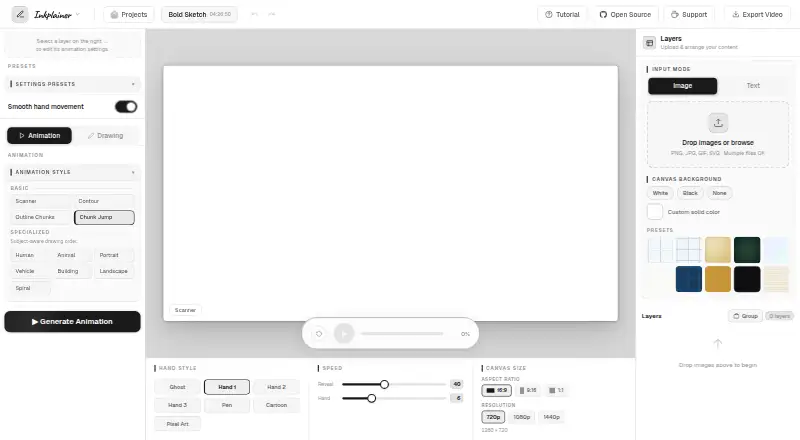
What Inkplainer is
Inkplainer turns images and text into hand-drawn explainer videos for educational content, product walkthroughs, and social media campaigns. Its animation styles include Chunk Jump, Scanner, Contour, Outline Chunks, and seven subject-aware styles such as Human, Animal, Portrait, and Landscape. Users can stack image and text layers, set their order, and divide images with Grid, Rectangle, or Freehand slicing. Per-layer controls include stroke styles, outline detection, coloring fills, and image reveal options. The editor accepts PNG, JPG, GIF, and SVG images, and exports animation as MP4 or WebM at up to 1440p, plus the final frame as PNG. The free plan costs nothing, has no subscription, requires no account, and adds no watermark. Projects save in browser storage, without syncing to another device or cloud service. The maker says images, text, projects, and exports remain on the user's device; however, Google Fonts may receive a request with the user's IP address and referring URL, and the MP4 export dependency may log the IP address. Inkplainer is designed for desktop browsers. MP4 export works only in Chrome and Edge; Firefox and Safari fall back to WebM. The maker describes it as an open-source alternative for students, teachers, creators, and small teams, and says commercial use is allowed.
Good
- Free plan requires no account
- Exports MP4 or WebM up to 1440p
- Accepts four image formats
- Projects stay in browser storage
Watch out
- MP4 export limited to Chrome and Edge
- Projects do not sync to other devices
- Some third-party requests may expose IP address
Who it suits
Inkplainer may suit students, teachers, creators, and small teams making illustrated explainers or walkthroughs in a desktop browser. It also permits commercial use and exports video without a watermark.
Verdict
Inkplainer offers layered drawing animations with several styles and video export at no cost. Keep its browser-specific MP4 support and local-only project storage in mind when choosing a workflow.
Plans and prices
From Inkplainer's own pricing page, checked 9 Oct 2026.
| Plan | Price | What it gives you |
|---|---|---|
| Free | Free | No account required · No watermark · Export up to 1440p · Free to use; no subscriptions |
The facts
Each one read from Inkplainer's own pages, with the date it was checked.
What it does
- Animation styles
- It offers Chunk Jump, Scanner, Contour, Outline Chunks, and seven subject-aware styles, including Human, Animal, Portrait, and Landscape.checked 9 Oct 2026
- Drawing controls
- Per-layer controls include stroke styles, outline detection, coloring fills, and image reveal options.checked 9 Oct 2026
- Export
- Animations can be downloaded as MP4 or WebM at up to 1440p, and the final frame can be exported as a PNG.checked 9 Oct 2026
- Input formats
- The editor accepts PNG, JPG, GIF, and SVG images, and supports adding text layers.checked 9 Oct 2026
- Intended users
- The maker describes it as an open-source alternative aimed at students, teachers, creators, and small teams.checked 9 Oct 2026
- Layers and slicer
- Users can stack image and text layers, set animation order, and split images into regions with Grid, Rectangle, or Freehand slicing.checked 9 Oct 2026
- Local projects
- Projects are automatically saved in browser storage and are not synced to another device or cloud service.checked 9 Oct 2026
- Privacy
- The maker says images, text, projects, and exported videos stay on the user's device and are not sent to Inkplainer's servers.checked 9 Oct 2026
- Purpose
- Inkplainer turns images and text into hand-drawn explainer videos for educational content, product walkthroughs, and social media campaigns.checked 9 Oct 2026
- Support
- The app links to a Ko-fi support page, and privacy questions can be sent to the developer on Reddit; response times may vary.checked 9 Oct 2026
- Third-party requests
- The privacy policy says Google Fonts may receive a request containing the user's IP address and referring URL; MP4 export loads mp4-muxer from jsDelivr, which may log the IP address.checked 9 Oct 2026
Where it runs
- Browser export limit
- MP4 export is available only in Chrome and Edge; Firefox and Safari fall back to WebM.checked 9 Oct 2026
- Desktop browser
- The maker describes Inkplainer as a desktop-browser tool and says it works best on a desktop browser.checked 9 Oct 2026
The company
- Maker
- The maker describes Inkplainer as a passion project built and maintained by one solo developer.checked 9 Oct 2026
Alternatives to Inkplainer
- 1
Explain Everything
Free planAndroidiOSWebmacOS8.3Free plan - 2

Fliki
Free planAndroidiOSWebAPI8.2From $28 a month - 3

Renderforest Slideshow Maker
Free planAndroidiOSWebAPI8.2From $8 a month - 4

Doratoon
Free planAndroidiOSWebAPI8.1From £5 a month - 5

mySimpleshow
Free planAndroidiOSWebAPI8.1From $5.99 a month - 6

Powtoon
Free planAndroidiOSWebExtension7.9From $8 a month