Hyperlane
Hyperlane is a desktop IDE for running coding agents alongside a VS Code-based editor.
What Hyperlane is
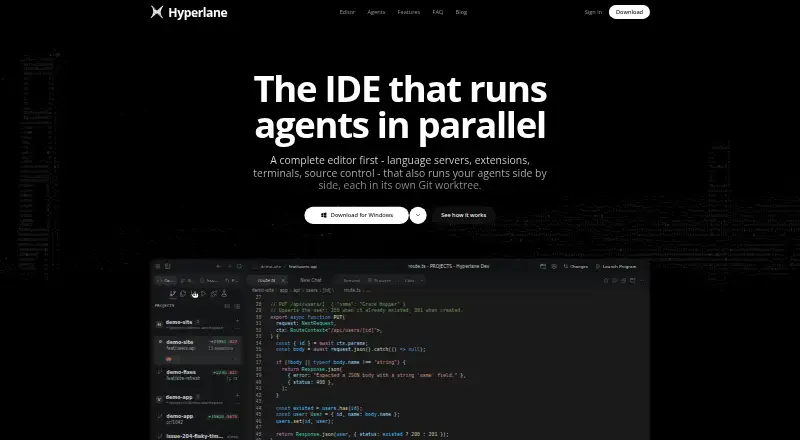
Hyperlane is a desktop IDE for running coding agents alongside a VS Code-based editor. Agents work in separate Git worktrees, and Hyperlane describes running four agents on four tasks at once. It supports a catalog of agents, including Claude Code, OpenCode, Cursor, Codex, Gemini CLI, and GitHub Copilot, as well as CLI-based agents and agents that speak ACP. The editor provides language server support, extensions, terminals, source control, multi-cursor editing, snippets, and refactoring. You can review an agent’s branch as a pull request beside its checks, description, diff, and discussion thread. Other tools include project search, a three-way merge-conflict editor, an HTTP client, design mode, Prettier formatting, and Vitest support. VS Code settings, keybindings, themes, and extensions carry over. Hyperlane is free to download for macOS, Windows, and Linux. It says source files are processed locally and API keys are not handled by Hyperlane; content sent to third-party AI services goes directly to the chosen provider.
Good
- Runs agents in separate Git worktrees.
- Supports CLI-based and ACP-speaking agents.
- Includes terminals, extensions, and source control.
- VS Code settings and extensions carry over.
- Free to download on three desktop platforms.
Watch out
- Sign-in features require an account.
- Account registration and sign-in are unavailable in the EU, UK, Switzerland, Türkiye, and some EEA states.
- Telemetry may include device, usage, error, and crash data.
Who it suits
Hyperlane suits developers who want to coordinate multiple coding agents and review their changes within an IDE. It is available for Linux, macOS, and Windows.
Verdict
Hyperlane combines parallel agent work with a VS Code-based editor and a built-in review workflow. Consider its regional sign-in limits and telemetry details if those matter to your setup.
Plans and prices
From Hyperlane's own pricing page, checked 4 Oct 2026.
| Plan | Price | What it gives you |
|---|---|---|
| Hyperlane | Free | Free to download; account required to sign in and use |
The facts
Each one read from Hyperlane's own pages, with the date it was checked.
What it does
- Account requirement
- An account is required to sign in and use Hyperlane.checked 4 Oct 2026
- Agent capacity
- The site describes running four agents on four tasks at once, with each agent in its own Git worktree.checked 3 Oct 2026
- Agent compatibility
- Hyperlane supports a catalog of coding agents and says it can run any CLI-based agent or any agent that speaks ACP.checked 3 Oct 2026
- API key handling
- The maker says Hyperlane does not proxy, store, or transmit API keys; CLI agents handle their own credentials.checked 3 Oct 2026
- Credentials
- Hyperlane says it does not proxy, store, or transmit API keys; CLI agents handle their own credentials, as do agents connected over ACP.checked 4 Oct 2026
- Development tools
- Built-in features include project-wide search, a three-way conflict editor, an HTTP client, design mode, Prettier formatting, and Vitest support.checked 4 Oct 2026
- Download
- The download page lists installers and builds for macOS, Windows, and Linux and says Hyperlane is free to download.checked 3 Oct 2026
- Editor features
- The editor includes language server support, an extension marketplace, integrated terminals, source control, multi-cursor editing, snippets, and refactors.checked 4 Oct 2026
- Other features
- The site lists project search, a three-way merge conflict editor, an HTTP client, design mode, Prettier formatting, and native Vitest support.checked 3 Oct 2026
- Parallel agents
- Agents run in separate Git worktrees, and the homepage describes starting four agents on four tasks at once.checked 4 Oct 2026
- Privacy
- The privacy policy says source code and files are processed locally and are not intentionally collected, stored, or accessed by Hyperlane; content sent to third-party AI services goes directly to the chosen provider.checked 3 Oct 2026
- Product
- Hyperlane is a complete code editor built on the VS Code engine that runs coding agents in parallel and brings their work together for review.checked 4 Oct 2026
- Regional availability
- The privacy policy says account registration and sign-in are not offered to people located in the EU, additional EEA states, the UK, Switzerland, or Türkiye.checked 3 Oct 2026
- Review workflow
- Each agent branch can be reviewed as a pull request beside the code, including its checks, description, diff, and discussion thread.checked 4 Oct 2026
- Settings migration
- Hyperlane says VS Code settings, keybindings, themes, and extensions carry over.checked 3 Oct 2026
- Support
- The site provides a contact link for support and enterprise inquiries.checked 4 Oct 2026
- Supported agents
- Hyperlane lists agents including Claude Code, OpenCode, Cursor, Codex, Gemini CLI, GitHub Copilot, and others, and supports any CLI-based agent or agent that speaks ACP.checked 4 Oct 2026
- Telemetry
- The privacy policy says desktop telemetry may include usage events, device and operating system information, and error and crash data, and is designed to exclude source code and file contents.checked 3 Oct 2026
- VS Code compatibility
- The product says VS Code settings, keybindings, themes, and extensions carry over.checked 4 Oct 2026
The company
- Maker
- The site identifies Akkento Pty Ltd as the maker; the opened pages did not state its headquarters or founding year.checked 4 Oct 2026
Where it runs
- Platform builds
- Downloads are offered for macOS, Windows, and Linux, including .deb and .rpm Linux packages.checked 4 Oct 2026
Alternatives to Hyperlane
- 1

Replit
Free planAndroidiOSWebLinux8.4From $18 a month - 2
Cursor
Free planiOSWebAPILinux8.3From $8 a month - 3

Kilo Code
Free planAndroidiOSWebAPI8.2From $15 a month - 4

Google Antigravity IDE
Free planAndroidAPIExtensionLinux8.0From $30 a month - 5

Cortex AI IDE
Free planOpen sourceLinuxmacOSWindows7.9From $40 a year - 6

Kiro
Free planiOSWebLinuxmacOS7.6From $20 a month