
HUAWEI Analytics Kit
HUAWEI Analytics Kit analyzes user behavior to support app marketing and product optimization.
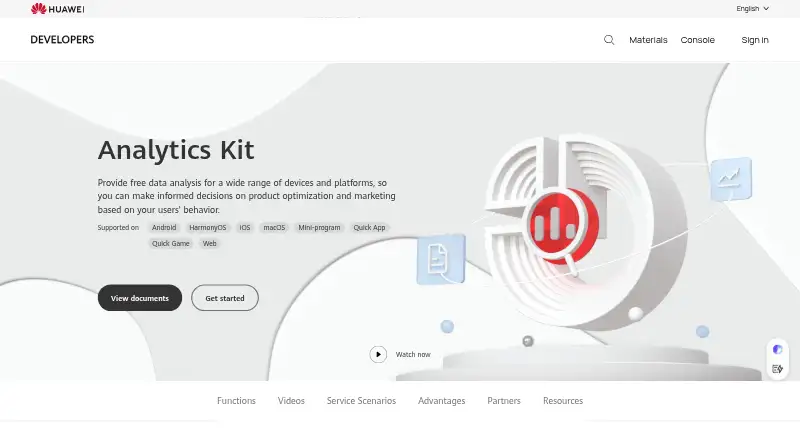
What HUAWEI Analytics Kit is
HUAWEI Analytics Kit analyzes user behavior to support app marketing and product optimization. It provides preset analysis models, more than 30 automatically collected events, and 500 custom events. Reports cover new, active, and returning users, paid traffic, channels, funnels, retention, and behavior. A lifecycle model groups users into audiences and predicts which may churn or convert; audiences can also be built from labels and events or from funnel and retention reports. Huawei lists support for Android, HarmonyOS, iOS, macOS, Mini-program, Quick App, Quick Game, and Web. The Analytics Kit plan is free at 0.00 USD. Huawei says SDK integration can be completed in five minutes and supports real-time online app debugging. Developers can set data retention to 6, 9, or 14 months, request deletion or export, and use an API to disable collection. Huawei describes itself as the end-user data processor and the developer as the data controller.
Good
- Includes 30+ automatically collected events
- Supports 500 custom events
- Provides funnel and retention reports
- Offers data deletion and export controls
- Free Analytics Kit plan
Watch out
- Session replay is not included
- Developers act as data controllers
Who it suits
The service is intended for app teams seeking behavior insights for marketing, retention, and product optimization. It may suit teams that want reports and audience segmentation across supported platforms.
Verdict
HUAWEI Analytics Kit offers behavior reporting, lifecycle insights, and developer data controls at no listed charge. Teams should note that session replay is not included and that developers have the data-controller role.
Plans and prices
From HUAWEI Analytics Kit's own pricing page, checked 2 Oct 2026.
| Plan | Price | What it gives you |
|---|---|---|
| Analytics Kit | Free | Free data analysis; 30+ automatically collected events · 500 custom events |
The facts
Each one read from HUAWEI Analytics Kit's own pages, with the date it was checked.
What it does
- Audience segmentation
- Audiences can be created by combining user labels and events or from funnel and retention reports.checked 2 Oct 2026
- Behavior analysis
- The service offers dozens of preset analysis models and supports 30+ automatically collected events and 500 custom events.checked 2 Oct 2026
- Data controls
- Huawei's personal-data page says developers can adjust retention to 6, 9, or 14 months, request data deletion or export, and disable collection with an API.checked 2 Oct 2026
- Developer support
- Huawei says customer service replies within 1 to 2 working days and provides a developer forum with Huawei experts.checked 2 Oct 2026
- Integrations
- Huawei says Analytics Kit is pre-integrated with its Push, Crash, A/B Testing, Account, In-App Purchases, and Ads services.checked 2 Oct 2026
- Intended users
- Huawei describes the service for app teams seeking user behavior insights for app marketing, retention, and product optimization.checked 2 Oct 2026
- Lifecycle insights
- Its user lifecycle model groups users into audiences and predicts which users may churn or convert.checked 2 Oct 2026
- Privacy roles
- Huawei's personal-data processing page says Huawei acts as the end-user data processor and the developer acts as the data controller.checked 2 Oct 2026
- Purpose
- Analytics Kit provides data analysis to inform product optimization and marketing based on user behavior.checked 2 Oct 2026
- Reporting
- The product offers reports on new, active, and returning users, paid traffic, channels, funnels, retention, and behavior.checked 2 Oct 2026
- SDK setup
- Huawei says SDK integration can be completed in five minutes and supports real-time online app debugging.checked 2 Oct 2026
- Supported environments
- Huawei lists Android, HarmonyOS, iOS, macOS, Mini-program, Quick App, Quick Game, and Web as supported platforms.checked 2 Oct 2026
The company
- Founded
- 1987checked 28 Sep 2026
- Headquarters
- Huawei Base, Shenzhen, 518129, Chinachecked 28 Sep 2026
The full review of HUAWEI Analytics Kit
HUAWEI Analytics Kit is a cross-platform analytics service for app teams making product and marketing decisions from user behavior. It is best suited to developers who want reports, audience segmentation, and lifecycle predictions without an analytics subscription. Its main trade-off is a clear one: strong aggregate analysis, but no session replay.
Overview
Analytics Kit supports the core measurement workflow: review user activity, inspect funnels and retention, then build audiences from those findings. Reports cover new, active, and returning users, paid traffic, channels, funnels, retention, and behavior. That range can help teams connect acquisition patterns with ongoing engagement, rather than focusing on a single metric.
The product is oriented toward structured reporting and audience work. It can help a team spot where users drop out or may churn, but teams that need to watch individual sessions to diagnose interface friction will need another tool.
Key features
Behavior and lifecycle analysis
Dozens of preset analysis models provide a starting point for common questions. Analytics Kit automatically collects more than 30 events and supports 500 custom events, giving teams room to track app-specific behavior without defining every event from scratch. The event ceiling is worth checking against a product's measurement needs before adoption.
The lifecycle model groups users into audiences and predicts which may churn or convert. This makes the product useful not only for reviewing past behavior but also for identifying groups a team may want to target. Predictions can inform decisions, but they do not replace a team's own judgment about what action to take.
Audience building and integrations
Audiences can be assembled from user labels and events or derived from funnel and retention reports. That flexibility links analysis to segmentation, which is valuable for teams using behavior data to shape marketing or retention work.
Huawei says Analytics Kit is pre-integrated with its Push, Crash, A/B Testing, Account, In-App Purchases, and Ads services. Teams already using those services can connect analytics with related app functions; teams outside that ecosystem may find this particular integration advantage less relevant.
Setup, debugging, and data controls
Huawei says SDK integration can be completed in five minutes and supports real-time online app debugging. Customer service replies within one to two working days, and a developer forum provides access to Huawei experts. These support options are useful for implementation questions, though they do not change the product's functional limits.
Huawei acts as the end-user data processor, while the developer is the data controller. Developers can set retention to 6, 9, or 14 months, request data deletion or export, and disable collection through an API. That control is useful for teams managing their own data responsibilities, but it also means the developer retains the controller role.
Pricing
The Analytics Kit plan costs free. It includes free data analysis, 30+ automatically collected events, and 500 custom events. The plan also covers funnel analysis, retention reports, revenue tracking, and crash insights. With no paid tier described, teams do not need to weigh a cheaper plan against a more capable subscription, but they should make sure the event allowance and lack of session replay fit their requirements.
Platforms
Analytics Kit is cross-platform, with support for Android, HarmonyOS, iOS, macOS, Mini-program, Quick App, Quick Game, and Web. This breadth makes it a candidate for teams measuring activity across multiple app environments, rather than just one mobile operating system.
Who it's for
Choose Analytics Kit if your app team needs behavior reporting, funnel and retention analysis, audience tools, and lifecycle insights at no charge. It is especially relevant to developers seeking connections with Huawei's Push, Crash, A/B Testing, Account, In-App Purchases, or Ads services. Look elsewhere or add another product if session replay is essential to investigating individual user journeys.
Pros and cons
- Pros: The free plan combines more than 30 automatic events with 500 custom events, funnel analysis, retention reporting, revenue tracking, and crash insights, giving teams a broad analytics starting point without a subscription.
- Pros: Lifecycle predictions and flexible audience creation connect behavior analysis with segmentation for marketing and retention work.
- Pros: Data retention settings, deletion and export requests, and an API to disable collection give developers practical controls over data handling.
- Cons: Session replay is not included, so the product cannot provide visual playback for investigating individual sessions.
- Cons: Developers remain data controllers, so responsibility for the end-user data does not move to Huawei.
- Cons: The 500-custom-event allowance may constrain teams whose measurement plans require a larger event vocabulary.
Alternatives
For a broader comparison of analytics products, see Mobile App Analytics Software, Product Analytics Tools, or Game Analytics Software. Teams choosing an identity or authentication product instead can compare Biometric Authentication Software.
Bitwarden is a password manager with a free plan for password management across unlimited devices and passwords; choose it for credential management rather than app behavior analysis. id3 Face SDK offers a 30-day evaluation with limited API calls and single-platform support, making it relevant when evaluating face SDK functionality rather than analytics. Ory offers identity infrastructure, with a production plan at $770 a year; pick it when identity infrastructure is the need, not user-behavior reporting. StrongKey FIDO Server provides a free community edition with stated unlimited users, applications, and transactions for teams seeking FIDO authentication. Hanko has a free Starter plan for up to 10,000 monthly active users and two projects, a better fit when passwordless authentication is the goal. HYPR Authenticate has a paid identity-assurance access plan at $3 a month for teams seeking phishing-resistant access. Passwordless.dev has a free plan for up to 10,000 users and one app per organization, suited to teams implementing passwordless authentication. Clerk offers a free Hobby plan with up to 50,000 monthly recurring users per app and three dashboard seats for teams building user authentication into an app.
Verdict
HUAWEI Analytics Kit is a strong choice for app teams that want a free, cross-platform toolkit for behavior reports, funnels, retention, and audience insights, especially when Huawei service integrations are useful. Its main reason to choose it is the breadth of analysis included in the free plan; its main reason to look elsewhere is the absence of session replay.
Alternatives to HUAWEI Analytics Kit
- 1
Foursquare
Free planAndroidiOSWebAPI8.2From $25 a month - 2
Tile38
Free planAPILinuxmacOSSelf-hosted6.3Free plan - 3
Radar
AndroidiOSWeb5.4 - 4
Amazon Location Service
AndroidiOSWeb5.3 - 5
Polyfence
AndroidiOSWebLinux5.3 - 6
SpatialFlow
AndroidiOSWeb5.2