
Homiwork AI Desktop Wallpaper Generator
Homiwork AI Desktop Wallpaper Generator makes widescreen desktop wallpapers from written scene descriptions.
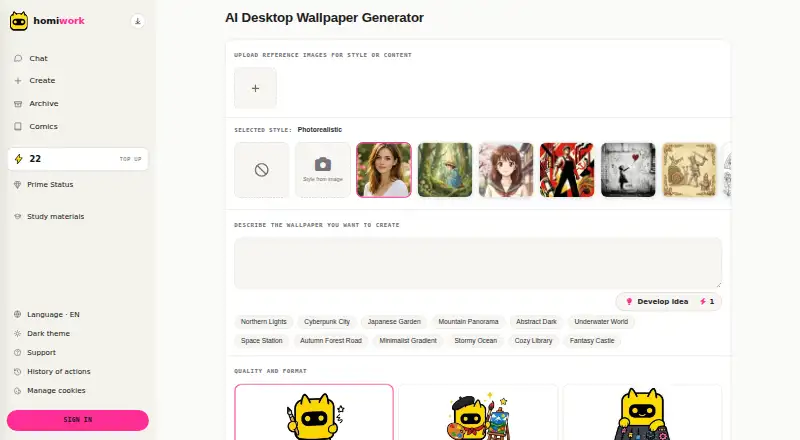
What Homiwork AI Desktop Wallpaper Generator is
Homiwork AI Desktop Wallpaper Generator makes widescreen desktop wallpapers from written scene descriptions. You can also upload a reference image to guide the style or content. Style choices include photorealistic, digital art, minimalist, anime, Ghibli, comics and pixel art. Generation has Standard, Advanced, Professional and Premium 4K tiers, costing 22, 28, 34 and 42 energy respectively. Advanced, Professional and 4K support 3:4 and 16:9 formats; the FAQ also describes widescreen 3:2 output and says 2K quality is available. The site says a wallpaper takes 10–30 seconds to generate. Images can be used as personal desktop backgrounds, social media covers or design references. New users receive free energy without registration. Prime costs $6 a month and provides 30 energy daily, up to 900 monthly; a one-time energy pack costs 30.00 USD. Generated content is deleted after 2–4 months for users without Prime, while uploaded reference photos are deleted within seven calendar days. The service is listed for Android, iOS, web and Windows.
Good
- Accepts reference images to guide style or content.
- Offers seven listed visual styles.
- New users receive free energy without registration.
- Uploaded reference photos are deleted within seven days.
Watch out
- Quality tiers consume 22 to 42 energy.
- Non-Prime generated content is deleted after 2–4 months.
- Prime costs $6 a month.
Who it suits
It suits people looking to create desktop wallpaper from a text description or reference image, with several visual styles and quality tiers. Its listed platforms include Android, iOS, web and Windows.
Verdict
Homiwork offers text-based wallpaper creation, reference-image input and a broad selection of styles. Check the energy costs and content-retention terms against how often you plan to generate and keep wallpapers.
Plans and prices
From Homiwork AI Desktop Wallpaper Generator's own pricing page, checked 30 Sep 2026.
| Plan | Price | What it gives you |
|---|---|---|
| Free energy | Free | New users receive free energy · no registration required |
| Prime | $6 a month | 30 energy per day · up to 900 per month · 30 days |
| Energy pack | $30, paid once | +1909 bonus · 1927 total energy · up to 120 Prime days |
The facts
Each one read from Homiwork AI Desktop Wallpaper Generator's own pages, with the date it was checked.
What it does
- Commercial use
- The wallpaper page says generated wallpapers can be used for personal desktop backgrounds, social media covers or as design references.checked 30 Sep 2026
- Content retention
- Generated content is automatically deleted after 2–4 months for users without Prime status.checked 30 Sep 2026
- Formats
- Advanced, Professional and 4K options support 3:4 and 16:9 formats.checked 30 Sep 2026
- Generation speed
- The site says AI creates a widescreen wallpaper in 10–30 seconds.checked 30 Sep 2026
- Payment security
- Homiwork says it does not store card data and that payments are processed through third-party services certified to PCI DSS standards.checked 30 Sep 2026
- Privacy compliance
- The privacy policy says it is designed to comply with Kazakhstan personal-data law, GDPR and CCPA.checked 30 Sep 2026
- Purpose
- The service generates unique widescreen desktop wallpapers from scene descriptions with AI.checked 30 Sep 2026
- Quality tiers
- Generation options include Standard, Advanced, Professional and Premium 4K, costing 22, 28, 34 and 42 energy respectively.checked 30 Sep 2026
- Reference images
- Users can upload reference images for style or content.checked 30 Sep 2026
- Resolution
- The FAQ says wallpapers are generated in widescreen 3:2 format and that 2K quality is available.checked 30 Sep 2026
- Service scale
- The homepage claims 1.3 million active users per month and support for more than 50 languages.checked 30 Sep 2026
- Styles
- The wallpaper tool offers styles including photorealistic, digital art, minimalist, anime, Ghibli, comics and pixel art.checked 30 Sep 2026
- Support
- Homiwork provides AI support for service questions, account issues, billing questions and technical problems.checked 30 Sep 2026
The company
- Headquarters
- Astana, Kazakhstanchecked 28 Sep 2026
Where it runs
- Uploaded photos
- User-uploaded reference photos are automatically deleted from Homiwork servers within 7 calendar days.checked 30 Sep 2026
The full review of Homiwork AI Desktop Wallpaper Generator
Overview
Homiwork AI Desktop Wallpaper Generator turns scene descriptions into widescreen backgrounds, with reference-image input for users who want to steer the subject or style. It is best suited to people who want a custom desktop image rather than a wallpaper library. The range of styles and quality tiers is useful, but energy costs make repeated exploration a plan-and-quota decision.
Key features
Text prompts let users start with a scene, while uploaded images can guide style or content. That makes Homiwork a fit for both a defined visual brief and an existing image used as a reference. It offers photorealistic, digital art, minimalist, anime, Ghibli, comics and pixel-art styles, covering markedly different looks without requiring a single aesthetic.
Homiwork says a widescreen image takes 10–30 seconds to generate. The FAQ describes 3:2 widescreen output and 2K quality; generation options also include Premium 4K. Advanced, Professional and 4K options support 3:4 and 16:9 formats, so users seeking those ratios must choose a higher tier. Standard costs 22 energy, Advanced 28, Professional 34 and Premium 4K 42. Higher quality therefore uses more of a finite allowance, a meaningful trade-off for anyone likely to iterate on prompts.
Generated wallpapers are suitable for personal desktop backgrounds, social media covers or design references. Homiwork does not describe broader commercial-use rights, so users planning other commercial applications should not assume them. Without Prime status, generated content is automatically deleted after 2–4 months; uploaded reference photos are removed from Homiwork's servers within 7 calendar days.
The privacy policy is designed to comply with Kazakhstan personal-data law, GDPR and CCPA. Homiwork says it does not store card data, with payments processed by PCI DSS-certified third parties. AI support handles service, account, billing and technical questions.
Pricing
Homiwork is freemium. The Free energy plan costs nothing; new users receive free energy without registration. Because each image costs 22–42 energy, free energy is a way to try the generator, not a dependable ongoing quota.
Prime costs $6 a month, billed every 30 days, and provides 30 energy per day, up to 900 per month. That supports regular use, though even the monthly maximum amounts to at most 40 Standard generations or 21 Premium 4K generations before any allowance is exhausted. This plan is the practical choice for users who create wallpapers routinely and want a recurring daily allowance.
The Energy pack costs $30, paid once and includes 1909 bonus energy, 1927 total energy, and up to 120 Prime days. It suits users who prefer a one-time purchase to a recurring subscription, but its finite balance does not provide Prime's daily refill. Homiwork also advertises pricing from $5.54; the named Prime plan is $6 a month.
Platforms
Homiwork lists Android, iOS, web and Windows. The tool is aimed at desktop wallpaper creation, while its platform range gives users several ways to access it.
Who it's for
Choose Homiwork if you want a specific scene rendered in one of several styles, value reference-image guidance, and are comfortable managing energy use. It is less suitable for users who want a browsable wallpaper collection, an unrestricted stream of generations, or rights beyond the stated personal, social-cover and design-reference uses.
Pros and cons
- Pros: Text prompts and reference images offer two ways to direct a custom image.
- Pros: Seven named styles and multiple quality tiers give users meaningful choices over appearance and output.
- Pros: Free energy requires no registration, and Prime provides a clear daily quota for regular creators.
- Cons: Each generation costs 22–42 energy, so repeated prompt changes can quickly consume an allowance.
- Cons: The 3:4 and 16:9 formats are limited to Advanced, Professional and 4K options.
- Cons: Generated content is deleted after 2–4 months without Prime, and broader commercial rights are not established.
Alternatives
AI Wallpaper Generators is the broader category for comparing wallpaper tools. Consider One4Wall instead if you want free wallpapers and free web downloads, or an iOS subscription option at $5.99 a month.
Pixazo AI Wallpaper Maker is another freemium option with a free trial and access on Android, iOS, web and API. Auto Wallpaper is a free alternative for Linux, macOS and Windows users. Pict.AI offers free web access, with two free uses per tool per IP address before further use directs users to its mobile app.
Backdrop is an iOS option with global wallpapers to browse and save, plus three creation credits for new accounts. BudgetPixel Wallpaper is web-based and offers 300 monthly credits on its free plan. Mixany AI Wallpaper Generator is another web option; its free plan includes 200 welcome credits and watermark-free downloads. GalleryWall is a free Android app.
Verdict
Homiwork is a strong fit for desktop users who want to generate a particular scene, guide it with a reference image and choose among several visual styles. Its central advantage is that creative control; its central drawback is that every iteration spends energy, with higher-quality options consuming more. Choose it if a daily or one-off energy budget suits your workflow, and look elsewhere if you need a wallpaper collection, sustained high-volume generation or clearly broader commercial use.
Getting started
- Open the Homiwork wallpaper generator website.
- Start with the free energy provided to new users; registration is not required.
- Enter a scene description and optionally upload a reference image.
- Choose a style and a generation quality tier, using the corresponding energy amount.
- Choose a supported format for Advanced, Professional or 4K generation, if needed.
Limits worth knowing
Generation options consume 22 energy for Standard, 28 for Advanced, 34 for Professional and 42 for Premium 4K. Prime costs $6 a month, billed every 30 days, and provides 30 energy per day, up to 900 monthly. Without Prime, generated content is deleted after 2–4 months.
Questions
Is Homiwork AI Desktop Wallpaper Generator free?
Yes. New users receive free energy, and no registration is required for that offer.
What does Prime cost?
Prime is $6 a month, billed every 30 days. It provides 30 energy per day, up to 900 per month.
What is the Energy pack price?
The one-time Energy pack costs 30.00 USD and lists 1927 total energy, including a 1909 bonus.
Which platforms are listed?
Android, iOS, web and Windows.
How long are generated content and uploaded photos retained?
For users without Prime, generated content is automatically deleted after 2–4 months. Uploaded reference photos are deleted within seven calendar days.
Can generated wallpapers be used commercially?
The wallpaper page lists personal desktop backgrounds, social media covers and design references as uses.
Alternatives to Homiwork AI Desktop Wallpaper Generator
- 1

One4Wall
Free planAndroidiOSWebmacOS7.4From $17.99 a year - 2

Pixazo AI Wallpaper Maker
Free planAndroidiOSWebAPI7.2From $120 a year - 3
Pict.AI
Free planAndroidiOSWeb6.9Free plan - 4

Mixany AI Wallpaper Generator
Free planWeb6.7From $7.17 a month - 5

Backdrop
Free planiOS6.6From $3.99 a month - 6
BudgetPixel Wallpaper
Free planWeb6.6From $100 a year