Auto Wallpaper
Auto Wallpaper is a desktop app that generates wallpapers based on current weather and time of day.
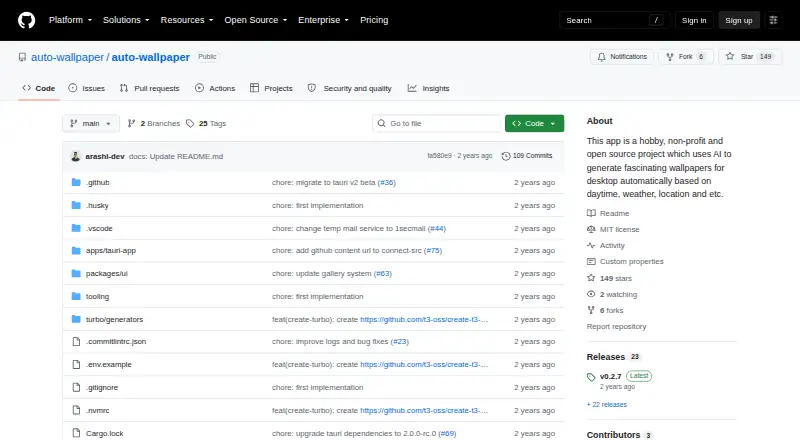
What Auto Wallpaper is
Auto Wallpaper is a desktop app that generates wallpapers based on current weather and time of day. It can change wallpapers automatically at an interval chosen by the user, and lets users save favorites for later. Prompts can be stored in albums and generated sequentially or at random. The README lists a 4K resolution option and high-detail upscaling. The app automates image generation and upscaling through Leonardo.ai and uses 1secmail.com for temporary email. Installers are linked for Windows, Linux, and Mac. The maker describes Auto Wallpaper as a free, open-source, non-profit hobby project built partly as a way to learn Tauri, for educational rather than commercial purposes. There is a current usability caveat: the README says a Cloudflare CAPTCHA on Leonardo.ai's login page stops the existing automation from working and that an update is needed. The latest listed release is v0.2.7. Bug reports can be sent through GitHub Issues, and the maker lists an email for questions or concerns.
Good
- Available for Windows, Linux, and Mac.
- Can change wallpapers at a chosen interval.
- Prompt albums support sequential or random generation.
- README lists 4K resolution and high-detail upscaling.
- Free and open-source.
Watch out
- Leonardo.ai CAPTCHA currently blocks existing automation.
- README says an update is needed.
- Commercial use is unclear.
Who it suits
Auto Wallpaper may suit desktop users who want weather- and time-based wallpaper generation, automatic changes, and saved prompt collections. It is aimed at educational use rather than commercial gain.
Verdict
Auto Wallpaper offers desktop wallpaper generation with scheduling and prompt albums, but its current Leonardo.ai automation is blocked by a CAPTCHA. Consider that limitation and the stated educational purpose before relying on it.
Plans and prices
From Auto Wallpaper's own pricing page, checked 30 Sep 2026.
| Plan | Price | What it gives you |
|---|---|---|
| Free | Free | README says no limitations or hidden costs |
The facts
Each one read from Auto Wallpaper's own pages, with the date it was checked.
What it does
- Automatic changes
- Users can set wallpapers to change automatically at a chosen interval.checked 30 Sep 2026
- Availability
- The README links installers for Windows, Linux, and Mac.checked 30 Sep 2026
- Current limitation
- The README warns that a Cloudflare CAPTCHA on Leonardo.ai's login page prevents the existing automation from working and says an update is needed.checked 30 Sep 2026
- Integrations
- The README says the app automates interactions with Leonardo.ai for image generation and upscaling and 1secmail.com for temporary email.checked 30 Sep 2026
- Latest listed release
- The GitHub releases page lists v0.2.7 as the latest release.checked 30 Sep 2026
- Project status and purpose
- The maker describes the app as a hobby, non-profit, open-source project built partly to learn Tauri, and says it is for educational purposes rather than commercial gain.checked 30 Sep 2026
- Prompt albums
- Users can save prompts in albums and generate them sequentially or randomly.checked 30 Sep 2026
- Purpose
- Auto Wallpaper uses AI to create desktop wallpapers based on the current weather and time of day.checked 30 Sep 2026
- Resolution
- The README lists an option for 4K resolution.checked 30 Sep 2026
- Saved wallpapers
- The app lets users save favorite wallpaper creations for future use.checked 30 Sep 2026
- Support
- The maker invites bug reports through GitHub Issues and lists [email protected] for questions or concerns.checked 30 Sep 2026
- Upscaling
- The app offers high-detail upscaling for generated wallpapers.checked 30 Sep 2026
The full review of Auto Wallpaper
Overview
Auto Wallpaper is an open-source desktop app that generates wallpapers around the current weather and time of day. It suits desktop users who want scheduled, prompt-driven variety at no subscription cost; its Leonardo.ai login automation is currently blocked by a CAPTCHA, so that dependency limits its practical appeal.
The project is a non-profit hobby effort, built partly as a way to learn Tauri and intended for educational use rather than commercial gain. That makes its aims clear, but leaves it a poor fit for anyone who needs dependable commercial wallpaper production.
Key features
Generation can respond to weather and time of day, while automatic changes let users choose an interval. In practice, the combination is aimed at people who want their desktop to evolve without manually choosing every background. Favorite creations can be saved, and prompt albums can be run sequentially or randomly, giving users a way to revisit themes with some variety.
The README describes 4K output and high-detail upscaling, useful options for users who value resolution and detail. It also describes image generation and upscaling through automated Leonardo.ai interactions, plus temporary email through 1secmail.com. The CAPTCHA on Leonardo.ai's login page currently prevents the existing automation from working; until that is updated, the central generation workflow is blocked.
Pricing
Auto Wallpaper is free: the Free plan costs nothing, and the README says there are no limitations or hidden costs. That is appealing for personal experimentation, with no paid tier to weigh against the current reliability issue. Commercial use is unclear, and the project is expressly intended for education rather than commercial gain, so businesses should not assume it is suitable for production.
Platforms
Installers are linked for Windows, Linux, and Mac. That range makes Auto Wallpaper relevant to desktop users across the major operating systems, but it is not a mobile wallpaper app.
Who it's for
Auto Wallpaper is best suited to technically curious desktop users who want to explore weather- and time-aware AI wallpaper workflows, save prompts, and experiment without a subscription. Its open-source, educational character may also appeal to people interested in the project itself. It is not the right choice for users who need working generation today, reliable automated changes, or clear commercial-use rights.
Pros and cons
Pros
- Free with no stated limits or hidden costs: there is no subscription expense for personal experimentation.
- Several ways to shape repeat generation: weather and time inputs, interval scheduling, saved favorites, and prompt albums support varied desktop routines.
- Desktop coverage and resolution options: Windows, Linux, and Mac installers plus a 4K option suit users with different desktop setups and display needs.
Cons
- Core automation is currently blocked: Leonardo.ai's Cloudflare CAPTCHA prevents the existing login automation from working.
- Commercial suitability is uncertain: the maker frames the project as educational and non-commercial, and commercial use is unclear.
- Hobby-project expectations apply: the maker invites bug reports through GitHub Issues and questions by email, but the project is not positioned as a commercial service.
Alternatives
For a broader look at the category, browse AI Wallpaper Generators. Consider Homiwork AI Desktop Wallpaper Generator instead if you want Windows plus Android, iOS, and web access, or a Prime plan at $6 a month billed every 30 days with 30 energy per day.
One4Wall is a better fit for users seeking wallpaper content across mobile, Mac, and web; it offers free wallpapers and downloads, with a $5.99 a month iOS plan. Choose Pixazo AI Wallpaper Maker if you want web or mobile access and a free trial with 100 bonus credits over seven days, while noting its trial has no commercial rights.
Mixany AI Wallpaper Generator is worth considering for web-based creation: its free plan includes 200 welcome credits, up to two standard 1K images, watermark-free downloads, and commercial use under Mixany terms. For a Linux-only free option, consider AI Wallpaper Generator. GalleryWall is a free, open-source Android project, while WallTrek is a free Windows alternative.
BudgetPixel Wallpaper is a web option with a free allowance of 300 credits per month and a cost of 50 credits per wallpaper run.
Verdict
Auto Wallpaper is a promising free project for desktop users who want scheduled, weather- and time-aware wallpaper ideas and are comfortable with an educational hobby app. Its prompt albums, saved wallpapers, and desktop platform range make the concept appealing. But the CAPTCHA currently blocks its Leonardo.ai automation, and its commercial use is unclear. Choose it to explore the idea, not as a dependable wallpaper pipeline; look elsewhere if you need generation to work now or need commercial certainty.
Getting started
- Open the Auto Wallpaper project website on GitHub
- Download the installer for Windows, Linux, or Mac
- Install and launch the application
- Set an interval for automatic wallpaper changes
- Save prompts in albums for sequential or random generation
- Save favorite wallpaper creations for later use
Limits worth knowing
The current Leonardo.ai login CAPTCHA prevents the existing generation and upscaling automation from working until an update is made. Commercial-use terms are unclear.
Questions
How much does Auto Wallpaper cost?
It is free, with a Free plan listed as free.
Which platforms are supported?
Installers are linked for Windows, Linux, and Mac.
Can it create 4K wallpapers?
The app lists an option for 4K resolution and offers high-detail upscaling.
Does it change wallpapers automatically?
Yes. You can choose an interval for automatic changes.
Is Auto Wallpaper open source?
Yes. Its maker describes it as an open-source, non-profit hobby project intended for educational purposes.
What currently affects Leonardo.ai automation?
A Cloudflare CAPTCHA on Leonardo.ai’s login page prevents the existing automation from working, and an update is needed.
Alternatives to Auto Wallpaper
- 1

Homiwork AI Desktop Wallpaper Generator
Free planAndroidiOSWebWindows7.4From $6 a month - 2

One4Wall
Free planAndroidiOSWebmacOS7.4From $17.99 a year - 3

Pixazo AI Wallpaper Maker
Free planAndroidiOSWebAPI7.2From $120 a year - 4
Pict.AI
Free planAndroidiOSWeb6.9Free plan - 5

Mixany AI Wallpaper Generator
Free planWeb6.7From $7.17 a month - 6

Backdrop
Free planiOS6.6From $3.99 a month