Homeroom
Homeroom is a student companion for organizing assignments, schedules, courses, and grades.
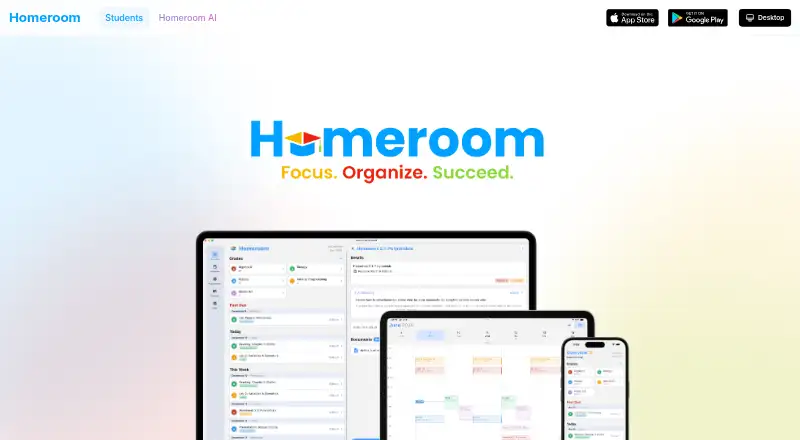
What Homeroom is
Homeroom is a student companion for organizing assignments, schedules, courses, and grades. Its assignment tracker records due dates and filters work by course or type, while Grade Analytics provides performance insights and a calculator for predicting grades. Homeroom AI can create multiple-choice questions and flashcards from schoolwork, images, or files. Its AI tutor answers questions with step-by-step explanations informed by courses and assignments, and document photos can be used to extract syllabi, assignments, and schedules. Students can start by entering courses and assignments manually or connect Google Classroom for assignment, due-date, and grade information. The privacy policy says that connection can be disconnected and Homeroom does not store Google passwords. Homeroom says data is encrypted in transit and at rest, and account deletion is available at any time. The service is directed to students aged 13 and older. The Free plan costs nothing and includes assignment tracking, grade management, and basic AI assistance. Homeroom Premium costs $4.99 a month, billed monthly.
Good
- Tracks assignment due dates by course or type
- Grade calculator helps predict grades
- AI creates questions and flashcards from school materials
- Account deletion is available at any time
Watch out
- Premium costs $4.99 a month
- Manual course and assignment entry is an available setup path
- Google Classroom connection accesses assignment, due-date, and grade information
Who it suits
Homeroom suits students aged 13 and older who want to manage coursework and grades alongside AI study tools. Its manual setup option may suit students who do not connect Google Classroom.
Verdict
Homeroom brings coursework organization, grade tools, and AI study features together for students. Compare the included Free features with Premium’s grade analytics, priority support, advanced reminders, and AI Pro features before choosing a plan.
Plans and prices
From Homeroom's own pricing page, checked 8 Oct 2026.
| Plan | Price | What it gives you |
|---|---|---|
| Free | Free | Assignment tracking · grade management · basic AI assistance |
| Premium | $2.99 a month | grade analytics · priority support · advanced reminders · monthly |
| Homeroom Premium | $4.99 a month | premium features · in-app purchase |
| Homeroom Premium Yearly | $39.99 a year | premium features · annual in-app purchase |
The facts
Each one read from Homeroom's own pages, with the date it was checked.
What it does
- Account deletion
- The Help Center says users can delete their account at any time.checked 8 Oct 2026
- Age requirement
- Terms require users to be at least 13 in the United States and 16 in the European Union.checked 15 Oct 2026
- AI document capture
- Snap and Go extracts syllabi, assignments and schedules from photos, then categorizes items and assigns due dates.checked 15 Oct 2026
- AI study guides
- Homeroom AI creates multiple-choice practice questions and flashcards from schoolwork, images or files.checked 15 Oct 2026
- AI study tools
- Homeroom AI can generate multiple choice questions and flashcards from schoolwork, images, or files.checked 8 Oct 2026
- AI tutor
- The AI tutor gives step-by-step explanations, uses course history for context and saves conversations for continuation.checked 15 Oct 2026
- AI tutoring
- The AI tutor answers questions with step-by-step explanations and context from courses and assignments.checked 8 Oct 2026
- Assignment tracker
- Assignments can be filtered by course or assignment type and tracked against due dates.checked 15 Oct 2026
- Assignment tracking
- The assignment tracker lets students track due dates and filter assignments by course or type.checked 8 Oct 2026
- Audience
- The privacy policy says Homeroom’s services are directed to students aged 13 and older.checked 8 Oct 2026
- Course management
- Users can keep courses and course materials together in the app.checked 15 Oct 2026
- Dark mode
- The app provides a dark theme with additional color customization.checked 15 Oct 2026
- Dashboard
- The dashboard summarizes upcoming assignments and scheduled activities.checked 15 Oct 2026
- Desktop requirements
- The Windows desktop app requires Windows 10 or later; Linux downloads target Ubuntu, Debian, Fedora and other distributions.checked 15 Oct 2026
- Document capture
- Homeroom AI can extract syllabi, assignments, and schedules from photos of documents.checked 8 Oct 2026
- G2 listing identity
- G2 describes its Homeroom profile as an after-school enrichment platform and says it has too few reviews to provide buying insight.checked 15 Oct 2026
- Google Play availability
- The Google Play listing identifies HOMEROOM LLC, shows 100+ downloads and lists advertisements and in-app purchases.checked 15 Oct 2026
Where it runs
- Apple requirements
- The iOS app requires iOS 15.3 or later; the Mac version requires macOS 12.2 or later on an Apple M1-or-newer Mac.checked 15 Oct 2026
- App privacy disclosure
- Apple's listing says identifiers may be used for tracking and that linked data can include contact information, photos or videos, usage data and diagnostics.checked 15 Oct 2026
- Cross-device sync
- Assignments, grades and study materials synchronize across devices with real-time updates and cloud backup.checked 15 Oct 2026
The company
- Company size
- LinkedIn lists Homeroom as an education partnership with 2–10 employees.checked 15 Oct 2026
- Company usage claim
- Homeroom says its platform is used by thousands of students across the country.checked 15 Oct 2026
- Founded
- The About page says Homeroom was founded in 2025 by two friends who started the idea in a college dorm.checked 15 Oct 2026
Money
- Free and premium tiers
- The free tier includes assignment tracking and grade management, while premium adds analytics, priority support and advanced reminders.checked 15 Oct 2026
The full review of Homeroom
Homeroom is a student-focused organizer for assignments, courses, schedules, and grades, with built-in study assistance. It is a strong fit for students who want planning and revision tools in one place, while its paid tiers matter most to anyone needing grade forecasting or the fuller AI toolkit.
Overview
Homeroom combines a course-based assignment tracker with grade management and AI study features. Deadlines can be filtered by course or assignment type, helping students separate a crowded workload into manageable lists rather than relying on one undifferentiated queue.
Students can populate the app manually by adding courses and assignments, or use document capture to extract syllabi, assignments, and schedules from photos. Google Classroom integration can access assignment, due-date, and grade information. Users can disconnect that connection, and Homeroom says it does not store Google passwords. Data is encrypted in transit and at rest, and accounts can be deleted at any time. The service is directed to students aged 13 and older.
Key features
Assignment and grade management
Filtering by course or type is useful for students handling several classes at once, particularly when deciding what to tackle next. Free includes assignment tracking and grade management. Premium's Grade Analytics adds performance insights and a grade calculator for predicting grades, making the upgrade relevant to students monitoring target marks rather than simply recording completed work.
AI study assistance
Homeroom AI can turn schoolwork, images, or files into multiple-choice questions and flashcards. Its tutor answers questions with step-by-step explanations and course- and assignment-related context, which is more targeted than a generic question-and-answer tool when class material has already been added. Basic AI assistance is included with Free; AI Pro features require a Premium subscription.
Capture, integration, and support
Photo-based extraction can reduce the effort of entering paper schedules or syllabi, while Google Classroom import can reduce duplicate data entry for compatible users. Email support is provided, and Premium adds priority handling. These conveniences favor students who want less manual administration; students who prefer complete manual control can simply enter courses and assignments themselves.
Pricing
| Plan | Price | What it includes |
|---|---|---|
| Free | free | Assignment tracking, grade management, and basic AI assistance |
| Homeroom Premium | $4.99 a month, billed Monthly | Grade analytics, priority support, advanced reminders, and AI Pro features |
| Homeroom Premium Yearly | $39.99 a year, billed Yearly | AI Pro features |
Free is the sensible starting point for students who need core organization without a subscription. The monthly Premium plan is aimed at students who want grade insights, advanced reminders, and priority support as well as AI Pro. The yearly plan costs less than twelve monthly payments but its stated inclusion is AI Pro features, so students should compare that narrower description with the monthly tier before committing. Premium subscriptions are cancelled through the App Store or Play Store subscription page, and paid features continue through the current billing period.
Platforms
Homeroom is available on iOS, Android, macOS, Windows, and Linux. That range suits students moving between phones and computers, including Linux users who are often limited to web-based planners.
Who it's for
Homeroom is best for students aged 13 or older who want assignments, grades, and study preparation together. Free suits students primarily tracking coursework and using basic AI help. Premium is a better fit for students who actively forecast grades, need advanced reminders, or expect to use AI Pro features and priority support. It is less compelling for someone seeking only a minimal checklist or a specialist revision library.
Pros and cons
Pros
- One student-focused workspace: assignments, courses, schedules, and grades are handled together.
- Useful study conversion: AI can create questions and flashcards from schoolwork, images, or files.
- Contextual tutoring: step-by-step answers can draw on course and assignment context.
- Flexible setup: manual entry, document capture, and Google Classroom connection cover different starting points.
- Broad device coverage: native availability spans iOS, Android, macOS, Windows, and Linux.
Cons
- Important analysis is paid: Grade Analytics, advanced reminders, and AI Pro are not part of Free.
- Plan descriptions differ: the yearly tier explicitly lists AI Pro features, while monthly Premium also lists analytics, reminders, and priority support.
- Age scope is limited: the service is directed to students aged 13 and older.
Alternatives
myHomework Student Planner is a better choice for a conventional planner with assignment, class, reminder, and device-sync tools, including a free ad-supported tier across more platforms.
Power Planner suits students who want a free semester-based planner with explicit limits on grades, repeating entries, and photo attachments before upgrading.
Adapt is for students prioritizing revision content and practice questions rather than a broad assignment-and-grade workspace.
School Planner is an alternative for students who prefer a planner whose Premium tier removes ads and unlocks premium features.
Fasti is a schedule-focused alternative with capped events and recurring blocks on its free tier.
MyStudyLife is worth considering for its planner, limited free task capacity, and timetable scanning.
Save My Exams is an alternative centered on Premium study resources.
Simplyr is suited to students wanting courses, assignments, exams, grades, planning, focus timers, and capped notebooks or flashcard decks in one free plan.
Verdict
Choose Homeroom if you want a cross-platform student organizer that also turns your own school material into practice and explains questions in course context. Start with Free for assignment and grade basics; pay for Premium when grade forecasting, advanced reminders, priority support, or AI Pro are central to your workflow. Look elsewhere if you need only a lightweight planner or a dedicated revision-content service.
Getting started
- Open the Homeroom website or install it on iOS, Android, macOS, Windows, or Linux
- Create an account and add courses and assignments manually
- Connect Google Classroom if you want assignment, due-date, and grade information imported
- Choose the Free plan or a Premium subscription
- Cancel premium through the App Store or Play Store subscriptions page if needed
Limits worth knowing
The Free plan includes assignment tracking, grade management, and basic AI assistance. Grade analytics, advanced reminders, AI Pro features, and priority support are part of paid plans.
Questions
Is Homeroom free?
Yes. The Free plan costs nothing and includes assignment tracking, grade management, and basic AI assistance.
What does Homeroom Premium cost?
Homeroom Premium costs $4.99 a month, billed monthly. Homeroom Premium Yearly costs $39.99 a year, billed yearly.
Which platforms support Homeroom?
Homeroom is available on iOS, Android, macOS, Windows, and Linux.
Can Homeroom connect to Google Classroom?
Yes. The integration can access assignment, due-date, and grade information, and users can disconnect it.
Does Homeroom store Google passwords?
Homeroom says it does not store Google passwords.
Alternatives to Homeroom
- 1

Power Planner
Free planOpen sourceAndroidiOSWebAPI8.5$4.99 one-time - 2

Fasti
Free planAndroidiOSWebmacOS8.0Free plan - 3

Altitask
Free planWebExtension7.5From $6.99 a month - 4

Save My Exams
Free planAndroidiOSWeb7.5Free plan - 5

Simplyr
Free planAndroidiOSWeb7.5From $59.99 a year - 6

Adapt
Free planAndroidiOSWeb7.4From £24.99 a month