
Fasti
Fasti is an AI student planner for organizing classes, shifts, study time, deadlines, commutes, shared plans and money in one place.
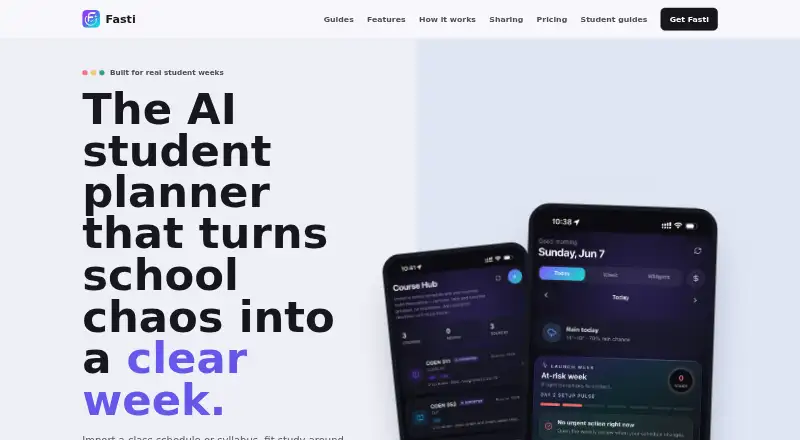
What Fasti is
Fasti is an AI student planner for organizing classes, shifts, study time, deadlines, commutes, shared plans and money in one place. It turns screenshots, photos, PDFs and pasted text into editable calendar events for courses, assignments, exams and shifts. The Planner takes natural-language requests and suggests calendar edits for users to preview, approve, reject or undo. Money tools link shifts, pay cycles, income, expenses and goals to forecast take-home pay and upcoming costs. Users can share selected events, courses, categories, import groups or date ranges, and proposed edits only take effect after acceptance. The web app works without an account or download; signing in enables cloud sync. Two-way calendar sync is optional, and Fasti says synced events are read or written on the device. Schedules stay on-device by default, while imported files are processed for extraction and discarded. Imported images and text are processed through the maker's server and Google Cloud Vertex AI; its policy says Vertex AI does not use content to train its foundation models. Fasti has a free plan, Plus at C$6.99 a month and Pro at C$13.99 a month.
Good
- Imports events from screenshots, photos, PDFs and text.
- Planner changes can be reviewed, rejected or undone.
- Budgeting forecasts take-home pay and upcoming expenses.
- Web app works without an account or download.
- Schedules stay on-device by default.
Watch out
- Free plan allows up to 30 events and recurring blocks.
- Free plan includes two starter imports.
- AI imports are processed through the maker's server and Google Cloud Vertex AI.
- Cloud sync requires signing in.
Who it suits
Fasti suits students who want to organize study commitments alongside shifts, money and commutes. It may also fit users who want to share selected schedule items or use a browser planner without an account.
Verdict
Fasti combines calendar planning, schedule sharing and money forecasts in a student-focused planner. The free plan is limited, while paid plans add more imports and planner requests.
Plans and prices
From Fasti's own pricing page, checked 15 Oct 2026.
| Plan | Price | What it gives you |
|---|---|---|
| Free | Free | Up to 30 events and recurring blocks · 2 starter schedule imports · optional 2-upload refill for CA$4.99 · weather, check-ins and weekly review · Free forever |
| Upload Pack: 2 | C$4.99, paid once | Adds two schedule uploads to the Free plan · Optional 2-upload refill |
| Plus Monthly (App Store) | $4.99 a month | Paid subscription; exact feature limits are described in the app listing · $4.99 monthly in U.S. App Store listing |
| Plus | C$6.99 a month | Unlimited events · 60 imports monthly · 100 Planner requests · pay forecasts, goals and commute alerts · two-way calendar sync and cloud backup · CA$6.99 / month |
| Pro Monthly (App Store) | $9.99 a month | Paid subscription; exact feature limits are described in the app listing · $9.99 monthly in U.S. App Store listing |
| Pro | C$13.99 a month | Everything in Plus · 200 imports monthly · 300 Planner requests monthly · exam game plans · desktop web access · CA$13.99 / month |
| Plus Yearly (App Store) | $44.99 a year | Paid subscription; exact feature limits are described in the app listing · $44.99 yearly in U.S. App Store listing |
| Plus | C$59.99 a year | Unlimited events · 60 imports monthly · 100 Planner requests · pay forecasts, goals and commute alerts · two-way calendar sync and cloud backup · CA$59.99 / year |
| Pro Yearly (App Store) | $89.99 a year | Paid subscription; exact feature limits are described in the app listing · $89.99 yearly in U.S. App Store listing |
| Pro | C$119.99 a year | Everything in Plus · 200 imports monthly · 300 Planner requests monthly · exam game plans · desktop web access · CA$119.99 / year |
The facts
Each one read from Fasti's own pages, with the date it was checked.
What it does
- Age policy
- The privacy policy says Fasti is intended for people aged 13 and over and is not directed to children under 13.checked 15 Oct 2026
- AI limitation
- Fasti warns that AI extraction and suggestions can be wrong and users must check them before relying on the results.checked 15 Oct 2026
- AI processing
- Imported images, PDFs and text are sent through the service to Google Cloud Vertex AI for extraction and then discarded rather than retained as uploads.checked 15 Oct 2026
- Budgeting
- Money tools connect shifts, pay cycles, one-off income, expenses, and goals, and forecast take-home pay and upcoming expenses.checked 30 Sep 2026
- Calendar sync
- Two-way device-calendar synchronization and optional cloud backup are available when enabled.checked 15 Oct 2026
- Changelog
- The August 2026 changelog records rotating timetables, Pomodoro, holiday-aware breaks, widgets, XP, streaks, leaderboards, flashcards, quizzes and performance analytics.checked 15 Oct 2026
- Complex schedules
- The importer is designed for alternating A/B weeks, irregular labs, date-limited terms and multiple courses in one source.checked 15 Oct 2026
- Developer restriction
- The terms prohibit reverse engineering and automated scraping of Fasti's AI endpoints.checked 15 Oct 2026
- Google Play privacy disclosure
- Google Play says no data is shared with third parties, while listing personal information, photos/videos and two other data categories as potentially collected.checked 15 Oct 2026
- Import review
- Every extracted event is shown as a proposal and is not saved until the user reviews and confirms it.checked 15 Oct 2026
- Integrations
- The privacy policy names Apple Maps, Google Maps, OpenStreetMap/Nominatim, Firebase Authentication, Google Cloud Vertex AI, RevenueCat, Apple and Google payment services, and Google Analytics as service providers.checked 15 Oct 2026
- Licence terms
- The terms grant a personal, non-exclusive, non-transferable licence for use on devices the customer owns or controls, indicating proprietary software rather than open source.checked 15 Oct 2026
- Limit: import accuracy
- Fasti acknowledges that rooms, times or recurrence patterns can be misread, making manual review necessary.checked 15 Oct 2026
- Limit: limited review evidence
- Apple says the U.S. listing has not received enough ratings or reviews to display an overview, so public review volume is very small.checked 15 Oct 2026
- Limit: subscription renewal
- Paid subscriptions renew automatically unless cancelled before the renewal period, and refunds are generally handled under Apple or Google policies.checked 15 Oct 2026
- Notable news: latest Google Play update
- Google Play lists an October 6, 2026 update adding focused study questions and improvements to study prompts, schedule imports and Planner reliability.checked 15 Oct 2026
- Praise: ease and consolidation
- An Apple reviewer praised the intuitive interface and said Fasti brought school, part-time work and social planning together in one place.checked 15 Oct 2026
Money
- AI Planner
- Users can describe desired calendar changes conversationally and receive a before-and-after proposal that can be approved, rejected or undone.checked 15 Oct 2026
Where it runs
- App size
- The iOS app listing reports an installed size of about 81.5 MB.checked 15 Oct 2026
- Notable news: Android launch
- Fasti announced that its production Android app was live with schedule imports, Planner, money, People features and cross-device sync for signed-in users.checked 15 Oct 2026
The company
- Company location
- The site says Fasti is made in Québec, Canada, and its privacy policy describes the operator as an individual sole proprietor based in Quebec.checked 30 Sep 2026
- Company status
- The privacy policy identifies the operator as an individual sole proprietor based in Quebec, Canada.checked 15 Oct 2026
- Headquarters
- Quebec, Canadachecked 23 Sep 2026
- Maker identification
- Apple identifies Nathanael Essousse as the seller and developer of the Fasti app.checked 15 Oct 2026
The full review of Fasti
Overview
Fasti is a student organizer that brings academic commitments, work shifts, shared schedules and personal finances into one planner. It is best suited to students balancing classes with paid work who want to coordinate both time and money. Its broad toolkit is compelling, though the free plan’s small event and import allowances make it a cautious starting point rather than a complete long-term setup.
Key features
Fasti turns schedule screenshots, photos, PDFs and pasted text into editable events for courses, assignments, exams and shifts. That flexibility is useful when schedules arrive in different formats; students with frequent updates may quickly outgrow the Free plan’s two starter imports.
The AI Planner accepts natural-language requests and suggests calendar changes for review. Users can approve, reject or undo each proposal, which makes the assistance more practical for anyone who wants help reorganizing a week without surrendering control. Assignment tracking, exam planning, revision scheduling and recurring study sessions round out the academic calendar.
Money tools connect shifts and pay cycles with one-off income, expenses and savings goals to forecast take-home pay and upcoming costs. For a student managing employment alongside study, that link between a work schedule and a budget is a meaningful advantage over a calendar-only planner.
Sharing can be restricted to selected events, courses, categories, import groups or date ranges. Proposed edits require acceptance before they take effect, a sensible safeguard for shared plans. Optional two-way calendar sync can read or write events on the device; signing in to the browser app enables cloud sync across devices.
Schedules stay on-device by default, and imported files are discarded after event extraction. Fasti says it does not sell personal data or use it for cross-app advertising. Imported images and text are processed through the maker’s server and Google Cloud Vertex AI; its policy says Vertex AI does not use that content to train foundation models. Students who prefer not to route imports through these services should weigh that processing before using the import feature.
Pricing
The Free plan costs nothing, billed Free forever. It allows up to 30 events and recurring blocks, includes two starter schedule imports, and offers weather, check-ins and a weekly review. An optional two-upload refill costs CA$4.99. This is a useful way to try the planner, but a 30-event ceiling can constrain a busy term, and the starter import allowance is modest.
Plus costs C$6.99 a month, billed CA$6.99 / month. It adds unlimited events, 60 imports monthly, 100 Planner requests with AI edits, pay forecasts, goals, commute alerts, two-way calendar sync and cloud backup. It is the more natural fit for students who need a full calendar and regular imports without the higher monthly quotas of Pro.
Pro costs C$13.99 a month, billed CA$13.99 / month. It includes everything in Plus, raises the limits to 200 monthly imports and 300 Planner requests, and adds exam game plans and desktop web access. It is aimed at heavier users who expect to rely on imports and AI planning throughout the month or need desktop access; occasional planners may not benefit enough from the added capacity to justify the increase.
Platforms
Fasti is available on Android, iOS and the web. The browser app works without an account or download, while signing in enables cloud sync across devices. The Free plan does not include cloud backup, which is a Plus feature.
Who it's for
Fasti makes the most sense for students juggling courses, deadlines and shifts who also want to forecast pay and expenses in the same system. Its sharing controls suit people coordinating selected parts of a schedule, while approval-based AI edits offer a measure of control. Students who only need a straightforward assignment tracker, or who want to avoid server processing of schedule imports, may be better served elsewhere.
Pros and cons
- Pros: Imports accept screenshots, photos, PDFs and text, accommodating schedules shared in varied formats.
- Pros: Budget forecasts connect shift income, pay cycles and expenses, making the planner relevant beyond coursework.
- Pros: Shared edits require acceptance, and AI-proposed changes can be reviewed, rejected or undone.
- Cons: Free is capped at 30 events and two starter imports, limiting its usefulness for a full, changing academic calendar.
- Cons: The optional two-upload refill costs CA$4.99; students who need frequent imports may find a paid plan more suitable.
- Cons: Imported material is processed through the maker’s server and Google Cloud Vertex AI, a consideration for privacy-conscious users.
Alternatives
Study Planner Apps is the broader category guide for readers who want to compare more options before choosing.
Choose myHomework Student Planner if assignment, project and test tracking with due-date reminders and device sync matters more than Fasti’s work-and-money planning. Its free Basic plan includes ads and works across Android, iOS, web, desktop systems and a browser extension.
Power Planner is another freemium option, with a free plan limited to one semester, five grades per class, one repeating bulk task or event entry, and one photo attachment per item.
Adapt may suit students who want revision content and practice questions; its free plan has limited amounts of both and shows ads.
Homeroom offers assignment tracking, grade management and basic AI assistance on its free plan, making it an alternative for students focused on coursework and grades.
MyStudyLife has a free planner across web, iPhone and Android, with up to five tasks at a time and a first AI timetable scan. Consider it if that narrower free allowance better matches your planning needs.
Save My Exams is an alternative for students seeking access to Premium study resources.
Simplyr combines courses, assignments, exams, grades and planning with focus timers and core study tools; its free plan limits several resources, including notebooks, PDFs and flashcard decks.
Helium is a free, open-source option for readers who prefer publicly available code and a choice of web, mobile, API or self-hosted access.
Verdict
Choose Fasti if you want one student planner to coordinate coursework, shifts and personal finances, with flexible imports and reviewable AI edits. The main reason to look elsewhere is its tight free-plan capacity or, for imported schedules, the server-based processing; students who need only assignment tracking may find a more focused alternative a better fit.
Alternatives to Fasti
- 1

Power Planner
Free planOpen sourceAndroidiOSWebAPI8.5$4.99 one-time - 2
Homeroom
Free planAndroidiOSLinuxmacOS8.0From $2.99 a month - 3

Altitask
Free planWebExtension7.5From $6.99 a month - 4

Save My Exams
Free planAndroidiOSWeb7.5Free plan - 5

Simplyr
Free planAndroidiOSWeb7.5From $59.99 a year - 6

Adapt
Free planAndroidiOSWeb7.4From £24.99 a month