HFSExplorer
HFSExplorer is a free, read-only desktop program for opening Mac-formatted hard disks and disk images on Linux, macOS, and Windows.
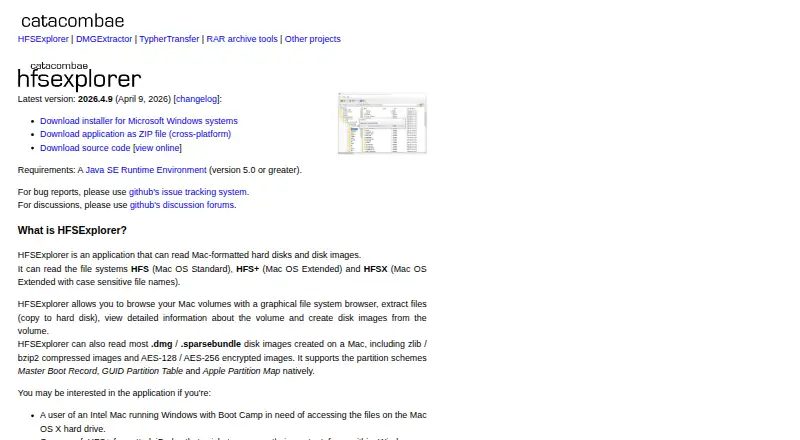
What HFSExplorer is
HFSExplorer is a free, read-only desktop program for opening Mac-formatted hard disks and disk images on Linux, macOS, and Windows. It supports HFS, HFS+, and HFSX file systems. Its graphical browser can show volume information and extract files, and the program can create disk images. It reads most Mac .dmg and .sparsebundle images, including compressed images using zlib or bzip2 and encrypted images using AES-128 or AES-256. Supported partition schemes are Master Boot Record, GUID Partition Table, and Apple Partition Map. HFSExplorer is released under GPL version 3 and listed as free, with no warranties. It requires Java SE Runtime Environment version 5.0 or greater; the product page says OpenJDK works. Access to physical disks requires administrator or equivalent privileges. A separate minimal text-mode program is described as unmaintained and supports HFS+ only. Bug reports and discussion are directed to GitHub issue tracking and discussion forums. The listed latest release is version 2026.4.9, dated April 9, 2026.
Good
- Supports HFS, HFS+, and HFSX.
- Reads many compressed and encrypted Mac disk images.
- Supports three partition schemes.
- Available free under GPL version 3.
Watch out
- Operates in read-only mode.
- Requires Java SE Runtime Environment 5.0 or greater.
- Physical disk access requires administrator privileges.
Who it suits
It suits desktop users who need to browse or extract files from Mac-formatted volumes or disk images on Linux, macOS, or Windows. It is read-only, so it is for access rather than writing to those volumes.
Verdict
HFSExplorer provides graphical browsing and extraction for a range of Mac volumes and disk images across three desktop platforms. Its Java requirement and read-only operation are important constraints to consider.
Plans and prices
From HFSExplorer's own pricing page, checked 7 Oct 2026.
| Plan | Price | What it gives you |
|---|---|---|
| HFSExplorer | Free | Free software · GPL version 3 · Read-only |
The facts
Each one read from HFSExplorer's own pages, with the date it was checked.
What it does
- Browse and extract
- It provides a graphical file system browser to browse volumes, extract files, view volume information and create disk images.checked 7 Oct 2026
- Command line
- The page describes a minimal, unmaintained text-mode program that supports HFS+ only.checked 7 Oct 2026
- Disk images
- It reads most Mac .dmg and .sparsebundle images, including zlib- or bzip2-compressed images and AES-128- or AES-256-encrypted images.checked 7 Oct 2026
- File systems
- It supports HFS, HFS+ and HFSX file systems.checked 7 Oct 2026
- Latest version
- The page lists version 2026.4.9, dated April 9, 2026, as the latest release.checked 7 Oct 2026
- Partition schemes
- It supports Master Boot Record, GUID Partition Table and Apple Partition Map schemes.checked 7 Oct 2026
- Physical disks
- Accessing physical disks requires administrator or equivalent privileges.checked 7 Oct 2026
- Purpose
- HFSExplorer reads Mac-formatted hard disks and disk images.checked 7 Oct 2026
- Read-only
- The program operates in read-only mode.checked 7 Oct 2026
- Requirements
- It requires Java SE Runtime Environment version 5.0 or greater; the page says OpenJDK works fine.checked 7 Oct 2026
- Support
- The page directs bug reports to GitHub issue tracking and discussions to GitHub discussion forums.checked 7 Oct 2026
Money
- License and cost
- It is released under GPL version 3 and provided for free with no warranties.checked 7 Oct 2026
The company
- Maker
- The HFSExplorer page identifies Erik Larsson as the contact for bug reports and feedback.checked 7 Oct 2026
Where it runs
- Platforms
- The Windows installer is offered alongside a cross-platform ZIP distribution; the page describes ZIP use on Linux, macOS and FreeBSD.checked 7 Oct 2026
The full review of HFSExplorer
HFSExplorer is a focused desktop utility for opening Mac-formatted storage and disk images when your computer cannot otherwise read them. It suits users who need to inspect or recover files from HFS-family media without altering the source. The main trade-off is a deliberately narrow, read-only workflow that depends on Java and elevated privileges for some physical-disk tasks.
Overview
HFSExplorer supports HFS, HFS+ and HFSX file systems and recognizes Master Boot Record, GUID Partition Table and Apple Partition Map layouts. Its graphical browser lets you navigate a volume, inspect volume information, extract files and create disk images. That makes it a practical retrieval tool for archives, transferred drives and forensic-style access where preserving the original contents matters more than editing them.
Read-only operation is also its clearest limitation. You can copy data out, but you cannot use HFSExplorer to write files, reorganize folders or repair a Mac volume. Choose it for access and extraction, not as a replacement for a full disk-management utility.
Key features
Broad image handling
The application reads most Mac .dmg and .sparsebundle images, including zlib- and bzip2-compressed variants. It also handles AES-128 and AES-256 encrypted images. This combination is valuable when the source arrives as a compressed or protected image rather than a directly attached drive, although the program remains an extraction route rather than an image editor.
Graphical browsing
The graphical file-system browser is the sensible choice for routine work: locate folders, review volume details and extract selected files in one desktop interface. It can also create disk images, extending its usefulness when you need a portable copy of a readable volume.
Command-line option
A minimal text-mode program is described for scripted or terminal-oriented use, but it is unmaintained and supports HFS+ only. Users needing HFS and HFSX coverage, image features or a maintained workflow should stay with the graphical application.
Access requirements
HFSExplorer requires Java SE Runtime Environment 5.0 or newer; OpenJDK works as well. That adds a setup dependency absent from many modern file viewers. Reading physical disks also requires administrator or equivalent privileges, so access policies on a managed computer may determine whether it is usable.
Pricing
HFSExplorer costs nothing. The sole HFSExplorer plan is free software under GPL version 3, operates read-only and comes with no warranties. There is no trial period because the product is already free, and there are no paid tiers, seat quotas or renewal terms to weigh. This is an uncomplicated fit for individuals, technicians and organizations that can accept community-licensed software and handle their own support.
Platforms
Desktop builds are provided for Linux, macOS and Windows. Cross-platform coverage is useful when a Mac volume must be opened from a non-Mac workstation, but every platform still carries the Java requirement. The page identifies version 2026.4.9, dated April 9, 2026, as the latest release.
Who it's for
HFSExplorer is right for anyone recovering or inspecting HFS-family media, especially when the source is a .dmg or .sparsebundle image with compression or AES encryption. It is also a good low-cost option for mixed Linux, macOS and Windows environments that need consistent read-only extraction.
Look elsewhere if you must modify a volume, want a native workflow without Java, or need a maintained command-line tool with broader filesystem support. Physical-disk access may also be unsuitable where administrator privileges are unavailable.
Pros and cons
- Pro: HFS, HFS+ and HFSX support covers the principal Mac file systems this utility targets.
- Pro: Compressed and AES-128/AES-256-encrypted disk images broaden recovery options beyond ordinary uncompressed files.
- Pro: Read-only behavior reduces the risk of changing source data during inspection and extraction.
- Con: Java SE 5.0 or newer is required, adding installation and maintenance overhead.
- Con: Physical disks need administrator-equivalent privileges, which can block use on restricted systems.
- Con: The text-mode program is unmaintained and limited to HFS+, so it is not a strong automation companion.
Alternatives
For a broader catalog of viewing tools, browse File Viewer Software.
ViewAnyFile.app is the better choice when you need a free viewer across Android, iOS, Linux, macOS, the web and Windows rather than a Mac-volume extraction specialist.
Choose Okular for a free GPLv2+ document viewer on Linux, macOS and Windows.
XnConvert fits users who need image conversion and processing, with a free private, educational and nonprofit plan and paid company licensing.
Geeqie is a free GPLv2 image viewer for Linux, macOS and Windows.
Universal File Opener is an option for Android and Windows users who want a freemium general file-opening tool with a free plan and trial.
Evince is a free Linux document viewer.
nomacs is a GPLv3 image viewer free for private and commercial use on Linux, macOS and Windows.
FastStone Image Viewer suits Windows users seeking a freemium image viewer with a free personal and educational option and a commercial license.
Verdict
Choose HFSExplorer when your priority is dependable, free, read-only access to HFS-family volumes and Mac disk images across Linux, macOS or Windows. Its filesystem and encrypted-image coverage are the main reasons to use it. Look elsewhere if Java, administrator privileges or the inability to write to a volume conflict with your workflow.
Alternatives to HFSExplorer
- 1
ViewAnyFile.app
Free planAndroidiOSWebLinux7.9From $9.99 a month - 2

Universal File Opener
Free planAndroidWebLinuxSelf-hosted7.8From $9.99 a year - 3

Okular
Free planLinuxmacOSWindows6.9Free plan - 4
FastStone Image Viewer
Free planWindows6.8Free plan - 5
IrfanView
Free planWindows6.8Free plan - 6
Evince
Free planLinux6.5Free plan