Hecate
Hecate is a free terminal hex editor for inspecting and changing file bytes.
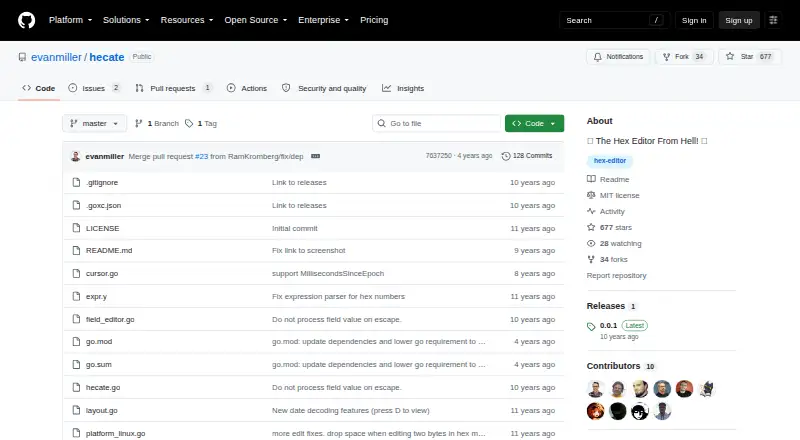
What Hecate is
Hecate is a free terminal hex editor for inspecting and changing file bytes. It displays interpreted values beneath their hexadecimal representation, so you can view bytes as text, bit patterns, integers, or floating-point values. Vim-like controls move the cursor, and edits can be made in place and written to disk. Hecate also supports tabbed browsing, large files, full-file searches, and expressions for specifying file offsets. Its interpretation options include toggling endianness and signedness, decoding dates, and configuring a date epoch. The project describes byte interpretation as useful for reverse-engineering work. Downloads are linked for Linux, Mac OS X, and Windows; a Go command is provided for compiling from source. Hecate is identified as MIT-licensed software, and the releases page lists version 0.0.1 as the latest release. The MIT license provides the software “AS IS” without warranty.
Good
- Displays interpreted values beneath hexadecimal bytes
- Supports text, bit, integer, and floating-point views
- Includes tabbed browsing and full-file searching
- Allows in-place edits written to disk
Watch out
- Latest listed release is version 0.0.1
- MIT license provides software without warranty
- No support service is stated
Who it suits
Hecate suits users who need to inspect or edit bytes in a terminal, including people doing reverse-engineering work. It is available for Linux, macOS, and Windows.
Verdict
Hecate combines byte inspection and editing with multiple value interpretations and search tools. Its latest listed release is version 0.0.1, so readers should weigh that alongside the features they need.
Plans and prices
From Hecate's own pricing page, checked 8 Oct 2026.
| Plan | Price | What it gives you |
|---|---|---|
| Free | Free | MIT-licensed software · no plan limits stated |
The facts
Each one read from Hecate's own pages, with the date it was checked.
What it does
- Browsing and search
- Hecate supports tabbed browsing, large files, and full-file searching.checked 8 Oct 2026
- Build method
- The README gives `go get -u github.com/evanmiller/hecate` as the command to compile from source.checked 8 Oct 2026
- Byte display
- It displays interpreted values directly beneath the hex representation of bytes.checked 4 Oct 2026
- Data interpretation
- It supports toggling endianness and signedness, plus date decoding and a configurable date epoch.checked 8 Oct 2026
- Data modes
- The editor can interpret bytes as text, bit patterns, integers, and floating-point values.checked 4 Oct 2026
- Editing
- Users can edit data in place and write the changes to disk.checked 8 Oct 2026
- Intended users
- The README describes the editor as useful for reverse-engineering needs.checked 8 Oct 2026
- Latest release
- The releases page labels version 0.0.1 as the latest release.checked 4 Oct 2026
- License
- The repository uses the MIT License, which permits use, modification, distribution, and sale subject to its stated conditions.checked 8 Oct 2026
- Navigation
- The editor supports Vim-like cursor controls and expressions for specifying file offsets.checked 8 Oct 2026
- Other features
- The README lists tabbed browsing, large-file support, full-file searching, and expressions for specifying file offsets.checked 4 Oct 2026
- Product
- Hecate describes itself as a terminal hex editor.checked 4 Oct 2026
- Release
- The GitHub Releases page lists version 0.0.1 as the latest release and shows it was released on May 20.checked 8 Oct 2026
- Source code
- The README gives a Go command for compiling Hecate from source.checked 4 Oct 2026
- Support
- The repository README provides usage instructions and a help screen command, but does not state a support service.checked 8 Oct 2026
- Use case
- The README describes interpreting bytes as useful for reverse-engineering work.checked 4 Oct 2026
- Value modes
- It can interpret bytes as text, bit patterns, integers, and floating-point values.checked 8 Oct 2026
- Warranty
- The MIT license states that the software is provided “AS IS” without warranty.checked 8 Oct 2026
- What it does
- Hecate is a terminal hex editor that displays interpreted byte values directly beneath their hexadecimal representation.checked 8 Oct 2026
Where it runs
- Download platforms
- The project README links a latest release for Linux, Mac OS X, and Windows.checked 8 Oct 2026
The full review of Hecate
Hecate is a terminal hex editor for inspecting and changing file data. It is best suited to technically comfortable users, particularly those doing reverse-engineering work, who want to interpret bytes in several ways without leaving a terminal.
Overview
Hecate places interpreted values beneath their hexadecimal bytes, making it possible to examine the same data as text, bit patterns, integers, or floating-point values. Date decoding and controls for signedness and endianness add useful ways to test what a field might represent. For reverse-engineering, this range of views is more valuable than a hex display alone; users who want a graphical editing workspace should look elsewhere.
The editor can change data in place and write those changes to disk. Tabbed browsing, large-file support, full-file search, and expressions for file offsets provide practical ways to move through unfamiliar data. Vim-like cursor controls will be a plus for users who already navigate that way, but may be less natural for others.
Key features
- Multiple value interpretations: View bytes as text, bit patterns, integers, or floating-point values, and use date decoding with a configurable epoch. This helps investigate data whose structure or meaning is not yet clear.
- Interpretation controls: Toggle signedness and endianness to examine how those choices affect a value. These controls are useful when a field's encoding is uncertain.
- Editing and navigation: Edit bytes in place, save changes to disk, browse in tabs, and search across the full file. Large-file support and offset expressions further serve users working through sizable or unfamiliar files.
- Terminal interaction: Vim-like cursor movement favors users comfortable with keyboard-driven navigation. The terminal format is a limitation for readers who prefer a visual interface.
Pricing
Hecate is free: its Free plan costs nothing and uses an MIT license. No plan limits are stated. The MIT license provides the software “AS IS” without warranty, so users should account for that when relying on it in important workflows.
Platforms
Hecate supports Linux, macOS, and Windows. It is a terminal application, not a graphical editor. The project also provides a Go command for compiling from source: go get -u github.com/evanmiller/hecate.
Who it's for
Hecate is a sensible fit for reverse-engineering and other byte-level work where comparing multiple interpretations, searching a whole file, or editing data directly matters. Its Vim-like controls make it especially appealing to terminal users familiar with that navigation style. Those who need a graphical environment or want an established release history should weigh its latest release, version 0.0.1, released May 20, before choosing it.
Pros and cons
- Pro: Several value modes, date decoding, and endianness and signedness controls make it easier to investigate ambiguous bytes.
- Pro: Full-file search, tabs, large-file support, and offset expressions address common navigation needs in file analysis.
- Pro: It is free, MIT-licensed software for Linux, macOS, and Windows.
- Con: The terminal interface and Vim-like movement are not a natural fit for users seeking graphical, pointer-driven editing.
- Con: The latest release is version 0.0.1, so users who prioritize a more mature release history may prefer another option.
- Con: The MIT license disclaims warranty, and the repository provides usage instructions rather than a stated support service.
Alternatives
Browse our Hex Editors guide for more options. Consider BinEd if Android support matters; it is free and open source, with Linux, macOS, web, and Windows support as well. HexEd.it is another free choice spanning Android, iOS, Linux, macOS, web, and Windows; its terms allow commercial and non-commercial use but prohibit copying the code to another server and selling it.
Bedrock Viz is free and GPL-2.0 licensed for Minecraft Bedrock Edition worlds, making it the more specific option for that use. REHex is free, GPL-2.0 licensed, and offers Windows, macOS, and Linux packages. dhex is a free Linux and macOS alternative.
ImHex is a free, open-source hex editor for Linux, macOS, and Windows. wxHexEditor is a free hex and disk editor for those same three platforms. Bless is a free Linux and Windows option distributed under GNU GPL-2.0-or-later and built from source.
Verdict
Choose Hecate if you want a free terminal hex editor that can show several interpretations of bytes and provides search and navigation tools for reverse-engineering work. Its principal advantage is the combination of value views and in-place editing; its terminal-only approach and version 0.0.1 release make it a less compelling choice for users seeking a graphical editor or a longer release history.
Getting started
- Open the Hecate project website
- Download the build for Linux, Mac OS X, or Windows
- Launch Hecate in a terminal
- Use Vim-like controls to move through bytes
- Compile from source with the documented Go command if preferred
Questions
How much does Hecate cost?
Hecate is free. The listed Free plan is free.
Which platforms does Hecate support?
Downloads are provided for Linux, Mac OS X, and Windows.
What values can Hecate display?
It can interpret bytes as text, bit patterns, integers, floating-point values, and dates, with configurable endianness, signedness, and date epoch.
Can Hecate edit files?
Yes. Data can be edited in place and the changes written to disk.
Is Hecate open source?
The repository identifies the software under the MIT license.
What is the latest release?
The GitHub Releases page labels version 0.0.1 as the latest release.
Alternatives to Hecate
- 1
Avidemux
Free planOpen sourceWebLinuxmacOSWindows7.3Free plan - 2
HexEd.it
Free planAndroidiOSWebAPI7.3Free plan - 3
Bedrock Viz
Free planWebLinuxmacOSWindows6.8Free plan - 4
010 Editor
LinuxmacOSWindows6.6 - 5
BinEd
Free planAndroidWebLinuxmacOS6.6Free plan - 6
Hiew
Free planWindows6.5$25 one-time