
ImHex
ImHex is a free hex editor for reverse engineers and programmers, available on Linux, macOS, and Windows.
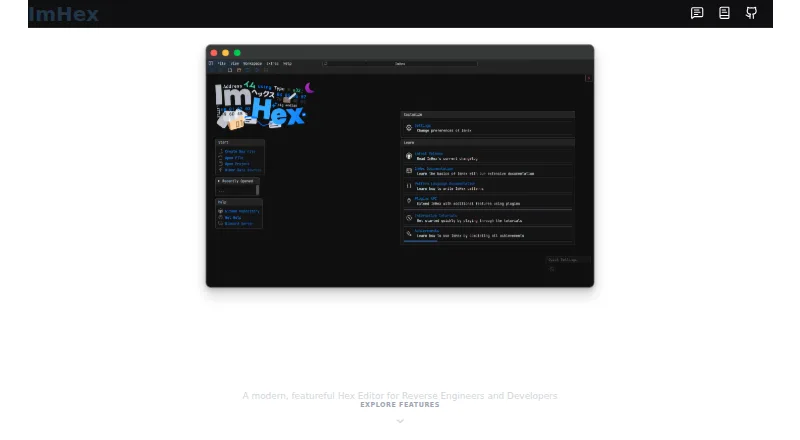
What ImHex is
ImHex is a free hex editor for reverse engineers and programmers, available on Linux, macOS, and Windows. Its hex view supports searching, byte patching, patch management, and undo and redo. A custom C-like Pattern Language lets users define structures and data types to parse and highlight file contents. Analysis tools include data inspection, file type parsing, byte type and entropy graphs, and detection of encrypted or compressed files. The YARA view scans files against rules, highlights matches, and provides navigation to them. An in-app Content Store offers community patterns, libraries, processor nodes, encodings, themes, and YARA rules; developers can also build plugins using libimhex, the ImHex API, and the Content Registry. Most of ImHex uses the GPLv2-only license, while libimhex and the UI plugin library use LGPLv2.1. ImHex generally needs a GPU supporting OpenGL 3.0, though slower software-rendered releases are available. Release binaries for macOS require macOS 15 or later; older versions require compiling from source.
Good
- Pattern Language parses and highlights defined structures.
- Includes byte patching, patch management, and undo and redo.
- YARA view highlights matches and enables navigation.
- Community content and plugin development are supported.
Watch out
- Generally requires a GPU with OpenGL 3.0 support.
- macOS release binaries require macOS 15 or higher.
- Older macOS versions require compiling from source.
- Security support generally covers only the latest release.
Who it suits
ImHex suits programmers and reverse engineers who need to inspect or edit binary data, apply patterns, or scan with YARA rules. Users should check its GPU and macOS version requirements before choosing it.
Verdict
ImHex combines hex editing with structured parsing, file analysis, and YARA scanning. Its platform requirements and macOS release limitation are worth checking before installation.
Plans and prices
From ImHex's own pricing page, checked 29 Sep 2026.
| Plan | Price | What it gives you |
|---|---|---|
| ImHex | Free | Open-source hex editor |
The facts
Each one read from ImHex's own pages, with the date it was checked.
What it does
- Analysis
- ImHex includes data inspection, file type parsing, byte type and entropy graphs, and encrypted or compressed file detection.checked 29 Sep 2026
- Community content
- The in-app Content Store provides community patterns, libraries, data processor nodes, encodings, themes, and YARA rules.checked 29 Sep 2026
- Downloads
- The install guide lists Windows installers and portable packages, a macOS DMG, and Linux AppImage, Flatpak, Snap, DEB, and RPM options.checked 29 Sep 2026
- Editing
- The hex view supports byte patching, patch management, infinite undo and redo, and searching.checked 29 Sep 2026
- Extensibility
- Developers can build plugins using libimhex, the ImHex API, and the Content Registry.checked 29 Sep 2026
- GPU requirement
- ImHex generally requires a GPU with OpenGL 3.0 support, with slower software-rendered releases available for users without a GPU.checked 29 Sep 2026
- License
- Most of ImHex is GPLv2-only; libimhex and the UI plugin library are LGPLv2.1.checked 29 Sep 2026
- Network privacy
- The project says ImHex will not transfer information to other networked systems unless specifically requested by the user or operator.checked 29 Sep 2026
- Pattern language
- Its custom C-like Pattern Language lets users define structures and data types to parse and highlight file contents.checked 29 Sep 2026
- Purpose
- ImHex is a hex editor for reverse engineers and programmers.checked 29 Sep 2026
- Security support
- The security policy generally supports only the latest release and directs critical vulnerability reports to Discord (@werwolv).checked 29 Sep 2026
- YARA
- The YARA view can scan files with rules, highlight matches, and jump to matches.checked 29 Sep 2026
Where it runs
- macOS limitation
- The project says release binaries require macOS 15 or higher; lower versions require compiling ImHex from source.checked 29 Sep 2026
The full review of ImHex
Overview
ImHex is a free hex editor for programmers and reverse engineers who need to interpret and modify binary files. Its combination of structured parsing, file analysis, and YARA scanning makes it a stronger fit for investigation than byte editing alone, provided your hardware and operating system meet its requirements.
Key features
ImHex’s custom C-like Pattern Language lets users describe structures and data types, then parse and highlight them in file contents. That makes complex binary data easier to examine in context, especially for users comfortable defining their own formats.
For editing, it supports byte patching, patch management, searching, and unlimited undo and redo. This is useful when making and revisiting changes during an investigation. Its analysis tools add data inspection, file-type parsing, byte-type and entropy graphs, and detection of encrypted or compressed content, giving users several ways to assess an unfamiliar file.
The YARA view scans files against rules, highlights matches, and jumps directly to them. The in-app Content Store offers community patterns, libraries, data processor nodes, encodings, themes, and YARA rules. Developers can also build plugins using libimhex, the ImHex API, and the Content Registry, making it more adaptable for users able to develop or maintain extensions.
Most of ImHex is GPLv2-only; libimhex and the UI plugin library are LGPLv2.1. The project says ImHex does not transfer information to other networked systems unless a user or operator specifically requests it. Security support generally covers only the latest release, and critical vulnerability reports are directed to Discord (@werwolv).
Pricing
ImHex is free: its ImHex plan costs nothing and is open-source. There is no paid tier or free trial to weigh against it. Binary comparison, binary templates, scripting, plugin support, and disk editing are included, so users do not have to move to a higher plan for those capabilities.
Platforms
ImHex supports Windows, macOS, and Linux. Downloads include Windows installers and portable packages, a macOS DMG, and Linux AppImage, Flatpak, Snap, DEB, and RPM packages. It generally requires a GPU with OpenGL 3.0 support; slower software-rendered releases are an option for systems without a suitable GPU.
The macOS release binaries require macOS 15 or later. Users on older versions must compile ImHex from source, an extra hurdle that makes it a less convenient choice for those systems.
Who it's for
ImHex suits programmers and reverse engineers who want to combine byte-level editing with structured interpretation, file analysis, and rule-based scanning. Its free plan also makes the full set of listed editing and extensibility capabilities accessible without a subscription. It is less suitable for people who need a ready-to-run macOS binary on a version below 15 or whose hardware lacks OpenGL 3.0 support and cannot use software rendering comfortably.
Pros and cons
Pros
- Deep file investigation: Pattern-based parsing, file analysis, and YARA scanning go beyond basic byte viewing.
- Broad editing tools: Patch management, search, and unlimited undo and redo support iterative changes.
- Extensible at no cost: The free plan includes plugin support, scripting, binary templates, and disk editing.
- Multiple Linux package formats: AppImage, Flatpak, Snap, DEB, and RPM options provide several installation routes.
Cons
- Hardware constraint: OpenGL 3.0 is generally required, while software-rendered releases run more slowly.
- macOS version cutoff: Release binaries need macOS 15 or later; older systems require compiling from source.
- Narrow security-support window: Support generally applies only to the latest release, and critical reports go through Discord.
Alternatives
Compare more hex editors if you want to weigh ImHex against other options.
- REHex is another free option for Windows, macOS, and Linux; consider it if you want a GPL-2.0-licensed alternative.
- Hex Editor Neo has a free plan for basic editing, with limited or no support, as well as a free trial; choose it if those terms and Windows-only availability fit your needs.
- wxHexEditor is a free hex and disk editor for Windows, macOS, and Linux; it may suit readers seeking that cross-platform combination.
- Hextor is free for personal and commercial use on Windows, with source code available for review only.
- BinEd is a free, open-source editor for Android, Linux, macOS, web, and Windows; its Android app is described as a free service.
- 010 Editor is a paid alternative for Linux, macOS, and Windows with a free trial; its New User — Home/Academic Use plan is $59.95 a month and is described as a perpetual license.
- HxD is free for private and commercial use on Windows, a narrower platform fit than ImHex.
- Hex Fiend is a free, open-source option for macOS under a BSD-style license.
Verdict
Choose ImHex if you need a free editor that can parse structured binary data, analyze files, and scan with YARA rules alongside editing. Its breadth and extensibility are compelling for technical users; look elsewhere if your system misses its GPU requirements or you need a macOS release binary for a version earlier than 15.
Alternatives to ImHex
- 1
Avidemux
Free planOpen sourceWebLinuxmacOSWindows7.3Free plan - 2
HexEd.it
Free planAndroidiOSWebAPI7.3Free plan - 3
Bedrock Viz
Free planWebLinuxmacOSWindows6.8Free plan - 4
010 Editor
LinuxmacOSWindows6.6 - 5
BinEd
Free planAndroidWebLinuxmacOS6.6Free plan - 6
Hecate
Free planLinuxmacOSWindows6.5Free plan