GoCast
GoCast is a self-hosted platform for live-streaming and recording lectures.
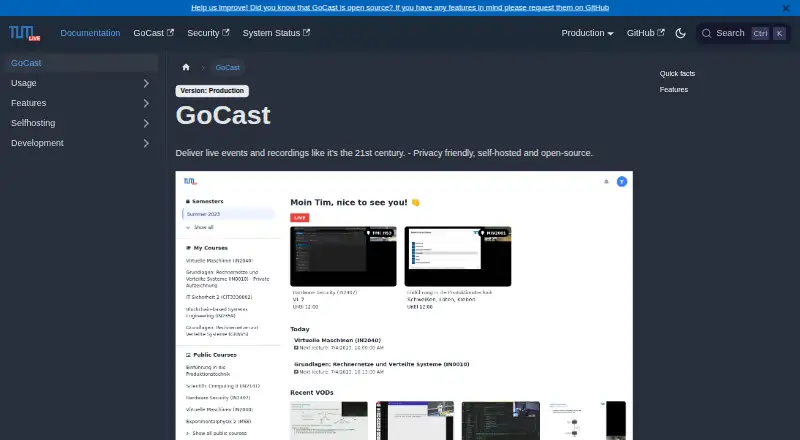
What GoCast is
GoCast is a self-hosted platform for live-streaming and recording lectures. Organizations run it on their own servers, controlling where streaming data is processed and stored. It can automatically stream auditorium lectures according to schedules, while lecturers can also stream using OBS, Zoom, or other streaming software. A self-service interface lets lecturers schedule and manage videos, and course and student enrollment information can be imported from CAMPUSonline. Live streams are recorded automatically, and video-on-demand uploads are supported. Post-processing can detect silence, produce searchable transcripts, and create thumbnails. During live sessions, listeners can ask questions and upvote them; lecturers can run polls and mark or hide questions. Course access can be public, limited to enrolled or invited users, or restricted to logged-in users with a LRZ ID. GoCast is open source under the MIT license and listed as free. The documentation says it is used at the Technical University of Munich for more than 150 courses and 15,000 students. Deployments require worker or runner servers and shared storage. The self-streaming guide warns of possible unreliability and corrupted recordings, and recommends keeping a local copy. Lecturers need to contact their organization's GoCast maintainer for access.
Good
- Open source under the MIT license.
- Can schedule auditorium streams automatically.
- Records live streams and supports video-on-demand uploads.
- Creates searchable transcripts and thumbnails through post-processing.
- Organizations control hosting and data storage.
Watch out
- Deployments require worker or runner servers and shared storage.
- Self-streaming may be unreliable and recordings can be corrupted.
- Lecturers must contact their organization's maintainer for access.
Who it suits
GoCast suits organizations that want to host lecture streaming and recording on their own infrastructure. Its course imports, scheduled streams, and audience controls are relevant to educational settings.
Verdict
GoCast offers lecture streaming, recording, and interaction for organizations prepared to manage a self-hosted deployment. Keep a local copy when self-streaming, as the guide warns that recordings can be corrupted.
Plans and prices
From GoCast's own pricing page, checked 5 Oct 2026.
| Plan | Price | What it gives you |
|---|---|---|
| Self-hosted GoCast | Free | MIT-licensed open-source software · requires your own servers and infrastructure |
The facts
Each one read from GoCast's own pages, with the date it was checked.
What it does
- Access and support
- Lecturers are directed to contact their organization's GoCast maintainer for access; organizations are directed to contact the RBG for maintainer access.checked 4 Oct 2026
- Access controls
- Courses can be public, limited to enrolled or invited users, or available to logged-in users with a LRZ ID.checked 5 Oct 2026
- Automatic streaming
- It can automatically stream auditorium lectures according to lecture schedules.checked 5 Oct 2026
- Course integration
- GoCast can import lectures and student enrollment information from CAMPUSonline.checked 5 Oct 2026
- Course management
- Lecturers can use a self-service interface to schedule and manage videos.checked 5 Oct 2026
- Data control
- Organizations can run GoCast on their own servers and control their data.checked 4 Oct 2026
- Deployment requirements
- A typical deployment needs an Edge server, at least one Worker or Runner VM, and shared storage for recordings and video files.checked 5 Oct 2026
- Live chat
- Listeners can ask questions in live chat; lecturers can create polls, and listeners can upvote questions.checked 4 Oct 2026
- Live interaction
- Live chat supports listener questions, lecturer polls, question upvotes, and marking or hiding questions.checked 5 Oct 2026
- Open source
- GoCast is open source and licensed under the MIT license.checked 5 Oct 2026
- Post-processing
- GoCast can detect silence, transcribe recordings for search, and generate thumbnails.checked 4 Oct 2026
- Privacy and hosting
- Organizations can run GoCast on their own servers, where streaming data is processed and stored.checked 5 Oct 2026
- Purpose
- GoCast is a self-hosted platform for live-streaming and recording lectures.checked 5 Oct 2026
- Recording and playback
- GoCast automatically records live streams and supports video-on-demand uploads.checked 5 Oct 2026
- Recording and video on demand
- GoCast automatically records live streams and supports video-on-demand uploads.checked 4 Oct 2026
- Scheduled streaming
- GoCast can automatically stream from auditoriums based on lecture schedules.checked 4 Oct 2026
- Self-streaming limitation
- The usage guide warns that self-streaming may be unreliable and recordings can be corrupted, so it recommends keeping a local copy.checked 5 Oct 2026
- Streaming sources
- Lecturers can self-stream using software such as OBS or Zoom.checked 4 Oct 2026
- Streaming tools
- Lecturers can self-stream using OBS, Zoom, or other streaming software.checked 5 Oct 2026
- Support and access
- Lecturers are directed to their organization's GoCast maintainer for access, while organizations can contact the RBG for maintainer access.checked 5 Oct 2026
- Use at TUM
- The documentation says GoCast is used at the Technical University of Munich for more than 150 courses and 15,000 students.checked 4 Oct 2026
- Video processing
- Post-processing can detect silence, transcribe recordings for search, and generate thumbnails.checked 5 Oct 2026
The full review of GoCast
GoCast is an open-source lecture-streaming and recording platform for organizations that can run their own infrastructure. It is best suited to universities and similar institutions that need scheduled capture, course controls, and audience interaction. Its broad lecture workflow is a strong fit for managed deployments, but it is not a hosted service that removes operational responsibility.
Overview
GoCast can take a lecture from scheduled auditorium streaming to recording and on-demand playback. Lecturers can also stream with software such as OBS or Zoom, and course access can be public, limited to enrolled or invited users, or restricted to people logged in with an LRZ ID.
Running the platform on an organization’s own servers gives it control over where streaming data is processed and stored. GoCast is MIT-licensed, but a deployment needs worker or runner servers and shared storage accessible to the relevant services. That makes it a better fit for institutions with infrastructure capacity than for groups seeking a managed video service.
The documentation describes use at the Technical University of Munich across more than 150 courses and 15,000 students, a substantial institutional use case.
Key features
Scheduled capture and course management
GoCast can automatically stream auditorium lectures according to their schedules, avoiding the need to initiate each stream manually. Lecturers can schedule and manage videos through a self-service interface, while importing lectures and student enrollment from CAMPUSonline can connect the workflow to an existing course system.
Recording, playback, and processing
Live streams are automatically recorded, and lecturers can upload videos on demand. Post-processing can detect silence, create searchable transcripts, and generate thumbnails. These tools help make recorded lectures easier to navigate and search, while keeping the recording workflow within the platform.
Live interaction
Listeners can ask questions in live chat, and lecturers can run polls. Questions can be upvoted, marked, or hidden, giving instructors ways to surface useful discussion and moderate what appears to the audience.
Self-streaming caveat
The self-streaming guide warns that streams may be unreliable and recordings can be corrupted. Lecturers who stream from OBS, Zoom, or other software should keep a local recording; GoCast’s automatic recording is not a substitute for that backup.
Pricing
Self-hosted GoCast: free. The plan is MIT-licensed open-source software, with no software charge, but it requires the organization’s own servers and infrastructure. It includes the platform’s lecture streaming and recording capabilities, including automatic captions, searchable transcripts, and live streaming.
This is a good fit for institutions able to supply and maintain the deployment. The zero software price does not make it a turnkey option: worker or runner servers and shared storage remain necessary, and lecturers obtain access through their organization’s GoCast maintainer. Organizations seeking maintainer access are directed to contact the RBG.
Platforms
GoCast is available as self-hosted software with a web interface. Its deployment is on-premise, so organizations manage the required servers and shared storage rather than relying on a hosted GoCast service.
Who it's for
GoCast suits universities and other organizations that need lecture capture tied to course schedules, enrollment, and access rules, and have the technical capacity to host it. CAMPUSonline integration is particularly relevant to organizations using that system. It is less suitable for a small team that wants to stream without managing infrastructure or to lecturers who cannot obtain access through an organizational maintainer.
Pros and cons
Pros
- Scheduled auditorium streaming: streams can follow lecture schedules, reducing manual capture work.
- Connected course workflow: lecturers can manage videos themselves, and lectures and enrollment can be imported from CAMPUSonline.
- Useful recording tools: automatic recording, on-demand uploads, silence detection, searchable transcripts, and thumbnails support a fuller lecture archive.
- Control over hosting and access: organizations run the software and process data on their own servers, with several course-access options.
- Live audience participation: chat, polls, question upvotes, and moderation controls support interaction during lectures.
Cons
- Infrastructure is the organization’s responsibility: deployments require worker or runner servers and shared storage, ruling out a hands-off hosted setup.
- Self-streaming can be risky: the guide warns of unreliable streams and corrupted recordings, so lecturers should retain a local copy.
- Access depends on an organizational maintainer: lecturers cannot treat GoCast as a self-serve public service; they need their organization to provide access.
Alternatives
Lecture Capture Software is the broader category directory for comparing options.
- Opencast is another free, open-source option for organizations wanting self-hosted lecture capture; demo instances let users try its administrative interface and video portal without installing it.
- Presentations2Go is worth considering for organizations seeking a freemium option with a free trial and support across mobile, desktop, web, and self-hosted platforms.
- Planet eStream suits buyers considering paid modular pricing, with costs depending on required features and, for school groups, the number of schools; room capture has no per-room licence cost.
- PuMuKIT is another free, open-source, self-hosted web video platform for organizations comparing no-cost software options.
- YuJa Lumina Video Platform is a paid alternative for buyers prepared to request pricing from a YuJa sales specialist.
- Galicaster-PRO is a paid alternative usually sold pre-installed with a Galicaster unit, with software licensing available under certain conditions and education discounts.
- Impartus Lecture Capture System is a paid alternative for buyers willing to request a demo.
- Vbrick Enterprise Video Platform is a paid, self-hosted-capable alternative whose quote is scoped to use cases, audience size, video library size, and network topology.
Verdict
Choose GoCast if your organization can operate its own servers and wants scheduled lecture streaming, recording, course access controls, and live interaction in one open-source platform. Its main advantage is control over the deployment and a workflow built around courses; its main drawback is that infrastructure and the risks of self-streaming remain yours to manage. Look elsewhere if you need a hosted service or cannot provide the required deployment and support.
Getting started
- Open the GoCast documentation website.
- Arrange an on-premise deployment with worker or runner servers and shared storage.
- Contact your organization's GoCast maintainer to request lecturer access.
- Schedule a lecture or self-stream using OBS, Zoom, or other streaming software.
- Keep a local recording copy when self-streaming, as the guide warns of possible unreliability or corruption.
Limits worth knowing
The free, MIT-licensed software requires your own servers and infrastructure, including worker or runner servers and shared storage. The self-streaming guide warns that streams may be unreliable and recordings may be corrupted.
Questions
How much does GoCast cost?
The listed Self-hosted GoCast plan is free. The software is open source under the MIT license.
Is there a free plan?
Yes. GoCast is listed as free, and the software is MIT-licensed.
Which platforms does GoCast support?
It is listed for self-hosted and web use, with on-premise deployment.
Can GoCast import course information?
Yes. Lectures and student enrollment information can be imported from CAMPUSonline.
What infrastructure does a deployment need?
It needs worker or runner servers and shared storage accessible to the relevant services.
How can lecturers get access?
Lecturers should contact their organization's GoCast maintainer. Organizations seeking maintainer access can contact the RBG.
Alternatives to GoCast
- 1

Opencast
Free planOpen sourceWebAPILinuxmacOS7.6Free plan - 2
lectureStudio
Free planOpen sourceWebLinuxmacOSSelf-hosted7.5Free plan - 3
PuMuKIT
Free planOpen sourceWebAPILinuxSelf-hosted7.2Free plan - 4
Vbrick Enterprise Video Platform
AndroidiOSWebAPI6.8 - 5

Presentations2Go
AndroidiOSWebAPI6.6 - 6

UbiCast Nudgis
WebAPImacOSSelf-hosted6.6From $4,500 a year