git-annex
git-annex manages large files with git while storing their contents outside git.
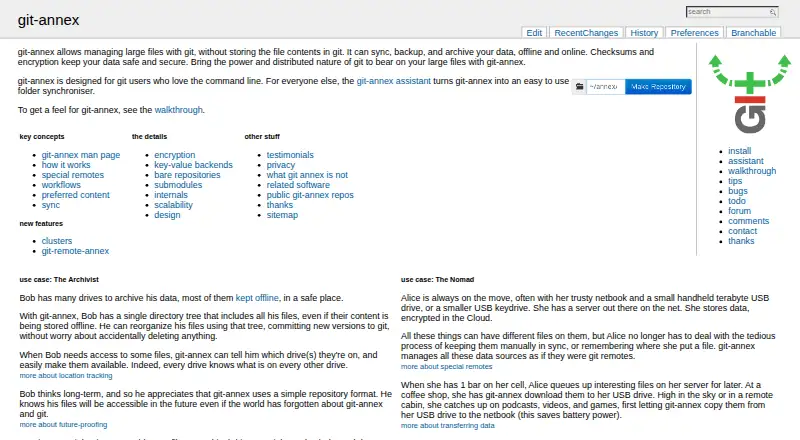
What git-annex is
git-annex manages large files with git while storing their contents outside git. Git keeps filenames and metadata; the file contents are held in a distributed store across repository clones. The tool can sync, back up, and archive data online or offline, and can resume interrupted transfers. Its assistant can create a synchronized folder across computers, Android devices, removable drives, NAS appliances, and cloud services. Built-in special remotes include S3, Glacier, rclone, rsync, web, WebDAV, and Android adb. Encrypted special remotes can encrypt contents and use HMAC hashing for filenames, but the project says encryption is mostly not used by default. git-annex is free software, with install instructions for Linux distributions, macOS, Android, and Windows. It is designed for git users who are comfortable with the command line. The project says repositories with hundreds of thousands of files are supported, though larger repositories may slow down because of git limitations. It also explicitly says git-annex is not a backup system, though it can be part of an archival or backup workflow.
Good
- Keeps large file contents outside git
- Can resume interrupted transfers
- Includes remotes such as S3, rsync, and WebDAV
- Install options include Linux, macOS, Android, and Windows
Watch out
- Encryption is mostly not enabled by default
- Larger repositories may slow down
- Project says it is not a backup system
Who it suits
git-annex suits command-line-oriented git users who need to sync, archive, or manage large files outside git. It supports workflows across computers, removable drives, NAS appliances, and cloud services.
Verdict
git-annex separates file contents from git while supporting distributed storage and synchronization workflows. Its own guidance makes clear that it should not be treated as a backup system on its own.
Plans and prices
From git-annex's own pricing page, checked 15 Oct 2026.
| Plan | Price | What it gives you |
|---|---|---|
| git-annex | Free | Free Software; no paid tiers stated |
The facts
Each one read from git-annex's own pages, with the date it was checked.
What it does
- Assistant
- The bundled assistant synchronizes folders across macOS and Linux computers, Android devices, removable drives, NAS appliances and cloud services.checked 15 Oct 2026
- Audience
- The project describes git-annex as designed for git users who love the command line.checked 4 Oct 2026
- Checksums
- Files can use cryptographic checksum keys and git-annex fsck can verify stored content.checked 15 Oct 2026
- Current issues
- The bug list includes an addurl signal-4 crash, S3/Minio data-loss concern, macOS openrsync sync breakage, slow webapp behavior and memory exhaustion reports.checked 15 Oct 2026
- Data workflows
- It can sync, back up, and archive data both offline and online.checked 4 Oct 2026
- Documentation
- The project provides a wiki, walkthroughs, man pages, design documents, special-remote recipes, a forum, IRC and a mailing list.checked 15 Oct 2026
- Encryption
- Encrypted special remotes support hybrid, shared, public-key and shared-public-key modes, but encryption is generally disabled unless configured.checked 15 Oct 2026
- Extensibility
- Users can write external special remotes, and the project documents external-remote and external-backend protocols.checked 15 Oct 2026
- Funding
- A campaign page records 541 sponsors and $20,819 raised against a $15,000 goal for development work.checked 15 Oct 2026
- Independent user concern
- A 2018 survey respondent said the complexity and quirks made recovery from mistakes difficult and requested more troubleshooting guidance.checked 15 Oct 2026
- Installation
- Packages or commands are provided for major Linux distributions, macOS Homebrew, FreeBSD, OpenBSD, Android Termux and Windows through PyPI tooling.checked 15 Oct 2026
- Install options
- Official install instructions list Linux distributions, macOS, Android, and Windows, with package and other install methods.checked 4 Oct 2026
- Integrations
- Documented service recipes cover Amazon S3 and Glacier, Backblaze B2, Dropbox, Google Cloud Storage, Google Drive, Azure, OneDrive, ownCloud and others.checked 15 Oct 2026
- Licence
- The project is AGPL version 3 or later, with portions under GPL, BSD and other free-software licences.checked 15 Oct 2026
- Limit: assistant workflow
- The hands-on report said automatic assistant commits made the Git log messy, leading the author to disable the assistant and commit manually.checked 15 Oct 2026
- Limitations
- The project says git-annex is not a backup system, though it may be part of an archival system or deliver files to a backup system.checked 4 Oct 2026
- Limit: backup expectations
- The project’s own explanatory page says git-annex is not itself a backup system, Dropbox replacement, filesystem mirror or distributed filesystem.checked 15 Oct 2026
- Limit: large repositories
- A Washington State University guide reports slow Git and git-annex performance with many files and says building from Haskell source is difficult.checked 15 Oct 2026
- Limit: learning curve
- A hands-on user found the software substantially more complex than typical tools and said its documentation is difficult to digest.checked 15 Oct 2026
- Limit: symlink workflow
- The same user found annexed images becoming symlinks confusing and said the basic walkthrough did not clearly explain a Google Drive workflow.checked 15 Oct 2026
The company
- Company status
- An independent review describes git-annex as maintained by Joey Hess and volunteers rather than a commercial company.checked 15 Oct 2026
- Founded
- Development began in 2010.checked 15 Oct 2026
- Maker
- The contact page identifies Joey Hess as the author, with contributions from others.checked 15 Oct 2026
Where it runs
- Limit: Android
- An Android report says FAT or sdcardfs environments may lack symlink support, causing duplicate copies and extra storage use, while permissions can also interfere.checked 15 Oct 2026
The full review of git-annex
Overview
git-annex manages large files for people who want to keep file contents out of Git while tracking filenames and metadata in repositories. It suits command-line-oriented Git users coordinating files across computers, devices and storage services. Its distributed design is flexible, but its own guidance is clear: it is not a backup system by itself.
Key features
Git holds filenames and metadata; annexed contents live in a distributed store across repository clones. That separation lets users sync, archive and move files without making Git carry the file contents. Transfers can resume after interruption, a practical safeguard for large or unreliable transfers.
The assistant can create a synchronized folder across computers, Android devices, removable drives, NAS appliances and cloud services. Built-in special remotes include S3, Glacier, rclone, rsync, web, WebDAV and Android adb, giving technically inclined users a broad choice of storage destinations.
Encrypted special remotes can encrypt contents and use HMAC hashing for filenames. Encryption is mostly not used by default, so users handling sensitive data need to configure an encrypted remote rather than assume stored files are protected.
File size is limited by the filesystem. Repositories with hundreds of thousands of files are supported, but larger ones may slow down because of Git limitations. The project says git-annex is not a backup system; it can instead form part of an archival workflow or deliver files to a separate backup system.
Pricing
git-annex is free and open source. The git-annex plan costs nothing and manages large files without storing their contents in Git. There is no paid tier or free-trial period to weigh; users provide or arrange the storage destinations themselves.
Platforms
Official installation instructions cover Linux distributions, macOS, Android and Windows, with package and other installation methods. The product is also categorized for self-hosted and web use. Its assistant's synchronized folders can span computers, Android devices, removable drives, NAS appliances and cloud services.
Who it's for
Choose git-annex if you already work with Git, are comfortable with the command line, and need to coordinate or archive large files across distributed storage. It is a poor fit as a standalone backup solution, or for someone who wants file protection without configuring storage and encryption choices.
It supports file-level snapshots, dataset branching and point-in-time rollback, with both storage backend types and a self-hosted deployment model. The project also notes that DataLad uses git-annex to provide access to scientific data from various sources.
Pros and cons
- Pros: Keeps large contents outside Git while preserving filenames and metadata, which avoids putting those contents directly in repository history.
- Pros: Supports many storage destinations and can resume interrupted transfers, useful for distributed workflows and lengthy transfers.
- Pros: Free, open source and installable across major desktop platforms and Android.
- Cons: Not a backup system on its own, so users must build a separate backup process where needed.
- Cons: Encryption is mostly not enabled by default, requiring deliberate configuration for sensitive contents.
- Cons: Very large repositories may slow down because of Git limitations, even though hundreds of thousands of files are supported.
Alternatives
For a broader category comparison, see Data Version Control Tools.
- Weights & Biases is a freemium alternative with a free plan and a free trial; its Free plan includes 5 model seats, 5 GB/month storage and 1 GB/month of Weave data ingestion.
- Apache Paimon is a free, open-source data lake platform; choose it when you need to select connectors and storage plugins for your environment.
- Dolt is a free, open-source option with a roughly 100 MB program; consider it as another Git-oriented data tool.
- ClearML offers a freemium model and says its self-hosted version is 100% open source on GitHub; consider it when a self-hosted open-source option is the priority.
- Neon has a free tier with 10 projects, 50 CU-hours per month per project, 0.5 GB storage per project, 10 branches per project and 5 GB monthly egress; consider it when those database project limits suit your needs.
- Nile offers a free local plan that runs entirely on your machine without a cloud account.
- DataLad is free and open source, and is a related option for scientific data workflows; the DataLad project uses git-annex.
- Hugging Face Hub has a free plan with 100 GB private storage and best-effort public storage; consider it when hosted model and dataset storage is a better fit.
Verdict
git-annex is a strong choice for command-line Git users who need distributed, resumable handling of large files without putting contents in Git. Its range of remotes and free, open-source model are compelling; look elsewhere or pair it with a separate system if you need a backup solution or encryption enabled by default.
Getting started
- Open the git-annex website
- Choose installation instructions for Linux, macOS, Android, or Windows
- Install the available package or another listed method
- Use the assistant to create a synchronized folder
- Connect computers, devices, removable drives, NAS appliances, or cloud services
- Select a special remote such as S3, Glacier, rclone, rsync, web, WebDAV, or Android adb
Limits worth knowing
File size depends on the filesystem. Repositories with hundreds of thousands of files are supported, but larger repositories can become slower because of Git limitations; git-annex itself is not a backup system.
Questions
Does git-annex cost anything?
git-annex is free software and open source. Its listed plan is free.
Which platforms can run git-annex?
The listed platforms are Android, Linux, macOS, self-hosted, web, and Windows.
How does git-annex store files?
Git stores filenames and metadata, while git-annex keeps annexed contents in a distributed store across repository clones.
Which storage services can it use?
Built-in special remotes include S3, Glacier, rclone, rsync, web, WebDAV, and Android adb.
Does git-annex encrypt files automatically?
Encrypted special remotes can encrypt contents and use HMAC hashing for filenames, but the project says encryption is mostly not used by default.
Is git-annex a backup system?
No. The project says it is not a backup system, though it can form part of an archival system or deliver files to a separate backup system.
Alternatives to git-annex
- 1

Roboflow
Free planAndroidiOSWebAPI8.3From $39 a month - 2

Weights & Biases
Free planAndroidiOSWebAPI8.3From $60 a month - 3

DagsHub
Free planWebAPILinuxmacOS7.9From $99 a month - 4

ClearML
Free planWebAPILinuxmacOS7.4From $15 a month - 5

Neon
Free planWebAPILinuxmacOS7.1$0.11 usage-based - 6

Dolt
Free planWebAPILinuxmacOS7.0From $5 a month