Gifsicle
Gifsicle is a free command-line tool for creating, editing, and inspecting GIF images and animations.
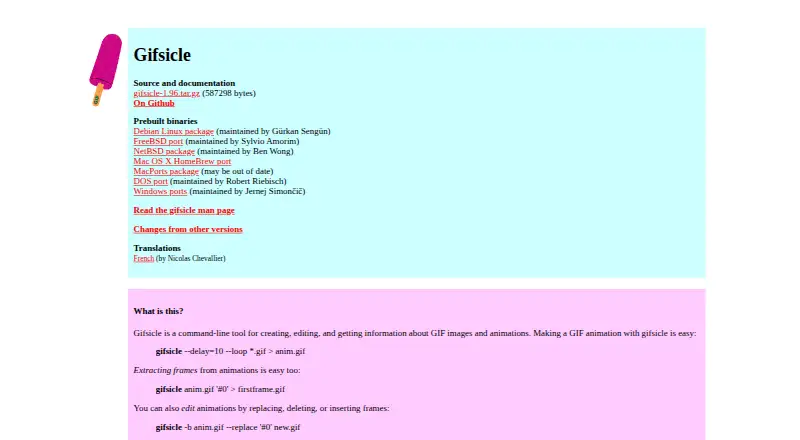
What Gifsicle is
Gifsicle is a free command-line tool for creating, editing, and inspecting GIF images and animations. It can combine GIF inputs into animations, set frame delays and looping, and extract, insert, replace, or delete frames. Image options include resizing, cropping, flipping, rotating, changing transparency, and reducing colors. Its optimizer offers three levels and stores changed portions of frames, though optimization can sometimes increase file size. Gifsicle can print detailed GIF information, including comments, and control interlacing, palettes, and transparency. Batch mode changes GIF files in place. The distribution also includes gifview, an animated-GIF viewer, and gifdiff, which compares GIFs for identical visual appearance. The software is available for Linux, macOS, and Windows. The maker provides a source archive and says an ANSI C compiler is needed to build it. The manual notes that some Java and Internet Explorer versions may not display minimal optimized GIFs correctly; a careful option writes somewhat larger GIFs to address such compatibility issues.
Good
- Combines GIF inputs into animations.
- Can extract, insert, replace, and delete frames.
- Includes animated-GIF viewer gifview.
- Includes visual comparison tool gifdiff.
- Runs on Linux, macOS, and Windows.
Watch out
- Command-line interface rather than a graphical editor.
- Optimization can sometimes enlarge files.
- Building from source requires an ANSI C compiler.
- Some Java and Internet Explorer versions may mishandle minimal optimized GIFs.
Who it suits
Gifsicle suits users who want command-line controls for GIF creation, editing, optimization, or inspection. It can also be useful for people who need frame-level animation changes or batch edits.
Verdict
Gifsicle offers a broad set of GIF and animation operations through a command-line workflow, with gifview and gifdiff included. Its optimization may increase file size, and some viewers may need the careful output option.
Plans and prices
From Gifsicle's own pricing page, checked 11 Oct 2026.
| Plan | Price | What it gives you |
|---|---|---|
| Gifsicle | Free | Freely available software for GIF images and animations |
The facts
Each one read from Gifsicle's own pages, with the date it was checked.
What it does
- Animation creation
- It combines multiple GIF inputs into an animation and supports setting frame delays and looping.checked 11 Oct 2026
- Animation editing
- It can replace, delete, or insert animation frames and extract frames from animations.checked 11 Oct 2026
- Author
- The manual names Eddie Kohler as the author and says Anne Dudfield named the software.checked 11 Oct 2026
- Availability
- The maker describes Gifsicle as freely available and says an ANSI C compiler is needed to build it.checked 11 Oct 2026
- Batch mode
- Batch mode changes GIF files in place.checked 11 Oct 2026
- Build requirement
- The official page says an ANSI C compiler is all that is needed.checked 11 Oct 2026
- Color handling
- It can shrink colormaps and change images to the Web-safe palette or another selected colormap.checked 11 Oct 2026
- Compatibility caveat
- The manual says some Java and Internet Explorer versions may not display minimal optimized GIFs correctly and describes a careful option for such cases.checked 11 Oct 2026
- Distribution
- The maker provides a source archive and links to the project on GitHub.checked 11 Oct 2026
- Frame editing
- It can extract, insert, replace, and delete animation frames.checked 11 Oct 2026
- GIF information
- It prints detailed information about GIFs, including comments.checked 11 Oct 2026
- Image controls
- It provides controls for interlacing, comments, looping, and transparency.checked 11 Oct 2026
- Image editing
- Options include resizing, cropping, flipping, rotating, changing transparency, and reducing colors.checked 11 Oct 2026
- Included programs
- The distribution includes gifview, a lightweight animated GIF viewer, and gifdiff, which compares GIFs for identical visual appearance.checked 11 Oct 2026
- Included tools
- The download page says the distribution also includes gifview, an animated-GIF viewer, and gifdiff, a tool for comparing GIFs for identical visual appearance.checked 11 Oct 2026
- Optimization
- Its animation optimizer stores changed portions of frames and offers three optimization levels; the manual says optimization can sometimes enlarge a file.checked 11 Oct 2026
- Output compatibility
- The manual says the --careful option writes slightly larger GIFs to avoid bugs in some other GIF implementations, including some Java and Internet Explorer versions.checked 11 Oct 2026
- Purpose
- Gifsicle is a command-line tool for creating, editing, manipulating, and getting information about GIF images and animations.checked 11 Oct 2026
- Support
- The maker invites changes, bug reports, and complaints by email at [email protected].checked 11 Oct 2026
- What it does
- Gifsicle is a command-line tool for creating, editing, and getting information about GIF images and animations.checked 11 Oct 2026
Where it runs
- Linux availability
- The official page links to a Debian Linux package maintained by Gürkan Sengün.checked 11 Oct 2026
- macOS availability
- The official page links to Homebrew and MacPorts packages for Mac OS X, and notes that the MacPorts package may be out of date.checked 11 Oct 2026
- Platforms
- The download page links to Windows ports, a Mac OS X Homebrew port, and a Debian Linux package.checked 11 Oct 2026
- Windows availability
- The official page links to Windows ports maintained by Jernej Simončič.checked 11 Oct 2026
The full review of Gifsicle
Gifsicle is free software for creating, editing and inspecting GIF images and animations from the command line. It suits people who want precise control over frames, image properties and batches of files.
Overview
Gifsicle handles still GIFs and animations, from combining input files into an animation to printing detailed information about a GIF, including its comments. Batch mode changes files in place, which makes repeatable edits practical but puts the originals at risk if you need to keep them unchanged.
The distribution also includes gifview, an animated-GIF viewer, and gifdiff, which compares GIFs for identical visual appearance. Those tools add useful ways to inspect and compare GIF work, while editing remains a command-line task.
Key features
Animation and frame control
Gifsicle can combine GIFs into an animation, set frame delays and looping, and extract, insert, replace or delete frames. That range suits targeted changes to existing animations as well as assembling a new one from GIF inputs. The controls are precise, but they require working with commands rather than manipulating frames in a visual timeline.
The optimizer stores changed portions of frames and offers three optimization levels. It can reduce redundant frame data, but it may also increase file size, so optimization is not a dependable shortcut to a smaller GIF.
Image and color controls
Options include resizing, cropping, flipping, rotating and changing transparency. Gifsicle can also reduce colors, shrink colormaps, select a different colormap, and control interlacing and comments. This makes it useful for file-level adjustments and palette work; it is less suited to drawing or retouching by hand.
Inspection and companion tools
Detailed GIF information, including comments, helps users inspect files, while gifview and gifdiff provide a viewer and a visual-appearance comparison tool. Together they make the package more than an editor, though each task still follows a utility-oriented workflow.
Pricing
Gifsicle costs nothing. There is no paid tier or trial to weigh against its free use. The maker describes it as freely available software, and an ANSI C compiler is sufficient to build it from source.
That price makes it an easy choice for command-line users who need GIF operations without a software fee. The cost is the command-line workflow itself: users who want visual editing may be better served by a GUI-oriented alternative.
Platforms
Gifsicle supports Linux, macOS and Windows. The maker links to a Debian package for Linux, Homebrew and MacPorts packages for macOS, and Windows ports. The MacPorts package may be out of date, so Mac users relying on that route should account for it.
Transparent GIF export is supported. The manual also describes a compatibility option, --careful, that writes slightly larger GIFs to avoid display bugs in some Java and Internet Explorer versions. That trade-off matters when output needs to work with those implementations.
Who it's for
Gifsicle is a strong fit for people comfortable with command-line tools who need repeatable GIF edits, frame-level animation control, batch changes or detailed file inspection. It also suits users who want a free utility with companion tools for viewing and comparing GIFs.
It is a weaker fit for people who expect a visual editor, drawing tools or a timeline-based workflow. Its in-place batch mode also calls for care when preserving source files matters, and optimization should be checked because it can enlarge output.
Pros and cons
- Pros: Free software covers still GIFs and animations, with frame editing, playback controls and image adjustments in one command-line toolkit.
- Pros: gifview and gifdiff add animated-GIF viewing and comparison for identical visual appearance.
- Pros: Linux, macOS and Windows support, plus an ANSI C source build requirement, gives users several ways to use or build it.
- Cons: Editing is command-line based, which rules it out for readers who want a visual workspace.
- Cons: Optimization can increase file size, so smaller output is not assured.
- Cons: Batch mode changes files in place, and the MacPorts package may be out of date.
Alternatives
For a visual animation workflow, consider Brush Ninja, which offers core animation tools without requiring an account and runs on Android, iOS, Linux, macOS, web and Windows. Piskel is a free browser-based pixel-art editor with an offline desktop version and open-source code, making it a better match for pixel-art authoring. Choose FlexClip for online video projects: its free plan allows 12 projects, up to 10 minutes per video, and one stock video and audio per project.
Gifski is another free option for Linux, macOS and Windows, with a free Windows GUI and an open-source library for free software use. Gifox is a macOS option with a 10-second screen-recording basic plan and a Pro plan priced at $14.99 a month. GIPHY Create is a free option for Android, iOS and the web. GiftedMotion offers a free GPL option for Linux, macOS and Windows, while Wigglegram Creator is a free option for the same platforms. Browse the GIF Maker Software list to compare more tools.
Verdict
Choose Gifsicle if you want a free, cross-platform command-line toolkit for precise GIF frame, image and batch operations. Its breadth and included viewer and comparison utility make it useful for file-focused work; look elsewhere if you need a visual editor or cannot accept the possibility that optimization will enlarge a GIF.
Getting started
- Open https://www.lcdf.org/gifsicle/
- Install a Linux, macOS, or Windows package, or obtain the source archive
- Build from source with an ANSI C compiler if needed
- Run Gifsicle commands on GIF images or animations
- Use gifview to view animations or gifdiff to compare GIFs
Limits worth knowing
The software is command-line based, and source builds require an ANSI C compiler. Optimization may occasionally produce a larger file; the careful compatibility option also creates slightly larger GIFs.
Questions
How much does Gifsicle cost?
Gifsicle is freely available. Its listed plan is free.
Which operating systems are supported?
Supported platforms are Linux, macOS, and Windows.
What can Gifsicle do with animation frames?
It can combine GIFs, set delays and looping, and extract, insert, replace, or delete frames.
Does it include other programs?
Yes. The distribution includes gifview for animated-GIF viewing and gifdiff for comparing GIFs for identical visual appearance.
Is source code available?
The maker provides a source archive and links to GitHub. Building it requires an ANSI C compiler.
How does it handle compatibility?
The manual notes that some Java and Internet Explorer versions may not display minimal optimized GIFs correctly. Its careful option writes slightly larger GIFs to avoid those implementation bugs.
Alternatives to Gifsicle
- 1

Brush Ninja
Free planAndroidiOSWebLinux8.2From $48 a year - 2
FlexClip
Free planAndroidiOSWebWindows8.1From $143.88 a year - 3

GIPHY Create
Free planAndroidiOSWeb7.0Free plan - 4
MakeAGIF
Free planWebAPIExtension6.9Free plan - 5

Gifox
Free planmacOS6.8$14.99 one-time - 6

ImgPlay
Free planAndroidiOS6.8From $29.99 a year