Genesis Framework
Genesis Framework is a foundation for building websites with WordPress, designed around security and search-engine optimization.
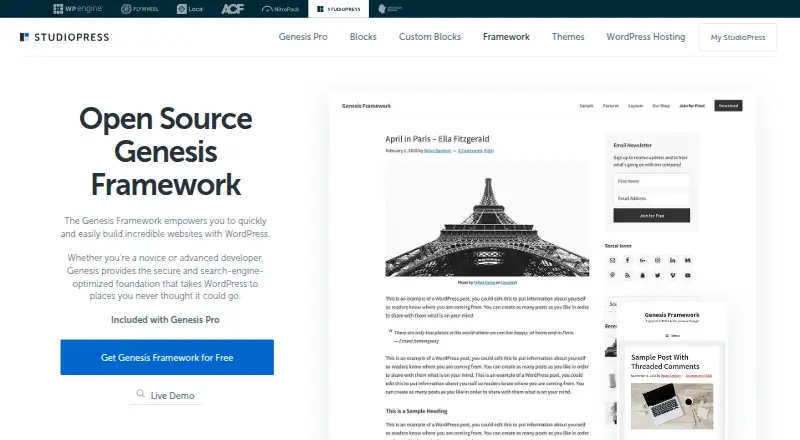
What Genesis Framework is
Genesis Framework is a foundation for building websites with WordPress, designed around security and search-engine optimization. It supports the Gutenberg block editor, and Genesis Pro adds content blocks, sections, and page layouts. The framework is pre-styled for WooCommerce and supports child themes, responsive designs, and multilingual sites, including right-to-left languages. StudioPress describes it as suitable for novice and advanced developers and labels it open source. A free framework download is available by requesting a zip file through a form. Genesis Pro costs $360 a year and includes the framework, 10 StudioPress-made premium child themes, support, and the Genesis Pro plugin with blocks and layouts. StudioPress says theme use has no specific site-count or time limit. Installing its themes requires a domain and WordPress on a web host; WordPress.com does not allow theme installation. Customers can use tutorials and submit support tickets for one-on-one help. StudioPress does not offer custom design services for its themes.
Good
- Supports the Gutenberg block editor and child themes.
- Pre-styled for WooCommerce.
- Supports multilingual sites and right-to-left languages.
- Theme use has no stated site-count or time limit.
Watch out
- Requires a domain and WordPress installed on a web host.
- WordPress.com does not allow theme installation.
- StudioPress does not provide custom design services.
- Genesis Pro costs $360 a year.
Who it suits
Genesis Framework suits people building self-hosted WordPress sites, from novice to advanced developers. It may also suit store owners using WooCommerce or site builders working with multilingual content.
Verdict
Genesis Framework provides a WordPress foundation with editor, WooCommerce, and multilingual support. The framework download is free by request; Genesis Pro is a paid option with additional themes and layout tools.
Plans and prices
From Genesis Framework's own pricing page, checked 4 Oct 2026.
| Plan | Price | What it gives you |
|---|---|---|
| Genesis Framework | Free | Free download by request · WordPress.org self-hosted sites |
| Genesis Pro | $360 a year | Unlimited sites · Genesis Framework and 10 StudioPress-made premium child themes · Support · Genesis Pro plugin, blocks, and layouts · $360/year |
The facts
Each one read from Genesis Framework's own pages, with the date it was checked.
What it does
- Audience
- StudioPress describes Genesis as suitable for both novice and advanced developers.checked 4 Oct 2026
- Customization limits
- StudioPress says it does not provide custom design services for its themes.checked 4 Oct 2026
- Download
- The Genesis Framework is available as a zip file requested through a form on the StudioPress site.checked 4 Oct 2026
- eCommerce
- The framework is pre-styled for WooCommerce to support setting up an online store.checked 4 Oct 2026
- Editor
- Genesis supports the Gutenberg block editor, and Genesis Pro adds content blocks, sections, and page layouts.checked 4 Oct 2026
- Hosting requirement
- Genesis themes require a domain and WordPress installed on a web host; StudioPress says WordPress.com does not allow theme installation.checked 4 Oct 2026
- Integrations
- StudioPress says its themes are compatible with WordPress Multilingual and can accommodate right-to-left languages.checked 4 Oct 2026
- Open source
- StudioPress labels Genesis Framework open source.checked 4 Oct 2026
- Purpose
- Genesis Framework is a WordPress foundation for building websites, including a secure and search-engine-optimized foundation.checked 4 Oct 2026
- Responsive design
- StudioPress says its themes adapt to mobile devices and screens.checked 4 Oct 2026
- Security and SEO
- StudioPress describes Genesis as the basic security and SEO foundation for a WordPress site.checked 4 Oct 2026
- Support
- StudioPress customers can access tutorials and submit support tickets for one-on-one customer support.checked 4 Oct 2026
- Updates and sites
- StudioPress says theme use is not limited to a specific number of sites or a specific period of time.checked 4 Oct 2026
The company
- Company
- WP Engine says it was founded in 2010 in Austin, Texas, and StudioPress pages carry WP Engine copyright.checked 4 Oct 2026
- Founded
- 2010checked 28 Sep 2026
The full review of Genesis Framework
Genesis Framework is a classic WordPress foundation for people who want to build on their own hosting instead of using a hosted website service. It suits both first-time site owners willing to manage WordPress and developers who need a reusable base across projects. The main decision is whether the free foundation is enough or whether Genesis Pro’s themes and layout tools justify its annual cost.
Overview
Genesis is built as a security- and search-engine-optimization-oriented foundation for WordPress. Its open-source framework is supplied as a zip download requested through a StudioPress form, rather than as a hosted site builder. You must have a domain and WordPress installed with a web host; WordPress.com does not permit Genesis theme installation.
StudioPress describes the framework as suitable for novice and advanced developers. That range is credible in practical terms: beginners get a structured WordPress base, while developers can reuse it and extend it with child themes. Theme use is not limited to a stated number of sites or a stated period, which is particularly useful for agencies and owners maintaining several self-hosted sites.
Key features
Genesis supports the Gutenberg block editor, keeping editing aligned with WordPress’s current block-based workflow. The free framework remains relatively lean, while Genesis Pro adds content blocks, sections, and page layouts for users who want more ready-made page-building components without assembling every layout themselves.
WooCommerce styling gives an online store a prepared visual starting point instead of leaving the shop interface entirely unstyled. Themes are responsive across mobile devices and screen sizes, are marked accessibility ready, and support child themes for safer customization. Compatibility with WordPress Multilingual and right-to-left languages broadens its usefulness for multilingual and international sites.
StudioPress presents Genesis as a basic security and SEO foundation rather than a guarantee of rankings or complete site protection. Customers receive tutorials and can submit support tickets for one-on-one assistance. StudioPress does not provide custom design services, so bespoke visual work remains the owner’s or developer’s responsibility.
Pricing
| Plan | Price | What you get |
|---|---|---|
| Genesis Framework | free | Free download by request for WordPress.org self-hosted sites |
| Genesis Pro | $360 a year | Unlimited sites, Genesis Framework, 10 StudioPress-made premium child themes, support, and the Genesis Pro plugin with blocks and layouts |
The free plan is the sensible entry point for a single site owner who only needs the framework, Gutenberg compatibility, WooCommerce styling, and child-theme support. Its download-by-request process adds a small administrative step, but there is no stated site-count or time restriction on use.
Genesis Pro is aimed at developers, agencies, and owners who need multiple premium designs or the additional block and layout tools. Unlimited sites makes the $360 a year easier to justify across a portfolio, while a single-site user may find the annual fee hard to rationalize if the free foundation already covers the project. The paid plan also bundles support and ten StudioPress premium child themes; those who do not need either give up the principal value of upgrading.
Platforms
Genesis runs on self-hosted WordPress on the web. It is not an installable WordPress.com theme, so users seeking managed hosting or an all-in-one hosted workflow should choose a different platform.
Who it's for
Choose Genesis if you want a durable WordPress base that can be reused across sites, supports child themes, and starts WooCommerce and multilingual work from a prepared foundation. It is also a strong fit for developers who value open-source code and for agencies that can spread Genesis Pro’s unlimited-site license across several client projects.
Look elsewhere if you do not want to arrange hosting, install WordPress yourself, or handle custom design work. The free framework supplies structure rather than a hosted finished site, and advanced block layouts require Genesis Pro.
Pros and cons
Pros
- Reusable licensing: StudioPress does not limit theme use by site count or duration, helping multi-site owners and developers.
- Solid WordPress foundation: Security- and SEO-focused positioning, responsive themes, accessibility readiness, and child-theme support cover core site requirements.
- Store and language support: WooCommerce styling, WordPress Multilingual compatibility, and right-to-left language accommodation suit broader site types.
- Pro adds practical tools: Genesis Pro combines ten premium child themes with blocks, sections, layouts, and support.
Cons
- Self-hosting required: You must supply a domain, web host, and WordPress installation, and WordPress.com is excluded.
- Paid tools are substantial: Content blocks, sections, layouts, premium child themes, and support sit behind a $360 a year plan.
- No custom design service: StudioPress leaves bespoke visual implementation to you or a hired developer.
- Download requires a request: The free framework is obtained through a form rather than an immediate one-click install.
Alternatives
WordPress Themes is the broader directory choice when you want to compare many WordPress themes rather than commit to Genesis’s framework model.
Choose Blocksy for another freemium, self-hosted web theme with a free plan. ColorMag offers a free WordPress.org theme and a $56 a year introductory Pro single-theme plan. Neve is another freemium self-hosted option with a free WordPress theme. Sydney provides a free freemium theme for self-hosted WordPress sites. Zakra has a free minimal-feature plan and a $69 a year Pro tier with 30-plus starter templates. Layers pairs a free WordPress theme with a StoreKit WooCommerce extension from $29.00 once. OceanWP is a free freemium WordPress theme. Qi Theme offers a free version and a $79.00 once single-website plan.
Verdict
Genesis Framework is a strong recommendation for self-hosted WordPress owners and developers who want an open-source, reusable foundation with WooCommerce, block-editor, multilingual, and child-theme support. Choose Genesis Pro when unlimited sites, ten StudioPress child themes, support, and richer layout tools matter. Look elsewhere if you want hosted WordPress, instant installation, or a lower-cost route to extensive visual building tools.
Alternatives to Genesis Framework
- 1

Blocksy
Free planOpen sourceWebSelf-hosted7.7From $69 a year - 2

ColorMag
Free planOpen sourceWebSelf-hosted7.7Free plan - 3
Neve
Free planOpen sourceWebAPISelf-hosted7.7From $69 a year - 4
Zakra
Free planOpen sourceWebSelf-hosted7.7From $69 a year - 5
Readable
WebSelf-hosted6.9From $99 a year - 6
Layers
Free planWebSelf-hosted6.8$29 one-time