
GameController Mapper
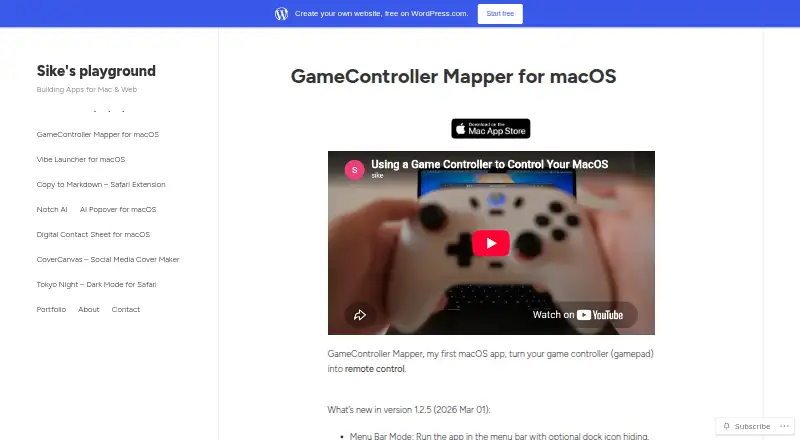
GameController Mapper turns a game controller into a remote control for macOS.
What GameController Mapper is
GameController Mapper turns a game controller into a remote control for macOS. It can move the cursor, simulate left and right clicks, double-clicks, and drags, and control scrolling or cursor speed. Each joystick can be assigned independently to mouse movement, scrolling, or keyboard directions. Buttons can send single keys, combinations, function keys, media keys, or custom text with one press. Multiple profiles are supported, with button-based cycling and customizable switch notifications. The maker describes use with Books, Keynote, IINA, Safari, Preview, and Homerow’s scroll shortcut. The app requires macOS accessibility permission to simulate keyboard and mouse input, and the App Store listing requires macOS 14.6 or later. It lists English and Simplified Chinese. GameController Mapper costs 7.99 USD once and has no free plan. The maker says personal information is not collected, stored, or transmitted; Apple notes its developer disclosure has not been verified.
Good
- Maps joysticks to mouse or keys
- Supports keyboard and media keys
- Allows custom text entry
- Includes multiple switchable profiles
- Works across listed Mac apps
Watch out
- Mac-only
- Requires macOS 14.6 or later
- Requires accessibility permission
- 7.99 USD one-time cost
Who it suits
It suits Mac users who want controller-based keyboard, mouse, scrolling, and media controls. It is also useful for people who need separate profiles across applications.
Verdict
GameController Mapper provides detailed controller remapping for macOS, including cursor, scrolling, keyboard, media, and profile controls. Its one-time price and system-permission requirement are important considerations.
Plans and prices
From GameController Mapper's own pricing page, checked 8 Oct 2026.
| Plan | Price | What it gives you |
|---|---|---|
| GameController Mapper | $7.99, paid once | Only for Mac · Requires macOS 14.6 or later |
The facts
Each one read from GameController Mapper's own pages, with the date it was checked.
What it does
- Accessibility permission
- The app requires macOS accessibility permissions to simulate keyboard and mouse inputs.checked 8 Oct 2026
- Integrations
- The maker describes Homerow integration for using its scroll shortcut in Safari, Preview, and other apps.checked 8 Oct 2026
- Joystick modes
- Each joystick can be configured independently for mouse movement, scrolling, or mapping its directions to keyboard keys.checked 8 Oct 2026
- Languages
- The App Store listing specifies English and Simplified Chinese.checked 8 Oct 2026
- Mouse controls
- It simulates left and right clicks, double-clicks, drag actions, and joystick-controlled cursor movement with adjustable speed.checked 8 Oct 2026
- Notable limit
- The maker advises exiting the app when gaming and describes reconnecting the controller after some emulator layout issues.checked 8 Oct 2026
- Privacy
- The maker states that the app does not collect, store, or transmit users’ personal information.checked 8 Oct 2026
- Profiles
- The app supports multiple configuration profiles, profile cycling by button, and customizable profile switch notifications.checked 8 Oct 2026
- Purpose
- GameController Mapper turns a game controller into a remote control for macOS.checked 8 Oct 2026
- Support contact
- The maker’s product page provides a contact form for questions or support.checked 8 Oct 2026
- System requirement
- The App Store listing requires macOS 14.6 or later.checked 8 Oct 2026
- Text input
- A button can be assigned custom text for one-press entry.checked 8 Oct 2026
Where it runs
- App compatibility
- The maker describes use across apps including Books, Keynote, and video players such as IINA.checked 8 Oct 2026
- App privacy disclosure
- Apple’s listing says the developer indicated that the app does not collect data; Apple notes this disclosure has not been verified by Apple.checked 8 Oct 2026
- Button mapping
- Controller buttons can trigger single keys, key combinations, function keys, and media keys.checked 8 Oct 2026
Alternatives to GameController Mapper
- 1
Avidemux
Free planOpen sourceWebLinuxmacOSWindows7.3Free plan - 2

OmniControl
Free planWindows7.3From $59.99 a year - 3
ControllerBuddy
Free planOpen sourceLinuxmacOSWindows7.2Free plan - 4
JoyShockMapper
Free planOpen sourceLinuxSelf-hostedWindows7.2Free plan - 5

PadLink
Free planAndroidiOSmacOSWindows7.2$2.99 one-time - 6
reWASD
AndroidiOSWindows7.1$14.99 one-time