Fully Exam Kiosk
Fully Exam Kiosk locks an Android device to a configured exam website during an online exam.
What Fully Exam Kiosk is
Fully Exam Kiosk locks an Android device to a configured exam website during an online exam. Students can use the quiz site and its features, while the app blocks access to other websites, apps, and device features. It also blocks app switching and screen capture. The app supports learning management systems that support Safe Exam Browser, including Moodle.
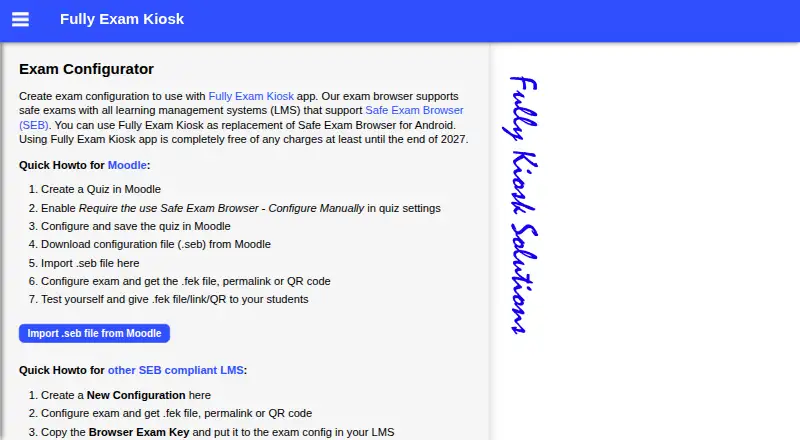
Teachers can prepare an exam configuration and distribute it as an FEK file, permalink, or QR code. For Moodle, they can import a Safe Exam Browser configuration file (.seb). Other exam sites can be used if their URL is kept secret; otherwise students could open the site in another browser. The app can run on school devices or students' own Android devices. Safe kiosk mode may require show-on-top and usage-data access permissions. Kiosk mode can be ended with a configured quit link, a password-protected quit button, or a device reboot. Its plan is free, with free access stated to last at least until the end of 2027. Google Play's developer-provided safety information says it collects no data, shares none with third parties, and encrypts data in transit. The maker notes exam-site speed, bugs, and user experience are outside its control.
Good
- Restricts devices to a configured exam website.
- Blocks app switching and screen capture.
- Teachers can distribute setups by file, link, or QR code.
- Supports Moodle Safe Exam Browser configurations.
- Free access stated through at least the end of 2027.
Watch out
- Android only.
- Other exam-site URLs must remain secret.
- Safe kiosk mode may require additional permissions.
- Exam-site speed and bugs are outside the maker's control.
Who it suits
Fully Exam Kiosk suits teachers who need to restrict Android devices to an exam website, including Moodle setups that use Safe Exam Browser. It can be used on school-owned or students' own devices.
Verdict
Fully Exam Kiosk provides exam-focused restrictions and several ways for teachers to share configurations. Check the URL secrecy requirement for other exam sites and the permissions needed for safe kiosk mode.
Plans and prices
From Fully Exam Kiosk's own pricing page, checked 4 Oct 2026.
| Plan | Price | What it gives you |
|---|---|---|
| Fully Exam Kiosk | Free | Free of charge at least until the end of 2027 |
The facts
Each one read from Fully Exam Kiosk's own pages, with the date it was checked.
What it does
- BYOD
- The app can be used on a school's devices or on students' own Android devices.checked 4 Oct 2026
- Exam setup
- Teachers can create an exam configuration and distribute it as an FEK file, permalink, or QR code.checked 4 Oct 2026
- Exit options
- Kiosk mode can be stopped with a configured quit link, a password-protected quit button, or a device reboot.checked 4 Oct 2026
- LMS support
- It supports learning management systems that support Safe Exam Browser, including Moodle.checked 4 Oct 2026
- Moodle integration
- Teachers can import a Moodle Safe Exam Browser configuration file (.seb) into the exam configurator.checked 4 Oct 2026
- Notable limit
- The app's listing says exam-site speed, bugs, and user experience are outside the app makers' control.checked 4 Oct 2026
- Other exam sites
- The maker says other exam websites can be used if the exam URL is kept secret; otherwise students can open it in another browser.checked 4 Oct 2026
- Permissions
- Students may be asked to grant show-on-top and usage-data access permissions for safe kiosk mode.checked 4 Oct 2026
- Purpose
- Fully Exam Kiosk locks an Android device to a configured exam website during an online exam.checked 4 Oct 2026
- Security and data
- Google Play's developer-provided data-safety information says no data is shared with third parties, no data is collected, and data is encrypted in transit.checked 4 Oct 2026
- Support
- The listing asks users with issues to email a screenshot and short description to [email protected].checked 4 Oct 2026
Where it runs
- Device restrictions
- During the exam, students can use the configured quiz website and features but cannot use other websites, apps, or device features.checked 4 Oct 2026
The company
- Headquarters
- Dormagen, Germanychecked 28 Sep 2026
Alternatives to Fully Exam Kiosk
- 1

TAO
Free planOpen sourceWebAPILinuxmacOS8.4From $149 a month - 2
Eklavvya
Free planAndroidiOSWebAPI8.2$600 usage-based - 3
ThinkExam
Free planAndroidiOSWeb7.5From $3,125 a month - 4

Questionmark
AndroidiOSWebAPI7.4$4,000 one-time - 5
Talview
AndroidiOSWebAPI7.2 - 6

Aiseptor Secure Browser
Free planWebAPImacOSWindows7.1Free plan