
Fresh
Fresh is a free, open-source terminal IDE and text editor designed to work alongside a full IDE and drive coding agents.
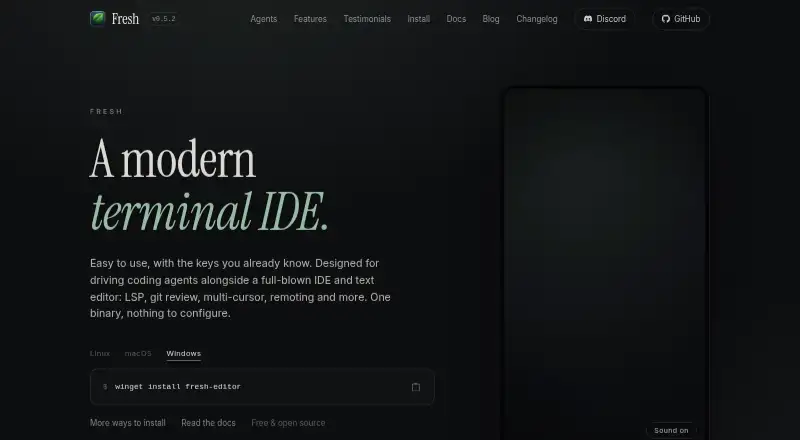
What Fresh is
Fresh is a free, open-source terminal IDE and text editor designed to work alongside a full IDE and drive coding agents. Its Orchestrator gives each task a separate Git worktree, tabs, terminals, and agent. It can run terminal agents including Claude Code, Codex, and OpenCode, as well as a command supplied by the user. Workspaces can run locally, over SSH, in Kubernetes, or in a dev container. Git review tools include hunk-level staging, unstaging, and discarding, side-by-side diffs, and notes that can be exported to Markdown. Editing features include multi-cursor support, keyboard macros, Vim mode, regex search and replace, and project-wide search. Fresh supports multiple language servers per language and lists configurations for Python, TypeScript, Rust, Go, Java, C/C++, and Ruby, among others. Its integrated terminal has multiple tabs and split placement. The product page says Fresh can open multi-gigabyte files without blocking the interface. Plugins are written in TypeScript and run sandboxed inside Fresh’s single binary.
Good
- Provides a separate Git worktree for each task.
- Runs several terminal coding agents or custom commands.
- Supports workspaces over SSH, Kubernetes, and dev containers.
- Includes hunk-level Git review and Markdown notes.
- Offers Vim mode and multi-cursor editing.
Watch out
- Sends anonymous telemetry about version, system, and terminal type.
- Telemetry and upgrade checks are enabled unless disabled.
Who it suits
Fresh is suited to developers who want IDE-style features while working in a terminal. It may also suit people managing coding-agent tasks across local or remote workspaces.
Verdict
Fresh brings editing, Git review, terminal workspaces, and agent orchestration into a terminal-focused tool. Users concerned about telemetry can disable it and upgrade checks through the provided options.
Plans and prices
From Fresh's own pricing page, checked 2 Oct 2026.
| Plan | Price | What it gives you |
|---|---|---|
| Free and open source | Free | No paid tiers or usage limits stated · GPL-3.0-or-later |
The facts
Each one read from Fresh's own pages, with the date it was checked.
What it does
- Agent support
- Fresh can run terminal coding agents including Claude Code, Codex, and OpenCode, or a user-supplied command.checked 2 Oct 2026
- Audience
- The maker describes Fresh as suited to developers who want IDE-style features while working in a terminal.checked 2 Oct 2026
- Editing
- Features include multi-cursor editing, keyboard macros, Vim mode, regex search and replace, and project-wide search.checked 2 Oct 2026
- Git review
- The editor provides hunk-level staging, unstaging and discarding, side-by-side diffs, and review notes exportable to Markdown.checked 2 Oct 2026
- Git workspaces
- Its Orchestrator gives each task its own Git worktree, tabs, terminals, and agent.checked 2 Oct 2026
- Language support
- Fresh supports multiple language servers per language and lists configurations for Python, TypeScript, Rust, Go, Java, C/C++, and Ruby, among others.checked 2 Oct 2026
- Large files
- The product page says Fresh can open multi-gigabyte files without blocking the interface.checked 2 Oct 2026
- Plugins
- Plugins are written in TypeScript and run sandboxed inside Fresh’s single binary.checked 2 Oct 2026
- Privacy
- Fresh sends anonymous telemetry consisting of its version, operating system and architecture, and terminal type; the maker says it collects no personal data, file contents, or usage behavior.checked 2 Oct 2026
- Product
- Fresh is a modern terminal IDE and text editor designed to work alongside a full IDE and to drive coding agents.checked 2 Oct 2026
- Remote work
- Workspaces can run locally, over SSH, in Kubernetes, or in a dev container.checked 2 Oct 2026
- Support
- The site links to Discord, GitHub Issues, and GitHub Discussions for community contact and support.checked 2 Oct 2026
- Telemetry controls
- Upgrade checks and telemetry can both be disabled with `fresh --no-upgrade-check` or the `check_for_updates` setting.checked 2 Oct 2026
- Terminal
- Fresh includes an integrated terminal with multiple terminal tabs, split placement, scrollback, and keyboard capture mode.checked 2 Oct 2026
The full review of Fresh
Fresh is a free, open-source terminal IDE and text editor for developers who want agent-driven coding, Git work, and remote environments in one workflow. It suits people who already live in terminals and need each task isolated, reviewed, and repeatable. Its orchestration and review tools are a strong reason to choose it; conventional desktop IDE users should look elsewhere.
Overview
Fresh is intended to complement a full IDE rather than replace every desktop development environment. Its Orchestrator creates a separate Git worktree, tab, terminal, and agent for each task. That separation is valuable when several changes or automated coding jobs run in parallel, because work stays scoped to the task instead of mixing in one checkout. Developers who only need a basic editor may find this structure more machinery than they need.
Workspaces can run locally, over SSH, in Kubernetes, or inside a dev container. Fresh therefore fits teams moving between a laptop and managed or containerized infrastructure, while retaining the same terminal-centered task model.
Key features
Agents and orchestration
Fresh runs terminal coding agents such as Claude Code, Codex, and OpenCode, as well as a command supplied by the user. The agent choice is flexible, but the bigger benefit is the consistent workspace around each agent: a worktree, terminal, tab, and task context. This is a particularly good match for developers supervising agent-generated changes. If agent use is not part of your workflow, the Orchestrator is less compelling than a conventional editor.
Git review
Review controls operate at hunk level. You can stage, unstage, or discard individual hunks, inspect side-by-side diffs, and export review notes to Markdown. Those controls make it easier to separate intentional edits from generated or incidental changes, and they give terminal users a more deliberate review process than a simple whole-file commit.
Editing, terminals, and language support
The editor includes multi-cursor editing, keyboard macros, Vim mode, regular-expression search and replace, and project-wide search. Multiple language servers can be used for one language, with configurations covering Python, TypeScript, Rust, Go, Java, C/C++, Ruby, and others. Compiler diagnostics and Rust navigation are supported, so Fresh can cover meaningful code-navigation work without abandoning the terminal.
Its integrated terminal offers multiple tabs, split placement, scrollback, and keyboard capture mode. The product page also says it can open multi-gigabyte files without blocking the interface, a useful distinction for logs, generated data, and large source artifacts. Plugins are written in TypeScript and run sandboxed inside Fresh’s single binary, giving extensibility without requiring a separate plugin runtime.
Privacy controls
Fresh sends anonymous telemetry containing its version, operating system, architecture, and terminal type. The maker says it collects no personal data, file contents, or usage behavior. Upgrade checks and telemetry can both be disabled with fresh --no-upgrade-check or the check_for_updates setting. Privacy-conscious users get an explicit opt-out, although those who want zero outbound reporting will need to enable it themselves.
Pricing
Fresh is free and open source under GPL-3.0-or-later. The Free and open source plan costs nothing, with no paid tiers or usage limits stated. There are no seat charges, agent quotas, or trial expiry to weigh, making it suitable for individual developers and teams that can work within the license. The trade-off is that the product does not offer a paid tier with separately defined commercial features or support guarantees.
Platforms
Fresh runs on Linux, macOS, and Windows, and supports self-hosted use. Remote development extends to SSH, Kubernetes, and dev containers, so platform choice is not limited to the machine running the editor.
Who it's for
Choose Fresh if your work is terminal-first, involves coding agents, or requires several isolated Git tasks at once. It is also a strong option for developers who review generated changes carefully and move between local and remote workspaces. A developer seeking a traditional, all-in-one desktop IDE, or someone who never uses agents, will likely get less from Fresh’s orchestration model.
Pros and cons
- Pro: Per-task Git worktrees, terminals, tabs, and agents keep parallel work isolated.
- Pro: Hunk-level review, side-by-side diffs, and Markdown notes support disciplined change review.
- Pro: Local, SSH, Kubernetes, and dev-container workspaces cover varied deployment setups.
- Pro: Free GPL-3.0-or-later licensing has no stated usage or seat limits.
- Con: The orchestration layer is unnecessary overhead for straightforward editing without coding agents.
- Con: Telemetry is enabled unless users turn it off through the command or setting.
- Con: It is positioned as a companion to a full IDE, so it may not replace desktop tooling for every project.
Alternatives
Zed is the better pick for a conventional cross-platform editor with a free Personal plan, 2,000 accepted edit predictions, and external-agent or API-key support. Choose Qt Creator when Qt-oriented desktop development and a freemium model matter more than terminal orchestration. Kate, Lapce, and CodeLite are free cross-platform editors or IDEs for readers who want simpler open-source tooling. RustRover is the more focused choice for Rust development, with a free non-commercial plan and trial. GNOME Builder is a Linux-only alternative, while Huly Code is a free-to-use option.
For broader comparisons, see Rust IDEs and Text Editors.
Verdict
Fresh is best for terminal-native developers who want coding agents wrapped in isolated Git workspaces and granular review controls. Its strongest reason to choose it is the way orchestration, remote work, and editing reinforce one another without a subscription. Look elsewhere if you need a conventional desktop IDE first, or if agent-based task management is not central to your work.
Alternatives to Fresh
- 1
Qt Creator
Free planAndroidiOSWebLinux7.7From €546 a year - 2

Zed
Free planLinuxmacOSWindows7.6From $10 a month - 3

Lapce
Free planOpen sourceExtensionLinuxmacOSWindows7.4Free plan - 4

RustRover
Free planLinuxmacOSWindows6.9From $6.90 a month - 5

Kate
Free planLinuxmacOSWindows6.5Free plan - 6

CodeLite
Free planLinuxmacOSWindows6.2Free plan