FreeShow
FreeShow is free, open-source presentation software for creating and displaying lyrics, slides, scripture, and media, with a focus on worship settings.
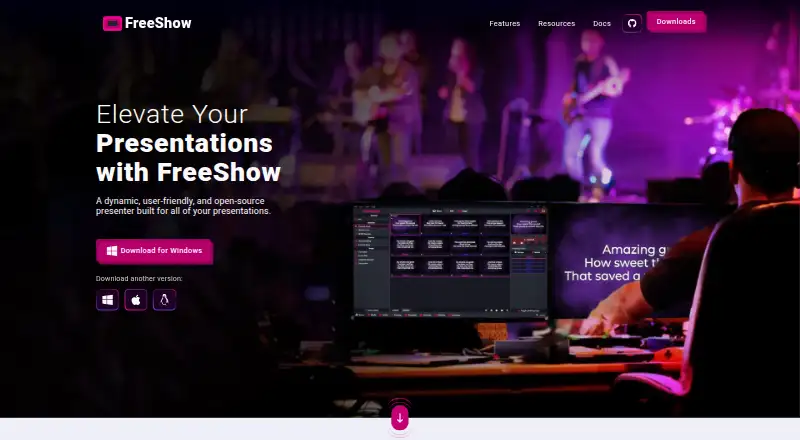
What FreeShow is
FreeShow is free, open-source presentation software for creating and displaying lyrics, slides, scripture, and media, with a focus on worship settings. Its editor lets users adjust text font, size, and color, add outlines and shadows, and make text changes during a presentation. Slides can autoplay on timers, while countdowns and MIDI commands can control slide changes or external actions. The software supports simultaneous output views, web output for mobile devices, NDI output, and mobile remote control. Images and videos can serve as slide backgrounds, and built-in YouTube and Vimeo players are listed. Users can look up scripture passages and create song slides from title searches; the features page describes access to over 200 Bibles through API.Bible. FreeShow imports from PowerPoint, ProPresenter, EasyWorship, and OpenSong, and exports content in multiple formats. Cloud sync supports collaborative work across computers, with media stored through a repository linked to the local file system. It runs on Windows, macOS, and Linux.
Good
- Free plan is listed as free.
- Supports lyrics, scripture, and media presentation.
- Offers simultaneous outputs and mobile remote control.
- Imports from four named presentation tools.
- Runs on Windows, macOS, and Linux.
Watch out
- No free trial is listed.
- Cloud-synced media uses a repository linked to local files.
- Security details do not specifically cover the FreeShow application.
Who it suits
FreeShow suits churches and worship teams looking for presentation software for lyrics, scripture, slides, and media. Its multi-screen output and remote control options may also suit presenters who need separate views.
Verdict
FreeShow combines worship-oriented slide creation with timers, multiple outputs, and media features at no charge. It is worth considering for users who need those presentation tools across its supported desktop platforms.
Plans and prices
From FreeShow's own pricing page, checked 2 Oct 2026.
| Plan | Price | What it gives you |
|---|---|---|
| FreeShow | Free | Free presentation software · the maker says it will always be free |
The facts
Each one read from FreeShow's own pages, with the date it was checked.
What it does
- Audience
- The maker describes FreeShow as presentation software for worship and says its mission is to provide church software free of charge.checked 2 Oct 2026
- Automation
- Slides can autoplay on timers, and the software includes countdowns and MIDI commands for slide changes or external actions.checked 2 Oct 2026
- Cloud sync
- FreeShow offers cloud sync for multiple people to work on presentations from different computers; its features page says sync covers songs and settings, with media using a repository linked to the local file system.checked 2 Oct 2026
- Developer
- The documentation says the project started in late 2021 and its first release was in February 2022.checked 2 Oct 2026
- Editing
- Its editor can change text font, size, and color, add outlines and shadows, and edit text during a presentation.checked 2 Oct 2026
- Import and export
- The homepage lists imports from PowerPoint, ProPresenter, EasyWorship, and OpenSong, and says content can be exported in multiple formats.checked 2 Oct 2026
- Media
- Users can add images and videos as slide backgrounds, and the features page also describes built-in YouTube and Vimeo players.checked 2 Oct 2026
- Organization
- The website identifies Live Church Solutions as a 501(c)(3) organization and links FreeShow to it.checked 2 Oct 2026
- Outputs
- FreeShow supports simultaneous output views, web output for mobile devices, NDI output, and remote control from a mobile device.checked 2 Oct 2026
- Purpose
- FreeShow is an open-source presenter for creating and showing lyrics, slides, scripture, and media.checked 2 Oct 2026
- Scripture and lyrics
- The homepage says users can look up scripture passages and create slides from song-title searches; the features page says it offers over 200 Bibles through API.Bible.checked 2 Oct 2026
- Security and compliance
- The linked privacy policy describes security measures for ChurchApps services, including HTTPS encryption and firewalled databases, but does not specifically describe FreeShow application security or compliance certification.checked 2 Oct 2026
- Support
- The maker lists [email protected] and links to GitHub for bug reports and feature requests.checked 2 Oct 2026
The company
- Founded
- 2021checked 23 Sep 2026
- Headquarters
- Broken Arrow, Oklahoma, United Stateschecked 23 Sep 2026
Where it runs
- Platforms
- The documentation says FreeShow is available on Windows, macOS, and Linux.checked 2 Oct 2026
The full review of FreeShow
FreeShow is an open-source presentation app for lyrics, scripture, slides, and media, aimed primarily at churches preparing worship services. It suits teams that want flexible presentation controls across desktop platforms without a software fee. Its mix of automation, output options, and imports is compelling, though teams should plan around how shared media is stored.
Overview
FreeShow combines worship-specific content with general slide creation: presenters can look up scripture, build slides from song-title searches, and use images or video as backgrounds. The maker frames the project as part of a mission to provide church software free of charge, and the FreeShow plan costs nothing.
The project began in late 2021, with its first release in February 2022. The website associates it with Live Church Solutions, a 501(c)(3) organization. That context aligns with the no-cost model, but the practical appeal rests on the presentation tools rather than the organization behind them.
Key features
Editing and automation
The editor covers font, size, color, outlines, and shadows, and allows text changes during a presentation. Autoplay timers, countdowns, and MIDI commands can advance slides or trigger external actions. That gives service planners options beyond manually advancing lyrics, while MIDI and timed behavior will matter most to teams coordinating more structured sequences.
Outputs and media
FreeShow supports simultaneous output views, NDI output, web output for mobile devices, and mobile remote control. Images and videos can serve as slide backgrounds, and built-in YouTube and Vimeo players add streaming media options. Churches needing separate presentation views or remote operation have a notably broad toolkit in a free app.
Scripture, lyrics, and migration
The software can look up scripture passages and create song slides from title searches; its features include more than 200 Bibles through API.Bible. It imports from PowerPoint, ProPresenter, EasyWorship, and OpenSong, and exports content in multiple formats. Those import paths can reduce friction for churches moving from established presentation tools.
Team sync
Cloud sync lets multiple people work on presentations from different computers, and covers songs and settings. Media instead uses a repository linked to the local file system, so teams should account for where media files live when sharing work across machines.
Pricing
FreeShow: free. The free plan is the presentation software itself, and the maker says it will always be free. There is no free trial because the product is already free to use. That makes it a straightforward fit for churches avoiding subscription costs; there is no paid tier in the stated plan to trade off against it.
Platforms
FreeShow supports Windows, macOS, and Linux for desktop use, and the platform list also includes web. Its mobile-oriented web output and remote control are useful companion capabilities, though the stated supported-platform list does not include Android or iOS apps.
Who it's for
FreeShow is a strong candidate for churches that need lyrics, scripture, stage display, media playback, and multi-screen presentation without a software charge. Its MIDI commands, timers, import support, and team sync also suit services with coordinated presentation workflows. It is less suitable for teams expecting cloud sync to carry their media automatically between computers, since media relies on a repository connected to the local file system.
Pros and cons
- Pros: Free presentation software covers lyrics, scripture, stage display, media playback, and multi-screen output, making it useful for worship services without a licensing expense.
- Pros: Timers, countdowns, MIDI commands, NDI, web output, and mobile remote control provide meaningful control and routing options for live presentations.
- Pros: Imports from four established presentation formats can help churches preserve existing content when changing tools.
- Cons: Media is not part of the same sync coverage as songs and settings, so teams sharing work across computers must manage file locations.
- Cons: The listed desktop platforms are Windows, macOS, and Linux; users looking for a dedicated mobile app should compare other options.
Alternatives
For more church presentation options, see Church Presentation Software.
- Church Presenter is another free choice, with Android and iOS support as well as Linux, macOS, and Windows; its Free Forever plan has no subscription or seat limits.
- WorshipTools Presenter may suit churches that want mobile apps and a defined cloud allowance: its free tier includes 500 MB storage, 10 users, and 15 items per service, with unlimited services and songs.
- Holyrics is worth comparing for teams willing to pay for computer and app allowances, with Basic at $5 a month for up to 3 computers and 30 apps, and Advanced at $10 a month for up to 10 computers and 100 apps.
- VerseVIEW is another free option, with Android, iOS, web, and Windows among its supported platforms.
- Crown Cast is a free alternative for Linux, macOS, and Windows users, with every feature included, unlimited installs, and no account requirement.
- OpenLP is another free option with Android, iOS, Linux, macOS, web, and Windows support.
- EasyWorship is a paid alternative with a free trial; its Basic plan starts at $17.50 a month, with a campus license included and pricing that varies by average weekly attendance.
- VerseCAST offers free Bible presentation with demo limits on slide count and functionality, alongside a paid Monthly plan at $3.49 a month.
Verdict
FreeShow is the right pick for churches that want worship-focused slides with automation, multiple outputs, and useful migration paths without paying for presentation software. Its strongest reason to choose it is the range of live-service tools in a free, open-source package; look elsewhere if your team needs dedicated Android or iOS apps, or expects shared media files to sync seamlessly between computers.
Alternatives to FreeShow
- 1
Holyrics
Free planAndroidiOSWebAPI8.1From $2 a month - 2
SongShow Plus
Free planAndroidiOSWebWindows7.4From $180 a year - 3
MakeChurchEasy
Free planAndroidiOSmacOSWindows7.1From $7 a month - 4
VerseCAST
Free planAndroidiOSWeb7.1From $24.99 a year - 5

WorshipTools Presenter
Free planAndroidiOSLinuxmacOS7.1Free plan - 6

OpenLP
Free planAndroidiOSWebLinux7.0Free plan