fre:ac
fre:ac is a free audio converter and CD ripper for Linux, macOS, and Windows.
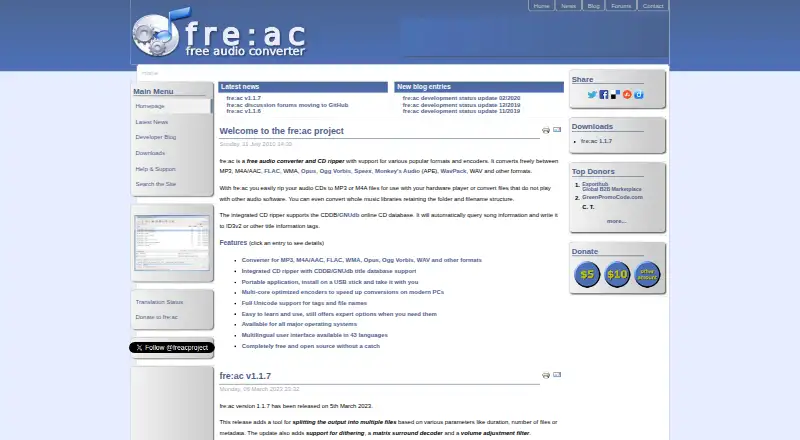
What fre:ac is
fre:ac is a free audio converter and CD ripper for Linux, macOS, and Windows. It converts audio among formats such as MP3, M4A/AAC, FLAC, WMA, Opus, Ogg Vorbis, Speex, Monkey’s Audio, WavPack, and WAV. Its CD ripper saves audio CDs in supported formats and can retrieve artist and title details through CDDB/GNUdb-compatible databases, then write them to ID3v2 or other tags. For larger collections, fre:ac can convert complete music libraries while keeping folder and filename structure intact. It supports Unicode filenames and tags, including Japanese, Cyrillic, Arabic, and Indian scripts. The MP3, M4A/AAC, Opus, and Speex encoders can use multicore CPUs. The app can also run from a USB stick or external drive and keep its configuration there. fre:ac is free and open source, with no adware. Its maker lists Windows, macOS, Linux, FreeBSD, and Haiku support and says the interface is available in 43 languages. Gracenote CDDB support is unavailable because of licensing issues.
Good
- Converts between many common audio formats.
- Rips CDs and looks up title information.
- Preserves library folder and filename structure.
- Can run from USB or external storage.
- Available free and open source without adware.
Watch out
- Gracenote CDDB support is unavailable.
- Online CD metadata queries or submissions transfer data.
Who it suits
fre:ac suits people who need to convert audio collections, rip CDs, or edit metadata on Linux, macOS, or Windows. Its portable setup and Unicode support may also suit users working across devices or with filenames in multiple scripts.
Verdict
fre:ac combines format conversion, CD ripping, and library conversion in one free desktop app. Check that its supported CD metadata databases meet your needs if you rely on Gracenote.
Plans and prices
From fre:ac's own pricing page, checked 29 Sep 2026.
| Plan | Price | What it gives you |
|---|---|---|
| fre:ac | Free | Free and open source · no adware |
The facts
Each one read from fre:ac's own pages, with the date it was checked.
What it does
- Audio conversion
- fre:ac converts between MP3, M4A/AAC, FLAC, WMA, Opus, Ogg Vorbis, Speex, Monkey’s Audio, WavPack, WAV and other formats.checked 29 Sep 2026
- CD database limit
- fre:ac supports freedb-compatible databases; its FAQ says Gracenote CDDB support is unavailable due to licensing issues.checked 29 Sep 2026
- CD ripping
- Its integrated CD ripper converts audio CDs to files in the formats supported for regular audio conversion.checked 29 Sep 2026
- Distribution
- The maker offers Windows installers and ZIP packages, macOS disk images, and Linux Snap, Flatpak and AppImage packages.checked 29 Sep 2026
- Languages
- The user interface is available in 43 languages, and the maker says it can be translated using the included smooth Translator utility.checked 29 Sep 2026
- Library conversion
- fre:ac can convert whole music libraries while retaining their folder and filename structure.checked 29 Sep 2026
- Metadata lookup
- The CD ripper can query the CDDB/GNUdb online database for artist and title information and write it to ID3v2 or other title tags.checked 29 Sep 2026
- Multicore encoding
- The integrated MP3, M4A/AAC, Opus and Speex encoders use multicore CPUs.checked 29 Sep 2026
- Portable use
- The application can be installed on a USB stick or external drive and store its configuration files there.checked 29 Sep 2026
- Privacy
- The privacy policy says the software does not collect personal information and describes data transfers for querying or submitting CD metadata to a configurable online database.checked 29 Sep 2026
- Support
- The maker directs users to its GitHub Discussions area for questions and ideas, and lists issue reporting by GitHub issue tracker or email.checked 29 Sep 2026
- Supported systems
- The maker lists Windows, macOS, Linux, FreeBSD and Haiku as supported operating systems.checked 29 Sep 2026
- Unicode
- fre:ac supports Unicode tags and filenames, including scripts such as Japanese, Cyrillic, Arabic and Indian scripts.checked 29 Sep 2026
The full review of fre:ac
Overview
fre:ac is a free, open-source desktop audio converter for people who want file conversion and CD ripping in one place. Its strongest fit is a music library that needs batch processing, format changes, or CD imports without losing its folder structure. It is less suitable if your CD workflow depends on Gracenote metadata or if you need cloud conversion.
Key features
fre:ac covers MP3, M4A/AAC, FLAC, WMA, Opus, Ogg Vorbis, Speex, Monkey’s Audio (APE), WavPack and WAV. Batch conversion and quality controls make it practical for processing collections rather than handling one track at a time. It can also convert an entire library while keeping its existing folders and filenames intact, a useful safeguard when reorganizing formats without rebuilding a collection.
The integrated CD ripper converts discs into the same formats supported for ordinary conversion. It can retrieve artist and track-title information through freedb-compatible CDDB/GNUdb databases and write that information into ID3v2 or other title tags. Gracenote CDDB is not supported because of licensing issues, so users who rely on that database should choose another ripping workflow.
Metadata editing, Unicode tags and filenames, and multicore encoding round out the feature set. Unicode support covers scripts including Japanese, Cyrillic, Arabic and Indian scripts. Multicore processing applies to the integrated MP3, M4A/AAC, Opus and Speex encoders, rather than every format. The app can also run from a USB stick or external drive and keep its configuration there, which suits a portable desktop setup.
The maker says fre:ac collects no personal information. Its privacy policy describes transfers when querying or submitting CD metadata to a configurable online database, so metadata lookup is the workflow that involves network communication.
Pricing
fre:ac costs free and is free and open source with no adware. There is no paid tier or free-trial decision to weigh: the same free app is the offering. That makes it a straightforward choice for users who want desktop conversion and ripping without a subscription, though it does not provide cloud conversion.
Platforms
fre:ac supports Windows, macOS, Linux, FreeBSD and Haiku. It is available as Windows installers or ZIP packages, macOS disk images, and Linux Snap, Flatpak and AppImage packages. The interface is available in 43 languages, and users can translate it with the included Translator utility. This breadth is valuable for desktop users outside the three most common platforms as well as those who prefer a particular Linux package format.
Who it's for
Choose fre:ac if you manage music files locally, want to convert batches or preserve a library’s folder layout, or need to rip CDs into several formats. Unicode support and portable operation add practical flexibility for multilingual collections and removable-drive workflows. Look elsewhere if web-based conversion is essential, if you need Gracenote CD metadata, or if you want an Android or iOS app.
Pros and cons
- Pro: Batch conversion and whole-library conversion preserve folders and filenames, reducing the work of moving an established collection to new formats.
- Pro: CD ripping, metadata lookup and tag writing are built into the same free desktop app as format conversion.
- Pro: Support for Windows, macOS, Linux, FreeBSD and Haiku gives it wider desktop reach than a Windows-only tool.
- Con: Gracenote CDDB is unavailable, limiting the metadata option for users who depend on that service.
- Con: Cloud conversion is not offered, so fre:ac is not a fit for browser-only or hosted workflows.
Alternatives
For more options, browse Audio Converter Software. Red Panda Compress Audio Converter is worth considering when mobile or web access matters: it supports Android, iOS and web as well as desktop systems, with unlimited use, no watermark, no signup and no daily quota; its desktop limit is 8GB and mobile limit is 2GB.
Switch Audio File Converter is an alternative for users seeking a non-commercial free version with standard features or a Plus license. Audio Converter by 123apps suits a browser-based workflow, though its free plan allows 70 files per day and files up to 4GB, with ads.
FreeConvert Audio Converter may suit users who want web conversion and a paid monthly plan with 1,500 conversion minutes per month, unlimited operations per day and a 1.5GB maximum file size. For Windows users looking for a free CD-ripping option, CDex is a GPL-licensed alternative. MediaHuman Audio Converter is another free option for Windows, macOS and Linux; X Lossless Decoder is free on macOS.
AVS Audio Converter is a Windows alternative with a free version, but that version adds a voice logo to output audio and reserves some editing, audiobook, export and command-line features for the full version.
Verdict
fre:ac is a strong choice for desktop users who want a free, open-source converter that can also rip CDs and preserve a library’s structure during batch conversion. Its broad operating-system support and portable mode add flexibility without complicating the central use case. Choose another tool if Gracenote metadata, mobile access or cloud conversion is a must.
Alternatives to fre:ac
- 1
Lacuna
Free planiOSWebAPIExtension8.2From $9.50 a month - 2
Avidemux
Free planOpen sourceWebLinuxmacOSWindows7.3Free plan - 3

MediaCoder
Free planAPISelf-hostedWindows7.3A$189 one-time - 4
MediaHuman YouTube to MP3 Converter
Free planLinuxmacOSWindows7.3$29.99 one-time - 5

FFmpeg
Free planLinuxmacOSSelf-hostedWindows7.0Free plan - 6
Red Panda Compress Audio Converter
Free planAndroidiOSWebLinux6.8Free plan