Focusmate
Focusmate pairs people for live virtual coworking sessions with an accountability partner.
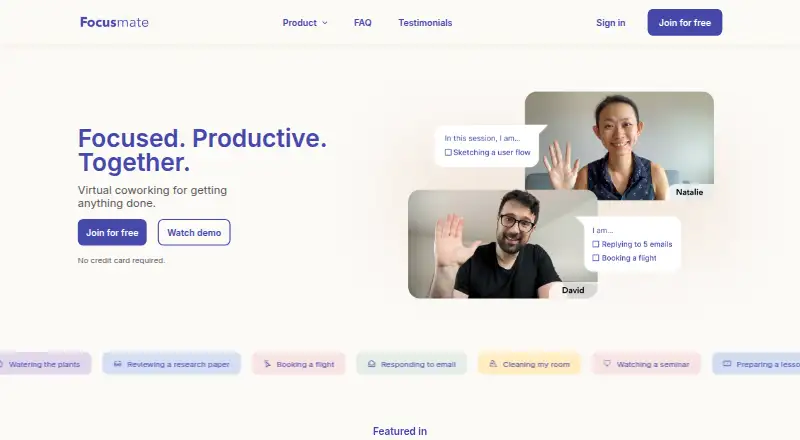
What Focusmate is
Focusmate pairs people for live virtual coworking sessions with an accountability partner. Sessions last 25, 50, or 75 minutes, and members can favorite partners to work together again. Task modes include Desk Mode, Moving, and Anything; Quiet Mode supports focusing without a microphone, including in shared offices, cafes, or libraries. Video add-ons include virtual backgrounds, screensharing, and video effects. Focusmate runs in a browser, where users can book and join sessions without installing software. Calendar invites work with most major calendars, including Apple, Google, and Outlook; listed integrations also include Google Calendar, Beeminder, and a Developer API. The service describes its audience as students, freelancers, homemakers, solopreneurs, remote workers, and office workers. The Free plan offers 3 sessions per week with no credit card required. Plus costs $8 a year billed annually or $12 a month billed monthly, and both provide unlimited sessions. There is no mobile app, though Focusmate can be added to an Android or iOS home screen for an app-like experience. An internet-connected device and camera are required; a microphone is preferred.
Good
- Sessions available in three lengths
- Favorite partners for future sessions
- Quiet Mode works without a microphone
- Free plan includes 3 weekly sessions
- Browser booking requires no software installation
Watch out
- No mobile app
- Camera and internet-connected device required
- Free plan limited to 3 sessions per week
Who it suits
Focusmate suits students, freelancers, remote workers, and others who want scheduled work sessions with an accountability partner. Quiet Mode may suit people working where microphone use is not practical.
Verdict
Focusmate centers on live coworking and partner accountability, with browser access and a free option. Consider the camera requirement and lack of a dedicated mobile app before choosing it.
Plans and prices
From Focusmate's own pricing page, checked 5 Oct 2026.
| Plan | Price | What it gives you |
|---|---|---|
| Free | Free | 3 sessions per week · no credit card required |
| Plus (annual billing) | $8 a month | Unlimited sessions · $8/mo. billed annually |
| Plus (monthly billing) | $12 a month | Unlimited sessions · $12/mo. billed monthly |
| Business | Priced on request | For enterprises, small businesses, learning communities, and more |
The facts
Each one read from Focusmate's own pages, with the date it was checked.
Where it runs
- Browser use
- Focusmate runs in a browser and lets users book and join sessions on its website without installing another app or software.checked 5 Oct 2026
What it does
- Calendar support
- Calendar invites are supported on most major calendars, including Apple, Google, and Outlook.checked 5 Oct 2026
- Camera requirement
- The Help Center lists an internet-connected device and camera as requirements, with a microphone preferred.checked 5 Oct 2026
- Integrations
- The feature page lists Google Calendar, Beeminder, and a Developer API as integrations.checked 5 Oct 2026
- Mobile availability
- The Help Center says there is no mobile app, but Focusmate can be added to an Android or iOS home screen for an app-like experience.checked 5 Oct 2026
- Partner matching
- Members can favorite partners and choose who they work with again.checked 5 Oct 2026
- Quiet Mode
- Quiet Mode supports focusing without using a microphone, including in libraries, cafes, and shared offices.checked 5 Oct 2026
- Security and privacy
- Focusmate says sessions are not recorded and account deletion removes data according to GDPR standards.checked 5 Oct 2026
- Session lengths
- Sessions are available in 25, 50, and 75 minute lengths.checked 5 Oct 2026
- Support and safety
- Users can report a session or partner if they have concerns about their activity.checked 5 Oct 2026
- Task modes
- Task modes include Desk Mode, Moving, and Anything.checked 5 Oct 2026
- Video tools
- Video add-ons include virtual backgrounds, screensharing, and video effects.checked 5 Oct 2026
- What it does
- Focusmate pairs people for live virtual coworking sessions with an accountability partner.checked 5 Oct 2026
- Who it is for
- Focusmate describes its audience as students, freelancers, homemakers, solopreneurs, remote workers, and office workers.checked 5 Oct 2026
The company
- Founded
- 2015checked 28 Sep 2026
The full review of Focusmate
Focusmate is a live virtual coworking service that pairs you with an accountability partner for scheduled focus sessions. It is best for students, freelancers, remote workers and other people who work more consistently when someone else is present. Its strongest case is structured, repeatable coworking in a browser; the camera requirement and limited free allowance narrow its fit.
Overview
Founded in 2015, Focusmate turns solitary work into a shared appointment. You book a session, meet a partner, and work in parallel rather than relying on a conventional course, task manager or open-ended chat room. The format suits study, freelance assignments, household work and office tasks, including for solopreneurs and people working remotely or on site.
Live coworking rooms and private rooms cover both open participation and more controlled sessions. Video presence, a focus timer and accountability tools reinforce the appointment, while the ability to return to favored partners can make regular use feel more dependable than repeatedly entering an unfamiliar room.
Key features
Three session lengths—25, 50 and 75 minutes—let you match the appointment to a quick task, a standard work block or a longer project stretch. Members can favorite partners and choose them again, a practical advantage when a compatible pace or routine matters. It is less suitable if you want entirely private, unscheduled focus with no partner interaction.
Desk Mode, Moving and Anything accommodate different kinds of work. Quiet Mode removes the need to use a microphone, which is useful in libraries, cafes and shared offices, but it does not remove the camera requirement: Focusmate requires an internet-connected device and camera, with a microphone preferred. Video add-ons include virtual backgrounds, screensharing and video effects.
Calendar invites work with major calendar services including Apple, Google and Outlook. Integrations listed for the service include Google Calendar, Beeminder and a Developer API, giving calendar-based users and developers more ways to connect sessions to an existing workflow.
Focusmate operates in a web browser, so booking and joining happen on its website without installing separate desktop software. Although Android and iOS devices can add the site to a home screen for an app-like shortcut, there is no dedicated mobile app. Focusmate says sessions are not recorded, and deleting an account removes data under GDPR standards. Users can report a session or partner when activity raises safety concerns.
Pricing
The free plan costs nothing and requires no credit card. It allows 3 sessions per week. That is enough for occasional accountability or a trial routine, but regular daily users will quickly encounter the cap.
Plus (annual billing) costs $8 a year, billed $8/mo. billed annually, and includes Unlimited sessions. It is the lower-cost route for people who expect steady use and are willing to commit to annual billing. Plus (monthly billing) costs $12 a month, billed $12/mo. billed monthly, with Unlimited sessions; choose it if you need the same capacity without an annual commitment, accepting the higher effective rate.
Business has custom pricing and is aimed at enterprises, small businesses, learning communities and similar groups. Its position makes it the relevant option for organized teams rather than an individual choosing between the free and Plus tiers.
Platforms
Focusmate supports the web, Android and iOS access through a home-screen addition, and provides an API. There is no mobile app, so users expecting a conventional store-installed application should account for that distinction.
Who it's for
Choose Focusmate if another person's visible presence helps you start and finish work, and you want appointments that can recur with familiar partners. The 25-, 50- and 75-minute choices work for students, freelancers, homemakers, solopreneurs, remote workers and office workers with different schedules. Quiet Mode is particularly relevant in public or shared spaces.
Look elsewhere if a camera is unacceptable, if you need a native mobile app, or if three weekly sessions are insufficient and an unlimited subscription is not worthwhile.
Pros and cons
Pros
- Repeatable accountability: Favorited partners and scheduled sessions can create a dependable working routine.
- Flexible session structure: 25-, 50- and 75-minute choices cover short and extended focus blocks.
- Useful quiet participation: Quiet Mode works without a microphone in libraries, cafes and shared offices.
- Browser-first access: Booking and joining require no separate software installation.
- Privacy and reporting controls: Sessions are not recorded, account deletion follows GDPR standards, and users can report partners or sessions.
Cons
- Camera required: A camera and internet-connected device are requirements, even when the microphone is muted.
- No dedicated mobile app: Android and iOS users rely on a home-screen website shortcut.
- Free-plan ceiling: Three sessions per week limits frequent users unless they move to Plus.
- Partner-based format: People seeking completely solitary or drop-in, unpaired focus may find the structure restrictive.
Alternatives
For a broader comparison of this category, see Virtual Study Room Apps.
Cosmos Video is the better choice when you need calls for up to four people, online spaces, uploads and recording retention across a wider range of desktop and mobile platforms.
Pick FLOWN if community sessions and private community access matter more than Focusmate's one-to-one accountability, while accepting its four free community sessions per month.
Kaizen suits users who want tasks, habits, app blocking and Focus Rooms alongside statistics rather than a partner-centered coworking appointment.
Choose StudyStream for focus rooms with a one-hour daily free allowance and a conventional Android, iOS, macOS and web footprint.
ClassLab is aimed at students who want communities, chat, study rooms, focus tracking, mind maps and an AI study assistant in a free account.
Pick Pomoroom if you prefer a mobile Android/iOS option built around Pomodoro-style focus.
Think Divergent offers a free, no-usage-limit option for users who do not want a subscription.
WhumbleZone is a free alternative with no subscription or hidden paywall.
Verdict
Focusmate is a strong choice for anyone who benefits from scheduled, visible accountability and wants flexible session lengths, repeat partners and browser access. Start with the free tier for occasional use; frequent users should choose Plus for unlimited sessions. Look elsewhere if you need a native mobile app, cannot use a camera, or prefer focus software without a live partner.
Alternatives to Focusmate
- 1
FLOWN
Free planAndroidiOSWebmacOS8.0From $19 a month - 2
StudyStream
Free planAndroidiOSWebmacOS8.0From $3.99 a month - 3

Pomoroom
Free planAndroidiOS7.6From $24.99 a year - 4

Cosmos Video
Free planAndroidiOSWebExtension7.4Free plan - 5
Kaizen
Free planAndroidiOSWebWindows7.3From €39.99 a year - 6
Focused Space
AndroidiOSWeb6.8From $120 a year