
ClassLab
ClassLab is a free digital campus for students, available on Android, iOS, and the web.
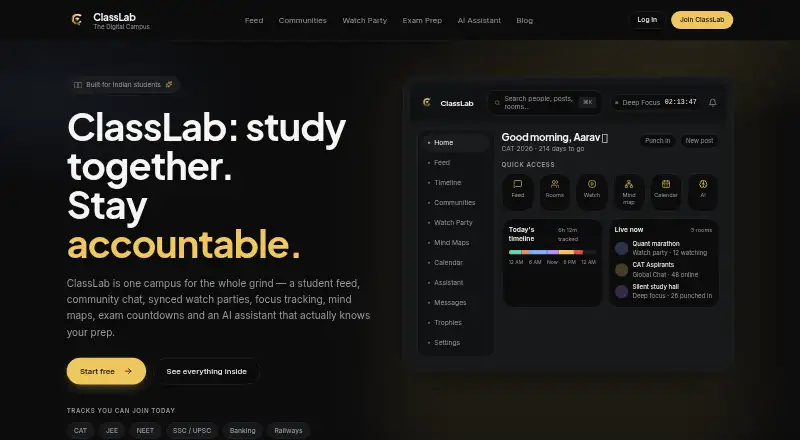
What ClassLab is
ClassLab is a free digital campus for students, available on Android, iOS, and the web. It brings together a feed, community chat, watch parties, focus tracking, mind maps, an exam calendar, and an AI study assistant. Focus tools record Deep Focus, Class, and Break sessions, show a daily timeline and hours, and let students set goals. Watch parties sync YouTube videos or playlists for participants, with live chat and a shared queue; hosts can manage participants. Mind maps help organize a syllabus, connect topics, and pin YouTube videos. The assistant draws on a student's exam and preparation profile, sessions, tasks, and milestones to tailor plans, explanations, and quizzes. ClassLab says account data is used only to personalize that user's assistant responses, not to train models. Students can also connect assistants such as Claude or ChatGPT to their tasks. Onboarding offers CAT, JEE, NEET, SSC/UPSC, Banking, and Railways tracks. It works in mobile browsers and can send push notifications for messages, mentions, and events. A free account includes the listed study features.
Good
- Free account includes listed study features.
- Tracks focus sessions and supports daily goals.
- Syncs YouTube watch parties with live chat.
- AI assistant personalizes plans, explanations, and quizzes.
- Available on Android, iOS, web, and mobile browsers.
Watch out
- Watch parties have no stated participant cap.
- AI features use personal study and account data.
Who it suits
ClassLab is aimed at competitive-exam aspirants, college students, self-study groups, and solo students. Its focus tools and shared study spaces may suit learners organizing study sessions or working together.
Verdict
ClassLab combines planning, focus tracking, and study collaboration in one student-focused service. Its free plan and mobile access make it worth considering for solo learners and study groups.
Plans and prices
From ClassLab's own pricing page, checked 11 Oct 2026.
| Plan | Price | What it gives you |
|---|---|---|
| Free student account | Free | Feed · communities · chat · study rooms · focus tracking · mind maps · AI study assistant |
The facts
Each one read from ClassLab's own pages, with the date it was checked.
What it does
- AI assistant
- The assistant uses a student's exam, prep profile, focus sessions, tasks and milestones to personalize plans, explanations and quizzes.checked 11 Oct 2026
- AI data use
- The AI assistant page states that account data personalizes only the user's assistant responses and is not used to train models.checked 11 Oct 2026
- Focus tracking
- Students can track Deep Focus, Class or Break sessions, see a daily timeline and tracked hours, and set daily goals.checked 11 Oct 2026
- Integrations
- ClassLab says users can connect assistants such as Claude or ChatGPT to their ClassLab tasks.checked 11 Oct 2026
- Mind maps
- Students can organize a syllabus on a mind map, connect topics and pin YouTube videos to the board.checked 11 Oct 2026
- Mobile access
- ClassLab says it works in any mobile browser and can send push notifications for messages, mentions and events.checked 11 Oct 2026
- Notable limit
- The watch party page describes rooms as suitable for study-group sizes and a full class group but gives no specific participant cap.checked 11 Oct 2026
- Product
- ClassLab describes itself as a digital campus for students, combining a feed, community chat, watch parties, focus tracking, mind maps, an exam calendar and an AI study assistant.checked 11 Oct 2026
- Room moderation
- Watch party hosts can manage participants, and ClassLab says its community is moderated.checked 11 Oct 2026
- Support
- ClassLab lists email support at [email protected] and says replies usually arrive within a day or two.checked 11 Oct 2026
- Supported exam tracks
- Onboarding offers CAT, JEE, NEET, SSC/UPSC, Banking and Railways tracks.checked 11 Oct 2026
- Watch parties
- Watch parties sync YouTube videos or playlists for participants and include live chat and a shared queue.checked 11 Oct 2026
- Who it is for
- ClassLab identifies competitive-exam aspirants, college students, self-study groups and solo students as intended users.checked 11 Oct 2026
Where it runs
- Browser-based
- The Watch Party page says the feature runs in the browser with no installs required.checked 11 Oct 2026
The full review of ClassLab
ClassLab is a broad study workspace for students who want planning, focus records, shared sessions and exam support in one account. It is particularly suitable for competitive-exam candidates, college learners and self-study groups that alternate between solo work and peer accountability. The zero-cost plan is its strongest argument, while users seeking only a timer or a specialized meeting platform may prefer a narrower tool.
Overview
ClassLab presents a digital campus rather than a single-purpose planner. Its feed, communities, chat and study rooms are combined with an exam calendar, focus tracking, mind maps and an AI study assistant. That range can keep schedules, progress and study discussion together instead of scattering them across several apps.
Live coworking rooms, private rooms, a focus timer and accountability tools cover both independent routines and group study. Community moderation and host controls for watch parties provide useful structure for shared activity. Email support is offered at [email protected], with replies usually arriving within a day or two.
Key features
Focus tracking
Students can record Deep Focus, Class and Break sessions, inspect a daily timeline and tracked hours, and set daily goals. This gives learners a record of how their day is divided, not merely a countdown, making it a better fit for people who review consistency or need accountability. The timer works alongside live coworking and private rooms for students who concentrate more reliably with others present.
Watch parties and rooms
Watch parties synchronize YouTube videos or playlists, provide live chat and maintain a shared queue. Hosts can manage participants, and the browser-based feature requires no installation. Rooms are described as suitable for study groups and full classes, but no participant cap is given, so very large cohorts should confirm suitability before organizing around it.
Mind maps and exam planning
A syllabus can be arranged on a mind map, with connected topics and pinned YouTube videos on the board. This is useful for visualizing relationships between subjects and attaching explanatory material directly to a plan. Onboarding includes CAT, JEE, NEET, SSC/UPSC, Banking and Railways tracks, giving competitive-exam aspirants a more relevant starting point than a generic task list.
AI study assistant
The assistant uses a student's exam and preparation profile, focus sessions, tasks and milestones to personalize plans, explanations and quizzes. ClassLab states that account data personalizes only that user's assistant responses and is not used to train models. Users can also connect assistants such as Claude or ChatGPT to ClassLab tasks, which may suit students already working in those ecosystems.
Pricing
ClassLab's Free student account costs nothing and includes the Feed, communities, chat, study rooms, focus tracking, mind maps and AI study assistant. There is no paid tier described, so the full listed toolkit is accessible without a subscription or trial decision. That makes it a practical first choice for students managing a budget, though it also means there is no higher plan to provide expanded room capacity or additional quotas if needs grow.
Platforms
ClassLab offers Android, iOS and web access. It works in any mobile browser and can send push notifications for messages, mentions and events, while watch parties run in a browser without an install. The combination is convenient for students moving between a phone and a computer, provided browser-based study fits their workflow.
Who it's for
Competitive-exam aspirants get dedicated onboarding tracks, exam planning and an assistant informed by milestones. College students and solo learners benefit from focus history, goals, mind maps and AI-generated study help. Self-study groups can use moderated communities, private rooms, coworking and synchronized YouTube sessions. It is less compelling for someone who wants only a minimal Pomodoro timer or a highly specialized video-conferencing service.
Pros and cons
Pros
- Complete free student account: planning, rooms, focus tracking, mind maps and AI assistance are included at 0.00 USD.
- Useful progress context: separate Deep Focus, Class and Break logs, daily timelines and goals show more than elapsed time.
- Strong group toolkit: private rooms, live coworking, moderated communities and YouTube watch parties support structured peer study.
- Flexible access: Android, iOS and web, plus mobile-browser use and push notifications, reduce device friction.
- Explicit AI privacy position: ClassLab says account data is used to personalize the user's responses, not to train models.
Cons
- Unspecified watch-party capacity: the service describes group and class use but gives no participant limit, making large-session planning uncertain.
- Broad rather than specialized: students wanting only a timer or dedicated meeting product may find the campus-style mix unnecessary.
- No paid expansion path: there is no higher plan described for users who outgrow the free room or usage arrangements.
Alternatives
For a wider comparison of shared study tools, see Virtual Study Room Apps.
- Cosmos Video is a better fit when cross-platform video spaces, four-person calls, uploads and recording retention matter more than exam planning.
- FLOWN suits users who want scheduled community sessions and private community attendance, with its free tier limited to four community sessions per month.
- Kaizen is preferable for task, habit and app-blocking controls, including a free allowance of seven tasks, five habits and 30 days of statistics.
- StudyStream is aimed at straightforward focus-room use, with its free plan allowing one hour daily.
- Focusmate is the clearer choice for one-to-one accountability sessions, with three free sessions per week.
- Pomoroom is an alternative for a mobile-focused Pomodoro approach.
- Think Divergent offers a free, unlimited-use option without a subscription.
- WhumbleZone keeps core features free with no subscription or hidden paywall.
Verdict
Choose ClassLab if you want a free, student-specific home for exam planning, measurable focus, collaborative rooms and AI-assisted study. Its main advantage is the breadth available in one account across phone and web. Look elsewhere if you need a tightly focused timer, a guaranteed large-room capacity or a specialist video-session service.
Alternatives to ClassLab
- 1
FLOWN
Free planAndroidiOSWebmacOS8.0From $19 a month - 2
StudyStream
Free planAndroidiOSWebmacOS8.0From $3.99 a month - 3

Pomoroom
Free planAndroidiOS7.6From $24.99 a year - 4

Cosmos Video
Free planAndroidiOSWebExtension7.4Free plan - 5
Focusmate
Free planAndroidiOSWebAPI7.4From $8 a month - 6
Kaizen
Free planAndroidiOSWebWindows7.3From €39.99 a year