FLOWN
FLOWN is an online coworking platform built around facilitated focus sessions and shared workspaces.
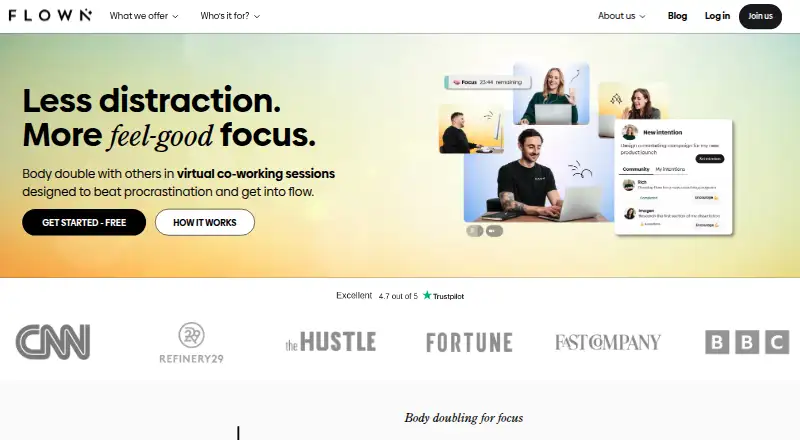
What FLOWN is
FLOWN is an online coworking platform built around facilitated focus sessions and shared workspaces. Members can join a one-hour Power Hour or a two-hour Deep Dive, or use the Drop-In room, which stays open around the clock. The private Focus Room offers an on-demand browser space for working alongside friends. Sessions also include guided daily and weekly Take-Off planning and recharge activities such as meditation, movement, breathwork, or mindfulness.
Members can host community sessions, with public hosting available after attending 30 or more sessions. FLOWN supports calendar subscriptions through an iCal link and explains how to join Zoom-based sessions. It is available on Android, iOS, macOS, web, and Windows, and can be installed as a Progressive Web App from supported browsers; its help page recommends Chromium-based browsers. FLOWN offers a free plan with four community sessions per month, all on Fridays, and a 30-day trial. A lifetime membership is listed at $900, paid once.
Good
- 24/7 Drop-In focus room
- Private browser room for working with friends
- Guided planning and recharge sessions
- Available on Android, iOS, macOS, web, and Windows
Watch out
- Free plan is limited to four sessions monthly
- Free sessions are only available on Fridays
- Public hosting requires 30 attended sessions
- No mobile app
Who it suits
FLOWN presents its focus sessions as support for busy professionals with ADHD and says neurodivergent members use the platform. It may suit people who want scheduled coworking, private rooms, or guided planning and recharge sessions.
Verdict
FLOWN brings facilitated focus sessions, always-open drop-in coworking, and private browser rooms together with planning and recharge activities. Check the free plan’s session limits and hosting rules against how you want to participate.
Plans and prices
From FLOWN's own pricing page, checked 15 Oct 2026.
| Plan | Price | What it gives you |
|---|---|---|
| FLOWN free | Free | 4 community sessions per month · all Friday sessions · private-session attendance · no public-session hosting · free membership |
| Yearly | $19 a month | Unlimited access to FLOWN sessions and features · private-session hosting · public hosting after 30+ attended sessions · billed annually |
| Monthly | $25 a month | Unlimited access to FLOWN sessions and features · private-session hosting · public hosting after 30+ attended sessions · monthly subscription |
| Flocks pay-as-you-go | $80, paid once | No recurring membership fee · 10 focus sessions · 10 Flocks per purchase |
| Lifetime | $900, paid once | Unlimited platform access · 80+ hours of facilitated sessions weekly · 24/7 Drop-In rooms · community events · on-demand content · one up-front payment |
| Lifetime membership | $900, paid once | Unlimited access to the FLOWN platform · 80+ hours of live facilitated coworking per week · 24/7 Drop-In focus rooms · One upfront payment |
| FLOWN member (Monthly or Yearly) | — | Unlimited access to FLOWN sessions and features · can attend and host private community sessions · can host public community sessions after attending 30+ sessions · Yearly subscription; price not stated on the page |
| FLOWN member (Monthly or Yearly) | — | Unlimited access to FLOWN sessions and features · can attend and host private community sessions · can host public community sessions after attending 30+ sessions · Monthly subscription; price not stated on the page |
The facts
Each one read from FLOWN's own pages, with the date it was checked.
What it does
- Additional product
- Crunchbase lists an ADHD Mastery Program as a six-week product alongside the virtual co-working platform.checked 15 Oct 2026
- Body doubling
- The service is built around body doubling, where working alongside other people is intended to reduce distraction and procrastination.checked 15 Oct 2026
- Breakout rooms
- Community-session hosts can create breakout rooms, assign participants automatically or manually, move between rooms and end them with a warning period.checked 15 Oct 2026
- Calendar
- The calendar supports browsing, booking, filtering and tracking sessions, with separate views for attended and hosted sessions.checked 15 Oct 2026
- Calendar integrations
- FLOWN provides an iCal feed that can be subscribed to from Apple Calendar, Google Calendar, Outlook and Yahoo Calendar.checked 15 Oct 2026
- Community
- Members can host community sessions, with public hosting available after attending 30 or more sessions.checked 4 Oct 2026
- Community hosting
- Members can host public community sessions after attending at least 30 sessions, while private hosting is available to members.checked 15 Oct 2026
- Data protection
- FLOWN’s privacy policy describes data processing rights under applicable privacy laws, including GDPR, and identifies the UK Information Commissioner’s Office as the regulator for data protection issues.checked 4 Oct 2026
- Deep Dive
- Deep Dive is a two-hour facilitator-led session aimed at larger or more demanding work.checked 15 Oct 2026
- Drop-In
- Drop-In is an always-open virtual focus room available around the clock.checked 15 Oct 2026
- Drop-In room
- FLOWN offers a virtual focus room that is open 24 hours a day, seven days a week.checked 4 Oct 2026
- Facilitated sessions
- It offers one-hour Power Hour and two-hour Deep Dive facilitator-led focus sessions.checked 4 Oct 2026
- Founder
- Crunchbase identifies Alicia Navarro as FLOWN's CEO and founder.checked 15 Oct 2026
- Funding profile
- Crunchbase shows four funding rounds, including equity crowdfunding, but the displayed monetary totals are obfuscated.checked 15 Oct 2026
- Independent recommendation
- Giodella's tested-app roundup names FLOWN its preferred option for group focus sessions and describes it as suitable for remote workers, students and people with ADHD.checked 15 Oct 2026
- Installation
- FLOWN is delivered as a Progressive Web App installable from supported browsers on computers and phones, with Chromium browsers recommended.checked 15 Oct 2026
- Integrations
- Users can subscribe to FLOWN’s iCal link to add focus sessions to their calendars, and FLOWN also provides instructions for joining Zoom-based sessions.checked 4 Oct 2026
- Legal name
- Crunchbase lists the legal name as Flown Ltd and the operating status as active.checked 15 Oct 2026
- Limit: audio preferences
- A reviewer criticized facilitator music as inconsistent or intrusive for sound-sensitive users and said muting it undermines the shared-session concept.checked 15 Oct 2026
- Limit: inactivity removal
- One reviewer reported being silently removed after an inactivity prompt while doing a task, with no audible warning before the session ended.checked 15 Oct 2026
The company
- Company profile
- LinkedIn lists FLOWN as a privately held software-development company headquartered in London with 2–10 employees and a 2019 founding year.checked 15 Oct 2026
- Headquarters
- London, United Kingdomchecked 28 Sep 2026
Where it runs
- Device requirements
- Browser sessions require camera and microphone permissions, and FLOWN advises closing other demanding apps or tabs when video performance suffers.checked 15 Oct 2026
- Installable app
- FLOWN is available as a Progressive Web App installable from supported browsers on a computer or phone; the help page recommends Chromium-based browsers.checked 4 Oct 2026
The full review of FLOWN
FLOWN brings scheduled focus to people who work better alongside others, including busy professionals with ADHD and neurodivergent members. Its blend of guided sessions, open coworking and planning gives more structure than a timer alone. The free tier is tightly restricted, so regular use may require a paid plan.
Overview
FLOWN is an online coworking platform built around concentration and accountability. Its facilitator-led sessions provide a shared work rhythm; the always-open Drop-In room and private browser Focus Room offer more flexible ways to work alongside others. This range suits people who want company or external structure, but may be more than needed for someone looking only for a solo focus timer.
Key features
- Facilitated sessions: Power Hour lasts one hour and Deep Dive lasts two, giving users a defined block rather than an open-ended work session. Daily and weekly Take-Off planning can help frame the day or week, while recharge sessions may include meditation, movement, breathwork or mindfulness. The mix is useful for people who benefit from cues to start, sustain and pause work.
- Flexible coworking: Drop-In is open 24 hours a day, seven days a week, so users need not match a scheduled session. The private Focus Room is an on-demand browser space for working in real time with friends. FLOWN also offers live coworking rooms, video presence, a focus timer and accountability tools.
- Community hosting: Members can host community sessions, but public hosting requires attending 30 or more sessions first. That creates a meaningful participation threshold for anyone joining chiefly to run public sessions; private community sessions remain available to free members.
- Calendar and access: An iCal subscription adds focus sessions to a calendar, and FLOWN provides instructions for Zoom-based sessions. The platform is offered on Android, iOS, macOS, web and Windows, with an installable Progressive Web App on supported browsers. FLOWN recommends Chromium-based browsers for installation. Despite its mobile platform availability, it does not offer a mobile app.
- Privacy and support: FLOWN says payment data is encrypted and personal-data access is limited to people with a business need to know. Its policy describes rights under applicable privacy laws, including GDPR, and names the UK Information Commissioner’s Office as the data-protection regulator. Members can contact support through website chat or by email.
Pricing
FLOWN uses a freemium model and offers a 30-day trial. The free plan costs free, but it allows only four community sessions per month, all on Fridays. Free members can attend private community sessions but cannot host public ones. The Friday-only schedule and small monthly quota make it a way to sample the community, not a flexible free option for regular weekday coworking.
The Lifetime membership costs $900, paid once, billed as one upfront payment. It includes unlimited platform access, 80+ hours of live facilitated coworking per week and 24/7 Drop-In focus rooms. This suits someone committed to FLOWN who prefers a single payment; the substantial upfront cost is a poor fit for someone still unsure whether facilitated coworking works for them.
FLOWN member (Monthly or Yearly) has custom pricing and is billed as a yearly subscription. It provides unlimited access to sessions and features, and lets members attend and host private community sessions. Public hosting becomes available after attending 30 or more sessions. Compared with Free, it removes the four-session monthly and Friday-only caps, while keeping the public-hosting threshold.
Platforms
FLOWN is available on Android, iOS, macOS, web and Windows. Its browser-based Progressive Web App can be installed on supported phones and computers, but it is not a mobile app. Calendar support comes through an iCal subscription, while Zoom-based sessions have joining instructions.
Who it's for
FLOWN is a strong fit for busy professionals, including people with ADHD and neurodivergent members, who find facilitated work periods or the presence of other workers helpful. It also suits friends who want an on-demand private coworking space and members willing to participate before hosting public sessions. It is less suitable for someone who needs an unrestricted free schedule, a native mobile app, or only a simple solo timer.
Pros and cons
- Pro: One- and two-hour facilitated sessions, guided planning and optional recharge activities cover more of a work routine than timed work blocks alone.
- Pro: The 24/7 Drop-In room and private browser Focus Room provide both unscheduled access and coworking with friends.
- Pro: Free members can attend private community sessions, and the platform offers an iCal subscription for calendar planning.
- Con: Free access is limited to four community sessions a month, all on Fridays, which sharply limits regular use.
- Con: Public community hosting requires attending at least 30 sessions, delaying that option for new members.
- Con: The member subscription is billed yearly, and the lifetime option requires a 900.00 USD upfront payment.
- Con: FLOWN has no mobile app; mobile access depends on its web experience or an installable Progressive Web App.
Alternatives
For more options, browse Virtual Study Room Apps.
- Cosmos Video is a freemium alternative with calls for up to four people, four online users per space, 25 MB uploads and seven-day recording retention on its free plan; choose it when those meeting and recording limits better match your needs.
- Kaizen offers a free plan with seven tasks, five habits, blocking for three apps, access to any Focus Room and 30 days of statistics; choose it if those task and habit tools are a closer fit than FLOWN’s facilitated coworking.
- StudyStream offers one hour daily and focus rooms on its free plan; choose it if that daily allowance and its Android, iOS, macOS and web availability suit your routine.
- Focusmate gives free users three sessions per week with no credit card required; choose it if a weekly session limit is more useful to you than FLOWN’s Friday-only monthly allowance.
- WhumbleZone is a free option whose terms state it has no uptime SLA.
- Momo offers unlimited tasks in The Pile, timed sessions and task and history sync across devices on its free plan; choose it if those solo planning and session tools are your priority.
- Pomoroom has a free version and a $2.99 a month Premium plan; choose it if you want an Android or iOS option and prefer that listed monthly price.
- Think Divergent is a free option with no usage limit, supported by donations.
Verdict
Choose FLOWN if you want facilitator-led focus blocks, an always-open coworking room and planning or recharge activities in one platform. Its strongest case is the combination of structure and flexible rooms, especially for people who value working alongside others. Look elsewhere if you need a generous free schedule, a native mobile app or a lower-commitment route to regular use.
Getting started
- Open https://flown.com/.
- Choose the free plan or review the listed 30-day trial and lifetime membership.
- Use FLOWN on Android, iOS, macOS, web, or Windows.
- Install the Progressive Web App from a supported browser if desired.
- Subscribe to the iCal link to add focus sessions to a calendar, or follow FLOWN's instructions for Zoom-based sessions.
Limits worth knowing
The free plan provides four community sessions per month, all on Fridays, and does not allow public community hosting. Public hosting becomes available after attending 30 or more sessions.
Questions
Does FLOWN have a free plan?
Yes. FLOWN Free costs nothing and permits four community sessions per month, all on Fridays.
Is there a free trial?
A 30-day trial is listed.
Which platforms can I use FLOWN on?
FLOWN is available on Android, iOS, macOS, web, and Windows. Its Progressive Web App can be installed from supported browsers on a computer or phone.
How much does lifetime membership cost?
Lifetime membership is listed at $900, paid once, as one upfront payment.
Can members host public community sessions?
Yes. Members can host public community sessions after attending 30 or more sessions.
How can sessions connect with calendars or Zoom?
Users can subscribe to FLOWN's iCal link to add sessions to calendars, and FLOWN provides instructions for joining Zoom-based sessions.
Alternatives to FLOWN
- 1
StudyStream
Free planAndroidiOSWebmacOS8.0From $3.99 a month - 2

Pomoroom
Free planAndroidiOS7.6From $24.99 a year - 3

Cosmos Video
Free planAndroidiOSWebExtension7.4Free plan - 4
Focusmate
Free planAndroidiOSWebAPI7.4From $8 a month - 5
Kaizen
Free planAndroidiOSWebWindows7.3From €39.99 a year - 6
Focused Space
AndroidiOSWeb6.8From $120 a year