
FiveDraft
FiveDraft is an online screenwriting studio with a distraction-free screenplay editor, screenplay formatting, and AI tools.
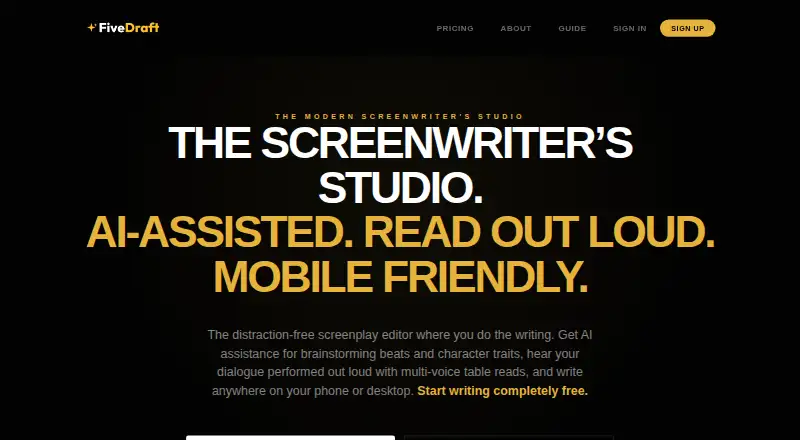
What FiveDraft is
FiveDraft is an online screenwriting studio with a distraction-free screenplay editor, screenplay formatting, and AI tools. Gemini tools can generate loglines, analyze character traits and arcs, and extract props from scripts. A multi-voice audio engine reads screenplays aloud with distinct character voices and narrator pacing. Writers can edit scene synopses and reorder scenes in the Scenes navigator. The editor imports Final Draft (.fdx), Fountain, PDF, and text files; PDF export is available, while Pro exports add FDX, Fountain, and Fade In. FiveDraft is designed for phones, tablets, and desktop, with Android, iOS, and web platforms listed. Read-only sharing links let viewers read on any device, print, or export a screenplay to PDF. FiveDraft says it uses AES-256 encryption at rest and SSL in transit, does not train AI models on scripts, and lets users retain ownership and export or delete their work. The Free Draft plan is €0/forever and allows one cloud-saved script, unlimited local drafts, no page limit, and watermarked PDF export. Pro Studio is €5 per month.
Good
- Imports FDX, Fountain, PDF, and text files.
- AI tools generate loglines and analyze character arcs.
- Multi-voice audio reads scripts aloud.
- Read-only links work on any device.
- Includes unlimited local drafts on the free plan.
Watch out
- Free Draft saves one script to the cloud.
- Free Draft PDF exports have a watermark.
- Real-time collaboration is not supported.
- Free trial is not offered.
Who it suits
FiveDraft suits screenwriters who want screenplay-specific editing, scene organization, AI assistance, or read-alouds. Its stated intended users range from first-time short writers to people writing a tenth feature.
Verdict
FiveDraft brings screenplay editing, scene navigation, AI tools, and audio read-alouds into one studio. The free plan has a one-script cloud limit, while Pro Studio is €5 per month.
Plans and prices
From FiveDraft's own pricing page, checked 7 Oct 2026.
| Plan | Price | What it gives you |
|---|---|---|
| Free Draft | Free | No page limits · unlimited local drafts · save 1 script to cloud · watermarked PDF export · €0/forever |
| Pro Studio | €5 a month | Unlimited cloud scripts · watermark-free PDF exports · pro exports (.fdx, .fountain, .fadein) · version snapshots & history · AI analysis suite (Gemini) · all cinematic themes · €39/year option available at checkout |
| Production Pass | €9, paid once | Watermark-free PDF export for 1 screenplay · pro exports (.fdx, .fountain, .fadein) · full production breakdown & stats · native table read TTS playback · One-time payment • No recurring subscription |
| Founding Member | €59, paid once | Everything in Pro Studio forever · no recurring fees · direct line to founder for feedback · early access to new features · Pay once, enjoy Pro features forever |
The facts
Each one read from FiveDraft's own pages, with the date it was checked.
What it does
- AI data policy
- FiveDraft says it does not train AI models on users’ script data.checked 7 Oct 2026
- AI tools
- Gemini AI tools can generate loglines, analyze character traits and arcs, and extract props from scripts.checked 7 Oct 2026
- Export
- Scripts can be exported as PDF, while Pro exports include Final Draft (.fdx), Fountain, and Fade In formats.checked 7 Oct 2026
- Import
- The editor can import Final Draft (.fdx), Fountain, PDF, and text files.checked 7 Oct 2026
- Intended users
- FiveDraft says it is built for screenwriters, including people writing their first short or their tenth feature.checked 7 Oct 2026
- Mobile use
- FiveDraft describes its editor as designed for use on phones and tablets as well as desktop.checked 7 Oct 2026
- Purpose
- FiveDraft is an online screenwriting studio with a distraction-free screenplay editor and AI assistance.checked 7 Oct 2026
- Scene navigation
- The Scenes navigator supports editable scene synopses and drag-and-drop scene reordering.checked 7 Oct 2026
- Security
- FiveDraft says it uses AES-256 encryption at rest and SSL in transit to protect screenplays.checked 7 Oct 2026
- Sharing
- Users can share a read-only screenplay link that viewers can read on any device and print or export to PDF.checked 7 Oct 2026
- Support
- The Help page directs users experiencing technical issues or seeking features to contact the support team.checked 7 Oct 2026
- Table reads
- Its multi-voice audio engine assigns distinct character voices and narrator pacing for screenplay read-alouds.checked 7 Oct 2026
Money
- Free plan limit
- The Free Draft plan allows one cloud-saved script, though it includes unlimited local drafts and no page limit.checked 7 Oct 2026
The company
- Ownership
- FiveDraft says users retain ownership of their work and can export and delete their data at any time.checked 7 Oct 2026
The full review of FiveDraft
FiveDraft is a screenplay studio for solo writers who want drafting, scene planning, and script review tools in one workspace. It is a strong fit for writers who work across mobile and desktop and want to hear a script read aloud. Its main trade-offs are the free plan’s one-script cloud cap and the lack of real-time collaboration.
Overview
FiveDraft combines a distraction-free screenplay editor with tools for shaping and reviewing a draft. Gemini AI can generate loglines, analyze character traits and arcs, and pull props from a script. These focused aids can support story development, though writers looking for live co-writing will need another tool: FiveDraft has no real-time collaboration.
The Scenes navigator gives each scene an editable synopsis and supports drag-and-drop reordering, making structural revisions easier to manage alongside the script. A multi-voice audio engine reads the screenplay with separate character voices and narrator pacing, giving solo writers a practical way to listen for dialogue and flow.
FiveDraft imports Final Draft, Fountain, PDF, and text files. Read-only screenplay links let viewers read on any device and print or export a PDF. The editor is designed for phones and tablets as well as desktop, so it can suit writers who move between devices. FiveDraft says it protects scripts with AES-256 encryption at rest and SSL in transit, does not train AI models on script data, and lets users keep ownership and export or delete their work at any time.
Key features
- Screenplay editor: Screenplay formatting and a distraction-free writing space center the app on drafting scripts.
- AI assistance: Gemini tools handle loglines, character traits and arcs, and prop extraction. Their scope is specific to screenplay development rather than general-purpose writing.
- Scene planning: Editable synopses and drag-and-drop ordering support writers who revise structure during drafting.
- Audio read-aloud: Distinct character voices and narrator pacing make it possible to review a script by listening, without arranging a live read.
- Import and export: Imports cover FDX, Fountain, PDF, and text. PDF export is available on Free Draft with a watermark; Pro Studio adds FDX, Fountain, and Fade In exports.
- Sharing: Read-only links are useful for distributing a draft for review, but recipients cannot collaborate in real time through FiveDraft.
Pricing
FiveDraft has a free plan and three paid options. There is no free trial, so writers can start with Free Draft before deciding whether a paid plan fits.
| Plan | Price | What it includes | Best fit |
|---|---|---|---|
| Free Draft | €0/forever | No page limits, unlimited local drafts, one cloud-saved script, and watermarked PDF export. | Writers starting out or managing one cloud-backed screenplay. The one-script cap and watermark make it limiting for ongoing multi-project work. |
| Pro Studio | €5 per month; €39/year option available at checkout | Unlimited cloud scripts, watermark-free PDF and FDX, Fountain, and Fade In exports, version snapshots and history, Gemini AI analysis suite, and all cinematic themes. | Screenwriters with several active scripts who need clean exports and version history. The annual option is available for those willing to pay by the year. |
| Production Pass | €9 one time | Watermark-free PDF export for one screenplay, FDX, Fountain, and Fade In exports, a full production breakdown and stats, and native table-read TTS playback. No recurring subscription. | A writer who needs production tools and clean exports for a single screenplay without a subscription. Its export allowance is limited to one screenplay. |
| Founding Member | €59 one time | Pro Studio features forever, no recurring fees, direct contact with the founder for feedback, and early access to new features. | Writers who expect to use Pro features long term and prefer a one-time payment. |
Free Draft retains unlimited local drafts, but only one script can be saved to the cloud and its PDF exports carry a watermark. Pro Studio removes those constraints for cloud scripts and adds version history and the full export formats. Production Pass is narrower: it covers one screenplay and adds production breakdowns and native table-read playback. Founding Member trades the monthly subscription for a one-time fee and lifetime Pro features.
Platforms
FiveDraft is available on Android, iOS, and the web. Its editor is designed for phones, tablets, and desktop, which gives writers flexibility to continue work across screen sizes.
Who it's for
FiveDraft suits screenwriters drafting their first short or a later feature, especially solo writers who value scene organization, AI-assisted story tasks, and listening to a draft. Free Draft is a reasonable place to begin with one cloud script; writers managing multiple cloud projects or needing unwatermarked PDFs and production formats will find Pro Studio more complete. Choose a different tool if real-time co-writing is essential.
Pros and cons
- Pro: Imports FDX, Fountain, PDF, and text, easing the move from an existing screenplay or draft file.
- Pro: Scene synopses, reordering, AI story tools, and multi-voice playback bring planning and review tasks into the writing workspace.
- Pro: Free Draft allows unlimited local drafts with no page limit, even though cloud storage is capped at one script.
- Pro: Production Pass offers one-time access to clean exports, production breakdowns, and table-read TTS for a single screenplay.
- Con: Free PDF exports are watermarked, and only one script can be saved to the cloud on Free Draft.
- Con: There is no real-time collaboration, so shared read-only links do not support a live co-writing workflow.
- Con: The €9 Production Pass applies to one screenplay, so writers with multiple projects may prefer a broader plan.
Alternatives
ScreenWeaver is a free option for writers who want unlimited projects and pages plus PDF and Final Draft exports; it also runs on Linux, macOS, and Windows alongside mobile and web.
Screenplay Assistant may suit writers who prefer a free plan with AI formatting on every scene and monthly allowances for character images, storyboards, and Atticus answers.
Lastslate is another freemium screenplay option, with a free plan and apps for macOS and Windows.
ScriptDraft is worth considering for Android or iOS writers who want a free Fountain editor with PDF, Fountain, and FDX export, plus support for more than 100 languages.
Scriptuber is a mobile and web alternative whose free plan centers on text note capture, AI cleanup, a private creator corpus, and a FlowMind canvas.
Inkwell may fit Apple users who want a free editor with unlimited scripts, offline use, no account requirement, and FDX, Fountain, and PDF import and export.
Plotwell is a web-based alternative with a free one-project plan that includes one collaborator, 10 AI credits, and version history for the last five saves.
Fabric is a broader option for writers who want an app spanning mobile, desktop, web, APIs, and browser extensions.
For a broader set of AI-focused tools, browse AI Script Writing Software.
Verdict
Choose FiveDraft if you write screenplays solo and want scene planning, focused Gemini tools, and multi-voice read-alouds alongside a formatted editor. Pro Studio is the clearest fit for sustained work across multiple cloud scripts, while Production Pass offers a one-time route for a single screenplay. Look elsewhere if you need real-time collaboration, or if the free plan’s one-cloud-script limit and watermarked PDF exports do not fit your workflow.
Getting started
- Open the FiveDraft website
- Choose Free Draft, Pro Studio, Production Pass or Founding Member
- Create or import a screenplay file
- Use the Scenes navigator to organize scenes
- Export a PDF or use Pro formats when included
- Share a read-only screenplay link if needed
Limits worth knowing
Free Draft permits one cloud-saved script, despite unlimited local drafts and no page limit, and its PDF export is watermarked. Pro Studio adds unlimited cloud scripts and watermark-free exports; Production Pass covers one screenplay.
Questions
Is FiveDraft free?
Yes. Free Draft costs €0 forever. Pro Studio costs €5 per month, with a €39 yearly option available at checkout.
Which export formats are available?
PDF export is available. Pro exports add Final Draft FDX, Fountain and Fade In formats.
What platforms does it support?
FiveDraft is available on Android, iOS and the web, and its editor is designed for desktop, phones and tablets.
Does FiveDraft train AI on scripts?
FiveDraft says it does not train AI models on users’ script data.
Can writers collaborate in real time?
No. FiveDraft does not support real-time collaboration.
Who owns the screenplay data?
Users retain ownership of their work and can export or delete their data at any time.
Alternatives to FiveDraft
- 1

ScreenWeaver
Free planAndroidiOSWebAPI8.2Free plan - 2

Fabric
AndroidiOSWebAPI7.9From $8 a month - 3
ngram
Free planWebAPIExtension7.6From $29 a month - 4
Lastslate
Free planmacOSWindows7.4From $10 a month - 5

Screenplay Assistant
Free planAndroidiOSWebmacOS7.3From $7 a month - 6
Scriptuber
Free planAndroidiOSWeb7.1From $19 a month