
Figma Slides
Figma Slides is a collaborative presentation tool for creating and delivering decks, and is included with seats on every Figma plan.
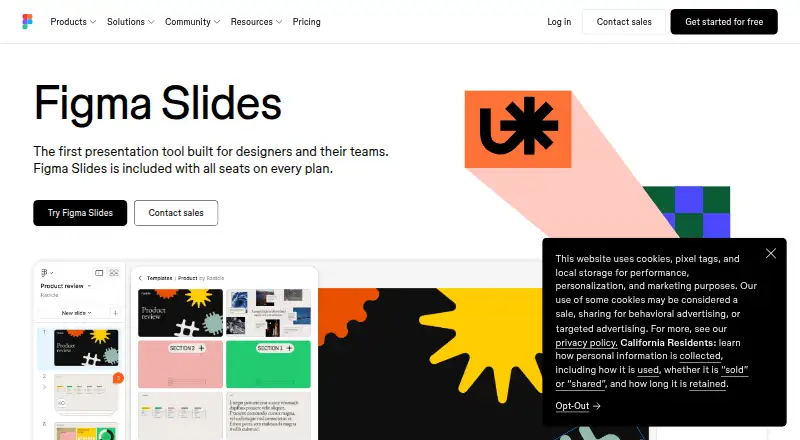
What Figma Slides is
Figma Slides is a collaborative presentation tool for creating and delivering decks, and is included with seats on every Figma plan. Teams can work together through chat, audio, comments, presenter notes and co-presenting control. Presentations can include polls, voting, alignment scales, interactive prototypes and embedded YouTube videos. AI tools can change text tone or length and add presenter notes. A FigJam board can be converted into a deck outline, while Figma Design libraries provide team components, variables and styles. Templates are available from Figma and its community. Users can import from and export to PowerPoint, use presenter mode and preload decks for offline presenting, although offline access is listed as unavailable. Starter is free with limited product access, unlimited drafts and up to 500 AI credits per month. Professional Collab is listed at $3 a month; Professional Dev and Full seats are listed at 12.00 USD and $16 a month respectively. Figma Slides is available on web, desktop and mobile platforms.
Good
- Included with seats on every Figma plan.
- Supports PowerPoint import and export.
- Teams can co-present with chat, audio and comments.
- Decks can include polls and interactive prototypes.
- AI can adjust text and add presenter notes.
Watch out
- Offline access is listed as unavailable.
- Starter has limited access to Figma products.
- Starter AI credits are capped at 500 per month.
Who it suits
Figma Slides suits teams that want to build and present decks collaboratively, including presentations with audience interaction or embedded media. It may also suit users who need PowerPoint import and export or want to turn FigJam outlines into decks.
Verdict
Figma Slides pairs collaborative deck creation with audience features and PowerPoint compatibility. It is included with Figma seats, but offline access is not available and Starter access is limited.
Plans and prices
From Figma Slides's own pricing page, checked 28 Sep 2026.
| Plan | Price | What it gives you |
|---|---|---|
| Starter | Free | Free limited access to Figma products · Unlimited drafts · 150 AI credits/day · 500 AI credits/mo |
| Professional — Full seat | $16 a month | 3,000 AI credits/mo · Monthly |
| Professional — Dev seat | $12 a month | 500 AI credits/mo · Monthly |
| Professional — Collab seat | $3 a month | 500 AI credits/mo · Monthly |
| Organization — Full seat | $55 a month | 3,500 AI credits/mo · Billed annually |
| Organization — Dev seat | $25 a month | 500 AI credits/mo · Billed annually |
| Organization — Collab seat | $5 a month | 500 AI credits/mo · Billed annually |
| Enterprise — Full seat | $90 a month | 4,250 AI credits/mo · Billed annually |
| Enterprise — Dev seat | $35 a month | 500 AI credits/mo · Billed annually |
| Enterprise — Collab seat | $5 a month | 500 AI credits/mo · Billed annually |
| Professional Collab seat | $3 a month | Collab seat |
| Enterprise Collab seat | $5 a month | Collab seat · billed annually at $5 /mo |
| Organization Collab seat | $5 a month | Collab seat · billed annually at $5 /mo |
| Professional Dev seat | $12 a month | Dev seat |
| Professional Full seat | $16 a month | Full seat |
| Organization Dev seat | $25 a month | Dev seat · billed annually at $25 /mo |
| Enterprise Dev seat | $35 a month | Dev seat · billed annually at $35 /mo |
| Organization Full seat | $55 a month | Full seat · billed annually at $55 /mo |
| Enterprise Full seat | $90 a month | Full seat · billed annually at $90 /mo |
The facts
Each one read from Figma Slides's own pages, with the date it was checked.
What it does
- AI assistance
- Yeschecked 20 Sep 2026
- AI Text Editing
- AI can adjust text tone and length, and add relevant presenter notes.checked 28 Sep 2026
- Audience Engagement
- Presentations support polls, voting, alignment scales, and interactive prototypes.checked 28 Sep 2026
- Collaboration Tools
- Teams can collaborate through chat, audio, comments, presenter notes, and co-presenting control.checked 28 Sep 2026
- Design Libraries
- Figma Design libraries provide team components, variables, and styles.checked 28 Sep 2026
- FigJam Conversion
- Any FigJam board can become a presentation deck outline.checked 28 Sep 2026
- Offline access
- Nochecked 20 Sep 2026
- Offline Presentations
- Decks can be pre-loaded for presenting slides offline.checked 28 Sep 2026
- Paid from
- 3checked 20 Sep 2026
- PowerPoint export
- Yeschecked 20 Sep 2026
- PowerPoint import
- Yeschecked 20 Sep 2026
- PowerPoint Import
- Figma Slides can import .pptx files.checked 28 Sep 2026
- Presenter mode
- Yeschecked 20 Sep 2026
- Real-time collaboration
- Yeschecked 20 Sep 2026
- Starter AI Limit
- Starter includes 150 AI credits per day, up to 500 AI credits per month.checked 28 Sep 2026
- Starter Drafts
- Starter includes unlimited drafts.checked 28 Sep 2026
- Support Resources
- The site provides a Help center and Figma Support.checked 28 Sep 2026
- Template Library
- Figma provides high-quality slide templates and community presentation templates.checked 28 Sep 2026
- YouTube Embeds
- Figma Slides supports embedding YouTube videos.checked 28 Sep 2026
Money
- Free plan
- Yeschecked 20 Sep 2026
- Included On Plans
- Figma Slides is included with all seats on every plan.checked 28 Sep 2026
- Starter Free Tier
- Starter is free and provides limited access to Figma products.checked 28 Sep 2026
Where it runs
- Supported platforms
- web,windows,macos,linux,ios,androidchecked 20 Sep 2026
The full review of Figma Slides
Overview
Figma Slides is a collaborative presentation tool for teams that already work with Figma’s design and prototyping tools. It suits groups building decks together and presenting them with audience participation; PowerPoint compatibility is useful, but the lack of offline product access and Starter’s limits make it less compelling for standalone or occasional use.
Its strongest distinction is how it connects deck creation to the rest of a team’s design workflow. FigJam boards can become presentation outlines, and Figma Design libraries bring shared components, variables, and styles into slides. Templates from Figma and its community help teams start from existing layouts, while YouTube embeds and interactive prototypes can make a deck more than a sequence of static pages. These connections are most valuable when a team already maintains its work in Figma; they matter less to someone who only needs a simple presentation editor.
PowerPoint import and export make it practical to exchange decks across tools. Teams can collaborate in real time using chat, audio, comments, presenter notes, and shared presenting control. Presenter mode supports live delivery, and decks can be pre-loaded for offline presenting. That does not provide offline access to Figma Slides itself, so preparation and editing still depend on access to the product.
Key features
Team creation and delivery
Comments, chat, audio, and co-presenting control cover both asynchronous feedback and live collaboration. Presenter notes and presenter mode support delivery, while the ability to pre-load slides is a useful safeguard for presenting without a connection. Teams that need to create or revise decks offline will still need another workflow.
AI and audience participation
AI can adjust text tone and length and add relevant presenter notes. Polls, voting, and alignment scales give audiences ways to respond during a presentation, and interactive prototypes can bring product concepts into the deck. These tools fit workshops, reviews, and product discussions better than a deck intended only for one-way delivery.
Design workflow
Turning FigJam boards into deck outlines and reusing Figma Design libraries can reduce the gap between design work and presentation work. Illustration tools, conditional logic, user testing, and prototype sharing extend the product’s reach into design and prototyping tasks. That breadth is useful for design teams, but presentation-focused users may not need it.
Pricing
Figma Slides is included with all seats on every plan, so the price depends on the Figma seat rather than a separate Slides subscription. Starter is free with limited access to Figma products, unlimited drafts, 150 AI credits per day up to 500 per month, and no published price. Its monthly AI cap is modest for frequent AI-assisted work, and the limited product access makes it a constrained option for regular team use.
| Plan and seat | Price and billing | AI credits |
|---|---|---|
| Professional — Full seat | $16 a month, billed Monthly | 3,000 per month |
| Professional — Dev seat | $12 a month, billed Monthly | 500 per month |
| Professional — Collab seat | $3 a month, billed Monthly | 500 per month |
| Organization — Full seat | $55 a month, billed annually | 3,500 per month |
| Organization — Dev seat | $25 a month, billed annually | 500 per month |
| Organization — Collab seat | $5 a month, billed annually | 500 per month |
| Enterprise — Full seat | $90 a month, billed annually | 4,250 per month |
| Enterprise — Dev seat | $35 a month, billed annually | 500 per month |
| Enterprise — Collab seat | $5 a month, billed annually | 500 per month |
Professional uses monthly billing and is the more flexible paid route; its Collab seat is the least expensive option for collaboration at $3 a month, while Full seats carry substantially more AI credits. Organization and Enterprise are billed annually, so their higher seat prices come with a longer billing commitment. Their Collab seats provide 500 AI credits per month at $5 a month; Dev seats provide the same credit allowance at a higher price. Full seats are the fit for users who need the larger listed AI allocations: 3,500 monthly credits on Organization and 4,250 on Enterprise.
Seat type matters when budgeting a team: the prices are per seat, and each tier separates Full, Dev, and Collab seats rather than offering one flat team price. The lower-cost Dev and Collab seats have 500 monthly AI credits, compared with thousands for Full seats. No trial term is stated, so teams should compare the seat and billing commitment that fits their usage rather than assume a trial period.
Platforms
Figma Slides supports web, Windows, macOS, Linux, iOS, and Android. The broad platform range helps teams work across desktop and mobile devices, but it does not change the offline-access limitation: decks may be pre-loaded for presenting, while the product itself has no offline access.
Who it's for
Figma Slides is a strong fit for product and design teams that already use Figma, want to build decks from shared design resources, and need feedback or audience interaction during presentations. It is less suitable for people who need a fully offline authoring tool, or for occasional presenters who would not benefit from its design, prototyping, and collaboration connections.
Pros and cons
- Pro: PowerPoint import and export ease exchange with PowerPoint workflows.
- Pro: FigJam conversion and Figma Design libraries connect presentations to team planning and design assets.
- Pro: Polls, voting, alignment scales, and interactive prototypes support audience participation.
- Pro: Pre-loading decks allows offline presenting even though the product itself cannot be used offline.
- Con: Starter offers limited access to Figma products and caps AI credits at 500 per month.
- Con: Lower-cost Dev and Collab seats have 500 monthly AI credits, which is far below the Full seat allowances.
- Con: Organization and Enterprise prices are billed annually, a less flexible commitment than Professional’s monthly billing.
Alternatives
Readers comparing presentation software can also consider these design and prototyping tools. Choose Fluid UI if its free plan or freemium model is a better fit for your prototyping needs; its listed platforms include mobile, desktop, and web. Justinmind is another freemium option with a free plan and support for web, desktop, mobile, API, and self-hosted platforms. Mockplus may suit teams that want its free Basic plan, which includes 10 users and 10 active projects.
ProtoPie is worth considering when a free prototyping plan with 2 cloud prototypes, 8 scenes per prototype, and 50MB of storage fits the project. UXPin offers a 14-day trial followed by a limited free plan with 2 prototypes and 50 AI credits. Lunacy is an alternative for users seeking a free plan with up to 10 cloud documents and 10 editors or exporters. Marvel has a free plan for 1 user and 1 project, while its Pro plan costs $12 a month billed yearly. Proto.io offers a free plan limited to 1 user, 1 active project, and 5 prototype screens.
Verdict
Choose Figma Slides if your team already works in Figma and wants collaborative deck creation tied to shared design assets, prototypes, and audience participation. Its PowerPoint exchange and broad device support add flexibility, but limited Starter access and the absence of offline product access are meaningful constraints. If offline authoring or a straightforward presentation-only workflow is the priority, look elsewhere.
Alternatives to Figma Slides
- 1

UXPin
Free planAndroidiOSWebmacOS8.4From $29 a month - 2

Justinmind
Free planAndroidiOSWebAPI8.3From $19 a month - 3
Marvel
Free planAndroidiOSWebAPI8.2From $12 a month - 4
Wondershare Mockitt
Free planAndroidiOSWebLinux8.2From $6 a month - 5

ProtoPie
Free planAndroidiOSWebAPI7.9From $25 a month - 6

Zeplin Flows
Free planWebAPIExtensionLinux7.9From $12 a month