
FARO RevEng
FARO RevEng is Windows software for turning 3D point clouds into meshes and CAD surfaces for reverse engineering, further design, and 3D printing.
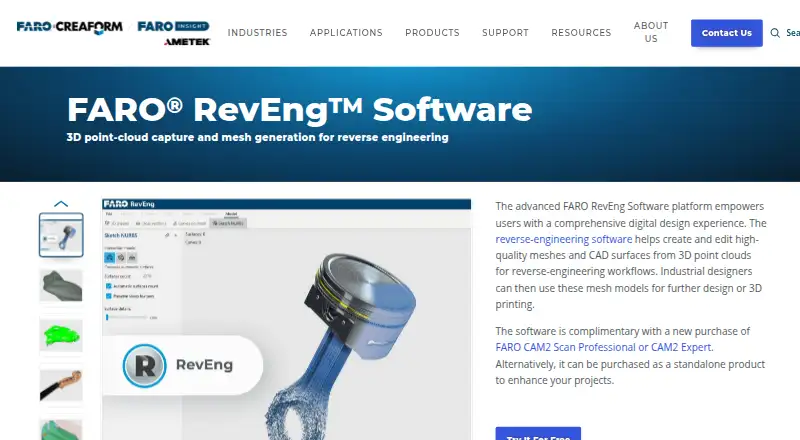
What FARO RevEng is
FARO RevEng is Windows software for turning 3D point clouds into meshes and CAD surfaces for reverse engineering, further design, and 3D printing. It supports capture devices including FARO ScanArms and the 8-Axis Quantum ScanArm, and can import point-cloud and mesh files in listed formats such as PC, PTS, E57, STL, PLY, OBJ, GLTF, and GLB. Mesh tools include automatic fixing, repair, adjustment, smoothing, and fitting. The Sketch Tool can create editable NURBS surfaces from point clouds; hole filling, simplification, offsets, and shell tools help prepare watertight meshes for printing. Export options include point-cloud formats, mesh formats, and STEP.
RevEng supports Windows 10 and 11, with virtual-machine installation and remote desktop accessibility. FARO recommends an Intel Core i7 or equivalent 6th generation or later, at least 16 GB of RAM, and 1 GB of free disk space. Standalone pricing is on request, and there is no free plan, but a fully functional 30-day trial is offered. A license is complimentary with a new purchase of FARO CAM2 Scan Professional or CAM2 Expert. FARO describes the software for industrial and product design and engineering, as well as historic preservation.
Good
- Creates editable NURBS surfaces from point clouds
- Includes mesh repair and fitting tools
- Offers a fully functional 30-day trial
- Supports virtual machines and remote desktop access
Watch out
- Standalone pricing is available only on request
- No free plan is listed
- Requires Windows 10 or 11
- Recommended requirements include at least 16 GB RAM
Who it suits
RevEng may suit industrial designers and product design or engineering teams working with point-cloud capture, mesh editing, or 3D printing. It may also be relevant to historic-preservation work involving 3D data.
Verdict
FARO RevEng covers point-cloud capture, mesh editing, surface creation, and export for reverse-engineering workflows. The trial provides a way to evaluate it, while standalone buyers need to request pricing and check the Windows system requirements.
Plans and prices
From FARO RevEng's own pricing page, checked 7 Oct 2026.
| Plan | Price | What it gives you |
|---|---|---|
| Standalone RevEng | Priced on request | Standalone purchase; price not listed |
The facts
Each one read from FARO RevEng's own pages, with the date it was checked.
What it does
- 3D printing
- Hole filling, simplification, offsets, and shell tools can prepare watertight meshes for 3D printing.checked 7 Oct 2026
- Data import
- FARO says RevEng can import meshes in any format from 3D point-cloud software.checked 7 Oct 2026
- Deployment
- FARO states that virtual machine installation and remote desktop accessibility are supported.checked 7 Oct 2026
- Included license
- RevEng is complimentary with a new purchase of FARO CAM2 Scan Professional or CAM2 Expert.checked 7 Oct 2026
- Intended users
- FARO describes RevEng for industrial designers and product design and engineering work, and cites historic preservation as another application.checked 7 Oct 2026
- Mesh editing
- Features include automatic mesh fixing, repair and adjustment tools, smoothing, and fitting.checked 7 Oct 2026
- NURBS surfaces
- The Sketch Tool can automatically create editable NURBS surfaces from point clouds.checked 7 Oct 2026
- Operating system
- The recommended operating system is Windows 10/11 64-bit.checked 7 Oct 2026
- Purpose
- RevEng creates and edits meshes and CAD surfaces from 3D point clouds for reverse-engineering workflows, including further design and 3D printing.checked 7 Oct 2026
- Release
- The Knowledge Base lists RevEng version 2026.1, released September 9, 2026.checked 7 Oct 2026
- Support resources
- FARO provides RevEng manuals, specifications, online help, and sample project files through its Knowledge Base.checked 7 Oct 2026
- System requirements
- Recommended requirements include an Intel Core i7 or equivalent 6th generation or later, 16 GB or more RAM, and at least 1 GB free disk space.checked 7 Oct 2026
Where it runs
- Device connection
- RevEng supports point-cloud capture devices such as FARO ScanArms and the 8-Axis Quantum ScanArm.checked 7 Oct 2026
Money
- Trial
- FARO offers a free, fully functional 30-day software trial through its trial page.checked 7 Oct 2026
Alternatives to FARO RevEng
- 1

Global Mapper
AndroidiOSWindows6.9From $599 a year - 2
WhiteboxTools
Free planLinuxmacOSWindows6.7From $740 a year - 3
Open3D
WebAPILinuxmacOS6.3 - 4
Point Cloud Library
Free planAndroidLinuxmacOSWindows6.3Free plan - 5
PointCab Origins
macOSWindows6.3From €420 a month - 6
Terrasolid TerraScan
Windows6.2From €570 a year