
EXScan Pro
EXScan Pro is Windows software for scanning and editing data from compatible EinScan Pro scanners to create 3D models.
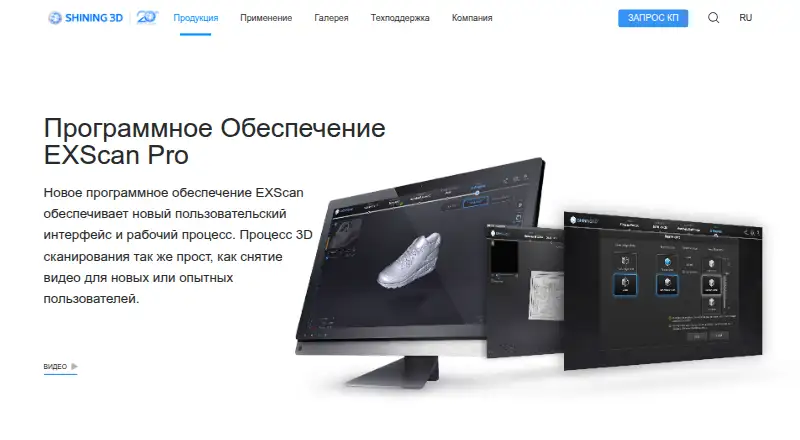
What EXScan Pro is
EXScan Pro is Windows software for scanning and editing data from compatible EinScan Pro scanners to create 3D models. Supported inputs include EinScan Pro, Pro Plus, Pro 2X, Pro 2X Plus, Pro 2X V2, and Pro HD. During processing, users can choose a work mode and resolution; individual scans appear in a list for editing and manual alignment. Point-cloud tools and mesh reconstruction support the workflow. Mesh editing covers cleaning, filling holes, simplifying data, smoothing, and sharpening. The software exports STL, OBJ, PLY, ASC, 3MF, and P3 files. Listed design integrations include Geomagic Essentials and Solid Edge SHINING 3D Edition, alongside Geomagic ControlX, Geomagic DesignX, QuickSurface, and VeriSurf. Version 4 adds background cutting and real-time marker recognition for fixed scanning, as well as an automatic cutting plane and separate editing of point clouds and markers. The maker describes handheld rapid scanning as portable and fast, while handheld HD scanning is intended for high-resolution capture of relatively small, detailed objects up to 1 meter. EXScan Pro is free and supports Windows 10 and 11, 64-bit.
Good
- Supports six listed EinScan Pro scanner models
- Includes point-cloud and mesh tools
- Exports six listed file formats
- Free plan is available
Watch out
- Windows 10 or 11, 64-bit only
- Designed for compatible EinScan Pro scanners
Who it suits
EXScan Pro suits users of the listed EinScan Pro scanners who need to process scan data and edit meshes on Windows. Its export formats and named design integrations may suit workflows that move into other design software.
Verdict
EXScan Pro provides scanning, alignment, mesh editing, and export tools for compatible EinScan devices. Confirm that your scanner model and Windows version are supported before choosing it.
Plans and prices
From EXScan Pro's own pricing page, checked 5 Oct 2026.
| Plan | Price | What it gives you |
|---|---|---|
| EXScan Pro | Priced on request | Pricing not listed on the product page; quote request available |
The facts
Each one read from EXScan Pro's own pages, with the date it was checked.
What it does
- Additional integrations
- The maker’s EinScan Pro 2X V2 page lists Geomagic ControlX, Geomagic DesignX, Geomagic Essentials, QuickSurface, and VeriSurf as EXScan Pro integrations.checked 5 Oct 2026
- Design integrations
- The product page lists Geomagic Essentials and Solid Edge SHINING 3D Edition as design software integrations.checked 5 Oct 2026
- File formats
- The software exports STL, OBJ, PLY, ASC, 3MF, and P3 files.checked 5 Oct 2026
- Handheld scanning
- The maker describes handheld rapid scanning as portable and fast, and handheld HD scanning as high resolution and suited to relatively small, feature-rich objects up to 1 meter.checked 5 Oct 2026
- Mesh editing
- Mesh editing includes cleaning, hole filling, data simplification, smoothing, and sharpening.checked 5 Oct 2026
- Post-processing
- Version 4.0 includes an auto cutting plane and separate editing of point clouds and markers.checked 5 Oct 2026
- Privacy and security
- SHINING 3D says it uses encryption, access controls, and security measures to protect personal information; this statement covers company data practices and does not specifically describe EXScan Pro.checked 5 Oct 2026
- Purpose
- EXScan Pro is software for EinScan Pro 2X and 2X Plus scanners, with scanning and mesh editing tools for producing 3D models.checked 5 Oct 2026
- Scan data
- Scans appear separately in a data list and can be edited and manually aligned individually.checked 5 Oct 2026
- Scanning workflow
- The software lets users choose a work mode and set resolution during data processing.checked 5 Oct 2026
- Support
- The maker lists [email protected] as its customer support email.checked 5 Oct 2026
- Version 4 features
- EXScan Pro v4.0 adds background cutting and real-time marker recognition for fixed scanning.checked 5 Oct 2026
The company
- Company certification
- The maker’s About page states that SHINING 3D holds TISAX and ISO/IEC 27001, 27701, 27017, and 27018 certifications.checked 5 Oct 2026
- Company focus
- SHINING 3D says its focus includes high-precision industrial 3D scanning and digital dental scanning.checked 5 Oct 2026
- Founded
- 2004checked 28 Sep 2026
- Headquarters
- Hangzhou, Zhejiang, Chinachecked 28 Sep 2026
Alternatives to EXScan Pro
- 1
Structure
Free planAndroidiOSWebAPI8.0From $199 a year - 2

MeshInspector
Free planWebAPILinuxmacOS7.8From $300 a year - 3
MeshLab
Free planOpen sourceiOSAPILinuxmacOS7.7Free plan - 4

3D Scanner App
Free planiOSmacOS7.5From $69.99 a year - 5

Polycam
Free planAndroidiOSWeb7.5From $150 a year - 6
RealityScan
Free planAndroidiOSLinuxWindows7.4From $1,250 a year