
EXIF Magic
EXIF Magic reads photo metadata, explains what it can reveal, and lets users remove or rewrite information.
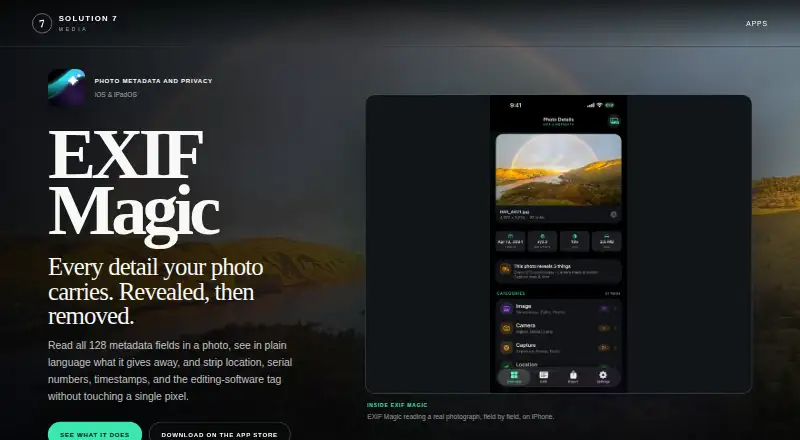
What EXIF Magic is
EXIF Magic reads photo metadata, explains what it can reveal, and lets users remove or rewrite information. It names 128 fields across EXIF, TIFF, IPTC, GPS, and manufacturer notes. A plain-language summary can identify details such as GPS coordinates, device serial number, camera model, capture date, and author. Users can clear all metadata, remove location data, or choose particular groups to remove. They can also clean a photo and add a selected location using a map, place name, address, ZIP code, or coordinates. The app copies the original compressed image data without decoding and re-encoding it, preserving image data, dimensions, and colour profile. It checks each export and refuses to save if sensitive metadata remains. Processing occurs on-device; the maker says the app has no servers, network code, or uploads. The free download has no in-app purchases, subscription, or account. It is listed for Android, iOS, and macOS. Replacing an original is limited to photos selected from the photo library and requires full library access.
Good
- Identifies 128 metadata fields across listed formats.
- Can remove all metadata or selected groups.
- Exports are checked for sensitive metadata.
- Processes photos on-device with no uploads.
Watch out
- Replacing an original requires full library access.
- Original replacement is limited to photo-library selections.
Who it suits
EXIF Magic suits people who want to inspect photo metadata and remove or change selected details. It is also relevant to users who want on-device processing and export checks.
Verdict
EXIF Magic offers detailed metadata controls, location editing, and checked exports without a subscription or account. Note the full-library-access requirement if replacing originals is important to your workflow.
Plans and prices
From EXIF Magic's own pricing page, checked 9 Oct 2026.
| Plan | Price | What it gives you |
|---|---|---|
| Free download | Free | No in-app purchases · no subscription · no account |
The facts
Each one read from EXIF Magic's own pages, with the date it was checked.
What it does
- Data collection
- The privacy policy says the app collects no personal information and has no accounts, analytics or advertising SDKs, or cross-app and website tracking.checked 9 Oct 2026
- Export verification
- Each export is re-read and checked, and the app refuses to save it if sensitive metadata remains.checked 9 Oct 2026
- Image quality
- The app copies the original compressed image data without decoding and re-encoding it, preserving the image data, dimensions, and colour profile.checked 9 Oct 2026
- Location editing
- Users can clean a photo and add a chosen location by map selection, place name, address, ZIP code, or coordinates.checked 9 Oct 2026
- Metadata fields
- The app names 128 fields across EXIF, TIFF, IPTC, GPS, and manufacturer maker notes.checked 9 Oct 2026
- Metadata removal
- Users can remove all metadata, remove location only, or choose individual metadata groups to clear.checked 9 Oct 2026
- Notable limit
- Replacing the original is available only for photos selected from the photo library and requires full library access.checked 9 Oct 2026
- Photo access
- The system photo picker gives the app only the selected photo; full library access is requested only when the user enables deletion of the original after saving.checked 9 Oct 2026
- Privacy summary
- A plain-language summary identifies information such as GPS coordinates, device serial number, camera model, capture date, and author name.checked 9 Oct 2026
- Purpose
- EXIF Magic reads photo metadata, explains what it reveals, and lets users remove or rewrite metadata.checked 9 Oct 2026
- Support
- The support page directs users to email [email protected] and asks them to include their device model, iOS version, and a short issue description.checked 9 Oct 2026
The company
- Headquarters
- Pacific Northwestchecked 28 Sep 2026
Where it runs
- On-device processing
- The app processes photos on the device using Apple's ImageIO framework and says it has no servers, network code, or uploads.checked 9 Oct 2026
The full review of EXIF Magic
Overview
EXIF Magic is a photo metadata reader and editor for iOS and macOS. It suits people who want to inspect a photo’s privacy footprint and control exactly which details stay in the file. Its combination of selective cleanup and checked exports makes it a focused tool for preparing images to share.
Key features
The app names 128 fields spanning EXIF, TIFF, IPTC, GPS, and camera maker notes. A plain-language summary draws attention to details such as GPS coordinates, a device serial number, camera model, capture date, and author name. That context helps users decide whether to remove everything or preserve useful metadata while clearing sensitive fields.
Cleanup can remove all metadata, location alone, or chosen groups. EXIF Magic can also add a selected location after cleaning, using a map, place name, address, ZIP code, or coordinates. This makes it useful both for privacy-conscious sharing and for correcting or deliberately setting geotags.
The app copies the original compressed image data without decoding and re-encoding it, preserving image data, dimensions, and colour profile. It then re-reads each export and refuses to save if sensitive metadata remains. Those safeguards address the two main risks in metadata cleanup: unwanted image changes and an incomplete removal.
Processing happens on the device through Apple's ImageIO framework. EXIF Magic says it has no servers, network code, or uploads; its privacy policy also says it collects no personal information and uses no accounts, analytics or advertising SDKs, or cross-app and website tracking. The system photo picker initially gives the app access only to the selected image. However, replacing the original after saving is limited to photos chosen from the photo library and requires full library access. Readers who want that workflow should weigh the broader permission against the convenience of replacement.
Pricing
The Free download costs nothing, with no in-app purchases, subscription, or account. There is no paid tier or trial to consider, so the full stated feature set is available without a recurring charge. The trade-off is not a pricing limit but the full-library-access requirement for replacing originals.
Platforms
EXIF Magic is available on iOS and macOS. Its mobile focus and location-editing tools make it a natural fit for people managing photos on Apple devices. It is not the choice for Windows or Linux users.
Who it's for
Choose EXIF Magic if you want a free Apple-device tool that explains metadata, offers granular removal and location editing, and checks exports before saving. It is especially relevant when privacy matters and you want to retain control over which metadata remains. If you need to replace originals, be comfortable granting full photo-library access for that option.
Pros and cons
- Pros: 128 named metadata fields and a plain-language privacy summary help users identify what a photo discloses.
- Pros: All-metadata, location-only, and group-based removal support different sharing needs; location can also be set by map or text entry.
- Pros: Copying compressed image data preserves dimensions and colour profile, while export checks catch sensitive metadata that remains.
- Pros: On-device processing, no account, and no stated personal-data collection keep the workflow private and free of sign-up friction.
- Cons: Replacing an original requires full library access and only applies to photos selected from the photo library.
- Cons: Availability is limited to iOS and macOS, leaving desktop users on other systems to look elsewhere.
Alternatives
Photo Metadata Editors is the directory’s broader comparison for readers still weighing options. Choose ExifTool if you need a free option spanning API, Linux, macOS, self-hosted, and Windows environments. ExifCleaner is another free desktop choice for Linux, macOS, or Windows. Pick Metadata Stripper if you want a free, open-source native desktop app for JPEG, PNG, and WebP. Photini offers free GPL-3.0-or-later software across Linux, macOS, and Windows. For a Windows desktop app with MSI and portable ZIP downloads, consider Photo Metadata Editor. Simple Photo Meta is a free GPLv3 alpha desktop application for Linux and macOS. On Windows, Exif Pilot offers a free Basic EXIF editor. If you want an iOS alternative with a free plan for viewing all photo metadata and browsing, sorting, and filtering a library, consider Exif Lens; its Pro plan is $0.99 a month and adds date and time editing.
Verdict
EXIF Magic is a strong fit for iOS and macOS users who want detailed metadata controls without paying or creating an account. Its clearest reason to choose it is the combination of selective cleanup, deliberate location editing, preserved image data, and checked exports. Look elsewhere if your workflow depends on replacing originals without granting full library access, or if you need Windows or Linux support.
Getting started
- Visit the EXIF Magic website
- Install the free app on Android, iOS, or macOS
- Select a photo with the system photo picker
- Review the metadata summary and choose fields or groups to remove
- Optionally assign a location by map, place name, address, ZIP code, or coordinates
- Export the cleaned photo
Limits worth knowing
The free download has no in-app purchases, subscription, or account. Replacing an original is limited to photo-library selections and requires full library access.
Questions
What does EXIF Magic cost?
The free download is 0.00 USD. It has no in-app purchases and no subscription.
Which platforms are supported?
EXIF Magic is available on Android, iOS, and macOS.
What metadata can it handle?
It names 128 fields across EXIF, TIFF, IPTC, GPS, and manufacturer maker notes.
Does it upload photos?
Processing is on-device, and the maker says there are no servers, network code, or uploads.
Can it replace the original photo?
Yes, but only for photos selected from the photo library, with full library access enabled.
Alternatives to EXIF Magic
- 1
Metadata Stripper
Free planOpen sourceLinuxmacOSWindows7.1Free plan - 2
Exif Lens
Free planiOS6.6From $0.99 a month - 3

ExifTool
Free planAPILinuxmacOSSelf-hosted6.6Free plan - 4
Photo Metadata Editor
Free planWindows6.6Free plan - 5

Exif Pilot
Free planWindows6.5€79.95 one-time - 6
QromaTag
iOSmacOS6.4$4.99 one-time