
ePassport Photo Maker
ePassport Photo Maker is a free web tool for preparing passport and visa photos from a selfie.
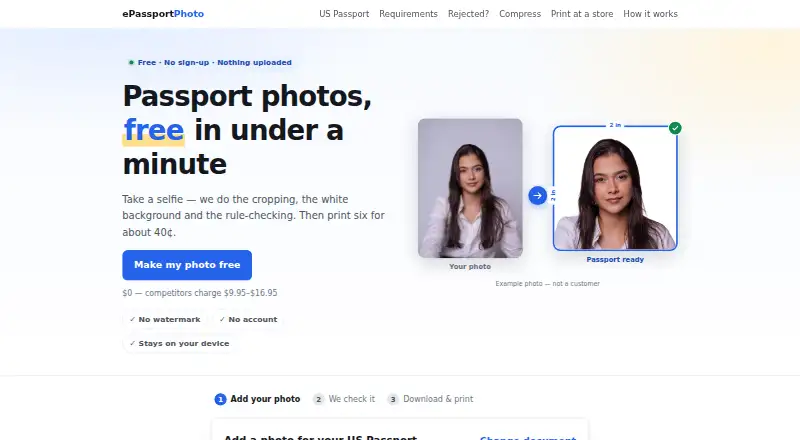
What ePassport Photo Maker is
ePassport Photo Maker is a free web tool for preparing passport and visa photos from a selfie. It crops the image, replaces the background with plain white, and checks details such as head size, eye height, tilt, open eyes, expression, lighting, and resolution. Listed formats include US passport and visa, green card, baby passport, USCIS, EAD, DV Lottery, Canadian, UK, and Australian photos. You can download a digital file and a 4×6 print sheet at no charge and without a watermark; the sheet holds six photos. The site says image processing normally happens in your browser, without uploading or storing images, unless you choose email delivery or accept server processing when local AI cannot run. It says it does not smooth skin, remove blemishes, or reshape faces, and no special backdrop is needed. The service does not guarantee that a reviewing authority will accept a photo; final approval belongs to that office.
Good
- Free plan with no watermark or account
- Checks head size, eye height, and other photo rules
- Offers a six-photo 4×6 print sheet
- Processing usually runs in the browser
- Does not reshape faces or smooth skin
Watch out
- Authority acceptance is not guaranteed
- Images may be processed on a server if local AI cannot run
Who it suits
It suits people who need a passport or visa photo in one of the listed formats and want a digital file or print sheet. It is available in a web browser.
Verdict
ePassport Photo Maker covers photo preparation and rule checks for a broad set of listed document formats. Its free downloads are useful, but the reviewing office makes the final acceptance decision.
Plans and prices
From ePassport Photo Maker's own pricing page, checked 3 Oct 2026.
| Plan | Price | What it gives you |
|---|---|---|
| Free | Free | Passport photo and 4×6 print sheet · no watermark · no account · Free; no payment |
The facts
Each one read from ePassport Photo Maker's own pages, with the date it was checked.
What it does
- Acceptance limit
- The service does not guarantee that an authority will accept a photo; final approval belongs to the reviewing office.checked 3 Oct 2026
- Analytics
- The site says it uses no third-party analytics, advertising pixels, or third-party trackers, and sets no cookies.checked 3 Oct 2026
- Background
- Background removal places the subject on a plain white background, and the site says a special backdrop is not required.checked 3 Oct 2026
- Face processing
- The site says it does not smooth skin, remove blemishes, or reshape faces.checked 3 Oct 2026
- Output
- Users can download a digital file and a 4×6 print sheet, both free and without a watermark.checked 3 Oct 2026
- Photo checks
- Checks include head size, eye height, tilt, eyes open, expression, lighting, and resolution.checked 3 Oct 2026
- Printing
- A 4×6 sheet holds six passport photos and can be printed as an ordinary photo print at listed retailers.checked 3 Oct 2026
- Privacy
- Photo processing runs in the browser and images are not uploaded or stored unless the user chooses email delivery or accepts server processing when local AI cannot run.checked 3 Oct 2026
- Purpose
- Creates passport and visa photos by cropping a selfie, replacing the background, and checking photo rules.checked 3 Oct 2026
- Security detail
- The site says its AI model files are served from its own domain rather than a third-party CDN.checked 3 Oct 2026
- Support
- Users can contact the maker by email at [email protected].checked 3 Oct 2026
- Supported documents
- The site lists US passport, visa, green card, baby passport, USCIS, EAD, DV Lottery, Canadian, UK, and Australian photo formats.checked 3 Oct 2026
The company
- Headquarters
- Pokhara, Nepalchecked 23 Sep 2026
The full review of ePassport Photo Maker
Overview
ePassport Photo Maker is a browser-based tool for turning a selfie into a passport or visa photo, with background replacement and checks against document-photo rules. It suits people who want a free, no-account way to prepare a digital photo or print sheet. Its breadth of formats and privacy-conscious browser processing are useful advantages, though they cannot guarantee approval by the reviewing office.
Key features
The service supports photo formats for US passports and visas, green cards, baby passports, USCIS, EAD, DV Lottery, Canadian, UK, and Australian documents. It crops the image, places the subject against a plain white background, and checks head size, eye height, tilt, open eyes, expression, lighting, and resolution. That combination is practical for catching common photo-rule issues before submission, but the final acceptance decision remains with the relevant authority.
Downloads include a digital file and a 4×6 print sheet, free and without a watermark. The sheet holds six passport photos and can be printed as an ordinary photo print at listed retailers. The site says it does not smooth skin, remove blemishes, or reshape faces, which keeps the output focused on preparation rather than retouching.
Processing runs in the browser, and images are not uploaded or stored unless the user chooses email delivery or accepts server processing when local AI cannot run. The site also says it sets no cookies and uses no third-party analytics, advertising pixels, or trackers; its AI model files are served from its own domain. Users who need help can email [email protected].
Pricing
The Free plan costs nothing, billed Free, with no payment required. It includes a passport photo and 4×6 print sheet, no watermark, and no account. There is no free trial because the core plan is free. For someone who needs a one-off document photo, the lack of a download charge or account requirement is a clear advantage; the trade-off is that the service does not guarantee official acceptance.
Platforms
ePassport Photo Maker runs on the web. It supports JPG, PNG, and PDF export formats, giving users options for digital submission and print preparation without a separate desktop or mobile app.
Who it's for
This is a sensible choice for people preparing a common passport or visa photo who want a free download, automated rule checks, and a print-ready layout. It is less suitable for anyone who needs guaranteed acceptance, face retouching, or a dedicated mobile application.
Pros and cons
- Pro: Free, watermark-free digital and print-sheet downloads make it possible to finish a photo without a paid tier or account.
- Pro: Checks cover several measurable photo requirements, while background removal avoids the need for a special backdrop.
- Pro: Browser-based processing and the stated lack of third-party trackers offer a privacy-oriented workflow, with clear exceptions for email delivery or server processing.
- Con: Photo checks cannot ensure acceptance; the reviewing office has the final say.
- Con: The tool does not retouch skin or facial features, so users seeking cosmetic edits will need another option.
Alternatives
Passport Photo Maker Software is a broader directory for readers comparing passport-photo tools across options.
- idpic.app is another free web option with no account or subscription requirement and no stated usage limits.
- PhotoID may suit Android and iOS users, but its free plan only processes and previews photos; downloading final photos requires a subscription.
- Passport Room offers Android, iOS, and web access, with three finished photos per day free and watermark-free exports; its Pro option is a 0.99 USD one-off payment for 30 days.
- PhotoID Studio is a desktop alternative for macOS and Windows, with a 30-day, 100-photo trial that includes all features and requires no credit card; its Pro plan has custom pricing.
- Smartphone iD offers a digital photo with AI and human verification for $8.50, paid once, with the exact price varying by document.
- Cutout.Pro is a broader cross-platform option with a subscription offering 80 credits per month for $5 a month.
- Photo Pass is another free web option.
- Snapport is a freemium Android option.
Verdict
Choose ePassport Photo Maker if you want a free, no-account web workflow for preparing a passport or visa photo, with useful rule checks and a six-photo print sheet. Its main limitation is decisive: automated checks are not official approval. If acceptance certainty, mobile-first use, or facial retouching matters more, look elsewhere.
Alternatives to ePassport Photo Maker
- 1
Cutout.Pro
Free planAndroidiOSWebAPI8.2From $5 a month - 2
ID Photo Studio
Free planAndroidiOSmacOS7.8$3.99 one-time - 3

ID Photo Maker
Free planiOS7.3From $19.99 a year - 4
Passport Room
Free planAndroidiOSWeb7.1$0.99 one-time - 5
Foxly Passport Photo
AndroidiOSWeb6.5$5 one-time - 6
MakePassportPhoto
Free planWeb6.5$2.99 one-time