
ID Photo Maker
ID Photo Maker is an iOS app for turning a selfie into a passport or ID photo in about 30 seconds.
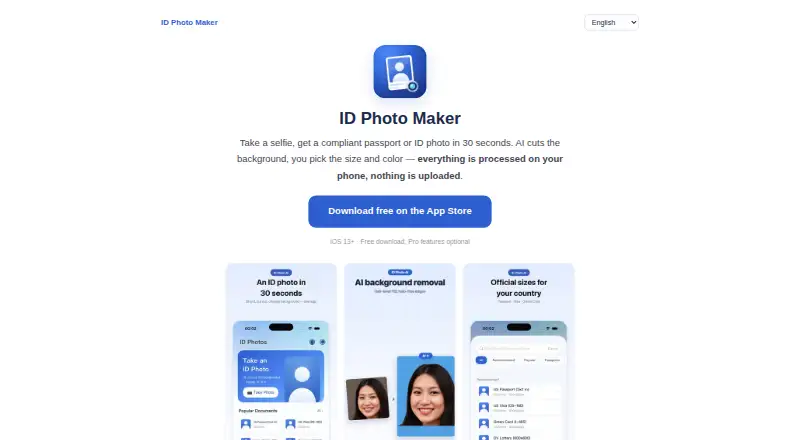
What ID Photo Maker is
ID Photo Maker is an iOS app for turning a selfie into a passport or ID photo in about 30 seconds. It includes more than 40 country formats, including US passport, Schengen visa, Japan résumé, and Korea ID. AI background removal lets users choose white, blue, red, or a custom color. The app exports exact pixel dimensions and target file sizes, with a stated example of 240 KB or less for DS-160, and arranges copies on a 4×6 inch print sheet for a photo kiosk or drugstore. Listed uses include passport, visa, green card, DV lottery, résumé headshot, employee badge, school, and club ID photos. The maker says presets follow official specifications for head size, margins, and background; strict document presets display a no-retouch reminder. Standard editing, including background removal, beautification, and cropping, runs on-device according to the privacy policy. Optional AI Attire sends a selected photo to the maker’s server and OpenAI’s image API, while the maker says it does not retain the photo. The free plan covers shooting, cropping, and previewing; the one-time PRO upgrade is 0.99 USD, and the yearly plan is $19.99 a year.
Good
- Includes more than 40 country photo formats.
- Background removal offers four color choices or a custom color.
- Arranges copies on a 4×6 inch print sheet.
- Standard photo editing runs on-device.
Watch out
- Available on iOS only.
- Optional AI Attire sends a selected photo to external services.
- The yearly plan is a $19.99 a year subscription.
Who it suits
ID Photo Maker suits iOS users who need passport, visa, or other listed ID photos in specific country formats. It may also suit people who want print-sheet layouts or precise image dimensions and file sizes.
Verdict
ID Photo Maker combines country-specific presets, background editing, file-size controls, and a print-sheet layout. Its free plan covers basic shooting, cropping, and previewing, while PRO and yearly options have separate listed costs.
Plans and prices
From ID Photo Maker's own pricing page, checked 15 Oct 2026.
| Plan | Price | What it gives you |
|---|---|---|
| Free | Free | shoot · crop · preview |
| PRO upgrade | $0.99, paid once | full-version feature unlock |
| Upgrade to PRO | $0.99, paid once | upgrade to PRO |
| Full version (yearly) | $19.99 a year | HD cutout · formal attire · beauty · print sheet · cloud album · yearly auto-renewing subscription |
| Full version yearly | $19.99 a year | HD cutout · attire · beauty · print sheet · cloud album · auto-renewing yearly subscription |
The facts
Each one read from ID Photo Maker's own pages, with the date it was checked.
What it does
- Account requirement
- Registration is not required and the maker says it does not collect names, phone numbers, or contacts.checked 15 Oct 2026
- AI Attire data path
- If AI Attire is used, the selected photo is sent over encryption to the maker's Alibaba Cloud server in Singapore and forwarded to OpenAI's image API.checked 15 Oct 2026
- AI attire exception
- Optional AI Attire uploads a selected photo over an encrypted connection to the maker's server and forwards it to OpenAI's image API; the maker says it does not retain the photo.checked 8 Oct 2026
- AI Attire retention
- The maker says AI Attire images exist only in memory for the request, while it retains an anonymous style, duration, and cost record.checked 15 Oct 2026
- API and SDKs
- The maker's public home page and App Store listing describe the consumer app but provide no public API or SDK.checked 15 Oct 2026
- Background removal
- AI removes the background with hair-level detail and lets users choose white, blue, red, or a custom color.checked 15 Oct 2026
- Cloud album
- The optional cloud album uses the user's private Apple CloudKit database, which the maker says it cannot access.checked 15 Oct 2026
- Compliance guidance
- The maker says presets follow official specifications for head size, margins, and background, and strict document presets show a no-retouch reminder.checked 8 Oct 2026
- Compliance presets
- The maker says each preset follows official head-size, margin, and background specifications and that strict-document presets show a no-retouch reminder.checked 15 Oct 2026
- Country formats
- The maker lists more than 40 country and document formats, including US passport, Schengen visa, Japan résumé, and Korean ID sizes.checked 15 Oct 2026
- Developer identity
- Apple identifies the seller and developer as 佳奇 王 (Wang Jiaqi).checked 15 Oct 2026
- Exact file export
- Exports can use exact pixel dimensions and a target file-size limit, including a stated 240 KB-or-less example for DS-160.checked 15 Oct 2026
- File export
- Users can export exact pixel dimensions and target file sizes, including a stated ≤240 KB example for DS-160.checked 8 Oct 2026
- Formal attire
- An optional one-tap feature changes a T-shirt to a suit or blouse.checked 15 Oct 2026
- Languages
- The App Store lists English plus French, German, Indonesian, Italian, Japanese, Korean, Portuguese, Simplified Chinese, Spanish, Thai, and Vietnamese.checked 15 Oct 2026
- Licence
- The opened maker pages and App Store listing do not state an open-source licence.checked 15 Oct 2026
- Limit: optional upload
- Although ordinary editing is local, using AI Attire sends the selected image to the maker's server and OpenAI.checked 15 Oct 2026
- Limit: paid features
- The free tier covers shooting, cropping, and previewing, while HD cutout, attire, beauty, print sheets, and cloud albums require paid access.checked 15 Oct 2026
- Limit: subscription renewal
- The paid weekly and yearly options renew automatically through Apple unless cancelled in account settings.checked 15 Oct 2026
Where it runs
- Apple platform listing
- The App Store lists the product as a free iPhone and iPad photo app with in-app purchases and says it is not verified for macOS.checked 15 Oct 2026
- App size
- The App Store lists an app size of 47.4 MB.checked 15 Oct 2026
- Limit: platform scope
- The product is distributed as an iPhone and iPad app; the maker does not present Android, Linux, Windows, or browser editions on the opened pages.checked 15 Oct 2026
- Mac compatibility
- Apple lists macOS 14 or later on an Apple M1-or-newer Mac as a compatibility option, while marking the app as not verified for macOS.checked 15 Oct 2026
- On-device processing
- Standard background removal, cropping, beautification, and editing run on the device and are not uploaded, stored, or viewed by the maker.checked 15 Oct 2026
The full review of ID Photo Maker
Overview
ID Photo Maker is an iOS app that turns a selfie into a formal passport, visa, or identification photo. It is most useful for iPhone owners who need a precise national format, controlled upload file, or multiple printed copies without visiting a studio. The free tier is a workable preview tool, but the features that make it a complete document-preparation app sit behind a one-time upgrade or yearly subscription.
Its scope reaches beyond passports: the app covers more than 40 country formats and supports green-card, DV-lottery, résumé, employee-badge, school, and club photos. That breadth makes it a practical general-purpose ID-photo utility, while its iOS-only availability rules out Android, desktop, and browser workflows.
Key features
Country presets include US passport, Schengen visa, Japan résumé, and Korea ID formats. They account for head size, margins, and background requirements, and strict document presets display a no-retouch reminder. This compliance guidance reduces guesswork during preparation, although responsibility for meeting the receiving authority's current rules remains with the applicant.
AI background removal separates the subject and offers white, blue, red, or a custom color. Exact pixel dimensions and target file sizes are available at export, including a stated ≤240 KB setting for DS-160. Those controls matter when an online form rejects oversized or incorrectly dimensioned files; they are unnecessary overhead for a casual portrait.
A multi-photo layout places copies on a 4×6-inch sheet sized for a photo kiosk or drugstore. It can therefore serve both digital submissions and inexpensive physical prints. Standard editing—cropping, beautification, and background removal—runs on the device, and the maker says those photos are not uploaded, stored, or viewed by it. Optional AI Attire is different: the selected image travels over an encrypted connection to the maker's server and then to OpenAI's image API, although the maker says it does not retain the photo. Cloud Album stores images in the user's private Apple iCloud database, which the maker says it cannot access. Apple handles payments and iCloud, while RevenueCat validates subscriptions; support is provided by email.
Pricing
The Free plan costs 0.00 USD and covers shooting, cropping, and previewing. It suits someone checking framing or deciding whether the app fits, but it does not provide the paid finishing tools.
Upgrade to PRO costs 0.99 USD once. The listing identifies it as an upgrade to PRO, making it the inexpensive choice for users who want to unlock the core paid tier without an ongoing charge.
Full version (yearly) costs $19.99 a year as a billed yearly, auto-renewing subscription. It includes HD cutout, formal attire, beauty tools, print sheet, and Cloud Album. This is the relevant plan for repeated use or for anyone who specifically needs those extras; occasional users should weigh the renewal commitment against the one-time option. The app does not publish a seat or usage quota.
Platforms
ID Photo Maker is distributed through the App Store and supports iOS 13 or later. There is no Android, web, macOS, Windows, or Linux version.
Who it's for
Choose it for iPhone-based passport, visa, immigration, résumé, workplace, school, or club-photo preparation when national presets and exact upload limits matter. It is less suitable for mixed-device households, desktop-first workflows, or users who only need a free final download.
Pros and cons
- Pros: More than 40 country formats reduce manual sizing; background-color choices and file-size controls address strict digital applications; 4×6-inch sheets simplify low-cost printing; standard edits stay on-device.
- Cons: iOS 13+ is required; the free plan stops at shoot, crop, and preview; formal attire, HD cutout, beauty, print sheets, and Cloud Album are tied to paid access; AI Attire introduces server and OpenAI processing.
Alternatives
For a broader platform range and credit-based subscriptions, consider Cutout.Pro. Passport Room is a better fit when Android or web access and three finished free photos per day matter. ID Photo Studio offers Android alongside iOS with free compliant basics and standard print sizes. PhotoID lets users process and preview free but requires a subscription to download final photos. On desktop, PhoyoID is free, GPL software with no stated limits and Java 1.8 required for its cross-platform version. IDPhoto4You is a free web option covering 73 countries and multiple print sizes. MakePassportPhoto provides manual web editing free or a 2.99 USD one-time automatic AI route. PersoFoto is a web alternative with free cropping and alignment but no compliance check.
Verdict
ID Photo Maker is a strong choice for iPhone users who need country-specific compliance guidance, exact digital exports, and a print-ready sheet in one workflow. Its main reason to look elsewhere is platform restriction, compounded by a free tier that previews rather than completes the job and a yearly subscription for its broadest feature set.
Alternatives to ID Photo Maker
- 1
Cutout.Pro
Free planAndroidiOSWebAPI8.2From $5 a month - 2
ID Photo Studio
Free planAndroidiOSmacOS7.8$3.99 one-time - 3
Passport Room
Free planAndroidiOSWeb7.1$0.99 one-time - 4
Foxly Passport Photo
AndroidiOSWeb6.5$5 one-time - 5
MakePassportPhoto
Free planWeb6.5$2.99 one-time - 6
Passport Photo Online
AndroidiOSWeb6.5$16.95 one-time