
EmailQA
EmailQA helps teams review HTML email layouts by rendering previews and collecting comments pinned to specific locations.
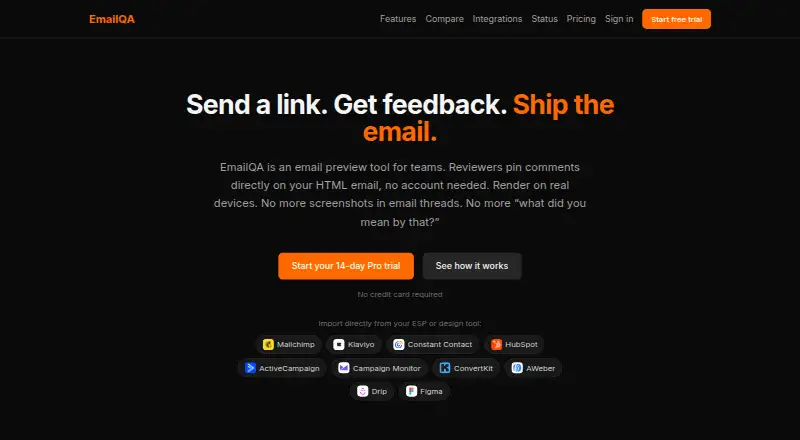
What EmailQA is
EmailQA helps teams review HTML email layouts by rendering previews and collecting comments pinned to specific locations. Users can paste HTML or upload an .html file to create a shareable preview link. Emails render in Gmail, Outlook, and Apple Mail on real devices, with screenshots in light and dark modes. Reviewers can open a shared link and comment without creating an account. Teams can upload later versions while keeping earlier feedback and comparing changes between iterations. EmailQA lists integrations with email platforms and Figma. Email service provider connections use OAuth and read-only access; the service says it reads templates without changing campaigns or accessing subscriber data. Slack notifications can flag comments, and users can reply in Slack threads. The REST API supports HTML uploads, real-device render requests, screenshots, and render-result webhooks; API access is included in Business. EmailQA offers a free plan and a 14-day trial. Pro costs $20 a month, billed at $20/month or $200/year; Business costs $99 a month, billed at $99/month.
Good
- Real-device previews include light and dark screenshots
- Guest reviewers can comment without accounts
- Version uploads preserve earlier feedback
- Slack comments and replies are supported
- Free plan and 14-day trial
Watch out
- Free plan allows 25 real-device renders monthly
- Free screenshot retention is 7 days
- No spam, accessibility, or link checks
- Independent SOC 2 or ISO 27001 audit not completed
Who it suits
EmailQA suits individuals and teams who want to review HTML email previews with comments and version comparisons. Business may fit agencies or automation workflows needing REST API access.
Verdict
EmailQA focuses on visual review and feedback rather than spam, accessibility, or link checks. Its free plan supports a limited number of monthly renders, while Business includes API access.
Plans and prices
From EmailQA's own pricing page, checked 7 Oct 2026.
| Plan | Price | What it gives you |
|---|---|---|
| Free | Free | 3 projects/month · 2 team members · 25 real-device renders/month · 7-day render history · unlimited guest reviewers |
| Pro | $20 a month | Unlimited projects · 10 team members · 1,000 real-device renders/month · 90-day render history · priority support · $20/month or $200/year |
| Business | $99 a month | 25 team members · 3,000 renders/month · 1-year render history · full REST API · extra renders at $0.05 each · $99/month |
The facts
Each one read from EmailQA's own pages, with the date it was checked.
What it does
- API
- The REST API supports HTML uploads, real-device render requests, screenshots, and render-result webhooks; API access is included in Business.checked 7 Oct 2026
- Audience
- The pricing page describes Free as for individuals, Pro as for teams and professionals, and Business as for agencies and automation.checked 7 Oct 2026
- Compliance
- EmailQA says it has not undergone an independent SOC 2 or ISO 27001 audit and offers a GDPR/UK GDPR data processing addendum.checked 7 Oct 2026
- Guest reviews
- Reviewers can view and comment through a shared link without creating an account.checked 7 Oct 2026
- Input
- Users can paste HTML or upload an .html file to create a shareable preview link.checked 7 Oct 2026
- Integration access
- ESP connections use OAuth and read-only access; EmailQA says it reads email templates without modifying campaigns or accessing subscriber data.checked 7 Oct 2026
- Integrations
- The integrations page lists Mailchimp, Klaviyo, HubSpot, Constant Contact, ActiveCampaign, Campaign Monitor, ConvertKit, AWeber, Drip, and Figma.checked 7 Oct 2026
- Purpose
- EmailQA lets teams preview HTML emails and collect feedback through comments pinned to specific locations.checked 7 Oct 2026
- Rendering
- It renders emails in Gmail, Outlook, and Apple Mail on real devices, with light- and dark-mode screenshots.checked 7 Oct 2026
- Retention
- The security page lists screenshot retention of 7 days on Free, 90 days on Pro, and 365 days on Business.checked 7 Oct 2026
- Security
- The security page says application, API, and render traffic uses HTTPS, and connected third-party credentials are encrypted with AES-256-GCM before storage.checked 7 Oct 2026
- Slack
- EmailQA can notify Slack when comments are added, and users can reply from Slack threads.checked 7 Oct 2026
- Support
- Pro includes priority support.checked 7 Oct 2026
- Version history
- Users can upload new versions while keeping previous feedback and compare changes across iterations.checked 7 Oct 2026
The full review of EmailQA
EmailQA is built for marketers, developers, and agencies that need visual approval of HTML email with feedback anchored to exact locations. It suits collaborative sign-off across clients and teammates, especially when real-device screenshots matter. Choose it for review workflow and rendering coverage; look elsewhere if your priority is deliverability or code-quality checks.
Overview
Paste HTML or upload an .html file and EmailQA creates a shareable preview link. Anyone with the link can view and comment without an account, so clients and occasional stakeholders can participate without joining a workspace. Comments remain attached to the relevant part of the email, making an annotated review more actionable than a loose email thread.
New uploads can retain earlier feedback and show differences between iterations. EmailQA renders Gmail, Outlook, and Apple Mail on real devices, with both light- and dark-mode screenshots, and supports inbox testing. It does not perform spam, accessibility, or link checks, so it is a visual-review tool rather than a complete preflight or deliverability platform.
Key features
Review workflow
Guest commenting removes a major barrier when approvals involve customers or executives. Pinned comments and version comparison give teams a traceable sign-off process across revisions. The practical constraint is retention: older render history disappears sooner on lower plans.
Integrations and automation
EmailQA connects through OAuth to Mailchimp, Klaviyo, HubSpot, Constant Contact, ActiveCampaign, Campaign Monitor, ConvertKit, AWeber, Drip, and Figma. Connections are read-only: EmailQA says it reads templates without changing campaigns or viewing subscriber data. Slack notifications bring new comments into a channel, and replies can be made from Slack threads.
The REST API handles HTML uploads, real-device render requests, screenshots, and render-result webhooks. That is valuable for automated pipelines, but API access is reserved for Business. Application, API, and render traffic use HTTPS, while connected credentials are encrypted with AES-256-GCM. EmailQA offers a GDPR/UK GDPR data-processing addendum, but has not had an independent SOC 2 or ISO 27001 audit.
Pricing
The Free plan costs nothing and is aimed at individuals. It allows 3 projects per month, 2 team members, 25 real-device renders per month, 7-day render history, unlimited guest reviewers, and 7-day screenshot retention. It is enough for occasional campaign checks, but the project and render ceilings will constrain an active production team.
Pro costs $20 a month, billed at $20/month or $200/year. Designed for teams and professionals, it adds unlimited projects, 10 team members, 1,000 real-device renders per month, 90-day render history, priority support, and 90-day screenshot retention. It is the sensible tier for recurring review without automation; the annual billing option lowers the effective monthly rate, while the plan still lacks the Business API.
Business costs $99 a month, billed at $99/month. It targets agencies and automation, with 25 team members, 3,000 renders per month, one-year render history, one-year screenshot retention, and the full REST API. Extra renders cost $0.05 each, making usage beyond the quota predictable but potentially material at scale. A 14-day trial is offered. Free and paid plans have different retention windows, so long-running approvals should not rely on the Free tier.
Platforms
EmailQA runs on the web and exposes an API. Its coverage spans 11 email clients and both light and dark device rendering, with inbox testing included.
Who it's for
Individuals can use Free for occasional visual checks. Pro fits marketing and product teams that need shared projects, a larger render allowance, and priority support. Business is the choice for agencies managing many collaborators or engineering teams that need API-driven rendering and webhooks. It is a poor fit when spam scoring, accessibility validation, or link auditing is mandatory.
Pros and cons
Pros
- Real-device Gmail, Outlook, and Apple Mail renders expose client-specific visual differences.
- Account-free guest reviews make external approval quick to arrange.
- Pinned comments, version comparison, and Slack replies keep feedback tied to production work.
- Read-only OAuth connections reduce the risk of accidental campaign changes.
- Business API access supports automated uploads, renders, screenshots, and webhooks.
Cons
- There are no spam, accessibility, or link checks, leaving important QA categories uncovered.
- Free limits of three projects and 25 renders per month suit light use only.
- API access requires the $99/month Business plan.
- Screenshot retention ranges from 7 to 365 days by plan, which matters for long approval cycles.
- No independent SOC 2 or ISO 27001 audit may disqualify it for some security-conscious buyers.
Alternatives
Email Testing Software is the broader category starting point when you want to compare multiple testing approaches.
Choose Mailpit for a free, self-hosted option delivered as a static binary or Docker image, with retention of the most recent 500 emails. MailHog is another free, open-source MIT-licensed email testing tool for self-hosted workflows.
MailSlurp suits API users who need inboxes, sandbox sends, and limited device rendering on its free tier. Pick Emailens when simulated previews and browser-extension access are more useful than EmailQA's real-device review workflow.
GlockApps is the better direction for spam testing, DMARC monitoring, and reputation checks. Mailinator fits disposable or private inbox verification. Mailtrap Email Sandbox is suited to developer sandboxes with controlled test-email quotas. Twilio Segment is an alternative when the requirement is broader customer-data integrations across web and mobile rather than email visual approval.
Verdict
EmailQA is a strong choice for teams that need real-device email previews, location-specific comments, and repeatable approval with outside reviewers. Pro is the practical starting point for most professional teams; Business earns its price when API automation and longer retention are essential. Look elsewhere if spam, accessibility, link validation, or independent compliance audits are core requirements.
Alternatives to EmailQA
- 1

MailSlurp
Free planAndroidiOSWebAPI7.9From $19.99 a month - 2

Mailinator
Free planAndroidWebAPIExtension7.8From $79 a month - 3

Emailens
Free planOpen sourceWebAPIExtensionSelf-hosted7.7From $9 a month - 4

GlockApps
Free planWebAPI7.4From $59 a month - 5

Unspam.email
Free planWebAPI7.4From $5 a month - 6
testmail.app
Free planWebAPI7.3From $9 a month