
Mailpit
Mailpit is a free, open-source utility for developers who need to test email content and SMTP delivery without sending messages to real email addresses.
What Mailpit is
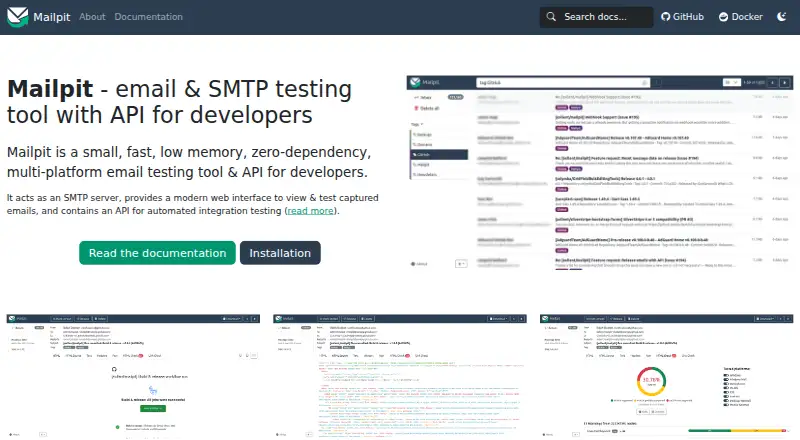
Mailpit is a free, open-source utility for developers who need to test email content and SMTP delivery without sending messages to real email addresses. It runs as a local SMTP server with a web interface and an API for integration testing, and is available for Linux, macOS, Windows, Docker, and self-hosted setups. The interface can display formatted HTML, highlighted source, text, headers, raw messages, and MIME attachments with image thumbnails. Email checks include HTML compatibility comparisons, link checking, optional SpamAssassin scoring, and screenshots. Its REST API can access, search, delete, send, tag, and release messages; webhooks can send message summaries to external services. Messages can also be relayed, automatically forwarded, tagged, or used to trigger configurable SMTP errors. The UI and API can use HTTPS and basic authentication, while SMTP can be configured with authentication and TLS. By default, SMTP listens on port 1025 without encryption or authentication, and Mailpit retains the most recent 500 messages.
Good
- Free and open source
- Displays HTML, source, headers, and attachments
- Includes HTML and link checks
- REST API supports integration testing
- Can trigger configurable SMTP errors
Watch out
- Default SMTP has no encryption or authentication
- Keeps only the latest 500 messages by default
- Optional POP3 exposes only the latest 100 messages
Who it suits
Mailpit suits developers testing email behavior locally or in CI/CD without sending messages to real recipients. Its API, webhooks, and configurable SMTP errors are useful for integration and resilience testing.
Verdict
Mailpit brings message inspection, email checks, and SMTP behavior testing into a local development tool. Its defaults and retention limits are worth considering when setting up a test environment.
Plans and prices
From Mailpit's own pricing page, checked 4 Oct 2026.
| Plan | Price | What it gives you |
|---|---|---|
| Mailpit | Free | Single static binary or multi-architecture Docker images · Default retention: most recent 500 emails |
The facts
Each one read from Mailpit's own pages, with the date it was checked.
What it does
- Automated testing
- Mailpit offers a REST API for integration testing and a Chaos feature that can trigger configurable SMTP errors.checked 4 Oct 2026
- Automation
- Mailpit provides a REST API for accessing, searching, deleting, sending, tagging, and releasing messages.checked 4 Oct 2026
- Capacity and retention
- Mailpit reports SMTP ingestion of 100–200 emails per second depending on system and message factors, and by default prunes messages to keep the most recent 500.checked 4 Oct 2026
- Default SMTP configuration
- By default, SMTP listens on port 1025 without encryption or authentication.checked 4 Oct 2026
- Deployment
- Mailpit runs as a single binary or multi-architecture Docker image, and publishes static binaries for Windows, Linux, and Mac.checked 4 Oct 2026
- Developer features
- The web UI can show formatted HTML, HTML source, text, headers, raw source, and MIME attachments, including image thumbnails.checked 4 Oct 2026
- Email checks
- Mailpit offers HTML email compatibility checks, link checks, SpamAssassin-based spam checks, and HTML message screenshots.checked 4 Oct 2026
- Email rendering security
- The UI applies a strict Content-Security-Policy that blocks remote content other than images, stylesheets, and fonts, and sets a no-referrer policy.checked 4 Oct 2026
- HTML checks
- HTML Check compares messages against more than 175 HTML and CSS checks based on compatibility data from caniemail.com.checked 4 Oct 2026
- Install format
- Mailpit runs as a single binary or multi-architecture Docker image without additional dependencies.checked 4 Oct 2026
- Integrations
- Mailpit can send message-summary webhooks to external services, has been tested with n8n, and has a Cypress package for integration tests.checked 4 Oct 2026
- Intended audience
- Mailpit is described as a development SMTP and email testing tool for developers, including use in CI/CD pipelines.checked 4 Oct 2026
- Intended users
- Mailpit is aimed at developers testing email functionality without sending messages to real email addresses.checked 4 Oct 2026
- Message handling
- Messages can be tagged, relayed through another SMTP server, automatically forwarded, or used to trigger configurable SMTP errors for resilience testing.checked 4 Oct 2026
- Message inspection
- The web UI can display formatted HTML, highlighted HTML source, text, headers, raw source, and MIME attachments with image thumbnails.checked 4 Oct 2026
- Network safety
- Link checking blocks requests to internal networks by default to help prevent server-side request forgery.checked 4 Oct 2026
- Notable limits
- Mailpit keeps the most recent 500 emails by default, and its SMTP server allows up to 100 recipients per message by default.checked 4 Oct 2026
- Other testing tools
- Features include link checking, HTML message screenshots from the web UI, and optional spam scoring through SpamAssassin.checked 4 Oct 2026
- POP3 limit
- The optional POP3 service makes only the latest 100 messages available for performance reasons.checked 4 Oct 2026
- Privacy protections
- The UI uses a strict Content-Security-Policy and a no-referrer policy; tracking images are still allowed.checked 4 Oct 2026
- Project history
- Mailpit was first released on July 30, 2022.checked 4 Oct 2026
- Purpose
- Mailpit is an open-source utility for testing emails and SMTP delivery, with a local SMTP server, web interface, and integration-testing API.checked 4 Oct 2026
The company
- Founded
- 2022checked 28 Sep 2026
Where it runs
- Platform support
- The installation guide provides static binaries for Windows, Linux, and Mac, plus Docker images for 386, amd64, and arm64.checked 4 Oct 2026
The full review of Mailpit
Overview
Mailpit is a free, open-source local SMTP server and email-testing utility for developers. It suits development and CI/CD workflows that need to inspect and exercise email without sending it to real recipients. Its strongest case is the combination of message inspection, rendering checks, and automation; its default unsecured SMTP setup and finite message retention call for deliberate configuration.
Key features
Inspect messages and catch rendering problems
The web interface presents formatted HTML, highlighted HTML source, text, headers, raw source, and MIME attachments, with thumbnails for image attachments. That breadth is useful when a fault could lie in either the rendered message or its underlying structure. HTML Check applies more than 175 HTML and CSS checks based on compatibility data from caniemail.com; link checks and HTML screenshots add practical ways to catch problems before messages reach customers. Optional SpamAssassin-based checks provide another testing signal, but require SpamAssassin.
Exercise delivery and automate tests
Messages can be tagged, relayed through another SMTP server, automatically forwarded, or made to trigger configurable SMTP errors through the Chaos feature. That makes Mailpit useful not just for viewing output but for checking how an application responds to delivery failures. Its REST API supports accessing, searching, deleting, sending, tagging, and releasing messages, which suits repeatable integration tests. Summary webhooks can send message information to external services; Mailpit has been tested with n8n and offers a Cypress package for integration testing.
Deployment, security, and operating limits
Mailpit runs without additional dependencies as a single binary or multi-architecture Docker image, with static binaries for Windows, Linux, and Mac and Docker images for 386, amd64, and arm64. Its reported ingestion rate is 100–200 emails per second, depending on system and message factors. By default it retains only the most recent 500 messages, while optional POP3 exposes only the latest 100. Those limits are sensible for a test inbox, but longer-running or busier environments may need active message management.
The web UI and API support optional HTTPS and basic authentication; SMTP can use authentication and TLS. However, SMTP defaults to port 1025 without encryption or authentication, so teams should review access and network exposure rather than carry development defaults into an environment where other users can connect. The UI's strict Content-Security-Policy blocks remote content other than images, stylesheets, and fonts, and it sets a no-referrer policy; tracking images remain allowed. Link checking blocks requests to internal networks by default, helping reduce server-side request forgery risk.
Pricing
Mailpit is free and open source. Its single plan costs nothing and includes a static binary or multi-architecture Docker images, with default retention of the most recent 500 emails. There is no paid tier to unlock higher retention or additional capabilities, so this is a strong fit for developers who can work within the default cap or manage messages themselves. The plan's defining trade-off is capacity, not a feature paywall.
Platforms
Mailpit supports Linux, macOS, and Windows, as well as web access, an API, and self-hosted deployment. The binary and Docker options make it suitable for local machines and CI/CD environments; the web interface provides the message-inspection surface.
Who it's for
Mailpit is best for developers who need a local destination for application email, want to inspect message content, or need SMTP behavior in integration tests without contacting real email addresses. It is less suited to teams seeking a managed production delivery service or a long-retention inbox without operating their own setup.
Pros and cons
- Pros: Broad message inspection, including raw content and MIME attachments, helps diagnose both formatting and construction issues.
- Pros: HTML, link, screenshot, and optional spam checks cover several common pre-delivery checks in one utility.
- Pros: REST API, webhooks, and configurable SMTP errors support automated tests and failure scenarios.
- Pros: Free, dependency-free binary and Docker deployment work across local development and CI/CD setups.
- Cons: The default 500-message retention and 100-message POP3 window constrain persistent or high-volume test use.
- Cons: SMTP starts without encryption or authentication, so exposed instances need configuration before broader access.
- Cons: Tracking images are still permitted by the UI's remote-content policy.
Alternatives
For a broader comparison, see Email Testing Software. Choose Twilio Segment instead if you want a freemium web, iOS, and Android platform with a free plan that includes 1,000 visitors per month, 500,000 Reverse ETL records per month, two sources, and 700+ integrations. Choose MailSlurp if you need hosted API and web inbox testing with monthly allowances for received emails, sandbox sends, device renders, and inbox placement tests. Emailens is another freemium web, API, and extension option, with 30 simulated previews per day on its free plan.
GlockApps is an alternative with free spam-test credits, DMARC allowances, uptime monitors, and an IP reputation monitor. SMTP Labs offers a free monthly tier with SMTP, IMAP, POP3, API, and email audit, plus seven-day message retention. Mailgun has a free plan that includes 100 emails per day, email APIs and SMTP relay, a custom sending domain, tracking, analytics, webhooks, and an inbound route. Twilio Email Testing offers a 60-day free trial with three email-testing credits, while its Basic plan starts at $15 a month with 10 credits. Inbox Monster is a paid alternative with annual creative and SMS suite plans.
Verdict
Choose Mailpit if you want a free, self-hostable tool that lets developers inspect messages and automate email and SMTP tests before they reach real recipients. Its testing breadth is the main reason to choose it; look elsewhere for managed production delivery, or plan additional configuration and message cleanup if the default security and retention settings do not fit your environment.
Getting started
- Download a static binary for Windows, Linux, or Mac, or use a Docker image.
- Run Mailpit as a local SMTP server.
- Open the web interface to inspect captured messages.
- Connect an integration test to the REST API if needed.
- Configure HTTPS, authentication, or SMTP TLS as appropriate for your setup.
Limits worth knowing
By default, Mailpit retains the most recent 500 emails, permits up to 100 recipients per SMTP message, and listens on port 1025 without encryption or authentication. Optional POP3 makes only the latest 100 messages available.
Questions
Does Mailpit cost anything?
Mailpit is free and open source. Its listed plan costs nothing.
Which platforms can run Mailpit?
Mailpit supports Linux, macOS, and Windows, as well as self-hosted use and Docker. Static binaries and multi-architecture Docker images are available.
Does Mailpit have an API?
Yes. Its REST API can access, search, delete, send, tag, and release messages.
Can Mailpit check spam and links?
Yes. It offers link checks and optional spam scoring through SpamAssassin.
What security options does it support?
The web UI and API can use HTTPS and basic authentication. SMTP can be configured with authentication and TLS.
Who develops Mailpit?
Mailpit is an open-source project first released on July 30, 2022.
Alternatives to Mailpit
- 1

MailSlurp
Free planAndroidiOSWebAPI7.9From $19.99 a month - 2

Mailinator
Free planAndroidWebAPIExtension7.8From $79 a month - 3

Emailens
Free planOpen sourceWebAPIExtensionSelf-hosted7.7From $9 a month - 4

GlockApps
Free planWebAPI7.4From $59 a month - 5

Unspam.email
Free planWebAPI7.4From $5 a month - 6
testmail.app
Free planWebAPI7.3From $9 a month