
edu-sharing
edu-sharing connects learning platforms and educational software so organizations can share learning content, metadata, and tools across systems.
What edu-sharing is
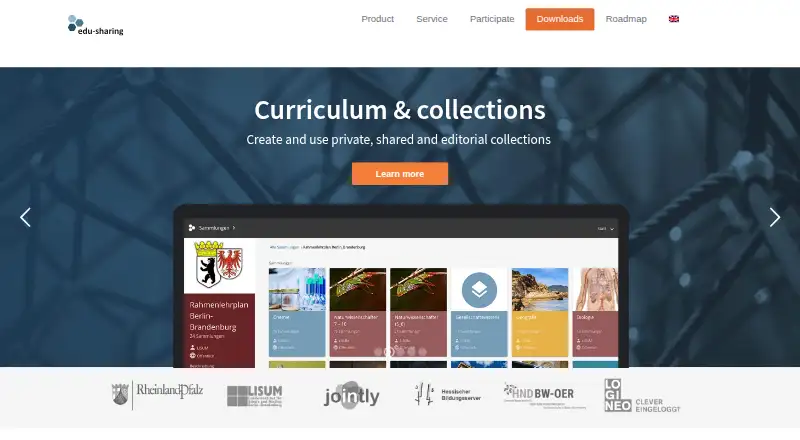
edu-sharing connects learning platforms and educational software so organizations can share learning content, metadata, and tools across systems. It combines an educational cloud, an OER search solution, and cloud storage for learning materials, tools, and didactical scenarios. Users can make private, shared, and editorial collections and set permissions for their use.
Listed plug-ins cover Moodle, ILIAS, MediaWiki, TYPO3, and OpenOLAT, with connectors for OnlyOffice and ONYX Editor. Identity management can connect to LDAP, Shibboleth, and SSO, and the product provides a REST API based on the OpenAPI Specification. Organizations can install it on their own servers and adapt it to their requirements. A protected safe area adds a second password and role- or permission-based access controls. Configurable upload filters can check file contents and extensions to block disguised file types. edu-sharing is open source and free to download; service partners offer hosting, installation, configuration, updates, training, and support. Its Android and iOS app requires an accessible repository with rendering service and an account.
Good
- Open-source product available free to download.
- Supports private, shared, and editorial collections.
- Connects to LDAP, Shibboleth, and SSO.
- Offers a REST API based on OpenAPI Specification.
- Android and iOS app is available.
Watch out
- Mobile app requires an accessible repository and rendering service.
- Mobile app use requires an account.
- Support and services are offered through service providers and development partners.
Who it suits
It suits schools, universities, public authorities, businesses, and associations that need to connect learning systems and manage shared learning materials. It is also relevant to organizations that want a self-hosted installation.
Verdict
edu-sharing combines content sharing, educational search, cloud storage, integrations, and self-hosting. Organizations should account for the repository requirements for mobile access and arrange support through service partners.
Plans and prices
From edu-sharing's own pricing page, checked 30 Sep 2026.
| Plan | Price | What it gives you |
|---|---|---|
| edu-sharing Open Source | Free | Open-source product and materials available for free download · Support and services offered through service providers and development partners |
The facts
Each one read from edu-sharing's own pages, with the date it was checked.
What it does
- API
- edu-sharing provides a REST API based on the OpenAPI Specification.checked 30 Sep 2026
- Collections
- Users can create private, shared, and editorial collections and control who has permission to use them.checked 30 Sep 2026
- Core uses
- The product is an educational cloud, an OER search solution, and cloud storage for managing and sharing learning materials, tools, and didactical scenarios.checked 30 Sep 2026
- Deployment
- The download page offers Docker images and downloads for the repository and rendering service, including version 10.0 RC.checked 30 Sep 2026
- File protection
- The maker's documentation says configurable upload filters check file content and extensions and can block disguised file types.checked 30 Sep 2026
- Identity management
- The product can connect to LDAP, Shibboleth, and SSO for mapping users, groups, and organizations.checked 30 Sep 2026
- Integrations
- The maker lists plug-ins for Moodle, ILIAS, MediaWiki, TYPO3, and OpenOLAT, and connectors for OnlyOffice and ONYX Editor.checked 30 Sep 2026
- Intended users
- The maker describes service offerings for schools, universities, public authorities, businesses, and associations.checked 30 Sep 2026
- Purpose
- edu-sharing connects learning platforms and educational software so users can share learning content, metadata, and tools across connected systems.checked 30 Sep 2026
- Security feature
- The safe is an additional secured area for protected materials, with a second password and access controls based on roles or permissions.checked 30 Sep 2026
- Self-hosting
- The maker says edu-sharing can be installed on an organization's own servers and adapted to its requirements.checked 30 Sep 2026
- Support
- Service partners offer hosting, installation, configuration, updates, training, and support.checked 30 Sep 2026
Where it runs
- Mobile app
- The app page says the app supports Android and iOS smartphones and tablets and requires an accessible edu-sharing repository with rendering service and an account.checked 30 Sep 2026
The full review of edu-sharing
edu-sharing is an open-source platform for organizations that need educational materials to move between learning systems. It suits schools and other institutions that can manage a repository or work with a service partner. Its breadth is useful, but mobile access depends on a properly configured repository and rendering service.
Overview
edu-sharing brings together educational cloud storage, search for open educational resources, and tools for managing and sharing learning materials, metadata, and didactical scenarios. Its strongest case is connecting existing learning platforms rather than replacing them: content and tools can be shared across connected systems.
Private, shared, and editorial collections let teams organize materials and control who may use them. Version history, content reuse, approval workflows, learning-standard support for SCORM and xAPI, and role permissions make it relevant to organizations with ongoing content governance needs, not just one-off file exchange.
Organizations can install the platform on their own servers and adapt it to their requirements. That control comes with operational responsibility: mobile use requires an accessible repository with a rendering service and an account, while service partners can handle hosting, installation, configuration, updates, training, and support.
Key features
- Collections and governance: Private, shared, and editorial collections have configurable permissions. Version history and approval workflows help teams manage reuse and review rather than circulate untracked copies.
- Connected learning tools: Plug-ins cover Moodle, ILIAS, MediaWiki, TYPO3, and OpenOLAT; connectors are available for OnlyOffice and ONYX Editor. This is most useful where an organization already uses one or more of those systems.
- Identity and access: LDAP, Shibboleth, and SSO connections can map users, groups, and organizations. The safe adds a separately secured area for protected materials, using a second password and role- or permission-based access controls.
- Developer and deployment options: A REST API based on the OpenAPI Specification supports integration work. Docker images and downloads for the repository and rendering service are offered, including version 10.0 RC; the ability to self-host and adapt the platform favors organizations with technical capacity or partner support.
- File safeguards: Configurable upload filters check file contents and extensions and can block files disguised as another type. This adds a useful control around shared uploads, though it does not remove the need for an organization’s own access and content policies.
- Mobile access: Android and iOS apps support smartphones and tablets, but they are not a standalone route into the service: users need an account and an accessible repository with its rendering service.
Pricing
edu-sharing Open Source — free. The open-source product and materials are available for free download. There are no stated seat or storage caps for this plan. Support and services are offered through service providers and development partners, so organizations needing implementation, hosting, updates, or training should plan to arrange those services separately. The free plan is the natural fit for technically capable institutions that can operate the software themselves; others can use service partners while retaining the open-source option.
Platforms
edu-sharing supports web, Android, iOS, API, and self-hosted deployment. The web and API options suit connected systems and custom integrations, while mobile access depends on the organization's repository and rendering service being accessible. Self-hosting offers control over installation and adaptation, with the corresponding need to manage deployment and ongoing operation or contract a partner.
Who it's for
The maker describes services for schools, universities, public authorities, businesses, and associations. The best fit is an organization that manages reusable learning resources across platforms, values permission controls and approval workflows, and has the technical capacity or partner support to maintain its repository. It is a weaker fit for individuals or small teams seeking a ready-to-use mobile library without an institutional repository behind it.
Pros and cons
- Pro — Broad learning-system connectivity: Named plug-ins and connectors, plus a REST API, make it suited to institutions linking content across established tools.
- Pro — Control over protected and shared content: Collection permissions, role controls, the safe, version history, and approval workflows support structured content management.
- Pro — Free, self-hostable open source: Organizations can download and adapt the platform without a license charge.
- Con — Mobile access has infrastructure prerequisites: The apps require an accessible repository, rendering service, and account, so they do not remove the need to operate or arrange the backend.
- Con — Support is partner-based: Organizations that need assistance must arrange it through service providers or development partners rather than rely on included support.
Alternatives
Browse more options in Learning Content Management Systems.
- Edlib is worth comparing if you want a self-hosted, web-based option with a free GPL 3.0-licensed plan and a free trial; it also offers a Teams plan at 23.00 USD per.
- eXact LCMS may suit organizations seeking an off-the-shelf platform with hosted or on-premises deployment and parametric settings, plus a free trial.
- LON-CAPA is another free option, with web and Linux platforms.
- WalkMe is a paid alternative spanning web, desktop, mobile, and extension platforms; its Digital Adoption Platform customer plan requires a quote.
- MadCap Flare is a paid, Windows and web option with a free trial; its Starter desktop plan is $3,150 a year.
- BLX LXMS is a paid, self-hosted and web alternative whose Starter plan includes interactive content, unrestricted editorial access, and support.
- CloudLCMS offers a web-based custom plan tailored to goals and scale, with a free trial.
- Instancy LCMS is a paid Android, iOS, and web alternative with a free trial and custom subscription pricing based on user count, modules, implementation, and learning needs.
Verdict
Choose edu-sharing if your school, university, or other organization needs a free, adaptable hub for sharing educational content across connected systems, and can operate or arrange the repository infrastructure. Its combination of integrations, governance, and open-source deployment is the main reason to choose it. Look elsewhere if you need mobile access without backend setup or support included as part of the product.
Getting started
- Download the repository and rendering service, or use the available Docker images.
- Install edu-sharing on your organization's own servers, or arrange installation through a service partner.
- Connect relevant learning platforms or software using the listed plug-ins and connectors.
- Set up identity connections such as LDAP, Shibboleth, or SSO if needed.
- For the mobile app, ensure an accessible repository with rendering service and an account.
Questions
How much does edu-sharing cost?
The edu-sharing Open Source plan costs nothing. Support and services are offered through service providers and development partners.
Is edu-sharing open source?
Yes. The product is open source, and materials are available for free download.
Which platforms does it support?
The listed platforms are Android, iOS, web, API, and self-hosted deployment.
Which integrations are listed?
Plug-ins are listed for Moodle, ILIAS, MediaWiki, TYPO3, and OpenOLAT; connectors are listed for OnlyOffice and ONYX Editor.
Can an organization host edu-sharing itself?
Yes. The maker says it can be installed on an organization's own servers and adapted to its requirements.
What does the mobile app require?
The Android and iOS app requires an accessible edu-sharing repository with rendering service and an account.
Alternatives to edu-sharing
- 1
AContent
Free planOpen sourceWebAPILinuxmacOS7.5Free plan - 2
LCMS Cloud
Free planWebSelf-hosted7.3From 1,490,000 IDR a year - 3
dominKnow ONE
AndroidiOSWebAPI7.2 - 4
SyberWorks Training Center
AndroidiOSWeb6.9 - 5
Edlib
Free planWebSelf-hosted6.6From $23 a month - 6

Edu-Suite CMS
Free planWebAPI6.5From €249 a month