EDExpress
EDExpress is a Windows PC application provided at no charge to institutions processing Title IV student financial aid records.
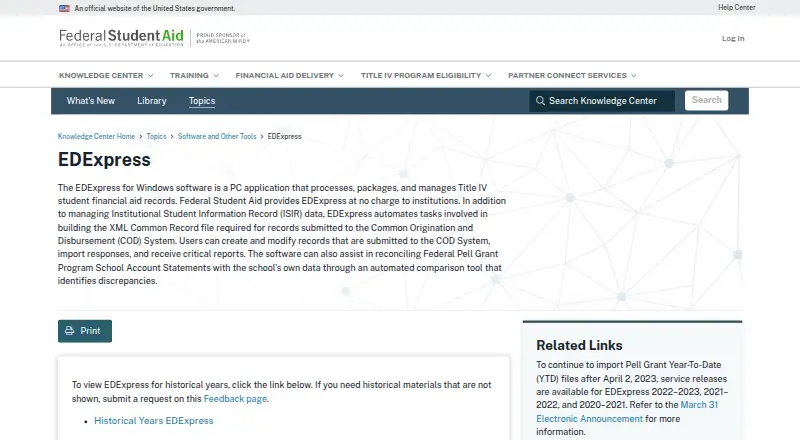
What EDExpress is
EDExpress is a Windows PC application provided at no charge to institutions processing Title IV student financial aid records. It processes, packages, and manages aid records, including Institutional Student Information Record (ISIR) data. For Common Origination and Disbursement (COD) workflows, it can build the required XML Common Record file, create or modify records, import responses, and produce reports. An automated comparison tool helps reconcile Federal Pell Grant School Account Statements against a school’s data and identify discrepancies. The 2027–28 release includes Global, Application Processing, Packaging, and College Financing Plan functionality. For Release 1.0, Packaging and College Financing Plan are optional, while Global and Application Processing install automatically. EDExpress 2027–28 requires Microsoft SQL Server 2019 or newer; it does not support other database systems or install SQL Server itself. Workstations in an office can connect to a shared database hosted in an organization’s SQL Server environment. The software is offered as a single-file full download, with installation guidance in its Windows Installation Guide.
Good
- Provided at no charge to institutions
- Automates COD record creation and response imports
- Includes Pell statement reconciliation
- Supports office workstations using a shared database
Watch out
- Requires Microsoft SQL Server 2019 or newer
- Does not support other database systems
- Organizations must secure the SQL Server environment
- Available on Windows
Who it suits
EDExpress suits institutions managing federal Title IV aid records, including schools handling ISIR data, COD submissions, and Pell Grant reconciliation. Organizations need an SQL Server 2019 or newer environment for the 2027–28 release.
Verdict
EDExpress provides no-charge workflows for processing, packaging, and reconciling federal student aid records. Its SQL Server requirement and the need to secure the database environment are important deployment considerations.
Plans and prices
From EDExpress's own pricing page, checked 4 Oct 2026.
| Plan | Price | What it gives you |
|---|---|---|
| EDExpress for Windows | Free | Provided at no charge to institutions |
The facts
Each one read from EDExpress's own pages, with the date it was checked.
What it does
- 2027–28 modules
- The 2027–28 release includes Global, Application Processing, Packaging, and College Financing Plan functionality.checked 4 Oct 2026
- Audience
- The Department describes EDExpress as software provided at no charge to institutions for processing Title IV student financial aid records.checked 4 Oct 2026
- COD records
- EDExpress automates building the XML Common Record file required for records submitted to the Common Origination and Disbursement (COD) System.checked 4 Oct 2026
- COD workflow
- Users can create and modify records submitted to COD, import responses, and receive reports.checked 4 Oct 2026
- Download
- The 2027–28 software is offered as a single-file full download, with installation guidance provided in an Installation Guide for EDExpress for Windows.checked 4 Oct 2026
- Integration
- EDExpress 2027–28 requires Microsoft SQL Server 2019 or newer and does not support other database systems or install SQL Server itself.checked 4 Oct 2026
- ISIR data
- The software manages Institutional Student Information Record (ISIR) data.checked 4 Oct 2026
- Network use
- EDExpress can connect workstations in an office to a shared database hosted in the organization's SQL Server environment.checked 4 Oct 2026
- Optional functionality
- For Release 1.0, Packaging and College Financing Plan can be selected or omitted, while Global and Application Processing install automatically.checked 4 Oct 2026
- Passwords
- New EDExpress 2027–28 passwords must be at least 12 characters and contain uppercase and lowercase letters, a number, and a non-alphanumeric keyboard character.checked 4 Oct 2026
- Pell reconciliation
- An automated comparison tool helps reconcile Federal Pell Grant Program School Account Statements against a school's data and identify discrepancies.checked 4 Oct 2026
- Purpose
- EDExpress is a PC application that processes, packages, and manages Title IV student financial aid records.checked 4 Oct 2026
- Security
- For EDExpress 2027–28, the Department says organizations must properly secure the SQL Server environment hosting student data and notes that SQL Server Express has limited security features compared with Standard or Enterprise.checked 4 Oct 2026
- Support
- The FPS Help Desk supports EDExpress by phone at 800-330-5947 and email at [email protected], with listed office hours of 8 a.m. to 8 p.m. Eastern, Monday through Friday.checked 4 Oct 2026
The full review of EDExpress
EDExpress is a Windows application for processing and managing federal Title IV student aid records. It is best suited to institutions that need federal-aid workflows at no software charge and can operate a secure SQL Server environment. Its focused federal scope is a strength, but the database requirement makes deployment a real institutional responsibility.
Overview
EDExpress covers ISIR data, aid packaging, COD record workflows, and Pell Grant reconciliation. Users can build XML Common Record files for the COD System, create or modify submitted records, import responses, and receive reports. An automated comparison helps schools reconcile Pell School Account Statements against their own data and spot discrepancies.
The 2027–28 release groups functionality into Global, Application Processing, Packaging, and College Financing Plan modules. Global and Application Processing install automatically; Packaging and College Financing Plan can be included or omitted in Release 1.0. That choice helps institutions limit the installed functionality to what they need, while keeping the core modules in place.
Key features
- ISIR and application processing: Manages Institutional Student Information Record data, making it a federal-aid processing tool rather than a general student information platform.
- COD workflows: Builds the required XML Common Record file and supports record changes, response imports, and reporting. This gives staff a defined path through COD submissions and returned information.
- Pell reconciliation: Compares federal Pell account statements with school data to identify discrepancies, a practical safeguard for reconciliation work.
- Packaging and financing plan functions: The 2027–28 release includes these capabilities, with both optional at installation for Release 1.0.
Pricing
| Plan | Price | What it suits |
|---|---|---|
| EDExpress for Windows | free | Institutions processing Title IV federal student aid records |
The software is provided at no charge to institutions, and there is no free trial because the plan is free. The no-cost license is a meaningful advantage for schools with federal-aid needs, but it does not remove the operational cost of hosting and securing the required database environment.
Platforms
EDExpress runs on Windows and is deployed on-premises. The 2027–28 release requires Microsoft SQL Server 2019 or newer; it does not support other database systems and does not install SQL Server. Workstations in an office can connect to a shared database in an organization’s SQL Server environment, which supports a shared workflow but makes database administration and security part of the institution’s deployment.
The Department cautions that SQL Server Express has fewer security features than Standard or Enterprise. New 2027–28 passwords must be at least 12 characters and include uppercase and lowercase letters, a number, and a non-alphanumeric keyboard character. The software is distributed as a single-file full download, with installation guidance in an Installation Guide for EDExpress for Windows. FPS Help Desk support is available by phone at 800-330-5947 and email at [email protected], 8 a.m. to 8 p.m. Eastern, Monday through Friday.
Who it's for
EDExpress fits institutions that process federal Title IV aid and want no-charge tools for application processing, packaging, COD records, and Pell reconciliation. Its on-premises Windows setup suits organizations able to provide SQL Server 2019 or newer and protect the student-data environment. It is a weaker fit for schools seeking a broader platform, a different database, or a deployment that does not depend on local database operations.
Pros and cons
- Pro: No software charge for institutions keeps the cost of federal-aid processing tools low.
- Pro: COD record creation, response handling, reporting, and Pell reconciliation address concrete federal processing and reconciliation workflows.
- Pro: Optional Packaging and College Financing Plan installation lets Release 1.0 deployments omit those modules when they are not needed.
- Con: SQL Server 2019 or newer is mandatory, and other database systems are unsupported; institutions without that environment must account for deployment work before choosing it.
- Con: Student-data security rests on the organization’s SQL Server environment, with SQL Server Express carrying fewer security features than Standard or Enterprise.
- Con: Windows-only, on-premises deployment is limiting for institutions seeking cross-platform or cloud-first access.
Alternatives
For a broader shortlist, see Financial Aid Management Software.
- Portico CORE is a paid alternative with per-student pricing that scales with the school, and Android, iOS, web, and API platforms.
- ProSAM Solution Suite is a paid option with Linux, Windows, web, and self-hosted platforms; pricing is by quote.
- Ellucian PowerCampus Financial Aid is a paid web and Windows alternative.
- VIAS Financial Plans is a paid alternative with Android, iOS, web, and API platforms.
- Oracle NetSuite for Government is a paid option with Android, iOS, web, and API platforms.
- Populi Financial Aid has a free trial and supports Linux, macOS, web, and Windows; its Populi plan is $1,999 a month, billed month-to-month.
- PowerFAIDS is a paid alternative with web and API platforms and pricing on request.
- CoreCampus is a paid web and API platform whose monthly pricing is based on a school’s average annual FTE students.
Verdict
Choose EDExpress if your institution handles federal Title IV aid, wants no-charge processing and reconciliation workflows, and can securely manage the required SQL Server environment. Its federal focus and practical COD and Pell tools make a strong case for that audience. Look elsewhere if your priority is a non-Windows or non-SQL Server deployment, or a broader platform beyond federal aid processing.
Getting started
- Download the 2027–28 single-file software package from the EDExpress website.
- Read the Installation Guide for EDExpress for Windows.
- Provide a Microsoft SQL Server 2019 or newer environment; EDExpress does not install it.
- Select whether to include Packaging and College Financing Plan in Release 1.0; Global and Application Processing install automatically.
- For office network use, connect workstations to the shared database in the organization’s SQL Server environment.
- Set new passwords with at least 12 characters, including uppercase and lowercase letters, a number, and a non-alphanumeric character.
Limits worth knowing
EDExpress is provided at no charge, but the 2027–28 release requires Microsoft SQL Server 2019 or newer and supports no other database system. In Release 1.0, Packaging and College Financing Plan are optional; Global and Application Processing install automatically.
Questions
How much does EDExpress cost?
It is provided at no charge to institutions.
Which operating system does it support?
EDExpress is a Windows PC application.
What database does EDExpress require?
The 2027–28 release requires Microsoft SQL Server 2019 or newer. It does not support other database systems or install SQL Server.
What does the 2027–28 release include?
It includes Global, Application Processing, Packaging, and College Financing Plan functionality. In Release 1.0, Packaging and College Financing Plan can be omitted; the other two install automatically.
Can multiple office workstations use a shared database?
Yes. EDExpress can connect office workstations to a shared database hosted in the organization’s SQL Server environment.
How can users contact support?
The FPS Help Desk offers phone support at 800-330-5947 and email support at [email protected], from 8 a.m. to 8 p.m. Eastern, Monday through Friday.
Alternatives to EDExpress
- 1
Ellucian Banner Finance
AndroidiOSWebAPI7.4From £335,000 a year - 2

Populi Financial Aid
WebLinuxmacOSWindows6.8From $1,999 a month - 3
Workday Student Admissions
AndroidiOSWebAPI6.7 - 4
VIAS Financial Plans
AndroidiOSWebAPI6.6 - 5
Anthology Student Verification
AndroidiOSWeb6.4 - 6
Portico CORE
AndroidiOSWebAPI6.4