
Echo Live
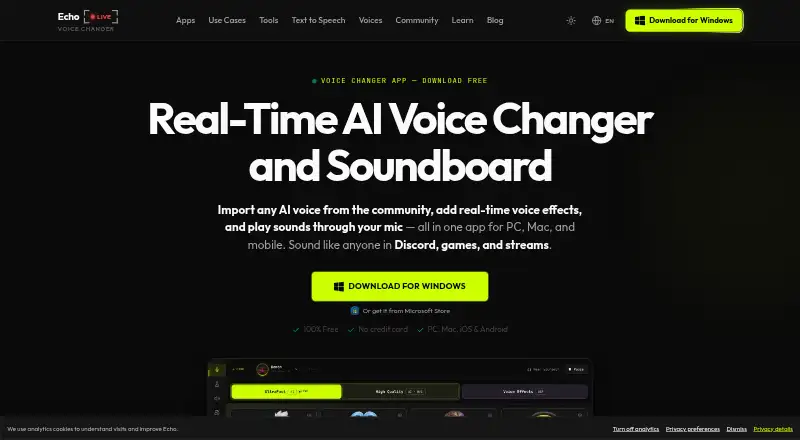
Echo Live changes microphone audio in real time using AI voice conversion and digital signal processing.
What Echo Live is
Echo Live changes microphone audio in real time using AI voice conversion and digital signal processing. Its desktop app includes AI voices, live effects, a soundboard, and Voice Lab for making custom effects. The soundboard accepts WAV, MP3, OGG, and FLAC files, with reusable boards and hotkeys for individual sounds. Changed audio can pass through a virtual microphone or cable to apps such as Discord, games, OBS, Zoom, and Google Meet. Echo Lite, the Chrome extension, processes voice effects, AI voices, and soundboard mixing on-device and can connect to supported calling websites. Separate iOS and Android apps offer speech-to-speech conversion, text-to-speech, and voice effects. Echo supports DirectML GPU acceleration on Windows and CoreML acceleration on Apple Silicon Macs. The maker says microphone processing runs locally and voice audio is not sent to its servers; it also describes encryption for account data and HTTPS/TLS for browser-to-server transmissions. The Echo Live Free plan is listed as free and includes an AI voice library, a daily free UltraFast voice, real-time effects, and the soundboard. The maker says all features are free during Alpha, while reserving the right to add paid tiers, subscriptions, or feature limits later.
Good
- Changes microphone audio in real time.
- Soundboard imports four listed audio formats.
- Virtual microphone routes audio to supported apps.
- Maker says microphone processing runs locally.
- Free plan includes voices, effects, and soundboard.
Watch out
- Maker may introduce paid tiers or feature limits.
- Echo Lite is a Chrome extension.
- Some Echo Pro features have no listed price.
Who it suits
It suits gamers, streamers, creators, and people using voice chat or calls who want real-time voice effects. The desktop, browser extension, and separate mobile apps offer different ways to use voice features.
Verdict
Echo Live combines real-time voice conversion with a soundboard and options for desktop, browser, and mobile use. Its stated free Alpha access may change, so review the current plan details before relying on specific features.
Plans and prices
From Echo Live's own pricing page, checked 7 Oct 2026.
| Plan | Price | What it gives you |
|---|---|---|
| Echo Live Free | Free | Included AI voice library · daily free UltraFast voice · real-time voice effects · built-in soundboard |
| Echo Pro | Priced on request | Custom RVC model imports · full UltraFast voice selection · more voice collection capacity · regional price shown before checkout |
The facts
Each one read from Echo Live's own pages, with the date it was checked.
Where it runs
- Browser extension
- Echo Lite is a Chrome extension that processes voice effects, AI voices, and soundboard mixing on-device and can connect to supported calling websites.checked 7 Oct 2026
- Mobile apps
- The maker also operates separate Echo mobile apps for iOS and Android with speech-to-speech conversion, text-to-speech, and voice effects.checked 7 Oct 2026
- Platforms
- Echo Live desktop supports 64-bit Windows 10 or later and Apple Silicon Macs running macOS 13 or later; Intel Macs are not supported.checked 7 Oct 2026
The company
- Company
- The product is operated by Escalera Labs S.L., which the privacy policy says is based in Spain.checked 7 Oct 2026
- Headquarters
- Spainchecked 28 Sep 2026
What it does
- Integrations
- Echo routes changed audio through a virtual microphone or cable for use in apps such as Discord, games, OBS, Zoom, and Google Meet.checked 7 Oct 2026
- Intended users
- The maker describes Echo Live for gamers, streamers, creators, and people using voice chat or calls.checked 7 Oct 2026
- Performance
- Echo supports DirectML GPU acceleration on Windows and CoreML acceleration on Apple Silicon Macs.checked 7 Oct 2026
- Pricing caveat
- The maker says all features are free during the Alpha period and reserves the right to introduce paid tiers, subscriptions, or feature limits later.checked 7 Oct 2026
- Privacy
- The maker says microphone voice processing runs locally and voice audio is not sent to its servers.checked 7 Oct 2026
- Security
- The maker says account data is encrypted at rest and in transit, and browser-to-server transmissions use HTTPS/TLS.checked 7 Oct 2026
- Soundboard
- The soundboard supports WAV, MP3, OGG, and FLAC imports, reusable boards, and per-sound hotkeys.checked 7 Oct 2026
- Support
- The support page offers email support with a stated reply time within 24 hours and a Discord community for faster help.checked 7 Oct 2026
- Voice features
- The desktop app includes AI voices, real-time effects, a soundboard, and Voice Lab for creating custom effects.checked 7 Oct 2026
- What it does
- Echo Live changes microphone audio in real time using AI voice conversion and digital signal processing.checked 7 Oct 2026
The full review of Echo Live
Echo Live is a cross-platform voice tool for people who want AI-altered speech, effects, and soundboard cues in calls, games, or streams. It fits gamers, streamers, creators, and frequent voice-chat users best. The combination of local processing and flexible audio routing is its strongest case, while the Alpha-era free terms make long-term planning less certain.
Overview
Echo Live applies AI voice conversion and digital signal processing to microphone input in real time, and it can also change recorded audio and export audio files. Its desktop application brings AI and character voices together with live effects, a soundboard, and Voice Lab for building custom effects. A virtual microphone or cable routes the result into Discord, games, OBS, Zoom, and Google Meet, so it serves both entertainment and production workflows.
The maker says microphone voice processing stays on the device and voice audio is not sent to its servers. It also states that account data is encrypted at rest and in transit, with HTTPS/TLS for browser-to-server traffic. Email support targets replies within 24 hours, and a Discord community is offered for quicker assistance.
Key features
Voices, effects, and soundboard
Desktop users get an AI voice library, character voices, real-time effects, and Voice Lab for custom effect creation. The soundboard accepts WAV, MP3, OGG, and FLAC files, lets you reuse boards, and assigns a hotkey to each sound. That is a practical arrangement for recurring stream cues, role-play lines, and game-session reactions because playback does not require repeatedly opening a control panel.
Routing and acceleration
Virtual microphone and cable output make Echo usable in mainstream calling and broadcast software rather than limiting it to its own interface. Windows users can use DirectML GPU acceleration, while Apple Silicon Macs can use CoreML acceleration; compatible hardware can therefore take more of the processing load. Recorded-audio conversion and export broaden its use to prepared clips as well as live speech.
Browser and mobile options
Echo Lite is a Chrome extension that processes effects, AI voices, and soundboard mixing on-device and connects to supported calling websites. Separate iOS and Android apps add speech-to-speech conversion, text-to-speech, and voice effects. These are useful alternatives when a desktop installation is impractical, although the experience is divided among separate products rather than presented as one identical client.
Pricing
Echo Live uses a freemium model. Echo Live Free costs nothing and includes the AI voice library, one daily free UltraFast voice, real-time voice effects, and the built-in soundboard. It is the sensible starting point for casual callers and streamers who can work within a rotating or limited UltraFast selection.
Echo Pro has custom pricing, with the regional price shown before checkout. It adds custom RVC model imports, the full UltraFast voice selection, and greater voice-collection capacity. That plan is aimed at creators or power users who need their own models or a larger permanent library; the free tier gives up those capabilities.
The maker says every feature is free during Alpha and may later introduce paid tiers, subscriptions, or feature limits. The stated free offer also includes a 3-day trial, so anyone building a workflow around unrestricted access should check the current terms before committing.
Platforms
Echo Live supports Android, iOS, macOS, Windows, and a Chrome extension, giving it unusually broad coverage for a voice changer. Desktop routing is the strongest fit for Discord, games, OBS, Zoom, and Meet; the extension is better for supported browser calls, while mobile apps target speech-to-speech, text-to-speech, and effects on phones.
Who it's for
Choose Echo Live if you need live AI or character voices plus a hotkey-driven soundboard and want to feed the output into several communication or streaming apps. It is especially suitable for streamers and role-play gamers who also edit or export audio. It is less suitable for someone seeking a single uniform interface across every device, or a guaranteed permanent free plan.
Pros and cons
- Pros: Local microphone processing addresses a central privacy concern; virtual microphone and cable routing works across chat, meeting, gaming, and broadcast software; broad file import and per-sound hotkeys make the soundboard reusable; desktop, browser, and mobile choices cover different setups.
- Cons: Echo Pro pricing is custom, and Alpha terms allow future subscriptions or limits; the free plan has a daily UltraFast voice allowance rather than the complete selection; features are split between desktop, Echo Lite, and separate mobile apps.
Alternatives
For a wider shortlist, see Game Voice Changers, AI Voice Changer Software, and Voice Changer Software.
- Voice.ai is a better fit if you want 5,000 monthly credits, online voice changing, text to speech, and audio tools in a free plan.
- EaseUS VoiceWave suits users who prefer four free effects or a clearly priced $14.95 a month Individual plan with auto-renewal.
- FineShare VoiceTrans is preferable for five daily free effects, community voices, and ten custom voices.
- iMyFone MagicMic offers five free voices daily alongside basic memes, effects, recordings, and audio files.
- Dubbing AI provides at least ten rotating voices daily, with all characters unlocked by subscription.
- FineVoice AI Voice Changer is aimed at users needing monthly text-to-speech and voice-change quotas plus professional voice clones.
- Altered Real-Time Pro is a narrower desktop choice with 20 minutes of daily processing and four daily Voice Skins on its free plan.
- Figaro is a free GPL-3.0 open-source project.
Verdict
Echo Live is a strong choice for gamers, streamers, and callers who want real-time AI conversion, dependable app routing, and a capable soundboard across desktop and mobile ecosystems. Its local processing and custom-effect options are compelling. Look elsewhere if you need fixed long-term pricing, unrestricted voice access, or one consistent experience on every platform.
Alternatives to Echo Live
- 1
Voice.ai
Free planAndroidiOSWebAPI8.3From $5 a month - 2
BadloVoice
Free planOpen sourceAndroidiOSWebAPI7.9Free plan - 3

FineVoice AI Voice Changer
Free planWebAPImacOSWindows7.8Free plan - 4
EaseUS VoiceWave
Free planAndroidiOSWebWindows7.6From $24.97 a year - 5
iMyFone MagicMic
Free planAndroidiOSmacOSWindows7.5From $45.99 a year - 6
FineShare VoiceTrans
Free planiOSWebmacOSWindows7.4$5.99 one-time