e@syFile Employer
e@syFile Employer is free Windows software from SARS for employers and payroll administrators managing tax affairs.
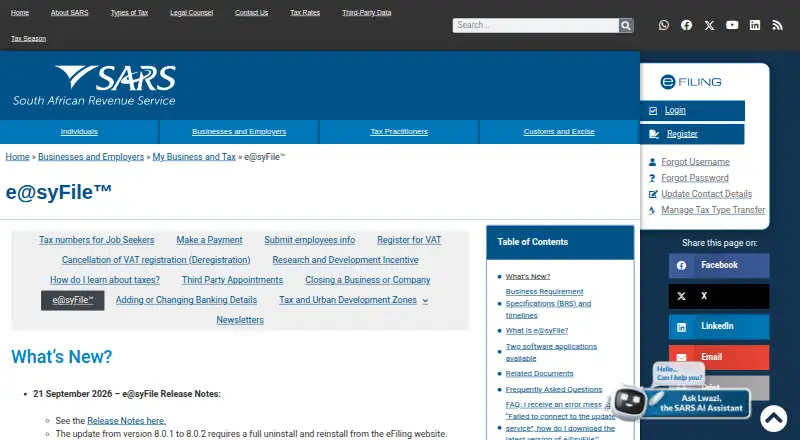
What e@syFile Employer is
e@syFile Employer is free Windows software from SARS for employers and payroll administrators managing tax affairs. It supports completing, submitting, and revising Monthly Employer Declarations (EMP201) and Employer Reconciliation Declarations (EMP501). The software also provides tools for managing an Employer Account and Third Party Appointments (AA88s), and an Income Tax Registration function for registering employees. Tax certificate imports and EMP501 data capture can be done offline, but submitting information to SARS requires an internet connection. SARS describes the software as linked to eFiling, with submissions sent to SARS through the service. Its listed tax capabilities include filing, form preparation, reconciliation, and year-end forms; tax payment support is not included. Minimum system requirements listed for download are Windows 10 (64 bit), 8 GB RAM, and 2 GB of hard drive space. SARS advises backing up current PAYE information before installing, as installation may delete current information. Backups made in old e@syFile Flex cannot be restored in the new e@syFile TC application, so users should consider that limitation when preparing to move to the new application.
Good
- Free software for Windows.
- Supports EMP201 and EMP501 declarations.
- Offline tax certificate imports and EMP501 data capture.
- Includes employee income-tax registration.
Watch out
- Submission to SARS requires internet access.
- Does not support tax payments.
- Requires Windows 10 (64 bit), 8 GB RAM, and 2 GB storage.
- Old e@syFile Flex backups cannot be restored in the new TC application.
Who it suits
e@syFile Employer is for employers and payroll administrators who handle EMP201 and EMP501 declarations. It suits users who need employee registration and employer-account tools on Windows.
Verdict
e@syFile Employer covers employer declarations, reconciliation, and related account tasks without a software fee. Back up current PAYE information before installation and note the stated backup incompatibility when moving from the old Flex application.
Plans and prices
From e@syFile Employer's own pricing page, checked 7 Oct 2026.
| Plan | Price | What it gives you |
|---|---|---|
| e@syFile™ Employer | Free | Free software · Windows 10 (64 bit) · 8 GB RAM · 2 GB hard drive space |
The facts
Each one read from e@syFile Employer's own pages, with the date it was checked.
What it does
- Backup guidance
- SARS advises users to back up current PAYE information before installing because installation may delete current information.checked 7 Oct 2026
- Download and requirements
- The download page lists Windows 10 (64 bit), 8 GB RAM, and 2 GB of hard drive space as minimum system requirements.checked 7 Oct 2026
- EMP201
- Employers can complete, submit, and revise Monthly Employer Declarations (EMP201).checked 7 Oct 2026
- EMP501
- Employers can complete, submit, and revise Employer Reconciliation Declarations (EMP501).checked 7 Oct 2026
- Employee registration
- An Income Tax Registration (ITREG) function lets employers register employees.checked 7 Oct 2026
- Employer account
- The software includes tools to manage the Employer Account.checked 7 Oct 2026
- Integration
- SARS describes e@syFile as linked to eFiling, and submissions are sent to SARS through the service.checked 7 Oct 2026
- Intended users
- SARS identifies employers and payroll administrators as users of e@syFile Employer.checked 7 Oct 2026
- Notable limit
- The download page warns that backups made in old e@syFile Flex cannot be restored in the new e@syFile TC application.checked 7 Oct 2026
- Offline work
- Tax certificate imports and EMP501 data capture can be done offline, with an internet connection needed to submit to SARS.checked 7 Oct 2026
- Purpose
- SARS says the software helps employers and payroll administrators manage their tax affairs.checked 7 Oct 2026
Where it runs
- Third-party appointments
- Employers can manage Third Party Appointments (AA88s) in the software.checked 7 Oct 2026
The full review of e@syFile Employer
e@syFile Employer is SARS software for employers and payroll administrators managing South African employer-tax workflows. It is best for organizations that need the specified declarations, reconciliation and registration functions at no software cost, rather than a complete payroll or payment system. The free Windows application is a practical compliance tool, provided installation and backup precautions fit your environment.
Overview
This is a focused employer-tax application covering recurring submissions, reconciliation and account administration. It prepares tax forms, supports reconciliation and year-end forms, and sends submissions to SARS through its link with eFiling. It does not support tax payments, so employers needing payroll disbursement or payment processing must use another service alongside it.
Key features
Employers can complete, submit and revise Monthly Employer Declarations (EMP201), then handle Employer Reconciliation Declarations (EMP501) in the same application. That combination suits routine monthly reporting and year-end reconciliation, with revision capability useful when submitted information needs correction.
Tax certificate imports and EMP501 data capture can be performed offline. This allows preparation work to continue without connectivity, although an internet connection is still required when sending submissions to SARS. Employer Account tools keep account-related work within the application, while Third Party Appointment (AA88) management addresses delegated appointment tasks. The ITREG function lets employers register employees for Income Tax.
These are meaningful compliance functions, but they remain narrower than a full payroll suite: tax payment support is absent, and the stated feature set centers on SARS submissions and employer administration rather than payroll operations.
Pricing
e@syFile™ Employer — free. The free plan includes the software for Windows 10 (64 bit), with minimum requirements of 8 GB RAM and 2 GB of hard-drive space. There is no paid tier in this offering, so employers and payroll administrators receive the same stated filing, reconciliation, account, appointment and registration capabilities without choosing between feature bundles.
Free access is especially compelling for users whose main requirement is SARS reporting. The trade-off is operational rather than subscription-based: compatible Windows hardware is required, and organizations still need a separate solution if they expect tax payment handling or broader payroll functionality.
Platforms
e@syFile Employer runs on Windows. The download requirements specify Windows 10 (64 bit), 8 GB of RAM and 2 GB of storage, which should be checked before deployment. SARS advises backing up current PAYE information before installation because installation may delete current information. Backups created in the old e@syFile Flex application cannot be restored in the new e@syFile TC application, making migration planning essential for existing users.
Who it's for
Employers and payroll administrators who file EMP201 and EMP501 declarations with SARS, register employees, manage AA88 appointments or maintain employer-account tasks are the natural audience. It is also a sensible fit for teams that value offline preparation and have Windows machines meeting the requirements.
Look elsewhere if tax payment support, a non-Windows platform, or a broader payroll environment is central to the purchase. e@syFile handles the stated tax administration tasks, not the whole payroll lifecycle.
Pros and cons
Pros
- No software charge: the free plan covers the core SARS employer-tax workflow.
- Complete EMP201 and EMP501 workflow: preparation, submission and revision support recurring and year-end reporting.
- Offline preparation: certificate imports and EMP501 data capture can continue before connectivity is available.
- Related administration: Employer Account tools, AA88 appointments and ITREG registration reduce the need to separate those tasks.
Cons
- No tax payments: payment processing is outside the product's stated scope.
- Windows-only deployment: Linux, macOS, mobile and web users are not covered by the platform offering.
- Installation and migration risk: current PAYE data should be backed up, and old Flex backups cannot be restored in the new TC application.
Alternatives
For a wider comparison, see Payroll Tax Software.
- PaymentEvolution is a better direction for teams wanting Android, iOS, web or API access, with a free-to-start Growth plan that charges per employee and pay run.
- TaxZerone suits users seeking freemium online information-return filing, including a free W-9 request plan and per-form federal filing.
- HMRC Basic PAYE Tools is an alternative free payroll tool for businesses with fewer than 10 employees and supports Linux, macOS and Windows.
- Yearli is aimed at web and Windows users handling W-2 and 1099 forms, quarterly filing and related annual subscription fees.
- efile4Biz offers web-based filing with a free basic plan and pay-per-form charges when filing.
- TaxBandits is a paid option with Android, iOS, web, API and extension platforms and monthly plans.
- ADP Workforce Now is a broader paid payroll platform with processing, tax filing, direct deposit and employee access.
- KLARA is a paid, multi-platform option with a two-year-term Business Basic plan and room for up to three administrators.
Verdict
Choose e@syFile Employer when your priority is free SARS employer reporting, reconciliation and related account administration on Windows, especially when offline preparation matters. Choose another product when you need tax payments, broader payroll capabilities, cross-platform access, or a migration path compatible with old e@syFile Flex backups.
Alternatives to e@syFile Employer
- 1

TaxBandits
Free planAndroidiOSWebAPI8.2From $199 a year - 2
efile4Biz
Free planAndroidiOSWebAPI8.1From $149 a year - 3

Yearli
WebAPIWindows7.6From $129 a year - 4
TaxZerone
Free planAndroidiOSWebAPI7.5From $179.99 a year - 5
Auris Tax Compliance
AndroidiOSWeb7.3From $89 a month - 6
PayFit
AndroidiOSWebAPI7.3From €16 a month