
dsync
dsync is a data migration and replication tool for moving data between databases and other stores, either once or through ongoing replication.
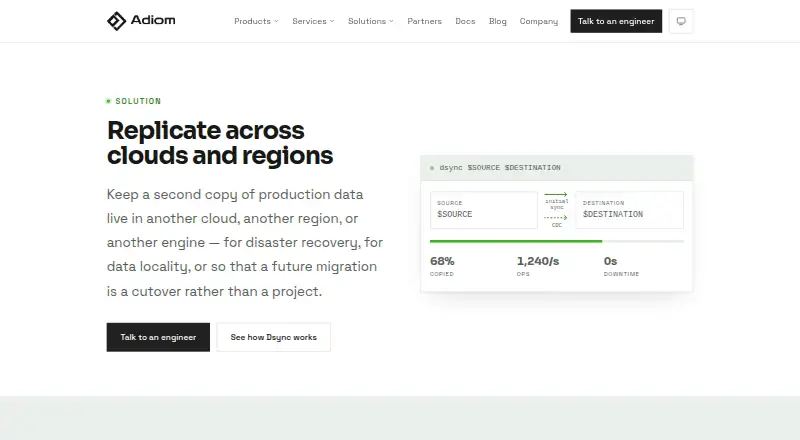
What dsync is
dsync is a data migration and replication tool for moving data between databases and other stores, either once or through ongoing replication. After an initial sync, it can monitor source changes and apply them to the destination. The open source edition is a single binary that can run on a laptop, VM or Docker container. Listed connectors include MongoDB, Cosmos DB, DynamoDB, AWS DocumentDB, PostgreSQL, S3 and CSV files, while several others remain in preview or development. Integrity checks range from namespace counts to complete hash-based verification, and interrupted initial copies or change-capture flows can resume from saved state. Progress appears in the CLI and a web page hosted on the machine running dsync. Adiom says the tool does not store data and supports network encryption. Transformations can be performed through external processes connected over gRPC. A limitation is that source DDL statements and indexes are not replicated. With a metadata store for resumability, the open source version has a 16 MB read-plan cap. Enterprise adds horizontal scalability, observability and transformations; Adiom offers commercial support for both editions.
Good
- Supports one-time migrations and continuous replication.
- Can resume interrupted sync and change capture.
- Offers quick counts and hash-based verification.
- Progress is available in CLI and a local web page.
- Open source edition is free forever.
Watch out
- Does not replicate source DDL statements or indexes.
- Open source read plan has a 16 MB cap with metadata store.
- Some connectors are in preview or development.
Who it suits
dsync is aimed at engineers and DevOps teams at enterprises and fast-growing companies that need database migration or replication. The open source edition may suit small projects and testing.
Verdict
dsync provides migration, change capture, verification and resumability in a self-hosted tool. Account for the DDL and index limitation and the open source read-plan cap when assessing a workload.
Plans and prices
From dsync's own pricing page, checked 2 Oct 2026.
| Plan | Price | What it gives you |
|---|---|---|
| Open Source | Free | Great for small projects and testing · Best effort support · Commercial support add-on · Free forever |
| Enterprise | Priced on request | Commercial support · Roadmap prioritization · Customization · Annual or monthly fee |
The facts
Each one read from dsync's own pages, with the date it was checked.
What it does
- Change capture
- After an initial sync, dsync monitors the source for changes and updates the destination.checked 2 Oct 2026
- Connectors
- Available connectors include MongoDB, Cosmos DB, DynamoDB, AWS DocumentDB, PostgreSQL, S3, and CSV files; several others are in preview or development.checked 2 Oct 2026
- Customization
- Dsync supports transformations through external processes connected over gRPC.checked 2 Oct 2026
- Deployment
- The open source edition is a single binary that can run on a laptop, VM, or Docker container.checked 2 Oct 2026
- Enterprise edition
- The Enterprise edition adds horizontal scalability, observability, and transformations and is described as suitable for production use cases from 100 GB to 100 TB and beyond.checked 2 Oct 2026
- Intended users
- Adiom describes dsync as intended for engineers and DevOps teams at enterprises and fast-growing companies.checked 2 Oct 2026
- Limit
- Dsync does not replicate DDL statements or indexes from the source to the destination.checked 2 Oct 2026
- Monitoring
- Dsync provides progress reporting through both a CLI and a web page hosted on the machine running dsync.checked 2 Oct 2026
- Open source limit
- With a metadata store for resumability, the open source version has a 16 MB cap on the read plan.checked 2 Oct 2026
- Purpose
- dsync migrates and replicates data between databases and data stores, including one-time migrations and continuous replication.checked 2 Oct 2026
- Resumability
- Dsync can resume an initial copy or change data capture flow from its last saved state.checked 2 Oct 2026
- Security
- Adiom says dsync does not store data and supports network encryption.checked 2 Oct 2026
- Support
- Adiom offers commercial support for both open source dsync and its Enterprise version.checked 2 Oct 2026
- Verification
- Data integrity checks include quick namespace counts and complete hash-based verification.checked 2 Oct 2026
The company
- Headquarters
- San Francisco, California, United Stateschecked 28 Sep 2026
The full review of dsync
dsync is a self-hosted migration and replication tool for engineers moving data between databases and stores. It is strongest for teams that need to keep a one-way transfer running, recover it after interruption, and check data integrity. It is a poor fit when the destination must inherit source indexes or DDL.
Overview
dsync copies data once or keeps replicating changes after an initial sync. That makes it useful when a destination needs to stay current during a migration, but its one-way replication rules out workloads that require bidirectional synchronization. Deployment stays under the operator’s control: the open-source edition is a single binary that runs on a laptop, VM, or Docker container.
Progress reporting is available in the CLI and in a web page hosted on the machine running dsync. The ability to resume a copy or change-capture flow from its saved state is particularly useful for long transfers, where an interruption need not mean starting over. Integrity checks range from quick namespace counts to complete hash-based verification, letting operators choose between a fast check and a more thorough comparison.
Key features
Connectors and transformations
The supported systems cover MongoDB, Cosmos DB variants, Azure Document DB, DynamoDB, HBase, AWS DocumentDB, AstraDB, Cassandra, CouchDB/IBM Cloudant, Firestore, PostgreSQL, SQL Server, Oracle, DB2, Weaviate, Qdrant, S3 Vector Index, S3 Storage, and files. Several other connectors remain in preview or development, so teams should confirm that a required endpoint is supported before building a migration around it. Transformations are supported through external processes connected over gRPC; Enterprise also adds transformations.
Verification, security, and boundaries
Count checks offer a quick view of whether namespaces line up, while hash-based verification provides a more complete integrity check. Adiom says dsync does not store data and supports network encryption, useful considerations for teams evaluating a self-hosted transfer tool. The hard boundary is schema-related: dsync does not replicate source DDL statements or indexes, so teams must account for those separately at the destination.
There is also a specific open-source constraint: when a metadata store is used for resumability, the read plan is capped at 16 MB. That cap may matter for larger or more complex read plans, even though Enterprise is positioned for production workloads from 100 GB to 100 TB and beyond.
Pricing
Open Source
The Open Source plan costs nothing and is billed Free forever. It is aimed at small projects and testing, with best-effort support; commercial support is available as an add-on. The free plan makes dsync accessible for evaluation and modest workloads, but the read-plan cap and best-effort support are meaningful constraints for production-critical use.
Enterprise
Enterprise has custom pricing, billed as an annual or monthly fee. It adds horizontal scalability, observability, and transformations, and includes commercial support, roadmap prioritization, and customization. This is the more appropriate option for organizations running production replication at the stated scale, but its pricing terms should be weighed against the operational value of those additions.
Platforms
dsync supports Linux, macOS, and Windows, with self-hosted deployment and a web interface hosted on the machine running the tool. Its single-binary open-source edition can also run in a Docker container.
Who it's for
dsync is aimed at engineers and DevOps teams at enterprises and fast-growing companies. It is a particularly good match for teams that can operate their own infrastructure and need a resumable, verifiable, one-way migration with ongoing change capture. Teams that require two-way synchronization, automatic index transfer, or DDL replication should choose another approach.
Pros and cons
Pros
- Resumability continues a migration or change-capture flow from saved state, reducing the burden of recovering interrupted transfers.
- Verification options span quick namespace counts and complete hash-based checks, allowing operators to match checking effort to the job.
- A broad set of database, store, and file connectors supports varied migration paths, with transformations available through gRPC-connected processes.
- The open-source single binary can run on a laptop, VM, or Docker container, giving teams flexibility over where it operates.
Cons
- It does not replicate DDL or indexes, leaving schema and index migration outside the replication flow.
- Replication is one-way, so it does not suit workloads that need changes synchronized in both directions.
- The open-source read plan is capped at 16 MB when a metadata store is used for resumability.
- Open-source support is best effort unless commercial support is added, which may be a concern for production operations.
Alternatives
For a broader comparison, see Database Replication Software.
- SymmetricDS is worth considering for readers who want a free Community plan with a 15-minute term.
- DBConvert Streams offers a free plan centered on an IDE, browser viewers and editor extensions, with federated queries over two sources and five AI questions per day.
- Debezium is a free, Apache License 2.0 distributed change data capture platform.
- NineData offers an on-premise Community plan capped at 10 data sources and 10 replication tasks, with single-node Docker deployment.
- DBSync may suit a small connector test through its free Developer plan, which allows two connectors, up to 10,000 records, and up to three objects; its Professional plan starts at $999 a month.
- Artie offers a free tier with up to 1M billable rows per month and two active pipelines, with backfills included.
- Google Cloud Datastream has a free tier with 100 GiB of CDC data per month per billing account for eligible AlloyDB and Spanner sources to BigQuery.
- PeerDB offers a free open-source plan for individuals, with Docker setup, CDC, streaming query, and query-layer features.
Verdict
Choose dsync if your team wants to run a one-way database or data-store migration on its own infrastructure, keep changes flowing after the initial copy, and verify or resume work as needed. Its strongest case is the combination of broad connectors, integrity checks, and recoverable transfers. Look elsewhere if source DDL and indexes must move automatically, if replication must run both ways, or if the open-source read-plan limit conflicts with the workload.
Getting started
- Visit Adiom's data replication website.
- Choose the open source edition or Enterprise edition.
- Run the open source single binary on a laptop, VM, or Docker container.
- Select a listed source and destination connector for the migration or replication flow.
- Use the CLI or the web page hosted on the dsync machine to follow progress.
Limits worth knowing
The open source edition has a 16 MB read-plan cap when a metadata store is used for resumability. It does not replicate source DDL statements or indexes.
Questions
How much does the open source edition cost?
The Open Source plan is free, billed free forever.
What platforms does dsync support?
Listed platforms are Linux, macOS, Windows, web, and self-hosted.
Can dsync keep a destination updated after migration?
Yes. After the initial sync, it monitors the source for changes and updates the destination.
Does dsync support data transformations?
Yes. Transformations can use external processes connected over gRPC; Enterprise also adds transformations.
What does Enterprise add?
Enterprise adds horizontal scalability, observability, and transformations. Commercial support is available for both editions.
Alternatives to dsync
- 1

SymmetricDS
Free planOpen sourceAndroidiOSWebAPI8.5Free plan - 2

NineData
Free planWebAPILinuxSelf-hosted7.6From $30 a month - 3

DBConvert Streams
Free planWebAPIExtensionLinux7.2From $9 a month - 4

Google Cloud Datastream
Free planWebAPI6.8From $0.40 a month - 5

PeerDB
Free planWebAPISelf-hosted6.8From $250 a month - 6
DBSync
Free planWebAPISelf-hosted6.7From $999 a month