
Drawgle
Drawgle is a web-based AI tool for planning, generating, editing, and handing off mobile app screens.
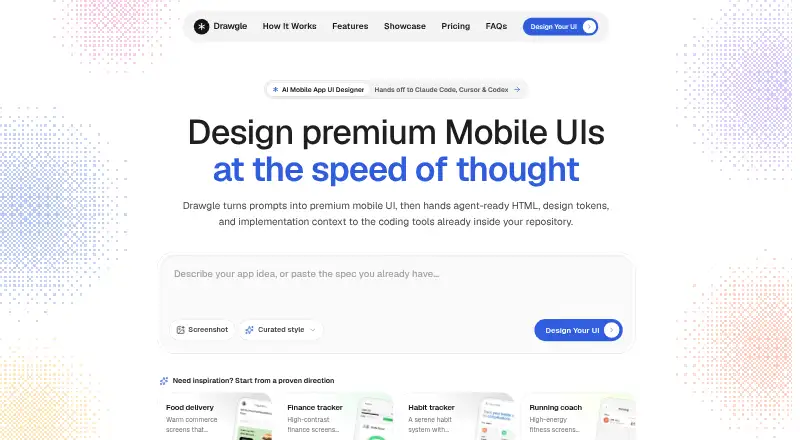
What Drawgle is
Drawgle is a web-based AI tool for planning, generating, editing, and handing off mobile app screens. Users describe an app, answer focused questions, approve a screen plan, and generate connected editable screens. An uploaded interface screenshot can be rebuilt as editable screens with HTML, design tokens, and components. Style references guide typography, color, surfaces, and spacing, while element-level requests can change one part without altering the rest of the screen or shared design system. Exports include standalone Tailwind HTML and an Agent Pack containing screen files, design tokens, shared navigation, a manifest, Design.md, and implementation instructions. The maker says these packs work with Cursor, Claude Code, Copilot, and Codex. Drawgle does not export native Figma layers or production React Native, Flutter, SwiftUI, or Kotlin code, build backends, connect production data, or publish apps. Starter costs $9 a month, Pro $29 a month, and Studio $79 a month. Projects are private unless shared, and prompts and project context may be sent to AI providers.
Good
- Generates connected, editable mobile screens from prompts
- Reconstructs uploaded screenshots into editable interfaces
- Exports Tailwind HTML and structured Agent Packs
- Includes shared design tokens and navigation
- Offers element-level editing requests
Watch out
- No free plan
- Does not export native Figma layers
- Does not build backends or connect production data
- Does not publish apps to stores
Who it suits
Drawgle suits founders and developers validating app concepts, as well as agencies and studios handling larger screen workloads. It is intended for design handoff to coding agents rather than complete app production.
Verdict
Drawgle focuses on mobile interface planning and structured handoff to coding tools. Its plans provide different credit volumes, but implementation beyond exported screens remains outside the product.
Plans and prices
From Drawgle's own pricing page, checked 5 Oct 2026.
| Plan | Price | What it gives you |
|---|---|---|
| Starter | $9 a month | 600 AI credits/month · ~30 full screens/month · 20 credits per new parent screen · screenshot reconstruction and style references · Tailwind HTML and Agent Pack exports · commercial use permitted under the Terms |
| Pro | $29 a month | 2,400 AI credits/month · ~120 full screens/month · all editor and export features · shared design tokens and navigation · selected element and region edits · commercial use permitted under the Terms |
| Studio | $79 a month | 8,000 AI credits/month · ~400 full screens/month · high-volume multi-screen planning · shared design tokens and navigation · Tailwind HTML and Agent Pack exports · commercial use permitted under the Terms |
The facts
Each one read from Drawgle's own pages, with the date it was checked.
What it does
- AI data processing
- Drawgle sends relevant prompts, project context, selected screen content, and optionally uploaded references to AI providers for requested generation or refinement.checked 5 Oct 2026
- Audience
- The maker describes Starter for founders and developers validating app concepts or designing smaller screen sets, and Studio for agencies, studios, and builders with larger workloads.checked 5 Oct 2026
- Coding tools
- The maker says Agent Packs can be used with Cursor, Claude Code, Copilot, and Codex; the coding agent implements the application in the user's chosen stack.checked 5 Oct 2026
- Credit usage
- Screen estimates assume 20 credits per new screen; extra screen states use 10 credits and selected-element edits use 3 to 15 credits depending on size.checked 5 Oct 2026
- Editing
- Users can select an element and request a change while preserving the rest of the screen and shared design system.checked 5 Oct 2026
- Exports
- Drawgle exports standalone Tailwind HTML and an Agent Pack with screen files, design tokens, shared navigation, a manifest, Design.md, and implementation instructions.checked 5 Oct 2026
- Limits
- Drawgle does not export native Figma layers or production React Native, Flutter, SwiftUI, or Kotlin code, and it does not build backends, connect production data, or publish apps to app stores.checked 5 Oct 2026
- Privacy
- The privacy policy says projects are private unless a feature lets users publish or share them, and Drawgle does not sell personal data for money.checked 5 Oct 2026
- Prompt-to-UI
- Users describe an app, answer focused questions, approve a screen plan, and generate connected editable screens.checked 5 Oct 2026
- Purpose
- Drawgle is an AI mobile UI design tool for planning, generating, editing, and handing off mobile app screens.checked 5 Oct 2026
- Screenshot reconstruction
- Image to UI rebuilds an uploaded UI screenshot as editable mobile screens with HTML, design tokens, and components.checked 5 Oct 2026
- Security
- The privacy policy lists authentication, access controls, encrypted transport, row-level data controls, and restricted service credentials as safeguards.checked 5 Oct 2026
- Style references
- Style Ref uses visual direction such as typography, color, surfaces, and spacing to create an original layout.checked 5 Oct 2026
- Support
- The maker lists [email protected] for questions and support requests.checked 5 Oct 2026
Alternatives to Drawgle
- 1

UXPin
Free planAndroidiOSWebmacOS8.4From $29 a month - 2

Figma Make
Free planAndroidiOSWebAPI8.2Free plan - 3
pen.dev
Free planWebAPIExtensionLinux7.8From $16 a month - 4

floow.design
Free planWebAPI7.4From $7.99 a month - 5

Mowgli
Free planWebAPI7.4From $12 a month - 6

Visily
Free planWebExtension7.3From $14 a month