
Delta Widgets
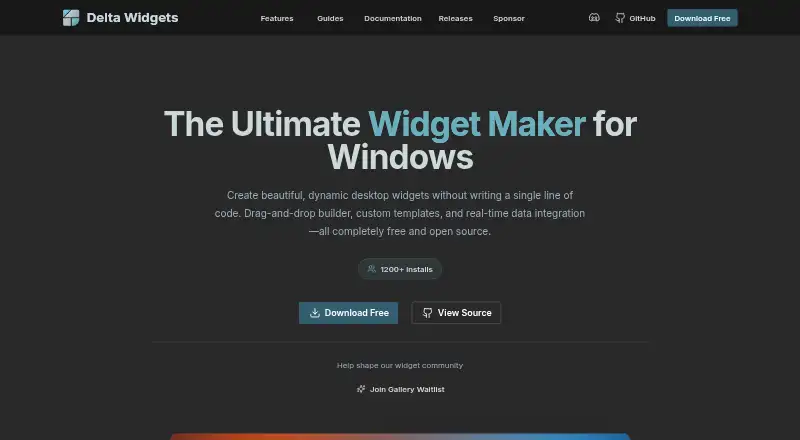
Delta Widgets is a free, open-source Windows app for creating desktop widgets without writing code.
What Delta Widgets is
Delta Widgets is a free, open-source Windows app for creating desktop widgets without writing code. Its visual drag-and-drop editor supports built-in templates, widgets built from scratch, custom HTML/CSS, and content loaded from URLs. Widgets can display live time, system statistics, media information, and weather. Pre-installed options include date and time, media controls, an audio visualizer, weather, disks, RAM, CPU, and battery. Expressions and variables let users insert and format dynamic values in widget text and images, while custom layouts let them arrange widgets. URL widgets can show webpages, dashboards, web apps, or online tools; they are described as sandboxed to display external content only. An optional assistant can use a key supplied by the user for OpenAI, Anthropic, Google, Ollama, or OpenRouter. The maker says provider keys are encrypted on the user’s device. The listed compatibility is Windows 10 and Windows 11, with Windows 10 April 2018 or later required. The download page says the app collects anonymous install and widget-enable events through Mixpanel and does not track personal data. Delta Widgets is licensed under GPL-3.0.
Good
- Visual editor supports drag-and-drop widget creation.
- Built-in widgets cover weather, media, and system stats.
- Widgets can use custom HTML/CSS or URLs.
- Optional assistant supports five listed providers.
- Free and open source under GPL-3.0.
Watch out
- Listed only for Windows 10 and Windows 11.
- Windows 10 must be April 2018 release or later.
- The download page reports anonymous install and widget-enable events.
Who it suits
It suits Windows users who want configurable desktop widgets, including system information, weather, or web content. It may also suit people who want to build widgets with HTML/CSS or use templates without coding.
Verdict
Delta Widgets offers a free way to build and arrange Windows desktop widgets, from system displays to URL content. Check the Windows version requirement and note the stated anonymous usage events.
Plans and prices
From Delta Widgets's own pricing page, checked 7 Oct 2026.
| Plan | Price | What it gives you |
|---|---|---|
| Free | Free | Free and open source under GPL-3.0 · Windows 10/11 |
The facts
Each one read from Delta Widgets's own pages, with the date it was checked.
What it does
- AI key storage
- The maker says assistant provider keys are stored encrypted on the user's device.checked 7 Oct 2026
- AI providers
- The optional bring-your-own-key assistant supports OpenAI, Anthropic, Google, Ollama, and OpenRouter.checked 7 Oct 2026
- Built-in widgets
- Pre-installed widgets include date and time, media controls, audio visualizer, weather, disks, RAM, CPU, and battery.checked 7 Oct 2026
- Dynamic data
- Widgets can display live time, system statistics, media information, and weather data.checked 7 Oct 2026
- Expressions
- Expressions and variables can insert and format dynamic values in widget text and images.checked 7 Oct 2026
- External content
- URL widgets can embed webpages, dashboards, web apps, or online tools, and are described as sandboxed to display external content only.checked 7 Oct 2026
- License
- The project is open source under the GPL-3.0 license.checked 7 Oct 2026
- Purpose
- Delta Widgets is a free, open-source widget maker for Windows that lets users create desktop widgets without writing code.checked 7 Oct 2026
- Support
- The maker links to documentation, GitHub issue reporting, and a community Discord for help and feedback.checked 7 Oct 2026
- Telemetry
- The download page says the app collects anonymous install and widget-enable events via Mixpanel and does not track personal data.checked 7 Oct 2026
- Templates
- Users can start with built-in templates or create their own from scratch.checked 7 Oct 2026
- Widget creation
- It offers a visual drag-and-drop editor, custom HTML/CSS widgets, and widgets made from URLs.checked 7 Oct 2026
Where it runs
- Platform support
- The maker lists Windows 10 and Windows 11 compatibility and specifies Windows 10 April 2018 release or later.checked 7 Oct 2026
Alternatives to Delta Widgets
- 1
Mango Mirror
Free planAndroidiOSWebLinux7.4From $5.99 a month - 2
Desktop Widgets
APILinuxmacOSWindows7.0From $12.99 a year - 3

Nexus
Free planAndroidiOSWebLinux6.9Free plan - 4
SAWAS Dashboard
Free planAndroidiOSWebWindows6.7Free plan - 5
Duckboard
Free planmacOSWindows6.5$29 one-time - 6
Monitor Flows
Free planAPIWindows6.5From $3 a month