Decap CMS
Decap CMS is an open-source content management system for Git-based workflows and static sites.
What Decap CMS is
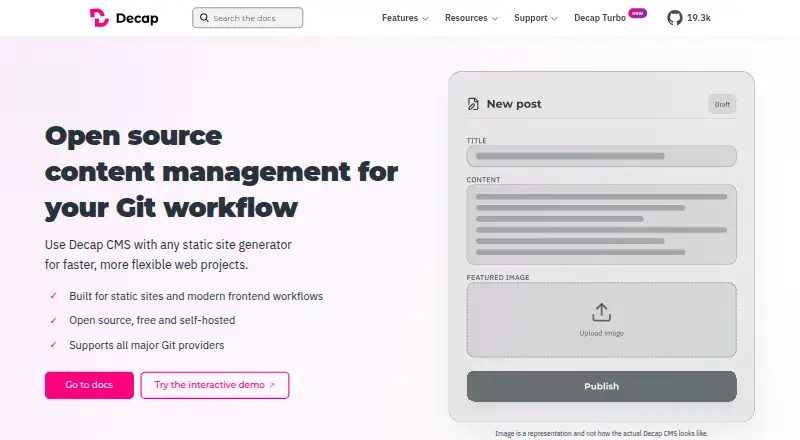
Decap CMS is an open-source content management system for Git-based workflows and static sites. Its web editor offers structured fields, rich text, and live preview, while draft, review, and publish statuses support editorial work. Content stays in the user's repository, with version history, branch workflows, and deployment checks. It can use backends including GitHub, GitLab, Gitea, Bitbucket, Azure, Git Gateway, proxy, and test backends. The system includes a media library and can connect to Cloudinary, Uploadcare, or custom integrations. Users can define collections, nested structures, relation fields, and slug behavior; developers can add custom widgets, editor components, and plugins. Decap CMS is MIT-licensed, free, and self-hosted, so users provide their own authentication and backend. The Free plan lists one site and one seat. Decap Turbo Pro costs €19 per month, then €10 per site and €6 per seat monthly for additions. Deploy notifications are currently available for GitHub-hosted sites; GitLab support is on the roadmap.
Good
- MIT-licensed and free to self-host.
- Includes draft, review, and publish stages.
- Supports multiple Git backends.
- Offers rich text and live preview.
- Developers can add widgets and plugins.
Watch out
- Users must provide authentication and a backend.
- Free plan lists one site and one seat.
- Deploy notifications currently support GitHub-hosted sites.
Who it suits
Decap CMS suits publishers, editors, and developers working with Git-backed static or Jamstack sites who want content kept in their own repository. It requires users to provide their own authentication and backend.
Verdict
Decap CMS combines an editorial interface with repository-based content workflows for static sites. It is free and self-hosted; Decap Turbo Pro adds listed capacity and features for €19 per month.
Plans and prices
From Decap CMS's own pricing page, checked 30 Sep 2026.
| Plan | Price | What it gives you |
|---|---|---|
| Free | Free | 1 site · 1 seat · Faster CMS · Git host request shielding · Activity log · Deploy notifications · Community support · Free forever; billed monthly where applicable |
| Pro | €19 a month | 1 site · 5 seats · Extra sites €10/site/month · Extra seats €6/seat/month · Site variables and secrets · S3-compatible media library · Custom roles and priority support are add-ons · €19 / month; then €10/site · €6/seat per month; billed monthly |
| Enterprise | Priced on request | Unlimited sites and seats · Unlimited usage · Custom/granular roles included · Dedicated support and SLA · Custom; billed monthly |
The facts
Each one read from Decap CMS's own pages, with the date it was checked.
What it does
- Content modeling
- Users can define collections, nested structures, relation fields, and slug behavior.checked 30 Sep 2026
- Editor
- It provides a web editor with structured fields, rich text, and live preview for non-technical contributors.checked 30 Sep 2026
- Editorial workflow
- Content can move through draft, review, and publish statuses.checked 30 Sep 2026
- Extensibility
- Developers can extend the editor with custom widgets, editor components, and plugins.checked 30 Sep 2026
- Git-based content
- Content stays in the user's repository with version history, branch workflows, and deployment checks.checked 30 Sep 2026
- Integrations
- Backends include GitHub, GitLab, Gitea, Bitbucket, Azure, Git Gateway (Netlify), proxy, and test backends.checked 30 Sep 2026
- Intended users
- The project describes Decap CMS as a content system for publishers, editors, and developers who want to own their content and keep it in their repository.checked 30 Sep 2026
- License and hosting
- Decap CMS is MIT-licensed, free, and self-hosted; users bring their own authentication and backend.checked 30 Sep 2026
- Media
- The CMS includes a media library and can integrate with Cloudinary, Uploadcare, or custom integrations.checked 30 Sep 2026
- Notable limitation
- Decap Turbo deploy notifications are currently available for GitHub-hosted sites, with GitLab support on the roadmap.checked 30 Sep 2026
- Product
- Decap CMS is an open-source content management system for Git workflows and static sites.checked 30 Sep 2026
- Security
- Decap Turbo site variables marked as secrets are encrypted at rest.checked 30 Sep 2026
- Site compatibility
- It is designed for Git-backed static and Jamstack architectures, including Hugo, Next.js, Gatsby, and Jekyll workflows.checked 30 Sep 2026
- Support
- The Decap CMS project offers community support; Decap Turbo Enterprise includes dedicated support and an SLA.checked 30 Sep 2026
Money
- Free plan
- Yeschecked 20 Sep 2026
The company
- Headquarters
- Ljubljana, Sloveniachecked 28 Sep 2026
The full review of Decap CMS
Decap CMS is an open-source editor for managing content in Git-backed static sites. It suits publishers and developers who want contributors to edit through a web interface while content remains in their repository. Its appeal is ownership and workflow flexibility; the trade-off is that you supply the hosting, backend, and authentication.
Overview
Decap CMS pairs structured editing fields, rich text, and live preview with repository-based content management. Editors can move material from draft to review to publish, while developers retain version history, branch workflows, and deployment checks in Git. That arrangement gives teams a familiar editorial surface without moving their content into a separate hosted CMS.
It is designed for Git-backed static and Jamstack sites, including Hugo, Next.js, Gatsby, and Jekyll workflows. Users define collections, nested structures, relation fields, and slug behavior, then extend the editor with custom widgets, components, or plugins as needed. The flexibility is useful for teams with development capacity, but less attractive to organizations seeking a managed system with hosting and authentication included.
Key features
Editorial and repository workflow
Draft, review, and publish statuses bring a basic editorial process to repository content. Git-backed history and branches help teams track changes and organize work, while deployment checks connect publishing to the site’s delivery workflow. The editor’s live preview helps non-technical contributors see content in context, though the overall setup still depends on the site and backend configuration.
Backends and media
Decap supports GitHub, GitLab, Gitea, Bitbucket, Azure, Git Gateway, proxy, and test backends. Its media library can also connect with Cloudinary, Uploadcare, or custom integrations. That breadth makes it adaptable to existing infrastructure, but the user remains responsible for bringing the backend and authentication.
Decap Turbo adds site variables and secrets, with secret variables encrypted at rest. Its deploy notifications currently support GitHub-hosted sites; GitLab support is on the roadmap. Teams relying on GitLab notifications should account for that limitation.
Pricing
The open-source CMS is MIT-licensed, free, and self-hosted. The Free plan is free forever and covers one site and one seat, with Faster CMS, Git host request shielding, an activity log, deploy notifications, and community support. It is a practical starting point for an individual or small project, but the single-seat and single-site limits constrain a growing team.
Pro costs €19 / month, billed monthly, for one site and five seats. Additional sites cost €10/site/month and additional seats €6/seat/month. It adds site variables and secrets and an S3-compatible media library; custom roles and priority support are add-ons. Pro fits teams that need more seats and those added capabilities, though its per-site and per-seat charges matter as usage expands.
Enterprise has custom pricing and offers fair-use unlimited sites and seats, custom or granular roles, SSO/SAML, dedicated support, and an SLA. It is the relevant tier for organizations needing centralized access controls and contracted support. A 14-day trial is offered.
Platforms
Decap CMS is a web editor that users self-host. Its Git integrations and site compatibility suit teams already operating a static-site workflow; it is not a managed hosting service that removes infrastructure responsibilities.
Who it's for
Decap is best for publishers, editors, and developers who want content to stay under their control in a repository, and who can manage the self-hosted setup. It is a weaker fit for teams that need a fully managed CMS, built-in authentication, or a workflow independent of Git.
Pros and cons
- Pro: Content stays in the user’s repository, with version history, branches, and deployment checks supporting a Git-centered publishing process.
- Pro: Structured fields, rich text, live preview, and editorial statuses let non-technical contributors work within that developer-owned setup.
- Pro: Multiple Git backends, media integrations, and custom editor extensions give teams room to fit Decap to their stack.
- Con: Self-hosting and user-supplied authentication and backend make setup and upkeep the team’s responsibility.
- Con: Free covers just one site and one seat, while Pro charges for extra sites and seats.
- Con: Turbo deploy notifications currently work with GitHub-hosted sites, not GitLab-hosted sites.
Alternatives
For a broader comparison, see Git-Based CMS. Consider Sveltia CMS if a free option with no account or subscription requirement and no hard limits on content or users is a closer fit. TinaCMS is another freemium alternative, with a free plan for two users and two roles.
CrafterCMS offers an open-source GPL v3 Community release with community support and a self-hosted download. deco CMS is an alternative with an open-source, self-hostable core that its company says is free. Keystatic has a free plan for up to three users per team. Kiln offers a free, self-hosted open-source plan, with users running the worker and GitHub App and providing the site host.
CloudCannon is a paid web-based alternative, with Standard at $55 a month for unlimited sites and three users. Sitepins is another option, with a Pro plan at $10 a month billed yearly for six sites, two organizations, three users per organization, and priority support.
Verdict
Choose Decap CMS if your team wants a contributor-friendly editor without giving up repository ownership, and has the capacity to self-host and manage authentication and its backend. Its Git workflow, flexible content modeling, and free entry tier are compelling for static-site teams. Look elsewhere if you need managed infrastructure or a free plan that accommodates multiple seats or sites.
Alternatives to Decap CMS
- 1
Enonic XP
Free planOpen sourceWebAPILinuxSelf-hosted9.0$990 usage-based - 2

CrafterCMS
Free planOpen sourceWebAPILinuxmacOS9.0Free plan - 3

Kiln
Free planOpen sourceWebAPISelf-hosted8.4From $4.99 a month - 4
Webflow CMS
Free planWebAPI8.3From $15 a month - 5
django CMS
Free planWebAPILinuxSelf-hosted8.3From $500 a year - 6

Tumblr
Free planAndroidiOSWeb8.3From $69.99 a year