ddcci
ddcci is a GPL-licensed Linux command-line interface for controlling monitors through DDC/CI.
What ddcci is
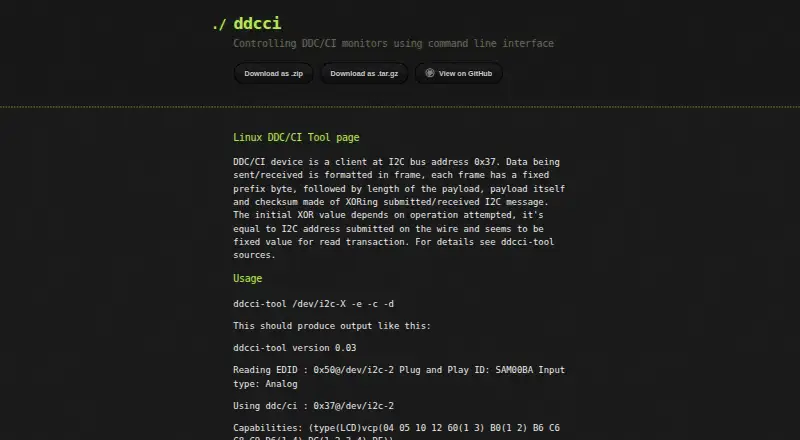
ddcci is a GPL-licensed Linux command-line interface for controlling monitors through DDC/CI. It can query monitor EDID at I2C address 0x50 and request the DDC/CI capabilities string at address 0x37. A discovery option checks controls 0 through 255, with an override for the validity check. Users can select a control to read or write, supply a value for writes, and send a separate command to save adjustments. Listed controls include brightness, contrast, input source, speaker volume, and power. A dedicated Samsung option sends an enable command that some Samsung monitors may require. Symbolic control names are based on Samsung SyncMaster 173T behavior and may be incorrect on other displays. The maker documents that the Mitsubishi Diamond Pro 2060u does not support capability requests. Source downloads are available as ZIP and tar.gz archives, alongside the GitHub repository. The project credits Oleg I. Vdovikin and accepts patches.
Good
- Queries EDID and DDC/CI capabilities
- Reads and writes monitor controls
- Can save adjustments made through writes
- Includes input source, brightness, and power controls
- GPL-licensed source is available
Watch out
- Control names may be wrong for non-Samsung monitors
- Mitsubishi Diamond Pro 2060u lacks capability requests
- Some Samsung monitors may require an enable command
- Linux command-line use requires terminal knowledge
Who it suits
It suits Linux users who want scriptable DDC/CI monitor control from a terminal, including brightness, input switching, and power settings. It is most appropriate when the monitor supports the required DDC/CI requests.
Verdict
ddcci offers direct terminal control for compatible Linux monitors, including input switching and saved adjustments. Compatibility details, especially control naming and capability requests, should be checked for your display.
The facts
Each one read from ddcci's own pages, with the date it was checked.
What it does
- Capabilities query
- The -c option queries the monitor's DDC/CI capabilities string.checked 9 Oct 2026
- Compatibility limit
- The page says the Mitsubishi Diamond Pro 2060u does not support capabilities requests.checked 9 Oct 2026
- Control discovery
- The -d option queries controls 0 through 255 and checks their validity, with -f available to override the validity check.checked 9 Oct 2026
- Control names
- The page says symbolic control names are based on Samsung SyncMaster 173T functionality and may be incorrect for other monitors.checked 9 Oct 2026
- Controls
- It can query available monitor controls and read or write a specified control, including brightness.checked 9 Oct 2026
- EDID query
- The -e option queries monitor EDID at I2C address 0x50.checked 9 Oct 2026
- Installation
- The maker's page links to ZIP and tar.gz source downloads and to the GitHub repository.checked 9 Oct 2026
- Known limitation
- The README says the Mitsubishi Diamond Pro 2060u does not support capability requests.checked 9 Oct 2026
- License
- The repository README describes the program as GPL-licensed.checked 9 Oct 2026
- License and author
- The repository README says the program is GPLed and written by Oleg I. Vdovikin.checked 9 Oct 2026
- Monitor compatibility
- The maker says symbolic control names are based on Samsung SyncMaster 173T functionality and may be incorrect for other monitors.checked 9 Oct 2026
- Monitor controls
- The page lists controls including brightness, contrast, input source, speaker volume, and power.checked 9 Oct 2026
- Monitor data
- The tool can query monitor EDID at I2C address 0x50 and DDC/CI capabilities at address 0x37.checked 9 Oct 2026
- Purpose
- ddcci is a command line interface for controlling DDC/CI monitors.checked 9 Oct 2026
- Read and write controls
- The -r option selects a control to read or write, and -w supplies the value to write.checked 9 Oct 2026
- Samsung support
- The -S option sends a Samsung DDC/CI enable command, which the page says some Samsung monitors seem to require.checked 9 Oct 2026
- Save settings
- The -s option sends a DDC/CI command to save adjustments made with -w.checked 9 Oct 2026
- Support
- The maker says they accept patches and directs users to inspect the tool if it hangs or does not work.checked 9 Oct 2026
Alternatives to ddcci
- 1
ddcutil
Free planAPILinuxSelf-hosted6.6Free plan - 2

ClickMonitorDDC
Free planWindows6.5Free plan - 3

Lunar
Free planmacOS6.5$23 one-time - 4

DisplayBuddy
macOSWindows6.3$24.99 one-time - 5
Monitor Switch
Free planWebAPILinuxSelf-hosted6.3Free plan - 6
AOC G-Menu
Free planWindows6.2Free plan