
CropBook
CropBook is a free bookkeeping application for Canadian grain farms, available on the web and iOS.
What CropBook is
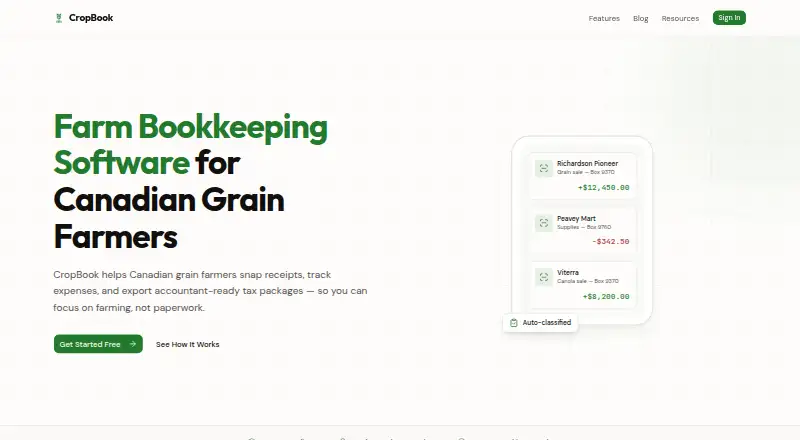
CropBook is a free bookkeeping application for Canadian grain farms, available on the web and iOS. It helps farmers photograph receipts and grain tickets, then extracts the vendor, amount, date, and GST. Transactions are automatically matched to supported CRA T2042 box codes, with manual review and override controls when adjustments are needed. Its farm ledger presents income, expenses, and net position, with filters for year, category, and date range.
Users can export a farm book in XLSX, CSV, or QBO format, plus a ZIP containing receipt images organized by box code. The QBO file is compatible with QuickBooks Online for accountants. CropBook is aimed at grain operations in Alberta and Saskatchewan, including canola, wheat, barley, pea, and mixed farms. It prepares bookkeeping records and exports but does not submit tax returns; the farmer or accountant files with CRA.
The Free plan costs nothing, requires no credit card, and has no subscription. Records and receipt images are stored in Supabase in Montréal, with backups kept in Canada. CropBook describes TLS encryption in transit, non-plaintext passwords, no data sales or advertising use, and deletion within 30 days after account deletion.
Good
- Free plan costs 0.00 USD with no credit card or subscription
- Extracts vendor, amount, date, and GST from receipts
- Automatic CRA T2042 box matching with manual overrides
- Ledger filters income and expenses by year, category, or date
- Exports XLSX, CSV, QBO, and organized receipt ZIP files
- Available on web and iOS
Watch out
- Does not file tax returns with CRA
- Designed specifically for grain farms in Alberta and Saskatchewan
- Google Play app is described as coming soon
Who it suits
CropBook suits grain farmers in Alberta and Saskatchewan who need receipt capture, CRA-oriented categorization, and exportable farm records. It is also useful for accountants working with canola, wheat, barley, pea, or mixed operations through QuickBooks Online-compatible QBO exports.
Verdict
Pick CropBook if your grain farm needs free receipt processing, CRA box organization, and accountant-ready exports. Its QBO compatibility and farm ledger support bookkeeping workflows without a subscription. Look elsewhere if you need direct tax-return filing or an Android app today.
Plans and prices
From CropBook's own pricing page, checked 20 Oct 2026.
| Plan | Price | What it gives you |
|---|---|---|
| Free | Free | Unlimited receipts · 1 farm · full export · No credit card or subscription |
The facts
Each one read from CropBook's own pages, with the date it was checked.
What it does
- Accountant handoff
- The receipt ZIP is renamed and grouped by box code for sending to an accountant.checked 20 Oct 2026
- AgriStability and AgriInvest
- CropBook tracks income for AgriStability and AgriInvest reporting.checked 20 Oct 2026
- API and SDKs
- The official pages reviewed describe exports and subprocessors but provide no public API, SDK or developer documentation.checked 20 Oct 2026
- CRA classification
- Transactions are automatically matched to CRA T2042 box codes, with confirmation and manual override.checked 20 Oct 2026
- Data location
- Farm records and receipt images are stored in Supabase in the ca-central-1 region in Montréal, and backups remain in Canada.checked 9 Oct 2026
- Data residency
- Account, farm and receipt data are stored in Supabase's ca-central-1 region in Montréal, with backups kept in Canada.checked 20 Oct 2026
- Data-sale policy
- CropBook says it does not sell or rent user data, advertise with it or perform cross-site tracking.checked 20 Oct 2026
- Deletion
- After account deletion, personal data, farm records, receipt images and transactions are scheduled for permanent deletion within 30 days.checked 20 Oct 2026
- Export formats
- Exports include an XLSX farm book, CSV files, QuickBooks Online-compatible QBO data and a receipt ZIP archive.checked 20 Oct 2026
- Exports
- Users can export a farm book XLSX, CSV and QBO files, and a ZIP of receipt images organized by box code.checked 9 Oct 2026
- Farm ledger
- The ledger displays income, expenses and net position with year, category and date-range filters.checked 20 Oct 2026
- Future pricing risk
- The service is currently free but the terms reserve the right to add paid tiers with at least 30 days' notice.checked 20 Oct 2026
- Grain-ticket support
- The receipt scanner is advertised as reading printed receipts and grain tickets.checked 20 Oct 2026
- GST/HST tracking
- GST is captured per transaction and organized using T2042 box 9974.checked 20 Oct 2026
- Integrations
- CropBook provides QuickBooks Online compatible exports for accountants.checked 9 Oct 2026
- Intended users
- CropBook is designed for grain farms in Alberta and Saskatchewan, including canola, wheat, barley, pea, and mixed operations.checked 9 Oct 2026
Where it runs
- App category
- Apple categorizes CropBook as a Finance app with a 13-plus age rating.checked 20 Oct 2026
- App privacy disclosures
- Apple's listing says the developer may link financial information, contact details and usage data to the user, while diagnostics are not linked.checked 20 Oct 2026
- App size
- The App Store lists the iOS app at 37.4 MB.checked 20 Oct 2026
- App Store seller
- Apple lists Jaden Sandin as the seller and developer.checked 20 Oct 2026
- App update history
- The listing shows version 2.0 with bug fixes, improved T2042 classification and smoother accountant exports.checked 20 Oct 2026
- iOS requirement
- The app requires iOS 13.0 or later.checked 20 Oct 2026
Money
- App Store price
- The iPhone app is listed as free with no subscription charge described in the listing.checked 20 Oct 2026
The company
- Headquarters
- Alberta, Canadachecked 28 Sep 2026
The full review of CropBook
CropBook is a focused bookkeeping app for Canadian grain farms. It suits Alberta and Saskatchewan growers who need receipt capture, CRA-organized records, and accountant handoffs without a subscription. The important boundary is that it prepares records; tax returns still have to be filed by the farmer or an accountant.
Overview
CropBook brings receipt collection, expense tracking, farm reporting, and tax-record export into one workflow. It is designed around grain operations such as canola, wheat, barley, pea, and mixed farms, rather than around general small-business accounting. That specialization makes the CRA T2042 structure and receipt-image organization practical for farm bookkeeping, but it also means the product should not be mistaken for a complete tax-filing service.
Key features
Receipt scanning and CRA classification
Photographed receipts and grain tickets are read for vendor, amount, date, and GST. CropBook then matches transactions to supported CRA T2042 box codes. Automatic classification can remove repetitive sorting, while manual review and override are important safeguards when a purchase does not fit the suggested code. The workflow is well suited to farmers who want records organized as transactions arrive, provided they still check the results.
Farm ledger and reports
The ledger presents income, expenses, and net position, with filters for year, category, and date range. Farm reports and tax-ready records make it easier to isolate a period or expense class for year-end work. This is a useful operational view for a grain farm, though the product's role ends at bookkeeping preparation rather than submission of a CRA return.
Exports for farmers and accountants
CropBook exports farm books in XLSX, CSV, and QBO formats, and can package receipt images in a ZIP organized by box code. QuickBooks Online-compatible exports give an accountant a recognizable handoff instead of requiring the practice to rebuild every transaction. Those options also make the free service more workable for farms that keep their own records but outsource final accounting.
Privacy, retention, and support
Farm records and receipt images are stored in Supabase's ca-central-1 region in Montréal, with backups kept in Canada. Traffic uses TLS, passwords are not stored in plaintext, and CropBook says it does not sell data or use it for advertising. Named subprocessors are Supabase for database, authentication, and image storage; Google Gemini for receipt parsing; Sentry for anonymized telemetry; and Vercel for hosting. Data is retained while an account is active, then personal data, farm records, images, and transactions are permanently deleted within 30 days of account deletion. Email support promises replies within two business days in Alberta time.
Pricing
CropBook has one published plan: Free costs free. It requires no credit card and no subscription. The plan includes farm reports, tax-ready records, receipt processing, ledger tools, and XLSX, CSV, QBO, and receipt-image ZIP exports. With no paid tier or stated usage allowance, it is a straightforward fit for farms that want the complete published feature set without recurring software cost. The trade-off is scope, not a cheaper feature tier: CropBook still does not file tax returns, so filing remains the user's or accountant's responsibility.
Platforms
CropBook runs on the web and iOS. An iPhone app is linked by the maker, while Google Play availability is forthcoming, so Android users currently need another solution or the web experience. The Canadian data location and farm-specific CRA structure are particularly relevant to growers operating in Alberta and Saskatchewan.
Who it's for
Choose CropBook if you operate a grain farm in Alberta or Saskatchewan and want a no-subscription way to turn paper receipts and grain tickets into organized bookkeeping records. It is also a sensible fit when an accountant uses QuickBooks Online or needs box-coded receipt images at year end. It is less suitable if you need direct CRA filing, a broader accounting suite, or an Android-native app today.
Pros and cons
Pros
- Free with no card or subscription: the full published plan avoids recurring software expense.
- Farm-specific CRA workflow: T2042 matching, review, and override reduce sorting work while preserving correction control.
- Accountant-ready handoff: QBO, XLSX, CSV, and box-coded receipt ZIP exports support different bookkeeping practices.
- Canadian data handling: Montréal storage and Canadian backups may suit farms with local data-residency expectations.
Cons
- No tax-return filing: users or accountants must still submit returns to CRA.
- Limited mobile reach: iOS is available, but Google Play is not yet available.
- Focused rather than broad: the product centers on grain-farm records instead of serving as a general accounting platform.
Alternatives
Browse Farm Accounting Software for a wider category comparison. Pick Farm-Ledger instead if you need Android alongside iOS and web, or a paid Farm plan at $25 a month billed annually for a fuller operation. Figured is the better direction for web-based, paid farm financial management with a free trial and multi-entity reporting. Choose AgriERP when you need a broader operations application spanning Android, iOS, Windows, web, API, or self-hosting. Lucro Rural targets paid farm-accounting work across Android, iOS, and web, with a free plan. Agraas is another paid, multi-platform option with a free plan. Farmcont offers a farm accounting platform with demonstration-based pricing. Phoenix Financials suits buyers seeking desktop and web coverage across major platforms, with a paid trial path. Traction Ag is a paid choice for multi-entity accounting and bank or credit-card synchronization.
Verdict
CropBook is the right pick for Canadian grain farmers who want free, focused receipt processing and clean CRA-oriented exports for themselves or an accountant. Its strongest advantage is the combination of farm-specific classification, receipt-image organization, and QBO-compatible handoff at no subscription cost. Look elsewhere if filing returns, Android support, or a broader farm-management and accounting system is central to your decision.
Getting started
- Open CropBook on the web or install its iOS app
- Create an account on the Free plan
- Photograph receipts or grain tickets
- Review CRA T2042 box matches and override them when needed
- Use the ledger to check income, expenses, and net position
- Export XLSX, CSV, QBO, or a receipt-image ZIP for your accountant
Limits worth knowing
The Free plan is provided at no cost with no credit card and no subscription. CropBook prepares records and exports but stops short of filing the CRA tax return, which must be handled by the user or accountant.
Questions
What platforms does CropBook support?
CropBook is available on the web and iOS. The maker says Google Play is coming soon.
How much does CropBook cost?
Its Free plan is free, with no credit card and no subscription.
Can CropBook file my tax return?
No. It prepares bookkeeping records and exports; the user or accountant files with CRA.
What export formats are available?
Exports include farm book XLSX, CSV, and QBO files, plus a ZIP of receipt images organized by box code.
Does it work with QuickBooks Online?
Yes. CropBook provides QBO exports compatible with QuickBooks Online for accountants.
Where are farm records stored?
Records and receipt images are stored in Supabase in Montréal, and backups remain in Canada.
Alternatives to CropBook
- 1
Lucro Rural
Free planAndroidiOSWeb7.9From R$348 a month - 2

FarmRaise Tracks
AndroidiOSWebmacOS7.6From $36 a month - 3

Phoenix Financials
AndroidiOSWebmacOS7.6From A$57 a month - 4
Farm-Ledger
Free planAndroidiOSWeb7.0From $25 a month - 5
FarmBooks
macOSSelf-hostedWindows6.9 - 6

Farmcont
AndroidiOSWeb6.9