
Creen
Creen is a sound-effects workspace that generates audio from written prompts rather than retrieving clips from a stock library.
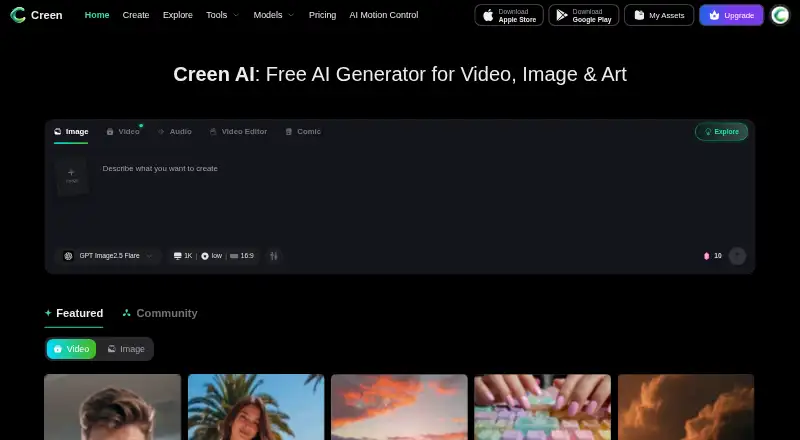
What Creen is
Creen is a sound-effects workspace that generates audio from written prompts rather than retrieving clips from a stock library. Its sound tools support text-prompted effects, video-aware audio, ambience beds, and AI music generation. Prompts can guide qualities such as material, distance, room size, microphone perspective, intensity, and mood. Each generation returns multiple takes to audition and regenerate; users can export audio and save favorites into reusable sets. Creen says its workspace brings together more than 40 image, video, and audio models. The sound workflow is prompt-first: descriptive language and model choice are the primary ways to steer output, rather than reference-audio uploads. Creen says users own generated sound effects and may use them in social content, video, games, podcasts, and advertising. It is available on Android, iOS, and the web. The listed audiences include video editors, filmmakers, indie game developers, short-form creators, podcasters, motion designers, teachers, students, and hobbyists. Creen is operated by CODESAIL LIMITED, whose listed address is in Kwun Tong, Hong Kong.
Good
- Generates sound effects from prompts instead of stock-library searches.
- Offers controls for material, distance, room size, perspective, intensity, and mood.
- Returns multiple takes users can audition and regenerate.
- Exports generated audio and saves favorites in reusable sets.
- Creen says users own generated effects and may use them commercially.
Watch out
- Reference-audio input is not supported.
- The sound workflow relies on descriptive prompts and model choice.
- Premium models may use credits on the free plan.
Who it suits
Creen suits people who need original sound effects for video, games, podcasts, social content, or advertising. Its listed audiences include editors, filmmakers, indie game developers, podcasters, educators, students, and hobbyists who can steer audio with text prompts.
Verdict
Pick Creen if you want to synthesize sound effects from text and refine them through multiple generated takes. Look elsewhere if steering audio with reference recordings is important, since the sound workspace is prompt-first and does not support reference input.
Plans and prices
From Creen's own pricing page, checked 8 Oct 2026.
| Plan | Price | What it gives you |
|---|---|---|
| Free | Free | Select models have free and unlimited daily generation; premium models may use credits |
| PLUS | $6 a month | 3,000 monthly credits · up to 3,000 audio · 3 audio tasks concurrently · Annual plan; displayed as ~~$15~~ $6 / month |
| PRO | $17.40 a month | 11,000 monthly credits · up to 8,000 audio · 6 audio tasks concurrently · Annual plan; displayed as ~~$29~~ $17.4 / month |
| MAX | $29.40 a month | 45,000 monthly credits · up to 20,000 audio · 12 audio tasks concurrently · Annual plan; displayed as ~~$49~~ $29.4 / month |
| ULTRA | $107.40 a month | 50,000 monthly credits · up to 80,000 audio · 24 audio tasks concurrently · Annual plan; displayed as ~~$179~~ $107.4 / month |
The facts
Each one read from Creen's own pages, with the date it was checked.
What it does
- Audio features
- The sound workspace supports text-prompted effects, video-aware audio, ambience beds, and AI music generation.checked 8 Oct 2026
- Commercial use
- Creen says users own generated sound effects and may use them in social content, video, games, podcasts, and advertising.checked 8 Oct 2026
- Downloads and library
- Users can export generated audio and save favorites into reusable sets.checked 8 Oct 2026
- Input limitation
- The sound workspace is prompt-first, and the page says descriptive language and model choice are the most reliable way to steer output instead of reference-audio uploads.checked 8 Oct 2026
- Intended users
- The page identifies video editors, filmmakers, indie game developers, short-form creators, podcasters, motion designers, teachers, students, and hobbyists as audiences.checked 8 Oct 2026
- Model lineup
- Creen says it offers more than 40 image, video, and audio models in one workspace.checked 8 Oct 2026
- Privacy and model training
- The sound-effects FAQ says uploads are not used to train models without consent; the privacy policy says user content may be processed to operate, maintain, and improve models.checked 8 Oct 2026
- Product
- Creen generates sound effects by synthesizing audio from written prompts rather than retrieving clips from a stock library.checked 8 Oct 2026
- Prompt controls
- Prompts can control material, distance, room size, microphone perspective, intensity, and mood.checked 8 Oct 2026
- Security
- Creen says it uses reasonable administrative, technical, and organizational safeguards and cannot guarantee absolute security.checked 8 Oct 2026
- Support
- The pricing page directs users to [email protected] for payment issues or feedback.checked 8 Oct 2026
- Variations
- Each generation returns multiple takes that users can audition and regenerate.checked 8 Oct 2026
The company
- Company
- Creen is operated by CODESAIL LIMITED, whose listed address is in Kwun Tong, Hong Kong.checked 8 Oct 2026
- Headquarters
- Hong Kongchecked 28 Sep 2026
The full review of Creen
Creen is a prompt-driven audio workspace for creating sound effects, ambience, and music, alongside video-aware audio tools and a broader collection of media models. It is best suited to editors, filmmakers, game makers, podcasters, educators, and hobbyists who can specify a sound in words and want several generated options to refine. Its strongest case is flexible, original audio creation; workflows built around matching a supplied recording need a different tool.
Overview
Creen synthesizes audio from written descriptions instead of searching a stock library. That makes it useful when a project needs a custom effect, atmosphere, or musical bed that may not exist as a ready-made clip. The trade-off is that results depend on descriptive prompting and model selection, so users who prefer browsing and choosing an existing recording may find this approach less direct.
The company says users own generated sound effects and can use them in social content, videos, games, podcasts, and advertising. Its sound-effects FAQ says uploads are not used to train models without consent, while its privacy policy allows user content to be processed to operate, maintain, and improve models. Creen describes reasonable administrative, technical, and organizational safeguards but does not guarantee absolute security.
Key features
Prompts can set material, distance, room size, microphone perspective, intensity, and mood. These controls give a sound designer practical language for shaping an effect, from the apparent recording space to how forceful or intimate it feels. They remain text controls, however, and do not provide a way to guide generation with a reference-audio upload.
Each request produces multiple takes that can be auditioned and regenerated. That is a useful refinement loop for editors and creators who need to compare interpretations rather than accept a single result. Audio can be exported, and favorites can be stored in reusable sets, helping users keep preferred sounds organized for recurring work.
Creen also covers ambience beds, video-aware audio, and AI music generation. The workspace contains more than 40 image, video, and audio models, which broadens its usefulness for creators working across formats. A sound-effects specialist may not need that breadth, but a small production team can keep several media tasks in one workspace.
Pricing
Creen uses a freemium model, with paid access advertised from $10/mo. The Free plan costs nothing: selected models offer free, unlimited daily generation, while premium models can consume credits. There is no free trial, so the free tier is the practical way to assess the workflow before paying.
| Plan | Price and allowance | Best for |
|---|---|---|
| PLUS | $6 a month, billed annually; 3,000 monthly credits, up to 3,000 audio, 3 concurrent audio tasks | Light regular use |
| PRO | $17.40 a month, billed annually; 11,000 monthly credits, up to 8,000 audio, 6 concurrent audio tasks | Frequent individual or small-team production |
| MAX | $29.40 a month, billed annually; 45,000 monthly credits, up to 20,000 audio, 12 concurrent audio tasks | High-volume work |
| ULTRA | $107.40 a month, billed annually; 50,000 monthly credits, up to 80,000 audio, 24 concurrent audio tasks | Very large production queues |
The cheaper paid tiers impose lower credit, audio, and concurrency ceilings, so the right choice depends on both monthly volume and how many generations must run at once. Payment issues and feedback are handled at [email protected].
Platforms
Creen runs on Android, iOS, and the web, giving creators a choice of mobile or browser access.
Who it's for
Video editors, filmmakers, indie game developers, short-form creators, podcasters, motion designers, teachers, students, and hobbyists are the clearest fits. It is particularly suitable when a creator can articulate sonic attributes and wants several alternatives quickly. It is less suitable for productions whose central requirement is reproducing a specific recording through reference input.
Pros and cons
Pros
- Detailed text control: material, space, perspective, intensity, and mood give prompts meaningful creative dimensions.
- Built-in iteration: multiple takes, regeneration, exports, and reusable favorite sets support a repeatable sound workflow.
- Broad media scope: ambience, video-aware audio, music, and more than 40 models extend beyond isolated effects.
- Commercial permissions: generated effects can be used in advertising, games, podcasts, videos, and social content.
Cons
- No reference-audio input: matching a supplied recording is not part of the sound workspace.
- Quota-based scaling: paid plans cap credits, audio volume, and concurrent tasks.
- No trial period: prospective subscribers must judge the service through the free plan.
- Prompt dependence: steering relies on descriptive language and model choice rather than direct sonic example.
Alternatives
Browse the AI Sound Effect Generators list when you want to compare this category broadly. Choose Resemble AI instead if you need Android, iOS, web, desktop, API, extension, or self-hosted coverage, plus a free tier with one team seat and pay-as-you-go credits that never expire. Mirelo suits creators seeking 24,000 monthly credits, 20 projects, and additional-credit purchasing on its Creator plan.
Morphic is a web-only freemium option with a forever-free tier capped at 20 credits and one user. Sonilo offers mobile, API, and web access, a free tier with credits refreshed every two weeks, and preview-quality exports. Pick Async when media upload, AI chat, storage, and video export are central; its free tier includes 10 lifetime AI credits, a one-hour media-upload allowance, 720p export, and 2 GB storage.
AudioGen is a free, self-hosted alternative with local inference requiring a GPU with at least 16 GB of memory. Autunes is a web freemium choice focused on songs, with a free tier offering 25 lifetime credits and 70-plus genres. MMAudio is free and self-hosted, released under MIT with pretrained checkpoints under CC-BY-NC 4.0.
Verdict
Pick Creen if you want prompt-controlled sound effects with multiple takes, reusable favorites, and adjacent ambience, video, and music tools across mobile and web. Its text controls and scalable paid quotas make it a practical fit for creators iterating on original audio. Look elsewhere when reference recordings, local self-hosting, or a workflow centered on music, media upload, or broader platform integrations matters more than prompt-first synthesis.
Getting started
- Visit https://www.creen.ai/features/sound-effects or use Creen on Android, iOS, or the web.
- Choose the free plan or a paid plan.
- Enter a descriptive prompt for the sound effect you want.
- Audition the generated takes and regenerate if needed.
- Export audio or save favorites into reusable sets.
Limits worth knowing
The free plan offers free and unlimited daily generation with select models; premium models may use credits. Annual paid plans list monthly credit amounts and audio-task concurrency limits.
Questions
Does Creen have a free plan?
Yes. The Free plan costs nothing and gives select models free and unlimited daily generation; premium models may use credits.
What do the paid plans cost?
The listed annual plans are PLUS at $6 a month, PRO at $17.40 a month, MAX at $29.40 a month, and ULTRA at $107.40 a month.
Which platforms can I use Creen on?
Creen is available on Android, iOS, and the web.
Can I upload reference audio?
No. Reference input is listed as unavailable; the sound workspace is prompt-first.
Can generated sound effects be used commercially?
Creen says users own generated sound effects and may use them in social content, video, games, podcasts, and advertising.
Who operates Creen?
Creen is operated by CODESAIL LIMITED, whose listed address is in Kwun Tong, Hong Kong.
Alternatives to Creen
- 1

Resemble AI
Free planAndroidiOSWebAPI8.3From $280 a month - 2

ElevenLabs
Free planWebAPI7.6From $6 a month - 3
Morphic
Free planWeb7.4From $4 a month - 4

Sonilo
Free planAndroidiOSWebAPI7.4From $11.99 a month - 5

Mirelo
Free planWebAPImacOSWindows7.1From €20 a month - 6

Autunes
Free planWeb7.0From ₹599 a month